

How to Use CoreDNS Effectively With Kubernetes
It's critical that you understand CoreDNS behaviors, monitor it, and customize it to your needs. This post helps you prevent DNS landmines on Kubernetes.
 ·
·
Join the DZone community and get the full member experience.
Join For FreeWe were increasing HTTP requests for one of our applications hosted on the Kubernetes cluster, which resulted in a spike of 5xx errors. The application is a GraphQL server calling a lot of external APIs and then returning an aggregated response. Our initial response was to increase the number of replicas for the application to see if it improved the performance and reduced errors, but as we drilled down further with the application developer, we found most of the failures related to DNS resolution.
That’s where we started drilling down DNS resolution in Kubernetes.
This post highlights our learnings related to CoreDNS, as we did deep dive in process of troubleshooting.
CoreDNS Metrics
A DNS server stores records in its database and answers a domain name query using the database. If the DNS server doesn’t have this data, it tries to find a solution from other DNS servers.
CoreDNS became the default DNS service for Kubernetes 1.13+ onwards. Nowadays, when you're using a managed Kubernetes cluster or are self-managing a cluster for your application workloads, you often focus on tweaking your application, but not much on the services provided by Kubernetes or how you are leveraging them. DNS resolution is the basic requirement of any application, so you need to ensure it’s working properly. We would suggest looking at dns-debugging-resolution troubleshooting guide and ensure your CoreDNS is configured and running properly.
By default, when you provision a cluster, you should always have a dashboard to observe for key CoreDNS metrics. For getting CoreDNS metrics, you should have Prometheus plugin enabled as part of the CoreDNS config.
Below sample config using Prometheus plugin to enable metrics collection from CoreDNS instance.
.:53 {
    errors
    health
    kubernetes cluster.local in-addr.arpa ip6.arpa {
      pods verified
      fallthrough in-addr.arpa ip6.arpa
    }
    prometheus :9153
    forward . /etc/resolv.conf
    cache 30
    loop
    reload
    loadbalance
}
Following are the key metrics we would suggest having in your dashboard. If you are using Prometheus, DataDog, Kibana, etc, you may find ready-to-use dashboard templates from the community/provider.
- Cache Hit percentage: Percentage of requests responded using CoreDNS cache
- DNS requests latency:
- CoreDNS: Time taken by CoreDNS to process DNS request
- Upstream server: Time taken to process DNS request forwarded to upstream
- Number of requests forwarded to upstream servers
- Error codesfor requests:
- NXDomain: Non-Existent Domain
- FormErr: Format Error in DNS request
- ServFail: Server Failure
- NoError: No Error, successfully processed request
- CoreDNS resource usage: Different resources consumed by a server such as memory, CPU, etc.
We were using DataDog for specific application monitoring. The following is a sample dashboard I built with DataDog for my analysis:
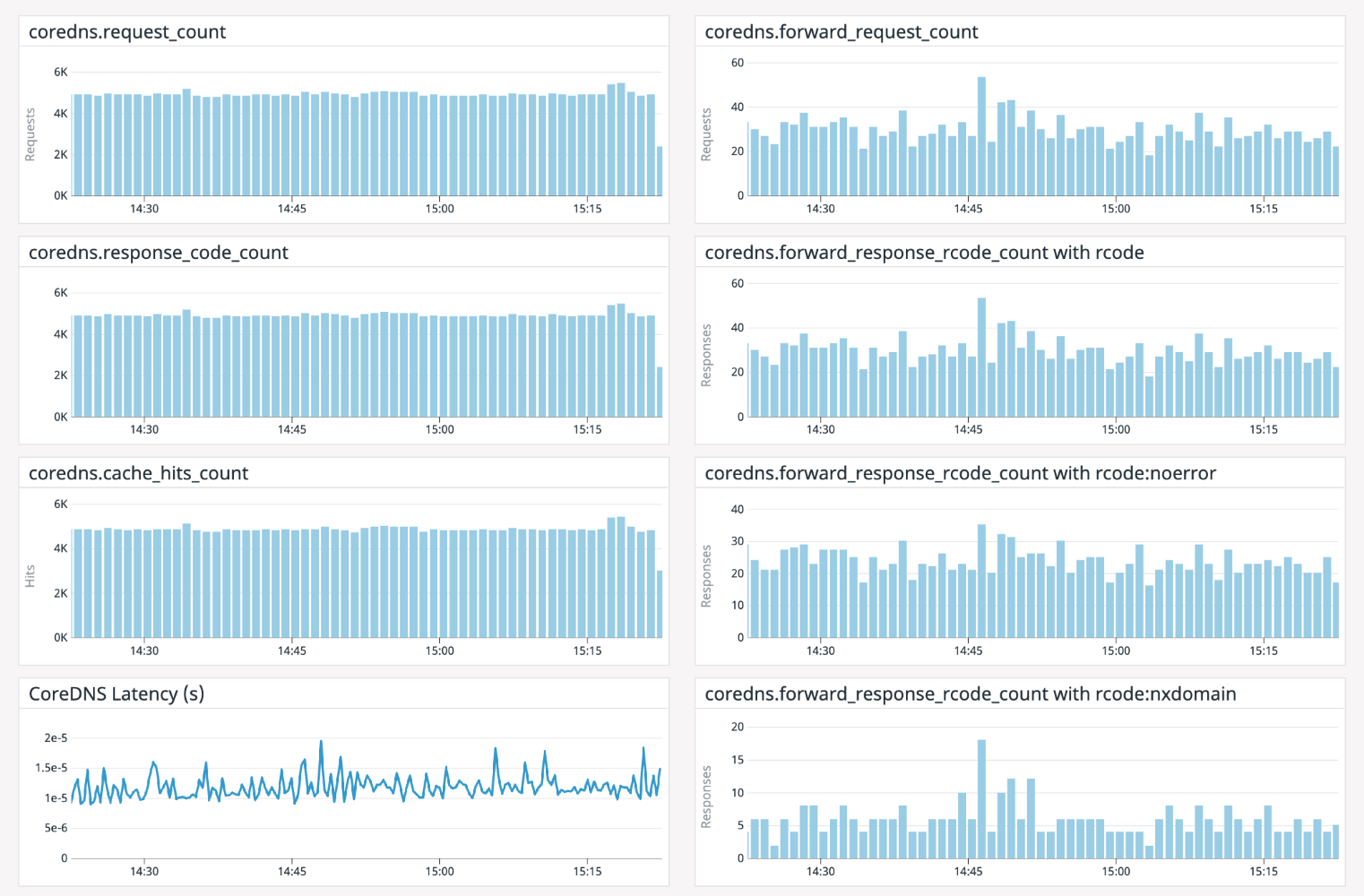
As we started drilling into how the application made requests to CoreDNS, we observed most of the outbound requests happening through the application to an external API server.
This is typically how resolv.conf looks in the application deployment pod:
nameserver 10.100.0.10
search kube-namespace.svc.cluster.local svc.cluster.local cluster.local us-west-2.compute.internal
options ndots:5
A Kubernetes attempts to resolve an FQDN through a DNS lookup at different levels.
Considering the above DNS config, when the DNS resolver sends a query to the CoreDNS server, it tries to search the domain considering the search path.
If we are looking for a domain boktube.io, it would make the following queries to receive a successful response in the last query:
botkube.io.kube-namespace.svc.cluster.local  <= NXDomain
botkube.io.svc.cluster.local <= NXDomain
boktube.io.cluster.local <= NXDomain
botkube.io.us-west-2.compute.internal <= NXDomain
botkube.io <= NoERROR
As we were making too many external lookups, we received a lot of NXDomain responses for DNS searches. To optimize this, we customized spec.template.spec.dnsConfig in the Deployment object. This is how change looked:
     dnsPolicy: ClusterFirst
     dnsConfig:
       options:
       - name: ndots
         value: "1"
With the above change, resolve.conf on pods changed. The search was being performed only for an external domain.
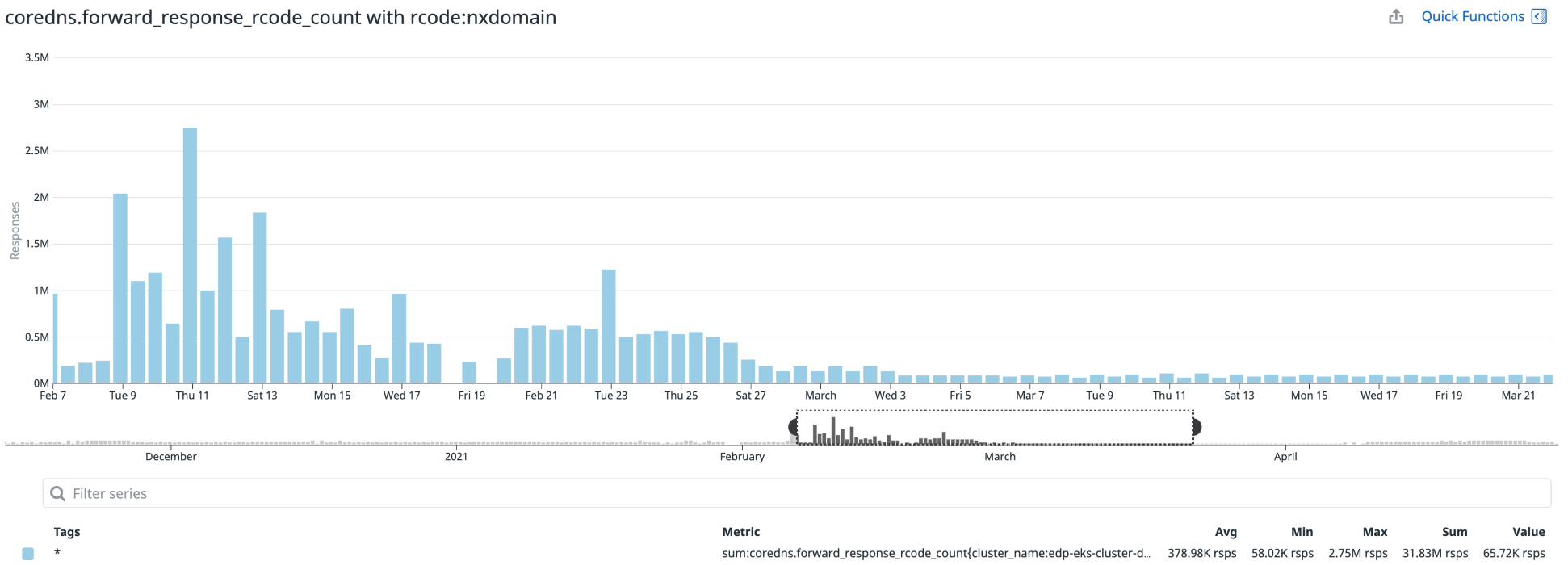
This reduced number of queries to DNS servers and also helped reduce 5xx errors for an application. You can notice the difference in the NXDomain response count in the following graph:
A better solution for this problem is Node Level Cache which is introduced Kubernetes 1.18+.
Customizing CoreDNS to Your Needs
We can customize CoreDNS by using plugins. Kubernetes supports a different kind of workload, and the standard CoreDNS config may not fit all your needs. CoreDNS has a couple of in-tree and external plugins.
The kind of FQDN you are trying to resolve might vary depending on the kind of workloads you are running on your cluster, like if applications are intercommunicating with each other or standalone apps that are interacting outside your Kubernetes cluster.
We should try to adjust the knobs of CoreDNS accordingly. Suppose you're running Kubernetes in a particular public/private cloud and most of the DNS-backed applications are in the same cloud. In that case, CoreDNS also provides particular cloud-related or generic plugins which can be used to extend DNS zone records.
If you're interested in customizing DNS behavior for your needs, we'd suggest going through the book “Learning CoreDNS” by Cricket Liu and John Belamaric. This book provides a detailed overview of different CoreDNS plugins with their use cases. It also covers CoreDNS + Kubernetes integration in depth.
One of the critical factors to decide is whether or not you're running an appropriate number of CoreDNS instances in your Kubernetes cluster. It’s recommended to run a least two instances of the CoreDNS server for a better guarantee of DNS requests being served.
You may need to add extra instances of CoreDNS or configure HPA (Horizontal Pod Autoscaler) for your cluster depending on the number of requests being served, the nature of the requests, the number of workloads running on the cluster, and the size of cluster. Factors like the number of requests being served, the nature of requests, the number of workloads running on the cluster, and the cluster size should help you in deciding the number of CoreDNS instances. You may need to add extra instances of CoreDNS or configure HPA (Horizontal Pod Autoscaler) for your cluster.
Summary
This blog post highlights the importance of the DNS request cycle in Kubernetes. Many times you can end up in a situation where you began thinking that "it’s not DNS,” but end up thinking “it’s always DNS!” Be wary of these landmines!
Published at DZone with permission of Sanket Sudake. See the original article here.
Opinions expressed by DZone contributors are their own.
Comments