

Using Salesforce Search Instead of a Query Using Mule 4
In this post, we'll learn how to integrate Mule 4 into our Salesforce instance so we can use SOSL or SOQL to create more efficient queries in Salesforce.
Join the DZone community and get the full member experience.
Join For FreeSOSL and SOQL
One of the most used actions when we work with Salesforce integrations is the use of queries. It allows us to pull information from any table and even perform some subqueries and pull relationship data. But, there’s one action we as developers don’t use very often (and sometimes we don’t even know this operation is available to us). I'm talking about Salesforce Object Search Language (SOSL).
What the Salesforce.com Developer Documentation Says
This section has been taken from the Salesforce docs, here.
A SOQL query is the equivalent of a SELECT SQL statement and searches the org database. SOSL is a programmatic way of performing a text-based search against the search index.
Whether you use SOQL or SOSL depends on whether you know which objects or fields you want to search, plus other considerations.
Use SOQL when you know which objects the data resides in, and you want to:
- Retrieve data from a single object or from multiple objects that are related to one another.
- Count the number of records that meet specified criteria.
- Sort results as part of the query.
- Retrieve data from number, date, or checkbox fields.
Use SOSL when you don’t know which object or field the data resides in, and you want to:
- Retrieve data for a specific term that you know exists within a field. Because SOSL can tokenize multiple terms within a field and build a search index from this, SOSL searches are faster and can return more relevant results.
- Retrieve multiple objects and fields efficiently where the objects might or might not be related to one another.
- Retrieve data for a particular division in an organization using the divisions feature.
- Retrieve data that’s in Chinese, Japanese, Korean, or Thai. Morphological tokenization for CJKT terms helps ensure accurate results.
Differences Between SOSL and SOQL
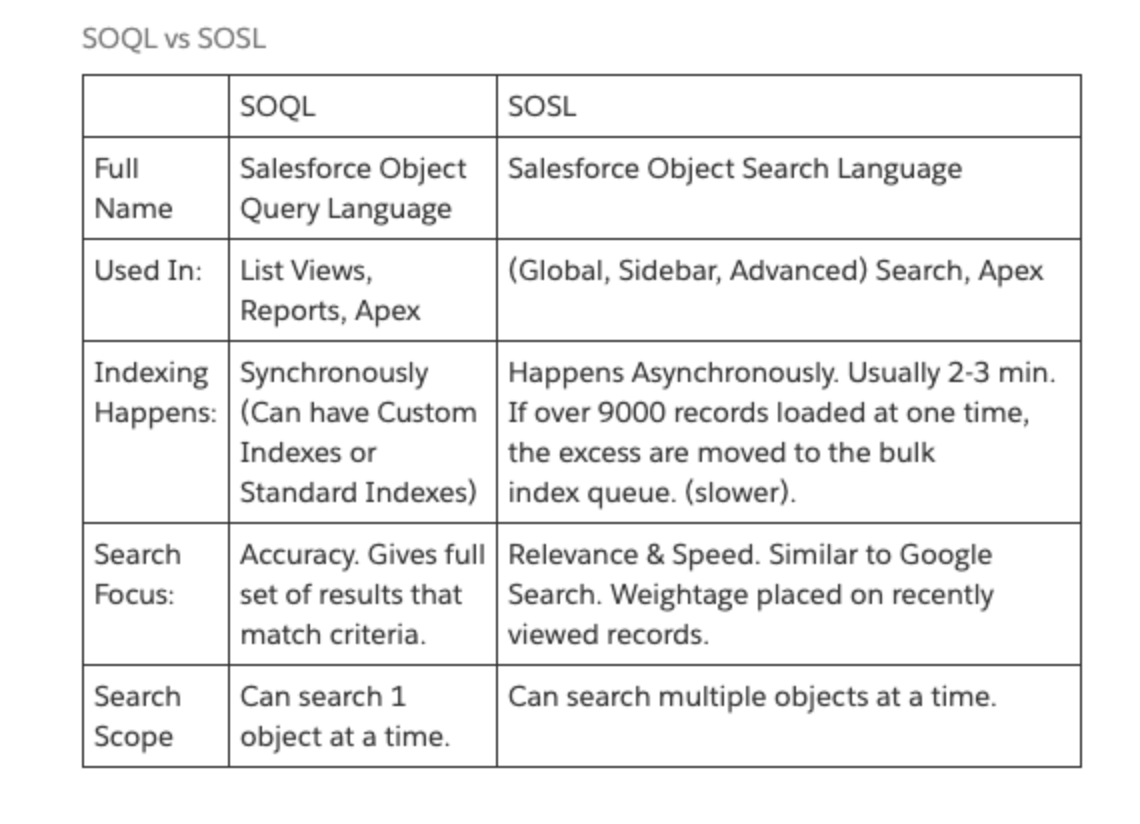
Taken from Salesforce.com Developer documentation.
At this point, you might be asking yourself how this is helpful and how I can use it. Let’s look at a scenario.
Scenario
The general idea is to be able to process User information coming from any source and use the information to be able to validate if a Contact or Lead already exists in the platform using a specific external Id field. Based on the result, we should be able to update a Contact/Lead or create a brand new Lead record.
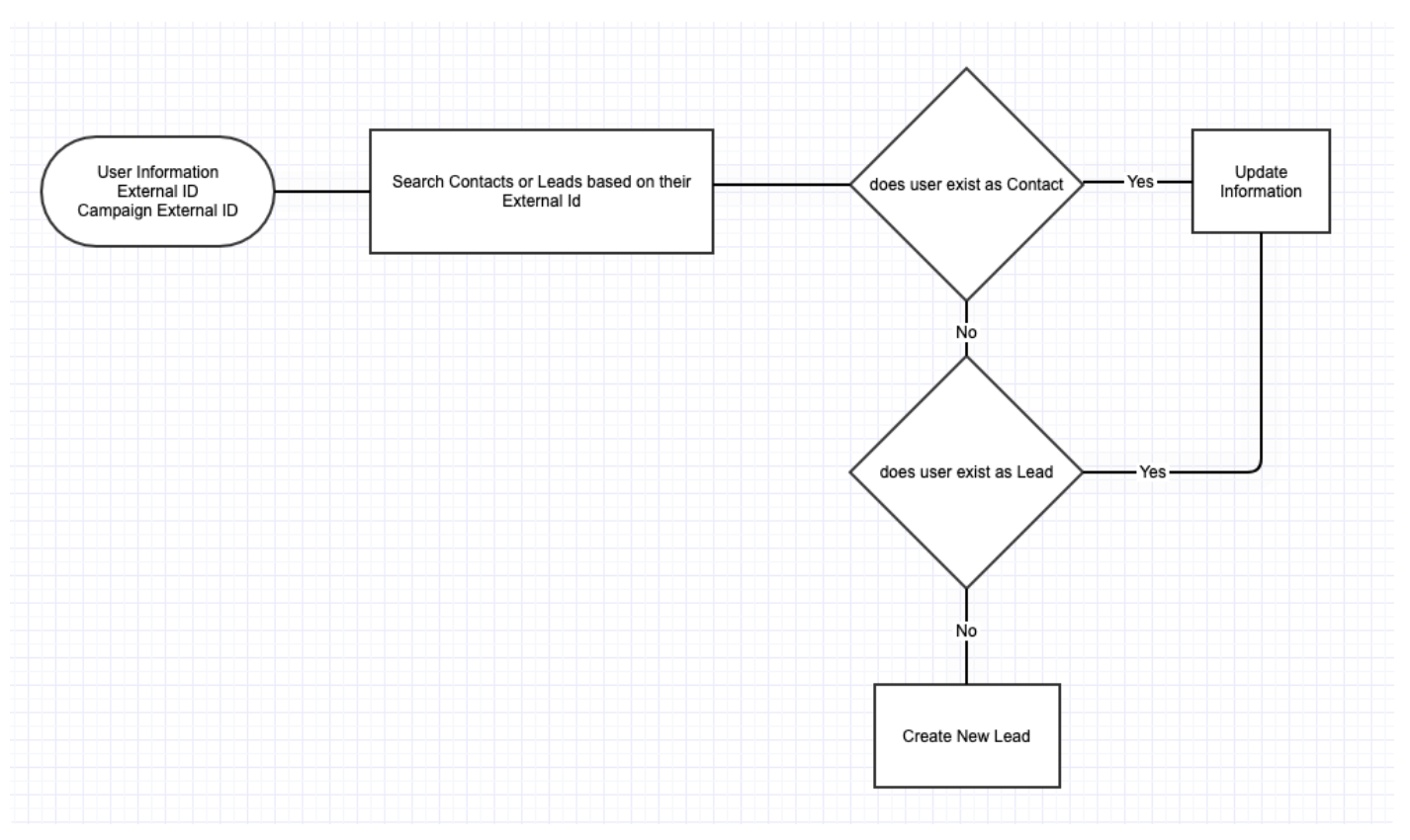
Implementation
I will create a pretty simple application to demonstrate how we can accomplish this. The Mule application will be created in Mule 4 and I will set a few records in a DataWeave component just like an input.
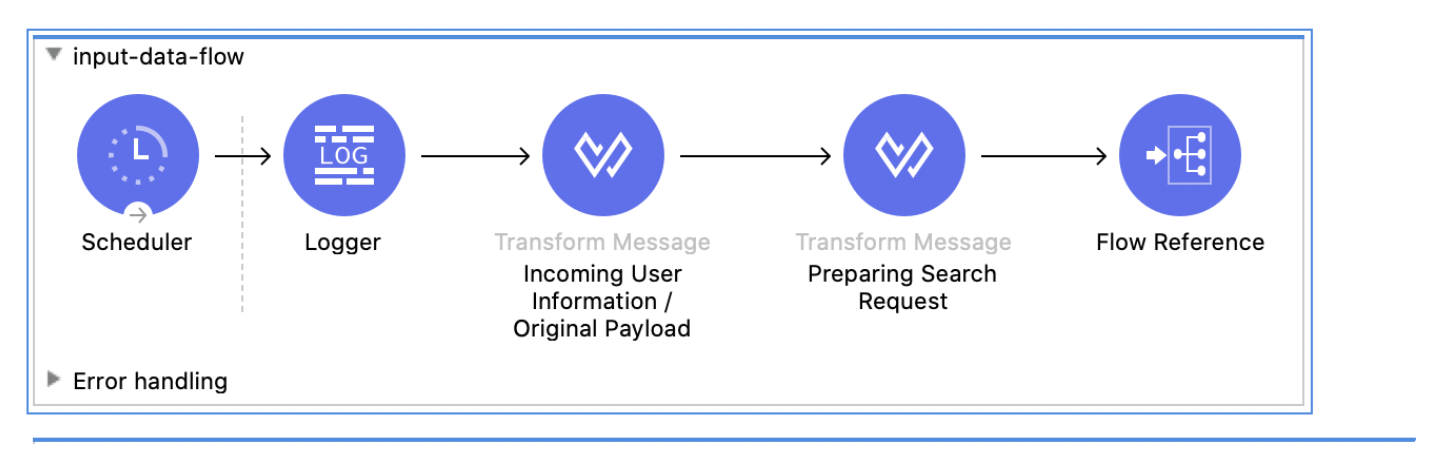
Input-data-flow
This flow contains a scheduler, basically to manually trigger the integration for demonstration. Then we set the incoming Payload in a DataWeave component just like this:
<script src="https://gist.github.com/emoran/7046fc33dd01ac664880ca4414e6e0c8.js"></script>
Also, there’s a variable called originalPayload which will be used to filter the information out, once we get Salesforce information.
In the next DW component (Preparing Search Request) we just convert all the external id values from the original response to a plain String value concatenated by OR, making this an understandable payload value for the Salesforce search. The code looks like this:
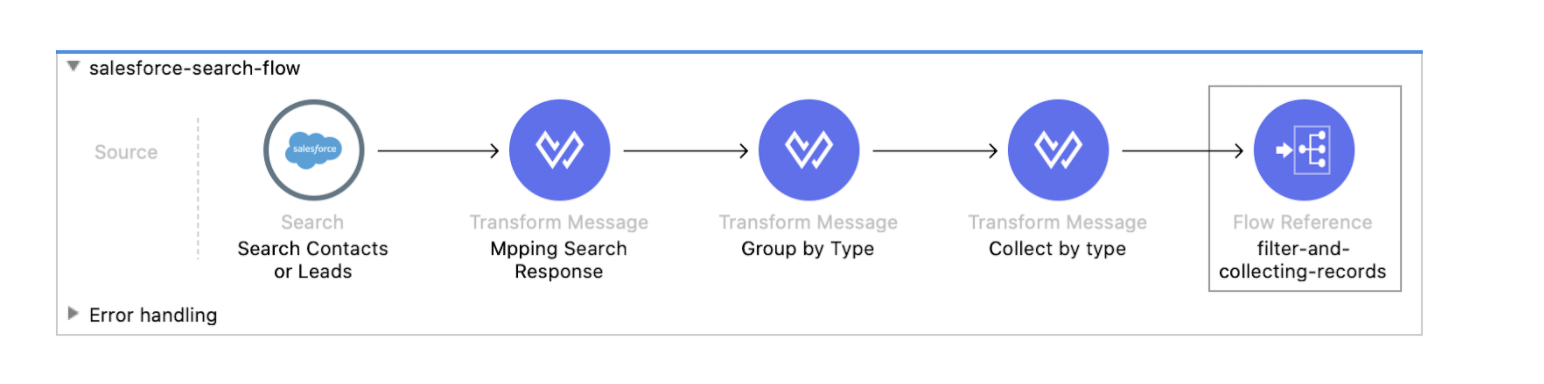
Salesforce-search-flow
This flow will be in charge of making the search call into Salesforce, grouping the response and creating the variables we need to filter the originalPayload with the existing records.
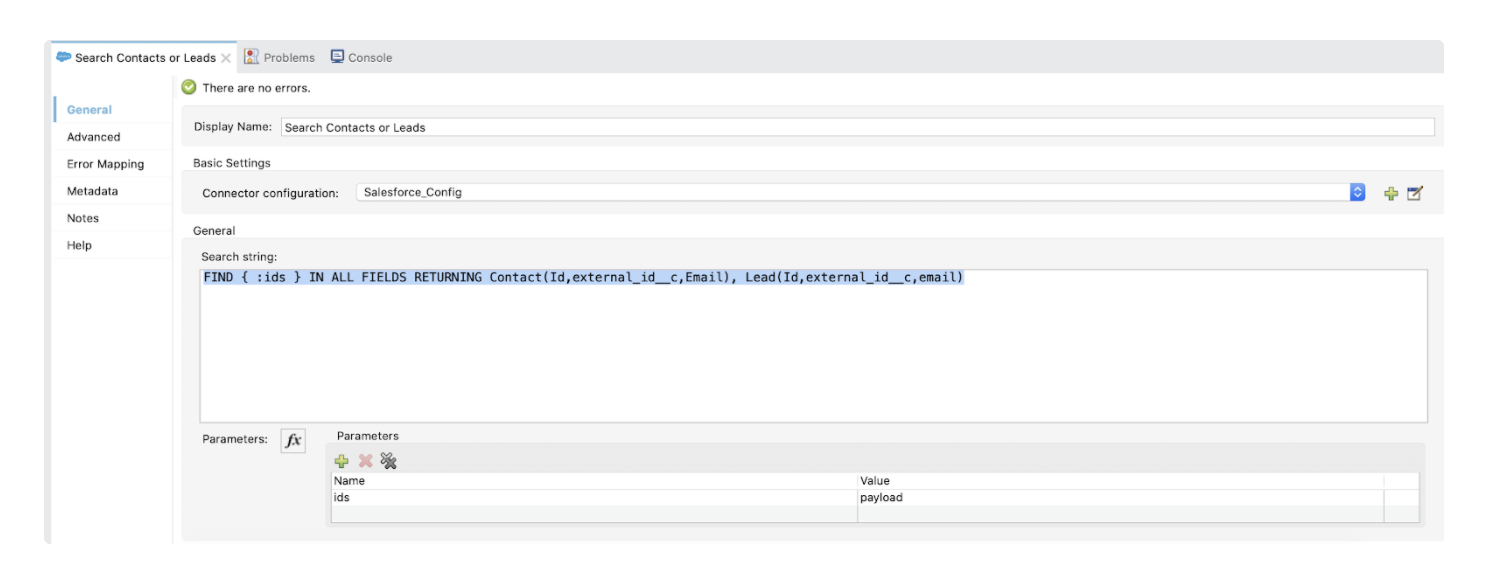
In the Salesforce search, we will pass the following:
xxxxxxxxxx
FIND { :ids } IN ALL FIELDS RETURNING Contact(Id,external_id__c,Email), Lead(Id,external_id__c,email)
Basically, the :ids parameter is the previous String we created by separating the Ids with OR. In this search, we are asking to search records from Contacts and leads, searching in all fields and when it returns the information we tell it what fields we need from each object.
Mapping the search response component just creates a map of the Salesforce results (payload.searchRecords). After this, we will group the information by type. We will use this script:
xxxxxxxxxx
%dw 2.0
output application/java
---
(payload groupBy ((value, index) -> value."type"))
And, in the same component, I’m creating a variable called salesforceResponseMap, which contains a key-value map we can access using a value to get the full record.
xxxxxxxxxx
%dw 2.0
output application/java
---
{
(payload map {
(($.external_id__c):$) if $.Id != null
})
}
Collect by type is a different variable – it allows us to separate the records from contacts and leads we found and we set the id as the main key in order to filter in next components. At this point, we already know what contacts and leads have been found.
xxxxxxxxxx
%dw 2.0
output application/java
---
{
fromContacts:payload.Contact map (salesforceContact,IndexOfContact)->{
(id:salesforceContact.external_id__c) if (salesforceContact.external_id__c != null),
},
fromLeads:payload.Lead map (salesforceLead,indexOfLeads)->{
(id:salesforceLead.external_id__c) if ( salesforceLead.external_id__c != null),
}
}
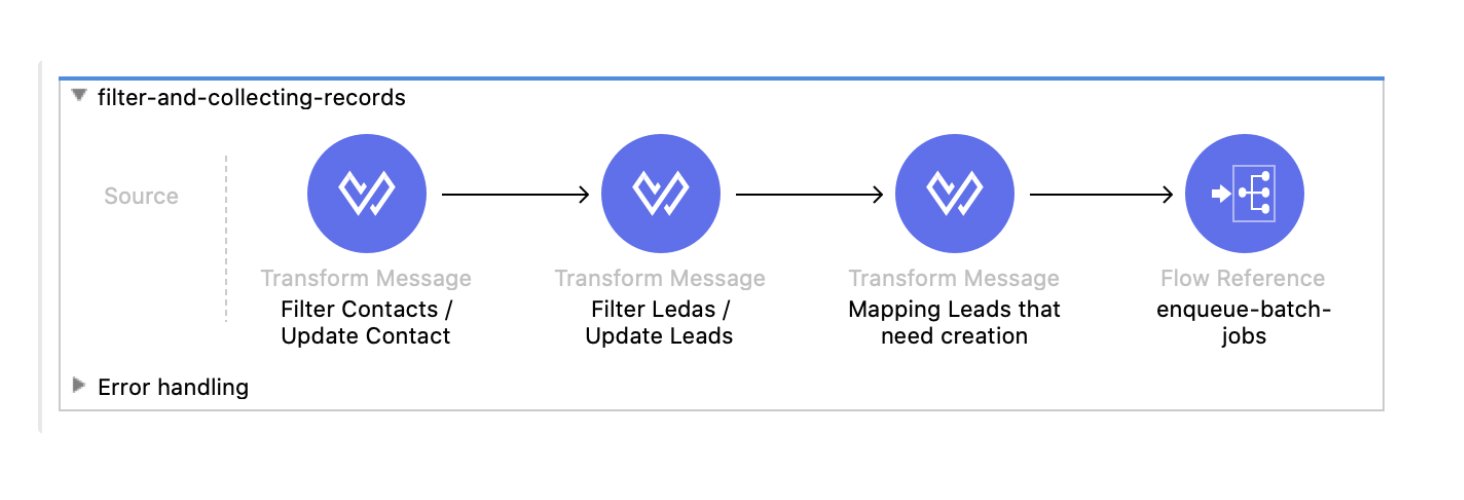
Filter-and-collecting-records
This flow will filter from the original payload, removing existing contacts from Salesforce and leaving the records that need to be created as leads.
Filter Contacts/Update Contacts will take any existing records from the groupedObjects.fromContacts flow variable based on the id using this script:
xxxxxxxxxx
%dw 2.0
output application/java
---
vars.originalPayload filter (not (vars.groupedObjects.fromContacts.id contains ($.id)))
Basically, we are moving records from one array to another.
In the same component we are doing basically the same thing, but without the not sentence, so we are collecting the information that needs to be updated as a Contact and we are able to map the fields we need to update.
xxxxxxxxxx
%dw 2.0
output application/java
---
(vars.originalPayload filter ((vars.groupedObjects.fromContacts.id contains ($.id))) map (contact,indexOfContact) -> {
Id:vars.salesforceResponseMap[contact.id].Id,
FirstName:contact."First Name"
})
Filter Leads/Update Leads is basically the same process, but uses the Leads group.
Finally, the last component collects the remaining information of records that need to be created as Leads in Salesforce and we can map the information.
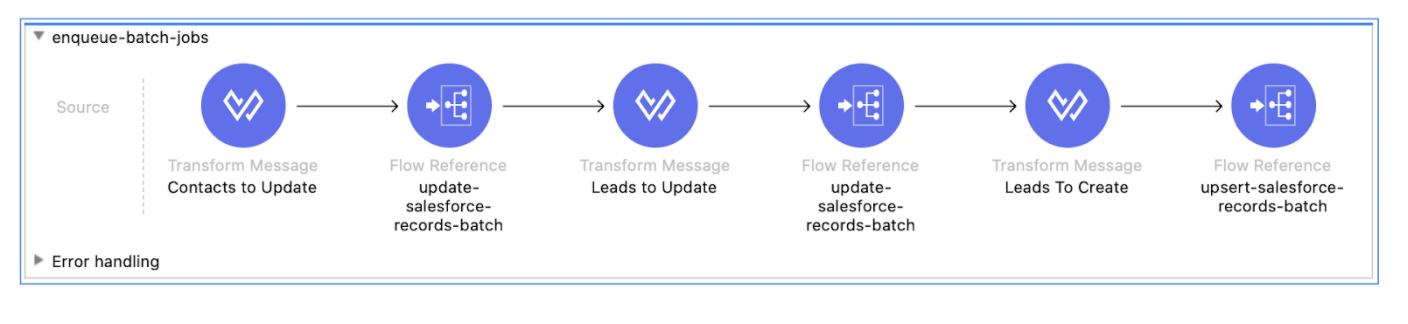
enqueue-batch-jobs
The meaning of this job is just to set the payloads for update and create records, the only additional thing on these components is that we are specifying sObject and external variables, so instead of writing a batch component for each type, we are dynamically passing the sObject for updates and sObject and externalId for Upsert calls. This means we can reuse our batch processes.
Finally, we can see the batch processing flow. One batch corresponds to updated objects and just controls the response from Salesforce with a DW component like this:
xxxxxxxxxx
%dw 2.0
output application/json
---
payload.items map {
id:$.id,
success:$.successful,
(field:$.errors[0].fields[0]) if $.successful == false,
(message:$.errors[0].message) if $.successful == false,
(statusCode:$.errors[0].statusCode) if $.successful == false
}
Now we can collect the responses and use them.
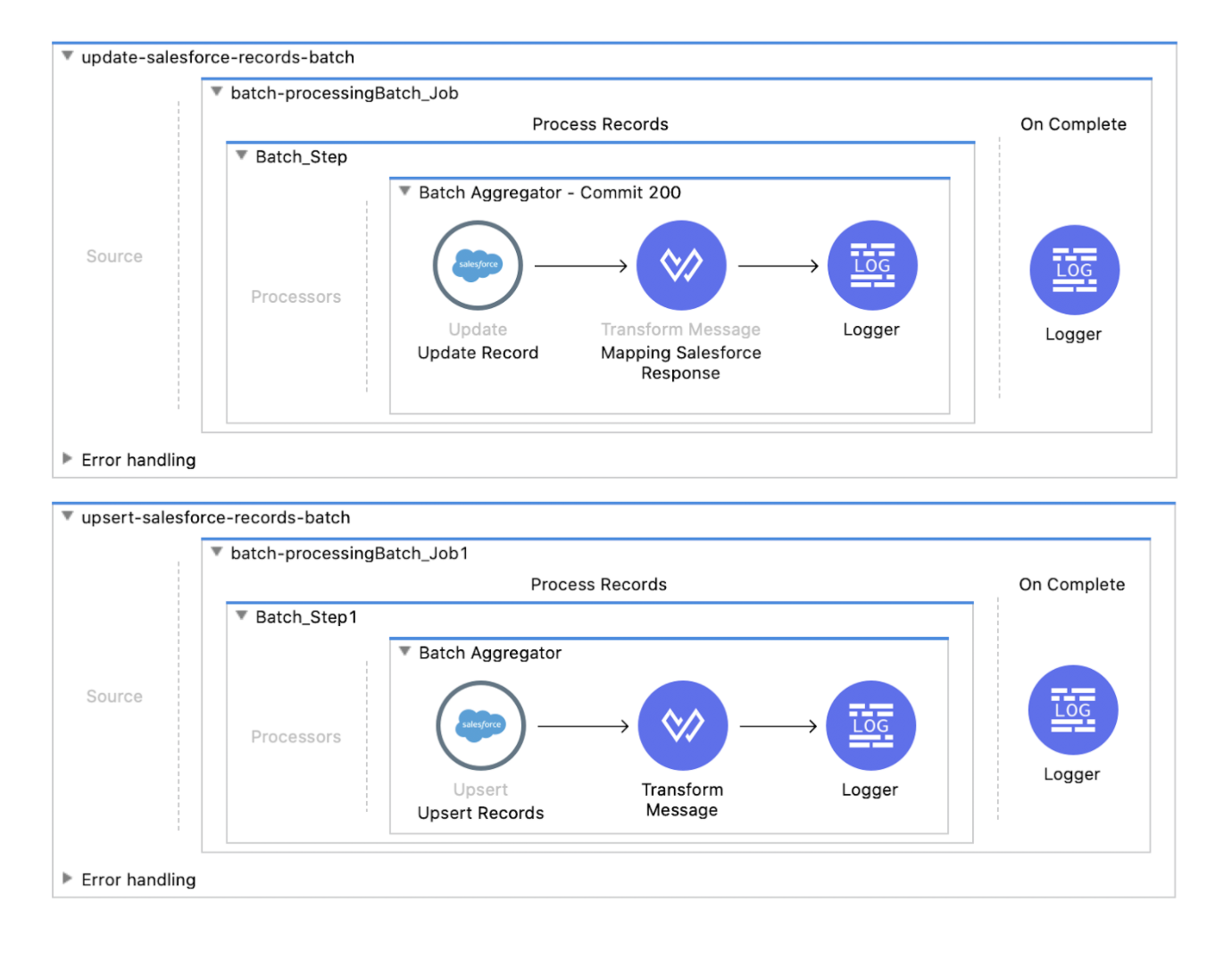
There are some considerations for using SOSL over SOQL. I think one of the best advantages of this is that we are able to retrieve multiple objects in a call and save a couple of API calls. This can be used on processes that need just a few records. Massive amounts of data might include some complexity on how we create the SOSL sentence, but in the end, we can just adjust the limits a bit if we need to.
Let me know if you think this is helpful and I will be happy to enhance this process as well.
You can pull the code from this repository if you want to see the whole process working.
Opinions expressed by DZone contributors are their own.
Comments