

What's Coming for CSS: Compatibility and Control
The W3C CSS working group continues to tackle two of web development's most common problems—compatibility and control—with high-level standards.
Join the DZone community and get the full member experience.
Join For FreeCore CSS—as distinct from frameworks—is set to become more relevant, not less, to developer activities, as new capabilities are proposed in response to common, overlapping problems: cross-browser compatibility and layout control.
Pain points have arisen here frequently for web developers—some might even say it's bred into the discipline now. Seeking polyfills, hacks, clever manipulations of the DOM, and plugins to do the work of creating a single and predictable experience is anticipatable.
For instance, the allure of Angular.js, jQuery, and other JavaScript variants is that they focus on behind-the-scenes work in order to deliver one API to the developer. However, using JS can create situations where the rendering engine wastes work because of JS's inopportune place in the pipeline.
Bootstrap, Foundation, and others are an attempt to approach the problem from the other side: using highly prescriptive conventions, they attempt to capitalize on known behavior to create uniformity.
With those problems in mind, the engineers of the W3C have some intriguing solutions that are coming to CSS in the future.
Houdini
It's the name of a new W3C group creating tools developers can use to create code that takes part in the styling and layout process of a browser’s rendering engine, via a new set of APIs.
This means developers can do more to influence the internal work done by the rendering engine, as opposed to simply giving it a style sheet and guessing how it will interpret your intent.
CSS Grids
In the future, web designers will have a new layout manager, the Grid Layout Manager. It combines speed, responsive design, and an adaptable grid, coded in a way similar to a table. The new approach does (some of) what a framework such as Bootstrap or Foundation does, but the new grid layout manager gives web designers more control natively—it splits up the screen and defines the relationship of elements to each other, while also adapting to form factor and orientation "without [designers] needing to alter the semantic nature of their content."
CSS Snap Points
...given the imprecise nature of ... inputs like touch panning and mousewheel scrolling, it is difficult for web developers...[to create] the effect of paging through content. For instance, it is easy for a user to land at an awkward scroll offset which leaves a page partially on-screen when panning.
- W3C
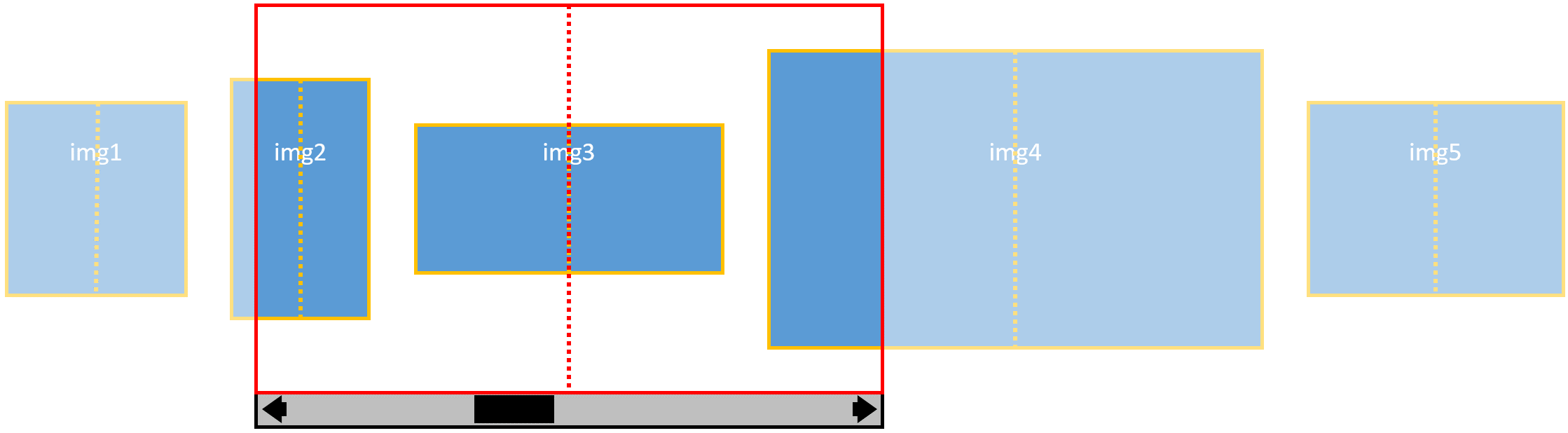
Here's an example of how this would be coded, from W3c:
img {
    /* Specifies that the center of each photo
       should align with the center of the scroll
       container in the X axis when snapping */
    scroll-snap-align: center none;

}
.photoGallery {
    width: 500px;
    overflow-x: auto;
    overflow-y: hidden;
    white-space: nowrap;
    /* Requires that the scroll offset always be
       at a valid snap position when the scrolling
       operation completes. */
    scroll-snap-type: mandatory;
}
<div class="photoGallery">
    <img src="img1.jpg">
    <img src="img2.jpg">
    <img src="img3.jpg">
    <img src="img4.jpg">
    <img src="img5.jpg">
</div>
Which yields a paginated document, where red is the snap container, and yellow represents the "scroll-snap-align" axes of an <img>.
Opinions expressed by DZone contributors are their own.
Comments