

Why I Prefer Trunk-Based Development Over Feature Branching and GitFlow
Check out the components of Trunk-based Development as implemented by Facebook and Google, and see how it helps resolve and prevent merge conflicts.

Have you ever taken a look at a development workflow and thought, "There must be a better way to do this"? I know I have.
We’re not the only ones. Companies such as Facebook and Google have been successfully adopting Trunk-Based Development in their projects as well. How can you take advantage of Trunk-Based Development, and how can you implement it? Read on to find out.
Feature Branch Development (a.k.a., GitFlow)
Before we start detailing the rules of Trunk-Based Development, let’s take a look at its counterpart: Feature Branch Development, also known as the GitFlow model.
The classical approach to the development of a product is to create a new branch for every feature we take care of and maintain this branch until we can merge it with the mainline.
In the meantime, we must check out to a hotfix branch, resolve merge conflicts, remember about our branches, etc.
The Feature Branch Development workflow is illustrated below.
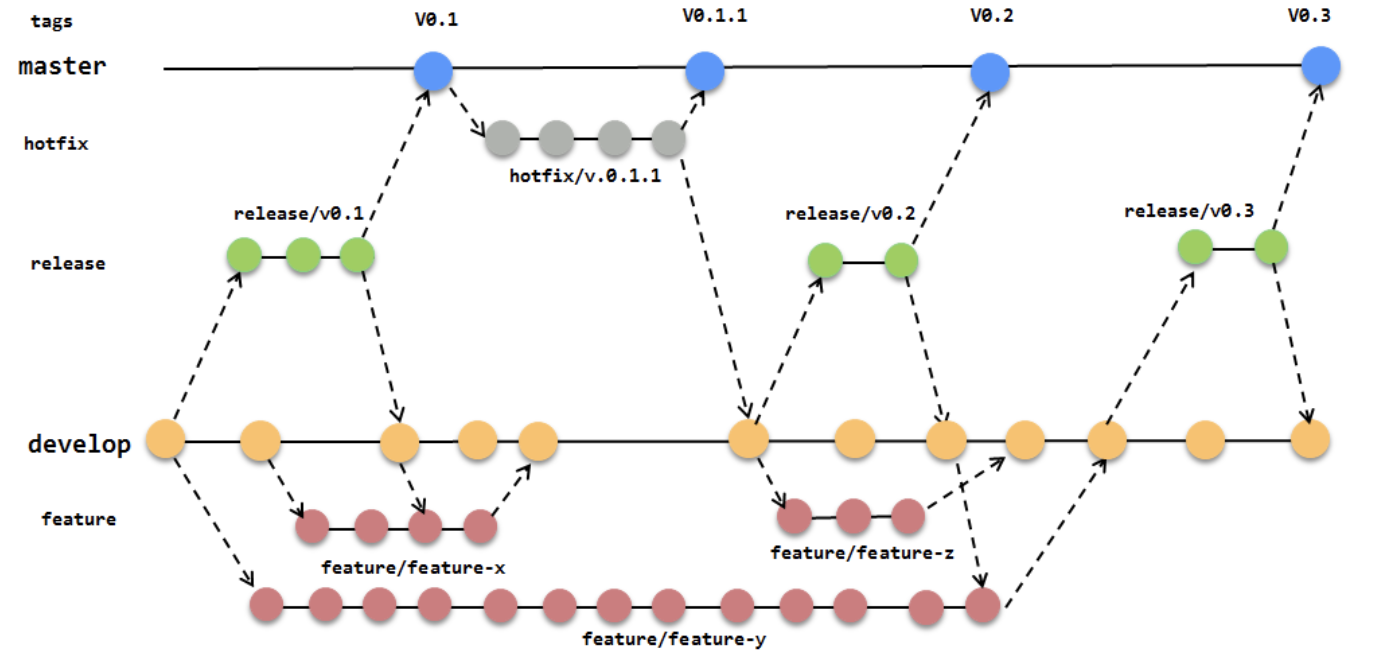
What you see above is an example flow of just one developer’s work. Could you image how many branches we would have if our company grew to 100 developers? And what would happen if the number of teams grew to 100? There would probably be continuous merging development. And any merges often would end with conflicts.
In other words, you’d be facing merge hell.
No one likes a merge conflict. When it occurs, one needs to focus both on his/her part of the code as well as the code of another developer.
Trunk-Based Development
There is a solution to merge hell, but like all changes, this can take some time.
Trunk-Based Development rejects any feature branches, hotfix branches, or parallel release branches. There is only one branch available to the developers — the Trunk.
This new approach depends on four simple rules:
- There is one branch called the "trunk" where developers directly commit;
- A release manager can create release branches and no one can commit to those;
- Developers commit small changes as often as they can;
- Commits should be reviewed and tested and must not destroy the mainline.
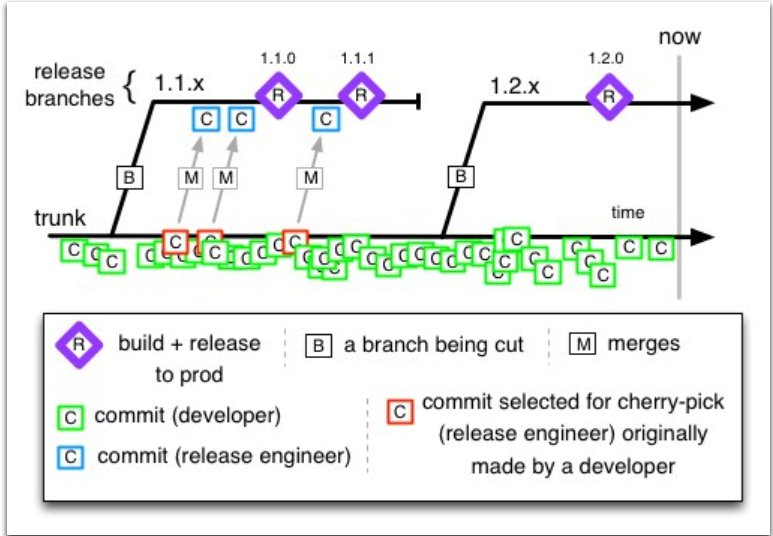
Please take a look at the picture below. Developers perform commits, as many as they can, on the "trunk" branch. Every commit is a small part of the code, e.g. one function or method with unit tests (green squares).
At some point, when the trunk branch contains every feature that we want, one person, the release manager or the release engineer, creates a new release branch from the trunk.
Typical Cases in A Developer’s Work
In our job, there are some typical cases such as:
- planning a new feature
- creating a new feature
- fixing a bug in production
- code review
- testing
- merging/resolving conflicts
- drinking coffee
Typical Use Cases for The Release Manager
The release manager plays a specific role in Trunk-Based Development. This is the only person (or group of people) who can create release branches and fix bugs in production.
The release manager has only two responsibilities:
- creating a new release branch
- cherry-picking a possible hotfix
Summary
Trunk-Based Development is not a new idea, but it has been growing in popularity recently. With projects at major IT companies gaining traction using the TBD approach, now is a great moment for you to introduce Trunk-Based Development at your company.
Let’s sum up how you can benefit:
- TBD saves you from merge hell.
- TBD supports the best developing practices, including feature planning, committing small changes, and writing backward-compatible code.
- TBD creates an opportunity to deploy new features faster than using feature branching.
- In the long-term, small commits could help split your big monolith application into neat services.
VI. Sources
- Trunk-Based Development
- What is Trunk-Based Development?
- Enabling Trunk-Based Development with Deployment Pipelines
- Branch By Abstraction
- Branch By Abstraction by Martin Fowler
- Feature Flags
- Feature Toggles by Martin Fowler
- Feature Flags by Pete Hodgson
- 11 Proven Practices for Peer Review
- Semantic Versioning
Further Reading
How to Resolve GitHub Merge Conflicts
The Origins of Trunk Based Development
Opinions expressed by DZone contributors are their own.