

Working With Large Messages (GBs) Using Apache Camel and ActiveMQ Artemis
See how the latest Apache Camel release improves support for the broker Apache ActiveMQ Artemis so that it works better with large messages.

Join the DZone community and get the full member experience.
Join For FreeThe Apache ActiveMQ message broker was originally created in a time where large messages were measured in MB, not in GB as you may do today.
This is not the case with the next generation broker Apache ActiveMQ Artemis (or just Artemis), which has much better support for large messages.
It's about time that the Camel team finally had some time to work on this to ensure Camel works well with Artemis and large messages. This work was committed this weekend (and will be available in the upcoming Camel 2.21 release), so we provided an example to demonstrate this.
The example runs Camel with the following two small routes:
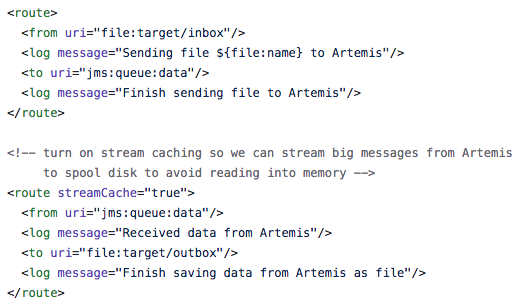
The first route just routes files to a queue on the message broker named data. The 2nd route does the opposite, routes from the data queue to file.
Pay attention to the 2nd route as it has turned on Camel's stream caching. This ensures that Camel will deal with large streaming payloads in a manner where Camel can automatic spool big streams to temporary disk space to avoid taking up memory. The stream caching in Apache Camel is fully configurable and you can setup thresholds that are based on payload size, memory left in the JVM etc to trigger when to spool to disk. However the default settings are often sufficient.
Camel then uses the JMS component to integrate with the ActiveMQ Artemis broker which you setup as follows:
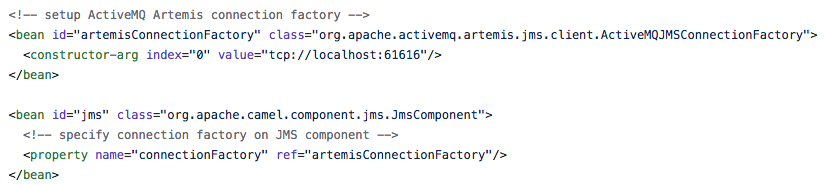
This is all standard configuration (you should consider setting up a connection pool as well).
The example requires to run a ActiveMQ Artemis message broker separately in a JVM, and then start the Camel JVM with a lower memory setting such as 128mb or 256mb etc which can be done via Maven:
export MAVEN_OPTS="-Xmx256m"
And then you run Camel via Maven
mvn camel:run
When the application runs, you can then copy big files to the target/inbox directory, which should then stream these big messages to the Artemis broker, and then back again to Camel which will then save this to the target/outbox directory.
For example I tired this by copying a 1.6gb docker VM file, and Camel will log the following:
INFO Sending file disk.vmdk to Artemis
INFO Finish sending file to Artemis
INFO Received data from Artemis
INFO Finish saving data from Artemis as file
And we can see the file is saved again, and its also the correct size of 1.6gb
$ ls -lh target/outbox/
total 3417600
 -rw-r--r-- 1 davsclaus staff 1.6G Oct 22 14:39 disk.vmdk
I attached jconsole to the running Camel JVM and monitored the memory usage which is shown in the graph:
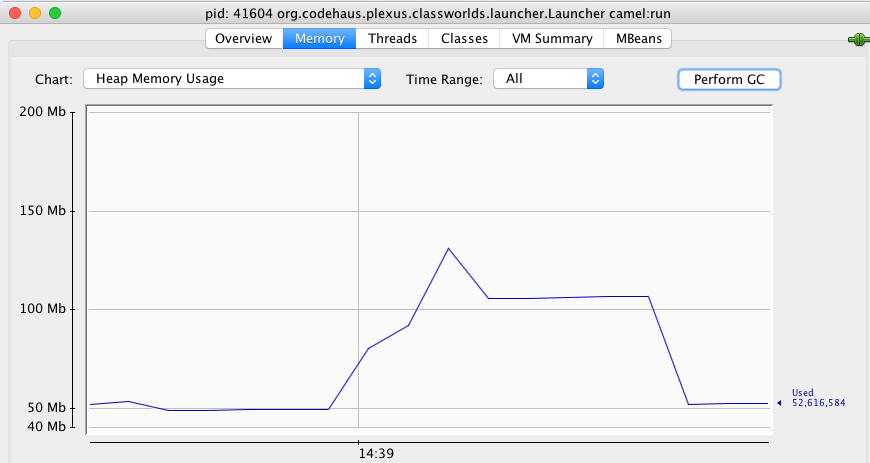
The graph shows that the heap memory peaked at around 130mb and that after GC its back down to around 50mb. The JVM is configured with a max of 256mb.
You can find detailed step by step instructions with the example how exactly to run the example, so you can try for yourself. The example is part of the upcoming Apache Camel 2.21 release, where the camel-jms component has been improved for supporting javax.jms.StreamMessage types and has special optimisation for ActiveMQ Artemis as demonstrated by this example.
PS: The example could be written in numerous ways, but instead of creating yet another Spring Boot based example we chose to just use plain XML. In the end Camel does not care, you can implement and use Camel anyhow you like.
Opinions expressed by DZone contributors are their own.
Comments