

WSO2 Token API Invocation From a Mediation Sequence in WSO2 APIM 3.1.0.
In this article, I am going to show how we can invoke WSO2’s token API from a mediation sequence to get the access/bearer token.
Join the DZone community and get the full member experience.
Join For FreeIn this article, I am going to show how we can invoke WSO2’s token API from a mediation sequence to get the access/bearer token which is used to invoke APIs’ secured using Oauth in WSO2. Here I have created an API in WSO2 APIM for achieving this functionality.
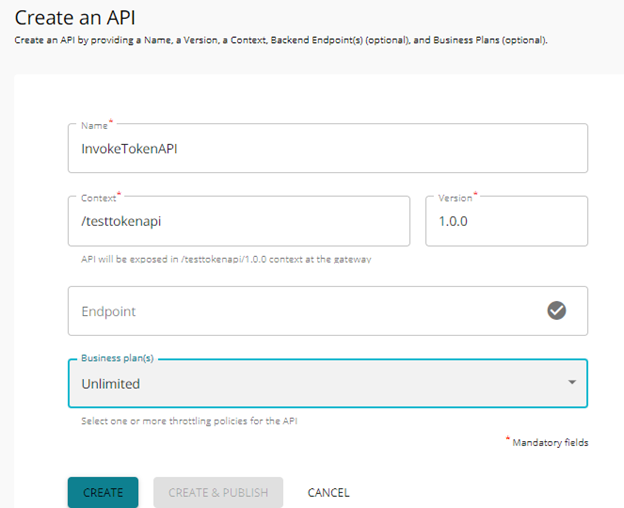
1. Create an API named “InvokeTokenAPI” in WSO2 API Publisher as below.
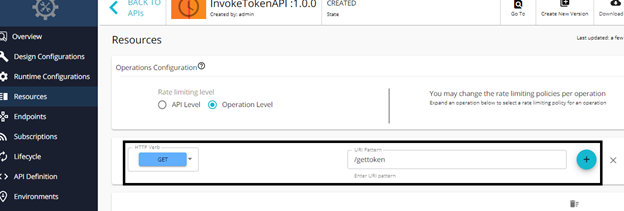
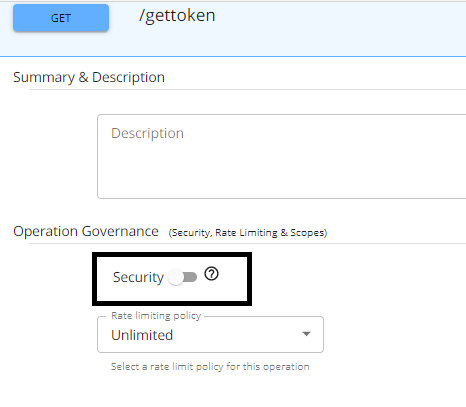
2. Go to Resources tab and create a GET resource with the name “gettoken” as shown below and click the plus icon. Then disable security for this resource and click Save at the bottom.
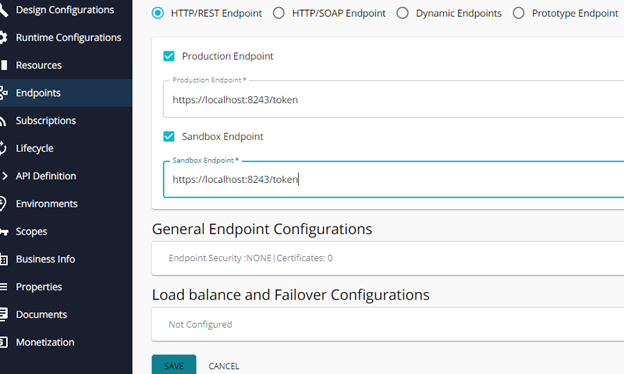
3. Go to the Endpoints tab and create an HTTP/REST Endpoint. Enter the token API URL in Production and Sandbox endpoints (in my case its “https://localhost:8243/token”) and click save.
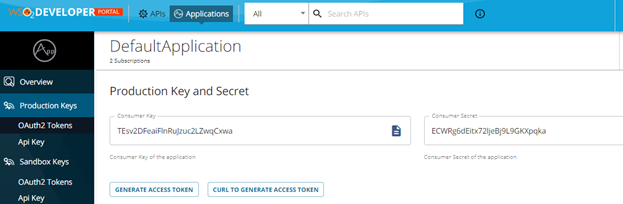
4. Create a mediation sequence (name: InvokeTokenAPI_INSequence.xml) with the below content in a text editor to invoke token API and save it. Here I am trying to get the access/bearer token of the Default Application in WSO2 APIM Dev Portal. So, while invoking the token API for this application we will pass the basic authorization header. This header value will be obtained by getting the consumer-key and consumer-secret for the particular application from Dev Portal. Its value should be in the form “Basic Base64(consumer-key:consumer-secret)”. In the content given below, I am passing the same header with the name “Authorization”.
Also, to invoke the token API we need to pass grant_type within the request body which I have done using the payload factory mediator as seen in the below content. Also, we need to pass another header called messageType=”application/x-www-form-urlencoded” for invoking the token API.
Sequence:
<sequence name="InvokeTokenAPI_IN_SEQ" trace="disable" xmlns="http://ws.apache.org/ns/synapse">
<log level="full">
<property name="InvokeTokenAPI_IN_SEQ" value="Start of InvokeTokenAPI_IN_SEQ"></property>
</log>
<property description="SwitchExpression" expression="fn:concat(get-property('axis2', 'HTTP_METHOD'),'##',get-property('axis2','REST_URL_POSTFIX'))" name="SwitchExpression" scope="default" type="STRING"></property>
<log level="full">
<property expression="get-property('PathSwitchExpression')" name="SwitchExp"></property>
</log>
<switch source="get-property('SwitchExpression')">
<case regex=".*GET##\/gettoken.*">
<log level="full">
<property name="LogMessage" value="GET resource - /gettoken called."></property>
</log>
<header name="Authorization" scope="transport" value="Basic VEVzdjJERmVhaUZsblJ1Snp1YzJMWndxQ3h3YTpFQ1dSZzZkRWl0eDcybGplQmo5TDlHS1hwcWth"></header>
<payloadFactory media-type="json">
<format>{"grant_type":"client_credentials"}</format>
<args></args>
</payloadFactory>
<property name="messageType" scope="axis2" type="STRING" value="application/x-www-form-urlencoded"></property>
<property name="HTTP_METHOD" scope="axis2" type="STRING" value="POST"></property>
</case>
<default></default>
</switch>
<log level="full">
<property name="InvokeTokenAPI_IN_SEQ" value="End of InvokeTokenAPI_IN_SEQ"></property>
</log>
</sequence>
xxxxxxxxxx
<payloadFactory media-type="json">
<format>{"grant_type":"password",
"username": "admin",
"password": "admin"}
</format>
<args/>
</payloadFactory>
For getting the consumer-key and consumer-secret for an application, log in to Dev Portal, go to the application, then production keys and obtain the values.
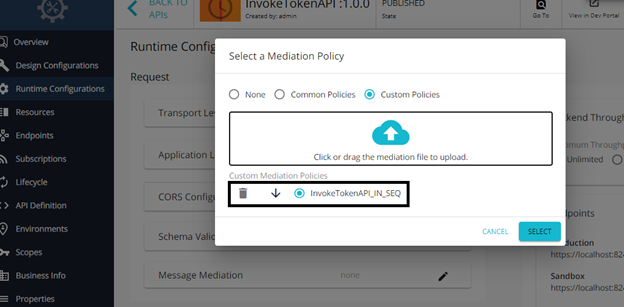
5. Now, go to Runtime Configurations tab, click on edit in the request message mediation, select Custom Policies, and choose the mediation sequence created in the above step and click select. Click save at the bottom.
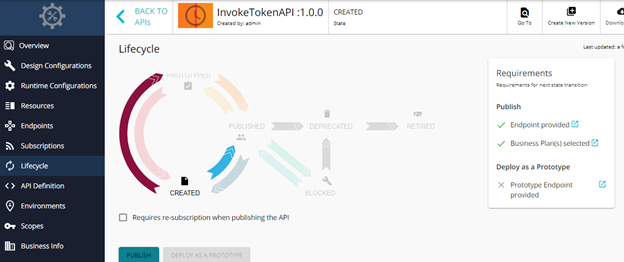
6. Now, go to the Lifecycle tab and Publish the API.
7. Test this API from WSO2 APIM Dev Portal or any Rest API testing tool like Postman. I have used Postman. Just give the API URL, choose the GET method, and invoke. No headers are required.
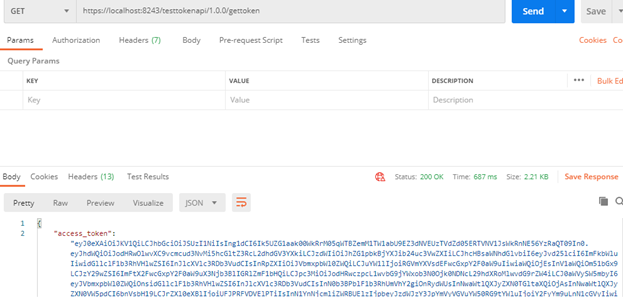
As seen in the above screenshot, the token API is getting invoked through the API we created in API Publisher and returning the access/bearer token in response.
The below 3 lines of code are the ones that are needed to invoke token API from a WSO2 mediation sequence. The same 3 lines can be used in a WSO2 ESB sequence as well to invoke the token API.
xxxxxxxxxx
<header name="Authorization" scope="transport" value="Basic VEVzdjJERmVhaUZsblJ1Snp1YzJMWndxQ3h3YTpFQ1dSZzZkRWl0eDcybGplQmo5TDlHS1hwcWth"/>
<payloadFactory media-type="json">
<format>{"grant_type":"client_credentials"}</format>
<args/>
</payloadFactory>
<property name="messageType" scope="axis2" type="STRING" value="application/x-www-form-urlencoded"/>
Opinions expressed by DZone contributors are their own.
Comments