

Orchestrating Complex Workflows With XState
Using XState to orchestrate backend workflows with serverless and container-based approaches and drawing performance comparisons.
 ·
·
Join the DZone community and get the full member experience.
Join For FreeXState is a state orchestration and management library designed for JavaScript and TypeScript applications. It approaches complex logic through an event-driven model that combines state machines, statecharts, and actors. This structure helps developers create clear, maintainable workflows and application states that behave reliably and are easy to visualize.
Although XState is widely used in UI development, its declarative structure makes it an excellent choice for backend workflows (specially in cloud-native and/or event-driven systems). In this article, we’ll look at how XState can be leveraged to manage complex backend workflows using AWS Lambda and AWS ECS and draw some comparisons.
Why XState isn’t just for UI/frontend development
At a high level, most backend orchestration services revolve around workflows which are states and transitions that represent business logic. A most commonly used example is “order processing” that includes placing order, payment followed by fulfillment and all of these can be mapped naturally to state machines.
Using XState, you get to define:
- States: Representing stages (finite) in the process
- Events: Triggers that cause transition from one state to another
- Actions: Side-effects (fire & forget) to perform
- Guards: Conditions to control whether a transition is allowed
When these patterns are applied to backend systems, the result is deterministic, traceable and easier-to-debug logic. A workflow being deterministic vs non-deterministic plays a huge role in orchestration systems as they impact retries, error handling and most importantly ensure a step in the process is not repeated in itself (either causing duplicate orders or payments).
Let’s walk through a simplified order-processing example. Assume the intake is via API gateway, workflow sourced from s3 and DynamoDB as our datastore. (If the events need ordering, consider SQS FIFO).
Simplified diagram using excalidraw
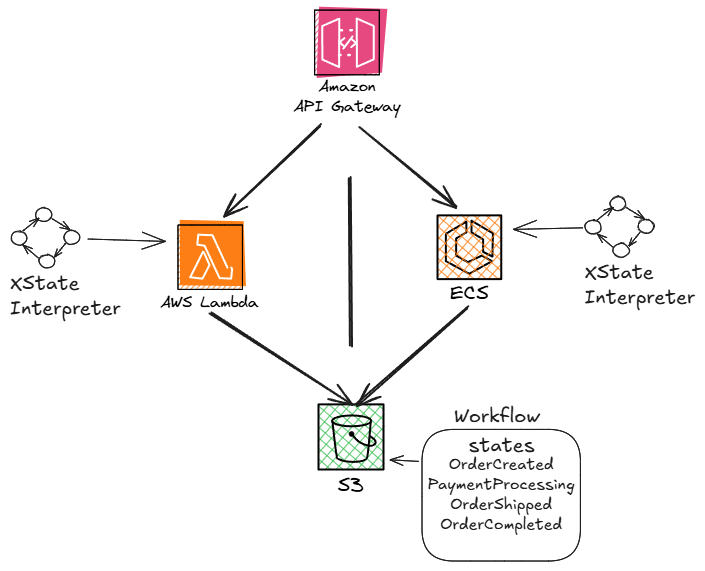
Define the Machine:
const orderMachine = {
  id: 'order-processing',
  initial: 'OrderCreated',
  states: {
    OrderCreated: {
      on: { PaymentReceived: 'PaymentProcessing' }
    },
    PaymentProcessing: {
      on: { PaymentProcessed: 'OrderShipped' }
    },
    OrderShipped: {
      on: { Delivered: 'OrderCompleted' }
    },
    OrderCompleted: {
      type: 'final'
    }
  }
};
Pattern 1: XState With AWS Lambda
1. Lambda Handler
const { createMachine, interpret } = require('xstate');

exports.handler = async (event) => {
  const machine = createMachine(orderMachine).withContext({
    orderId: event.orderId,
    paymentStatus: event.paymentStatus,
  });

  const service = interpret(machine).start();

  service.send(event.type); // e.g. 'PaymentReceived'

  const nextState = service.state;

  console.log(`Order ${event.orderId} transitioned to ${nextState.value}`);

// Best practice to stop the machine to avoid any memory leak
  service.stop();

  return {
    statusCode: 200,
    body: JSON.stringify({ newState: nextState.value })
  };
};
2. Post Effects (e.g. DynamoDB Updates)
Add actions or post-transition logic to update state in your database:
await updateOrderInDynamoDB(event.orderId, nextState.value);This works well for short-lived logic where each Lambda execution represents a single transition.
Pattern 2: XState With Amazon ECS
For long-running workflows or scenarios where Lambda’s timeout and cold start issues become limiting, Amazon ECS (Fargate or EC2-backed) is a strong alternative. ECS tasks can run XState interpreters as long-lived services, which makes them well-suited for:
- Stateful workflow runners
- Orchestration engines
- Services waiting on external signals/events
1. Running the Same Machine in ECS
You can reuse the same XState definition from the Lambda section. The difference lies in how you manage lifecycle and communication. Here's an approach
const express = require('express');
const { createMachine, interpret } = require('xstate');

const app = express();
app.use(express.json());

const machine = createMachine(orderMachine);
const service = interpret(machine).start();

app.post('/event', (req, res) => {
  const event = req.body;
  service.send(event.type);
  res.json({ newState: service.state.value });
});

app.listen(3000, () => {
  console.log('XState workflow service running on ECS');
});
You can deploy this as a containerized app to ECS (with Fargate or EC2) and expose it via an Application Load Balancer or an internal network.
2. State Persistence
In ECS, because your service is long-lived, you might want to:
- Persist workflow state (e.g., DynamoDB in this case)
- Implement a resume/replay mechanism
- Add durability for restarts (e.g., using checkpoints, this is critical so you do not lose data)
You can hydrate machine state using
createMachine(config).resolveState(serializedState);Performance Testing XState on Lambda vs ECS
To better understand how XState performs in different compute environments, I ran a set of benchmarks simulating the workflow we have with 4 state transitions, including DynamoDB interactions. Performance testing done using jmeter sending requests to API gateway endpoint that has connections to Lambda & ECS.
Workflow steps: Simulated order lifecycle
OrderCreated -> PaymentProcessing -> OrderShipped -> OrderCompleted
State Machine: XState interpreter initialized per request for Lambda (to calculate cold starts), vs long-lived (ECS)
Infrastructure:
- Lambda: 1GB memory configs, cold and warm starts tested
- ECS: Used fargate with 0.5 vCPU / 1GB memory, container kept warm with ALB health checks
- Region: us-east-1
Performance Results:
| Metric | lambda | ecs (fargate) |
|---|---|---|
|
Avg Transition Time (w/ DynamoDB) |
180ms |
87ms |
|
Cold Start Time |
~280ms |
N/A (warm ECS container) |
|
Throughput (events/sec) |
~34 |
~65 |
|
Memory Overhead (XState Interpreter) |
~6MB |
~8MB |
|
Cost per Million Invocations |
$7.54 |
~$15.40 (idle containers incl.) |
Test Observations
Lambda: Works great for low-latency, single-shot transitions and especially with warm containers. Cold starts are non-trivial but manageable with provisioned concurrency or async triggers (e.g., SQS).
ECS: Better suited for high-throughput, low-latency workloads. The interpreter stays warm, making it ideal for more complex, long-lived workflows or event batching but the durability is questionable in my opinion if teams do not implement their own retry mechanism.
XState Overhead: Minimal across the board (~4-7 ms per transition), showing that the performance difference stems more from the hosting environment than from the state machine logic itself.
Choose "Lambda" when:
- Transitions are fast and event-driven
- You need a highly scalable, low cost compute
- Most importantly, if you have to maintain event processing order you need to rely on SQS FIFO or any other patterns (out of scope for this article)
- You need to keep interpreter alive across multiple events
- You need complex state recovery or long-running workflows
My Conclusion
XState brings a formal model to backend engineering. Abstracting workflows into state machine will help developers gain clarity, testability and extensibility.
Whether you’re deploying functions to Lambda or spinning up services in ECS, XState can serve as the brain of your backend workflows. If you’ve been manually stringing together state logic (if/else logic), it might be time to give state charts a serious look.
One more thing—there are other orchestration engines out there like Temporal and Restate that offer durable execution out of the box. The difference is, XState is just a library. It handles state transitions and you rely on AWS or your cloud setup to manage durability, retries and infrastructure. That tradeoff gives you more flexibility but also means more responsibility. Good luck!
Opinions expressed by DZone contributors are their own.
Comments