

Building a Zero-Cost Approval Workflow With AWS Lambda Durable Functions
Learn how to build an ETL pipeline with human-in-the-loop approval that costs nothing while waiting — and see real cost data from processing 1,000 documents.
Join the DZone community and get the full member experience.
Join For FreeWhen AWS announced Lambda Durable Functions at re: Invent 2025, my first reaction was, "Okay, but how is this different from Step Functions?" I have been building serverless workflows on AWS for a while now, and Step Functions has always been my go-to service for orchestrating multi-step pipelines. So naturally, I wanted to put this new capability to the test.
I decided to build a simple document processing workflow, an ETL pipeline with human-in-the-loop approval using both Durable Functions and Step Functions, then run 1,000 actual document processing workflows through each system. What I found surprised me. Not just the cost difference (79% cheaper with Durable Functions), but the trade-offs that nobody is really talking about yet.
In this tutorial, I will walk you through building a zero-cost approval workflow using Lambda Durable Functions with Python. Along the way, I will share the actual cost numbers and the lessons that would have saved me a few hours of debugging.
The Problem: Approval Workflows Are Expensive
If you have ever built a document processing system that requires human approval, you know the pain. Someone uploads a file, your system processes it, and then... it sits there. Waiting for a human to review and approve it. That wait can be 5 minutes, 20 minutes, or even hours.
Traditional approaches to handling this waiting are:
- Polling: Your code keeps checking every 30 seconds — "Is it approved yet? How about now?" making those calls the entire time.
- Always-on server: An EC2 instance or ECS container sits idle, costing you money 24/7, just to catch that one approval event.
- External state management: You build a custom solution with DynamoDB, SQS, and Lambda triggers — works fine, but it requires you to maintain a state machine you built yourself.
What if your workflow could just... pause? No compute charges. No polling. Just pause, wait for the human to do their thing, and resume exactly where it left off.
That is exactly what Lambda Durable Functions enables with the wait_for_callback pattern.
What We Are Building
Here is the workflow we will implement:
Extract data → Transform data → Load data → Wait for approval (≈20 min) → Finalize & archive
A CSV file gets uploaded to an S3 bucket under the uploads/ prefix. Our durable function picks it up, runs it through three ETL steps (extract, transform, load), then pauses execution and waits for a human to approve the processed data through a shared approval API. Once approved, the function resumes, finalizes the job, and archives the file.
The key part? During that 20-minute (or 2-hour, or 2-day) approval wait, you pay absolutely nothing for compute.
Architecture Overview
The project uses three separate SAM stacks:
shared-resources/      # Approval API, DynamoDB, SNS (shared by both systems)
durable-functions/     # Lambda Durable Functions ETL pipeline
step-functions/        # Step Functions ETL pipeline (for comparison)
The shared approval handler serves for both workflow types using a single API.
- When a job comes in for approval, it checks the
workflowTypefield, and if it isdurable-functions, it callssend_durable_execution_callback_success. - If
step-functions, it callssend_task_success. Same API endpoint, different callback mechanisms under the hood.
Prerequisites
Before we begin, make sure you have the following:
- AWS SAM CLI (latest version recommended)
- Python 3.14 runtime
- AWS account with Lambda, DynamoDB, S3, SNS, and API Gateway access
- Docker for local Lambda testing
Check your SAM CLI version:
sam --versionStep 1: Deploy Shared Resources First
Before the ETL pipeline, we need the shared infrastructure — the approval API, DynamoDB table for pending approvals, and SNS topic for notifications. Here is the shared-resources/ SAM template:
# shared-resources/template.yaml
AWSTemplateFormatVersion: '2010-09-09'
Transform: AWS::Serverless-2016-10-31
Description: Shared resources for ETL approval workflow

Parameters:
  ApproverEmail:
    Type: String
    Description: Email address to receive approval notifications
    Default: [email protected]

Resources:
  PendingApprovalsTable:
    Type: AWS::DynamoDB::Table
    Properties:
      TableName: etl-pending-approvals
      BillingMode: PAY_PER_REQUEST
      AttributeDefinitions:
        - AttributeName: jobId
          AttributeType: S
      KeySchema:
        - AttributeName: jobId
          KeyType: HASH
      TimeToLiveSpecification:
        AttributeName: ttl
        Enabled: true

  ApprovalNotificationTopic:
    Type: AWS::SNS::Topic
    Properties:
      TopicName: etl-approval-notifications
      Subscription:
        - Endpoint: !Ref ApproverEmail
          Protocol: email

  ApprovalApi:
    Type: AWS::Serverless::Api
    Properties:
      Name: ETL-Approval-API
      StageName: prod

  ApprovalHandlerFunction:
    Type: AWS::Serverless::Function
    Properties:
      FunctionName: ETL-Approval-Handler
      CodeUri: ./src
      Handler: approval_handler.handler
      Runtime: python3.14
      MemorySize: 256
      Timeout: 30
      Environment:
        Variables:
          APPROVALS_TABLE: !Ref PendingApprovalsTable
      Policies:
        - DynamoDBCrudPolicy:
            TableName: !Ref PendingApprovalsTable
        - Version: '2012-10-17'
          Statement:
            - Effect: Allow
              Action:
                - states:SendTaskSuccess
                - states:SendTaskFailure
                - lambda:SendDurableExecutionCallbackSuccess
                - lambda:SendDurableExecutionCallbackFailure
              Resource: '*'
      Events:
        ApproveJob:
          Type: Api
          Properties:
            RestApiId: !Ref ApprovalApi
            Path: /approve/{jobId}
            Method: POST
        RejectJob:
          Type: Api
          Properties:
            RestApiId: !Ref ApprovalApi
            Path: /reject/{jobId}
            Method: POST
        GetJobStatus:
          Type: Api
          Properties:
            RestApiId: !Ref ApprovalApi
            Path: /status/{jobId}
            Method: GET
Notice the approval handler has permissions for both states:SendTaskSuccess (Step Functions) and lambda:SendDurableExecutionCallbackSuccess (Durable Functions). This is the shared handler approach, one API that works with both workflow types.
Deploy it:
cd shared-resources
sam build
sam deploy --guided
Step 2: The Durable Functions SAM Template
Now the ETL pipeline itself for the Duration Functions. The key addition is the DurableConfig property. The DurableConfig property tells Lambda to enable durable execution for your function.
# durable-functions/template.yaml
AWSTemplateFormatVersion: '2010-09-09'
Transform: AWS::Serverless-2016-10-31
Description: Lambda Durable Functions ETL Pipeline

Globals:
  Function:
    Runtime: python3.14
    Architectures:
      - arm64
    MemorySize: 512
    Timeout: 900

Resources:
  ETLOrchestratorFunction:
    Type: AWS::Serverless::Function
    Properties:
      FunctionName: ETLDurableOrchestrator
      CodeUri: ./src
      Handler: handlers/etl_handler.lambda_handler
      MemorySize: 1024
      Timeout: 900
      DurableConfig:
        ExecutionTimeout: 86400       # 24 hours for human approval
        RetentionPeriodInDays: 14     # Keep execution history for debugging
      AutoPublishAlias: live
      Policies:
        - AWSLambdaBasicExecutionRole
        - S3CrudPolicy:
            BucketName: !Sub "${RawBucketName}-${AWS::AccountId}"
        - S3CrudPolicy:
            BucketName: !Sub "${ProcessedBucketName}-${AWS::AccountId}"
        - DynamoDBCrudPolicy:
            TableName: !Ref ETLMetadataTable
        - DynamoDBCrudPolicy:
            TableName: etl-pending-approvals
        - SNSPublishMessagePolicy:
            TopicName: etl-approval-notifications
      Events:
        S3Upload:
          Type: S3
          Properties:
            Bucket: !Ref RawDataBucket
            Events: s3:ObjectCreated:*
            Filter:
              S3Key:
                Rules:
                  - Name: prefix
                    Value: uploads/
                  - Name: suffix
                    Value: .csv
      Environment:
        Variables:
          PROCESSED_BUCKET: !Sub "${ProcessedBucketName}-${AWS::AccountId}"
          METADATA_TABLE: !Ref ETLMetadataTable
          APPROVALS_TABLE: etl-pending-approvals
          APPROVAL_TOPIC_ARN: !ImportValue ETL-ApprovalTopicArn
          APPROVAL_API_URL: !ImportValue ETL-ApprovalApiUrl
A few things to notice here:
MemorySize: 1024on the orchestrator (overrides the 512 MB global default). Since this single function does all the work, it needs more memory.ExecutionTimeout: 86400– This is the total workflow duration across all invocations (24 hours). The standardTimeout: 900is the per-invocation limit (15 minutes). Each checkpoint/resume is a fresh invocation.AutoPublishAlias: live– AWS recommends using Lambda versions with durable functions. If you update code while an execution is suspended, replay will use the version that started the execution.- S3 filter with
prefix: uploads/andsuffix: .csv– Only CSV files under theuploads/directory trigger the workflow. - The stack imports shared resources via
!ImportValuethe approval table, SNS topic, and API URL from the shared stack.
Step 3: Writing the Durable Function
This is where it gets interesting. The entire ETL pipeline, including the approval wait, lives in a single Lambda function. No state machine definition. No JSON DSL. Just Python code.
First, the individual ETL steps. Each one is a regular Python function in a separate file:
Extract
import csv
import io
import boto3
import logging

logger = logging.getLogger()
s3_client = boto3.client("s3")

def extract_data(source_bucket, source_key, step_context=None):
    logger.info(f"Extracting from s3://{source_bucket}/{source_key}")
    response = s3_client.get_object(Bucket=source_bucket, Key=source_key)
    content = response["Body"].read().decode("utf-8")
    reader = csv.DictReader(io.StringIO(content))
    records = list(reader)
    schema = {
        "columns": reader.fieldnames,
        "source_file": source_key,
        "file_size_bytes": response["ContentLength"]
    }
    logger.info(f"Extracted {len(records)} records with {len(schema['columns'])} columns")
    return {"data": records, "record_count": len(records), "schema": schema}
Transform
import logging
from datetime import datetime

logger = logging.getLogger()

def transform_data(raw_data, schema_config, step_context=None):
    logger.info(f"Transforming {len(raw_data)} records")
    valid_records, rejected_records = [], []

    for i, record in enumerate(raw_data):
        try:
            cleaned = {k: v.strip() if isinstance(v, str) else v for k, v in record.items()}
            if not cleaned.get("id") or not cleaned.get("name"):
                rejected_records.append({"index": i, "reason": "Missing required field"})
                continue
            if "date" in cleaned:
                cleaned["date"] = normalize_date(cleaned["date"])
            cleaned["_processed_at"] = datetime.utcnow().isoformat()
            for key in ["amount", "quantity", "price"]:
                if key in cleaned and cleaned[key]:
                    try:
                        cleaned[key] = float(cleaned[key])
                    except ValueError:
                        cleaned[key] = None
            valid_records.append(cleaned)
        except Exception as e:
            rejected_records.append({"index": i, "reason": str(e)})

    return {
        "data": valid_records,
        "valid_records": len(valid_records),
        "rejected_records": len(rejected_records),
        "rejection_details": rejected_records[:100]
    }

def normalize_date(date_str):
    for fmt in ["%Y-%m-%d", "%m/%d/%Y", "%d-%m-%Y", "%Y/%m/%d"]:
        try:
            return datetime.strptime(date_str, fmt).strftime("%Y-%m-%d")
        except ValueError:
            continue
    return date_str
Load
import json
import boto3
import logging

logger = logging.getLogger()
s3_client = boto3.client("s3")


def load_data(transformed_data, target_bucket, target_key, step_context=None):
    logger.info(f"Loading {len(transformed_data)} records to s3://{target_bucket}/{target_key}")
    output_lines = "\n".join(json.dumps(r) for r in transformed_data)
    s3_client.put_object(
        Bucket=target_bucket, Key=target_key,
        Body=output_lines.encode("utf-8"),
        ContentType="application/jsonl",
        Metadata={"record_count": str(len(transformed_data))}
    )
    summary = {
        "record_count": len(transformed_data),
        "columns": list(transformed_data[0].keys()) if transformed_data else [],
        "sample_records": transformed_data[:3]
    }
    return {"target_path": f"s3://{target_bucket}/{target_key}", "record_count": len(transformed_data), "summary": summary}
Notice the steps are plain Python functions — no special decorator, no SDK import. They take step_context=None as an optional last parameter, which keeps them testable outside the durable execution context.
Now the main ETL orchestrator that ties it all together:
import json
import os
import logging
from datetime import datetime
from aws_durable_execution_sdk_python import durable_execution, DurableContext

from steps.extract import extract_data
from steps.transform import transform_data
from steps.load import load_data
from steps.finalize import finalize_job

logger = logging.getLogger()
logger.setLevel(logging.INFO)

PROCESSED_BUCKET = os.environ.get("PROCESSED_BUCKET")
METADATA_TABLE = os.environ.get("METADATA_TABLE")


@durable_execution
def lambda_handler(event, context: DurableContext):
    # Handle both S3 event format and direct invocation
    if "Records" in event:
        s3_event = event["Records"][0]["s3"]
        source_bucket = s3_event["bucket"]["name"]
        source_key = s3_event["object"]["key"]
    else:
        source_bucket = event.get("bucket")
        source_key = event.get("key")

    # Generate job_id deterministically using context.step()
    job_id = context.step(
        lambda _: f"etl-durable-{datetime.utcnow().strftime('%Y%m%d%H%M%S')}-"
                  f"{source_key.split('/')[-1]}",
        name="generate-job-id"
    )
    context.logger.info(f"Starting ETL job: {job_id}")

    # Step 1: Extract
    extracted = context.step(
        lambda _: extract_data(source_bucket, source_key, None),
        name="extract-data"
    )
    context.logger.info(f"Extracted {extracted['record_count']} records")

    # Step 2: Transform
    transformed = context.step(
        lambda _: transform_data(extracted["data"], extracted.get("schema", {}), None),
        name="transform-data"
    )

    # Step 3: Load
    loaded = context.step(
        lambda _: load_data(transformed["data"], PROCESSED_BUCKET,
                           f"processed/{job_id}/output.jsonl", None),
        name="load-data"
    )

    # --- EXECUTION PAUSES HERE ---
    # The submitter function stores the callback_id in DynamoDB
    # and sends an SNS notification to the reviewer.
    # No compute charges while waiting for approval.
    def submit_for_approval(callback_id: str, ctx):
        return notify_reviewer(job_id, callback_id, loaded["summary"])

    approval = context.wait_for_callback(
        submitter=submit_for_approval,
        name="quality-check-approval"
    )

    # Parse approval result
    if isinstance(approval, str):
        approval = json.loads(approval)

    if not approval or not approval.get("approved"):
        return {"status": "REJECTED", "job_id": job_id,
                "reason": approval.get("reason", "No reason")}

    # Step 4: Finalize (only runs after approval)
    final = context.step(
        lambda _: finalize_job(job_id, source_bucket, source_key,
                              loaded, approval, METADATA_TABLE, None),
        name="finalize-job"
    )

    return {
        "status": "COMPLETED",
        "job_id": job_id,
        "records_processed": transformed["valid_records"],
        "output_path": loaded["target_path"],
        "approved_by": approval.get("reviewer"),
        "completed_at": final["completed_at"]
    }
Let me break down the important parts:
@durable_execution– This decorator (imported fromaws_durable_execution_sdk_python) enables the checkpoint/replay mechanism on the handler.context.step(lambda _: ..., name="...")– Each step call creates a checkpoint. On replay, completed steps return their cached results instantly instead of re-executing.context.wait_for_callback(submitter=..., name="...")– This is the zero-cost waiting magic. Thesubmitterfunction receives acallback_idwhich gets stored in DynamoDB. Execution then pauses completely — Lambda saves the state, shuts down, and you stop paying.- Determinism matters – Notice
job_idis generated inside acontext.step(). That is intentional. Since Lambda replays your function from the beginning on resume,datetime.utcnow()would produce a different value on each replay. Wrapping it in a step ensures the timestamp gets checkpointed and replayed consistently.
The notify_reviewer function (in the same file) stores the callback details in DynamoDB and sends an SNS notification:
def notify_reviewer(job_id, callback_id, summary):
    import boto3
    from datetime import timedelta

    dynamodb = boto3.resource('dynamodb')
    sns_client = boto3.client('sns')

    approvals_table = os.environ.get('APPROVALS_TABLE', 'etl-pending-approvals')
    approval_topic_arn = os.environ.get('APPROVAL_TOPIC_ARN')
    approval_api_url = os.environ.get('APPROVAL_API_URL')

    table = dynamodb.Table(approvals_table)
    ttl = int((datetime.utcnow() + timedelta(hours=24)).timestamp())

    table.put_item(Item={
        'jobId': job_id,
        'callbackId': callback_id,
        'functionArn': os.environ.get('AWS_LAMBDA_FUNCTION_NAME'),
        'workflowType': 'durable-functions',
        'summary': json.dumps(summary),
        'status': 'pending',
        'requestedAt': datetime.utcnow().isoformat(),
        'ttl': ttl
    })

    if approval_topic_arn:
        sns_client.publish(
            TopicArn=approval_topic_arn,
            Subject=f'ETL Job Approval Required: {job_id}',
            Message=f"Job ID: {job_id}\n"
                    f"Approve: POST {approval_api_url}/approve/{job_id}\n"
                    f"Reject: POST {approval_api_url}/reject/{job_id}"
        )

    return {"job_id": job_id, "callback_id": callback_id, "status": "pending"}
The workflowType: 'durable-functions' field is important — it tells the shared approval handler which callback mechanism to use when the reviewer responds.
Step 4: The Shared Approval Handler
When the reviewer clicks approve, the shared handler looks up the callbackId from DynamoDB and sends the callback to the paused durable execution:
# shared-resources/src/approval_handler.py (key excerpt)

if workflow_type == 'durable-functions':
    callback_id = approval_record.get('callbackId')
    if approved:
        lambda_client.send_durable_execution_callback_success(
            CallbackId=callback_id,
            Result=json.dumps(approval_response)
        )
    else:
        lambda_client.send_durable_execution_callback_failure(
            CallbackId=callback_id,
            Error='JobRejected',
            Cause=reason or 'Job rejected by reviewer'
        )

elif workflow_type == 'step-functions':
    task_token = approval_record.get('taskToken')
    if approved:
        stepfunctions.send_task_success(
            taskToken=task_token,
            output=json.dumps(approval_response)
        )
Same API, same reviewer experience — the underlying callback mechanism is the only thing that differs.
Step 5: Deploy and Test
Deploy in order (shared resources first, since the other stacks import from it):
# 1. Deploy shared resources
cd shared-resources
sam build && sam deploy --guided

# 2. Deploy Durable Functions
cd ../durable-functions
sam build && sam deploy --guided
Generate test data:
python scripts/generate_test_data.py --count 10 --output test-data/Upload files to trigger the workflow (note the uploads/ prefix — the S3 filter requires it):
aws s3 cp test-data/ s3://etl-raw-data-bucket-YOUR_ACCOUNT_ID/uploads/ --recursiveCheck approval status and approve:
# Check status
curl https://<api-id>.execute-api.us-east-1.amazonaws.com/prod/status/<job-id>

# Approve
curl -X POST https://<api-id>.execute-api.us-east-1.amazonaws.com/prod/approve/<job-id> \
  -H "Content-Type: application/json" \
  -d '{"reviewer": "harpreet", "reason": "Data looks good"}'
For bulk approvals during testing, the repo includes a handy script:
./scripts/approve_all_jobs.shFor local testing, the testing SDK supports pytest:
pip install aws-lambda-durable-execution-sdk-testing
pytest durable-functions/tests/
Step 6 (Optional): Deploy Step Functions for Comparison
If you want to reproduce my full comparison, deploy the Step Functions stack too:
cd step-functions
sam build && sam deploy --guided
Here is what the same workflow looks like in Amazon States Language:
{
  "StartAt": "ExtractData",
  "States": {
    "ExtractData": {
      "Type": "Task",
      "Resource": "${ExtractFunctionArn}",
      "ResultPath": "$.extractResult",
      "Next": "TransformData"
    },
    "TransformData": {
      "Type": "Task",
      "Resource": "${TransformFunctionArn}",
      "ResultPath": "$.transformResult",
      "Next": "LoadData"
    },
    "LoadData": {
      "Type": "Task",
      "Resource": "${LoadFunctionArn}",
      "ResultPath": "$.loadResult",
      "Next": "WaitForApproval"
    },
    "WaitForApproval": {
      "Type": "Task",
      "Resource": "arn:aws:states:::lambda:invoke.waitForTaskToken",
      "Parameters": {
        "FunctionName": "${ApprovalFunctionArn}",
        "Payload": {
          "taskToken.$": "$$.Task.Token",
          "jobId.$": "$.loadResult.job_id",
          "summary.$": "$.loadResult.summary"
        }
      },
      "TimeoutSeconds": 86400,
      "ResultPath": "$.approvalResult",
      "Next": "CheckApproval"
    },
    "CheckApproval": {
      "Type": "Choice",
      "Choices": [{
        "Variable": "$.approvalResult.approved",
        "BooleanEquals": true,
        "Next": "FinalizeJob"
      }],
      "Default": "JobRejected"
    },
    "JobRejected": {
      "Type": "Pass",
      "Result": { "status": "REJECTED" },
      "End": true
    },
    "FinalizeJob": {
      "Type": "Task",
      "Resource": "${FinalizeFunctionArn}",
      "End": true
    }
  }
}
Compare the two approaches. Durable Functions: one Python file, one Lambda, familiar programming constructs. Step Functions: a JSON state machine definition, five separate Lambda functions, plus the ASL learning curve. Both do the same thing.
The Real Cost Numbers
Now, here is the part that made me rebuild a mental model I had about serverless orchestration costs. I ran 1,000 CSV files through this exact workflow — both with Durable Functions and with the Step Functions implementation. The approval wait averaged about 20 minutes per document.
| Cost Component | Durable Functions | Step Functions | Difference |
|---|---|---|---|
| Lambda invocations | $0.000358 | $0.001 | -64% |
| Lambda duration | $0.0308 | $0.0179 | +72% |
| State transitions | $0.000 | $0.175 | -100% |
| DynamoDB | $0.003 | $0.003 | 0% |
| S3 operations | $0.010 | $0.010 | 0% |
| TOTAL | $0.044 | $0.207 | -79% |
Source: AWS CloudWatch Metrics
The total cost, which is 79% cheaper, is mainly driven almost entirely by one thing: state transitions.
Step Functions charges
- $0.025 per 1,000 state transitions.
- ASL workflow has 7 states (ExtractData, TransformData, LoadData, WaitForApproval, CheckApproval, JobRejected/FinalizeJob).
- For 1,000 workflows, that is 7,000 transitions, which costs $0.175.
- That single line (state transition) item is 84% of the total Step Functions cost.
Durable Functions eliminates state transition costs. The trade-off?
Higher Lambda duration costs ($0.031 vs. $0.018) because the durable function runs with 1,024 MB memory (single function handling all work) compared to Step Functions using 512 MB per function across five smaller functions.
At scale, the difference adds up quickly:
| Daily Volume | Durable Functions/year | Step Functions/year | Annual Savings |
|---|---|---|---|
| 1,000/day | $16.06 | $75.56 | $59.50 |
| 10,000/day | $160.60 | $755.60 | $595 |
| 100,000/day | $1,606 | $7,556 | $5,950 |
And the most important validation: both systems achieved $0 compute cost during the 20-minute approval wait. That is the real game-changer compared to polling or always-on servers.
Understanding the Replay Model
One thing that confused me initially was the invocation count. I expected 1,000 invocations for 1,000 workflows. Instead, I got 1,788.
Here is why. The checkpoint/replay model means each workflow requires a minimum of 2 invocations:
- Initial invocation — S3 trigger fires, function runs generate-job-id → extract → transform → load → submit-for-approval → pause
- Resume invocation — Callback received, function replays from the beginning (all completed steps return cached results instantly), then executes the finalize step
So the theoretical minimum is 2,000 invocations for 1,000 workflows. The actual number was 1,788 because some workflows were still pending approval when I collected the metrics over the 24-hour measurement window.
The important thing to remember: your code must be deterministic. Since Lambda replays your function from the beginning on resume, any non-deterministic operations (random numbers, timestamps, external API calls) must happen inside context.step() blocks so their results get checkpointed.
job_id = context.step(
        lambda _: f"etl-durable-{datetime.utcnow().strftime('%Y%m%d%H%M%S')}-"
                  f"{source_key.split('/')[-1]}",
        name="generate-job-id"
    )
That is exactly why the job_id generation in our code uses context.step().Without it, the timestamp would change on every replay.
Here are some other examples where your code must be deterministic and how to avoid that:
| Deterministic Isssues | Why It Breaks | Solution |
|---|---|---|
Math.random() |
Different value on every replay | Wrap in context.step() |
Date.now() |
Time keeps moving forward | Use context.timestamp or wrap in a step |
| Global variables | Might change between replays | Pass state through function arguments |
| External API calls | Network is a lie | Always wrap in context.step() |
Iterating over Map or Set |
Iteration order can vary by runtime | Use arrays or ensure stable ordering |
When Not to Use Durable Functions
I want to be honest about the trade-offs, because this is not a "Durable Functions is better than everything" story.
Choose Step Functions when:
-
Visual debugging matters. The step function state machine execution graph is genuinely superior. You can see exactly which step failed, inspect the input/output of each state, and non-technical stakeholders can actually understand what the workflow is doing.
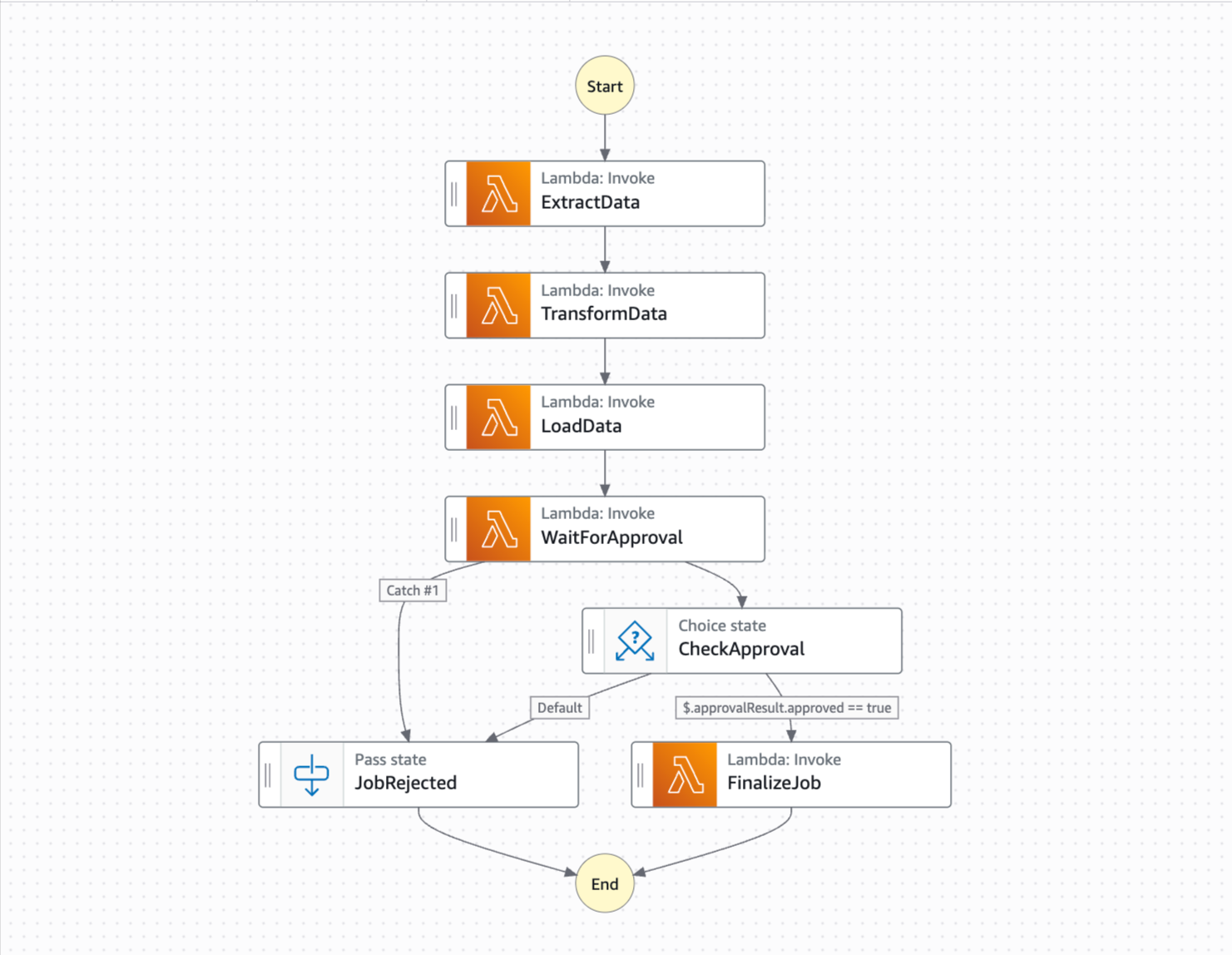
With Durable functions, AWS did provide visual analysis, monitoring, and debugging as well, but its little more developer-friendly.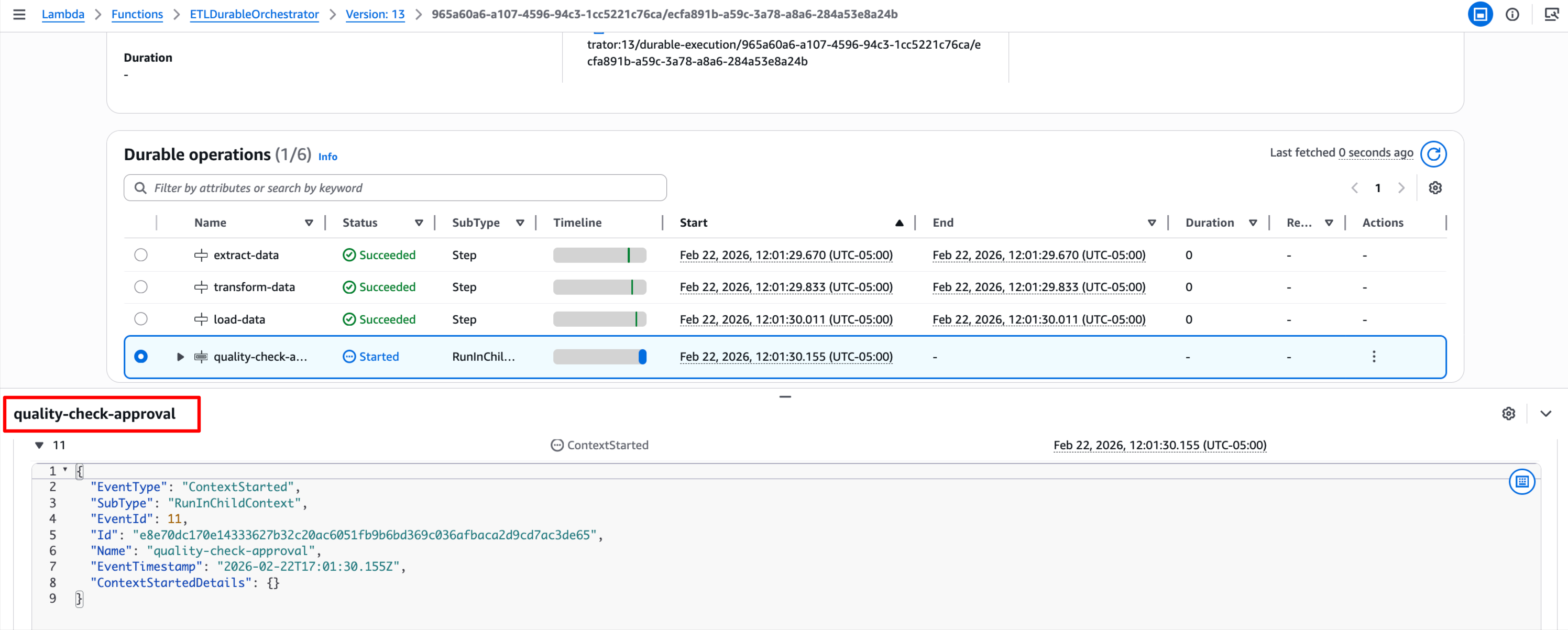
- Multi-service orchestration. Step Functions has 220+ native AWS service integrations. DynamoDB, SQS, SNS, ECS, and Glue without writing Lambda glue code. In our Step Functions implementation, the ASL connects directly to Lambda function ARNs with built-in retry policies. With Durable Functions, all integrations go through your Lambda code.
- Express Workflows apply. For short-duration (under 5 minutes), high-throughput workflows, Step Functions Express Workflows use a different pricing model that can be very competitive.
Choose Durable Functions when:
- Cost optimization is the priority (79% savings at scale)
- Workflows are Lambda-centric (your logic lives in Lambda code anyway)
- You prefer writing orchestration in Python/TypeScript/over Amazon States Language. AWS just now released Lambda Duration functions with Java in developer preview.
- Your logic is complex, and dynamic programming language is preferred by developers over the declarative ASL.
AWS recommends a hybrid approach: use Durable Functions for application-level logic within Lambda, and Step Functions for high-level orchestration across multiple AWS services.
Concurrency Planning — A Quick Note
One thing worth mentioning: Durable Functions consolidates your entire workflow into a single Lambda function (ETLDurableOrchestrator in our case). This means your Lambda concurrency quota directly limits how many workflows can run simultaneously. Step Functions distributes execution across five separate Lambda functions (Extract, Transform, Load, Approval, Finalize), spreading the concurrency demand.
In practice, this means you should plan your Lambda concurrency quotas carefully when using Durable Functions. If you expect burst uploads of hundreds or thousands of files at once, set reserved concurrency appropriately for your workload. This applies to both services — the difference is just where the concurrency demand concentrates.
Wrapping Up
Lambda Durable Functions is a genuinely useful addition to the serverless toolkit. For a simple ETL pipeline with human-in-the-loop approval, it delivered 79% cost savings over Step Functions while achieving the same 100% success rate and zero-cost waiting.
The code-first approach feels natural if you are already comfortable writing Lambda functions in Python, TypeScript, or Java. The wait_for_callback pattern for human approvals is clean and straightforward. And the cost savings are real, which is driven entirely by the elimination of state transition charges.
That said, Step Functions remains the better choice when visual workflow representation, multi-service orchestration, or operational simplicity are your priorities. There is no universal winner here, and it depends on what your team values more.
The complete implementation — both SAM stacks, shared approval infrastructure, test data generation scripts, bulk approval scripts, and detailed cost analysis — is available here: github.com/hsiddhu2/aws-lambda-durable-vs-stepfunctions.
Clone it, deploy both implementations, run your own 1,000-file comparison, and see the numbers for yourself. The ~79% cost advantage held consistent for this workflow, but your number will vary based on workflow complexity and state count.
Opinions expressed by DZone contributors are their own.
Comments