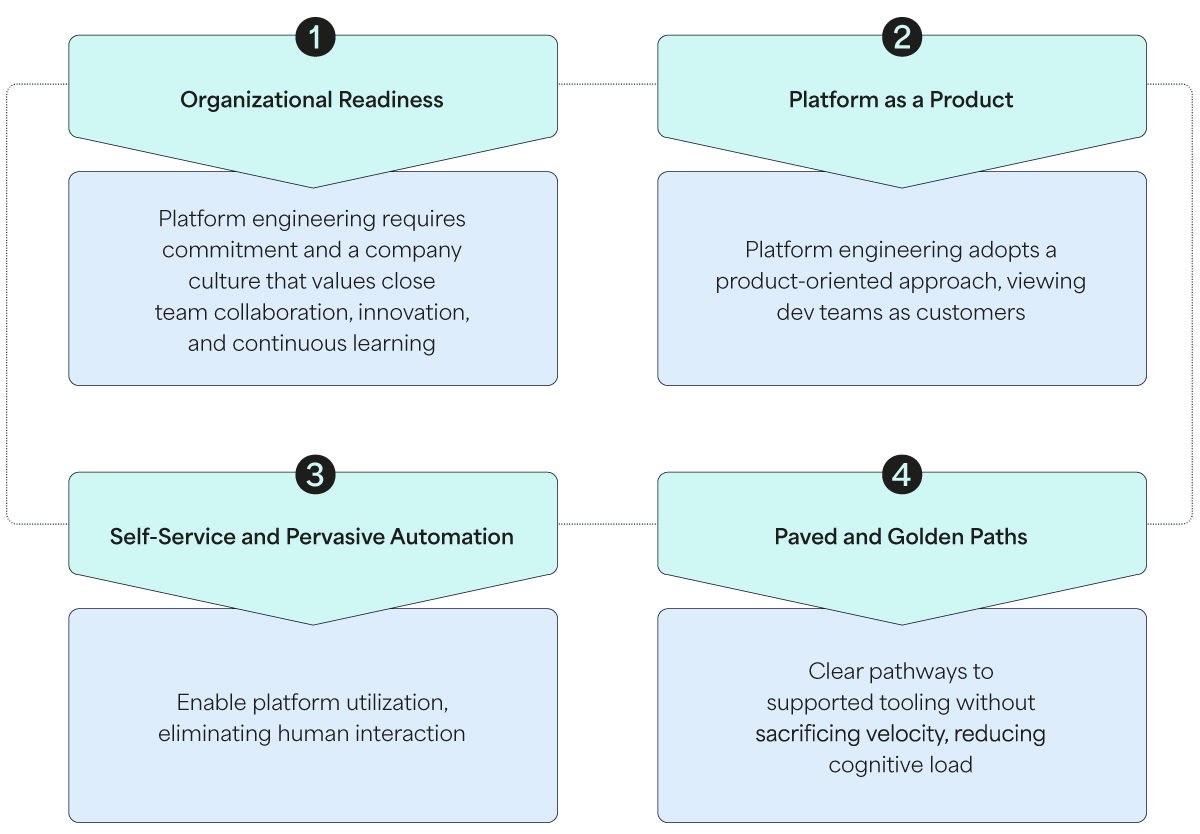
Each platform will evolve uniquely based on the organization’s specific needs; however, most incorporate several fundamental capability domains:
- Internal developer portal
- Repository templates
- Paved and golden paths
- Software/service catalog
- Documentation repository
- Scorecards
- GenAI capabilities “as a Service”
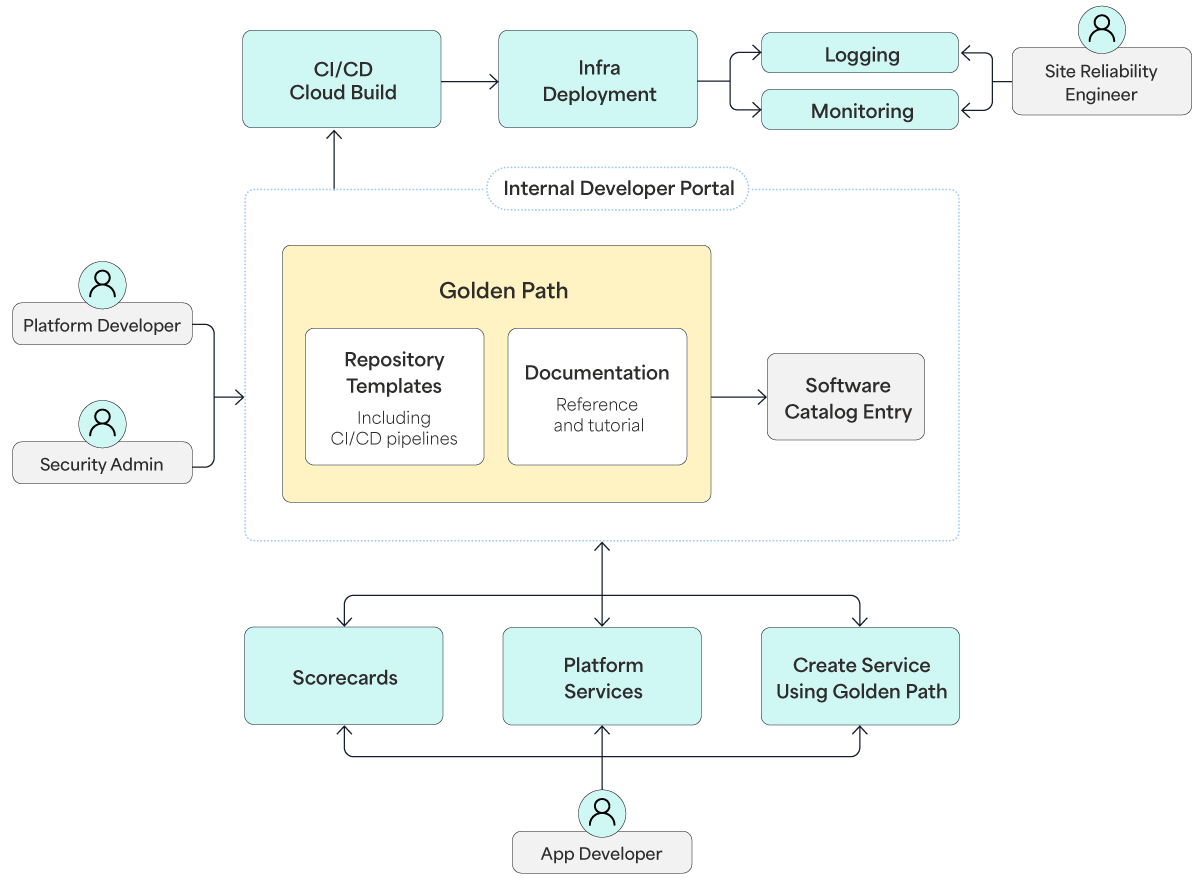
Overview of Platform Engineering Capabilities
Self-Service Developer Portal
Developer portals streamline operations within internal developer platforms (IDPs), making it easier for teams to discover and leverage platform resources and services effectively. They typically consist of the following key components:
- Universal software and service catalog
- Software templates based on existing practices
- Technical auto-documentation
- Access management via RBAC
Developer portals offer self-service and automation capabilities that allow development teams to independently perform routine tasks such as automatically provisioning environments, deploying applications, discovering services, and requesting permissions. Tools embedded in the portal can automate tasks like triggering alerts, terminating temporary environments, and managing permissions. Portals also provide platform engineering and development teams with access to dashboards that display platform performance, status, and adoption metrics.
Developer Portal Example: Backstage.io
One of the earliest and most widely adopted developer portals is Backstage.io, an open-source framework originally developed by Spotify. Rather than being a standalone portal, Backstage serves as a framework that allows platform engineers to create customized developer portals. This flexibility is due to Backstage’s plugin-based architecture, which makes it highly extensible and adaptable for various use cases.
However, Backstage lacks enterprise-level features such as RBAC, dedicated customer support, extended lifecycle management, certifications, and support for legacy versions. This gap is filled by enterprise-grade internal developer portals, which either extend Backstage or offer more comprehensive enterprise solutions. These platforms provide advanced features like RBAC, integration with container platforms, dynamic and verified plugins, configuration and infrastructure orchestration, data aggregation, and scalable infrastructure.
Repository Templates
Repository templates allow development teams to share boilerplate code across codebases. Efficient project bootstrapping with preferred tools and directory structures significantly reduces manual configuration and compatibility issues. By standardizing the initial set-up process, repository templates ensure structural uniformity, making it easier for engineers to transition between different codebases and maintain a predictable development environment.
Platforms provide a centralized registry to store these assets, offering a streamlined method for consuming them within each repository’s CI/CD pipelines. This consolidation simplifies lifecycle management and enhances cross-team collaboration. Housing foundational workflows in a single, shared location allows organizations to scale best practices and governance standards globally, which drastically reduces manual errors and deployment friction.
Additionally, templates provide predefined configurations for bug reports, feature requests, and community discussions, further accelerating the development process. Repository templates are the foundation upon which golden paths are built.
Paved and Golden Paths
Golden paths are designed to provide a single, well-defined method to accomplish specific tasks, drastically reducing cognitive load by leveraging abstractions and comprehensive documentation. Essentially, they function as configurable, extensible frameworks that offer total transparency, making it easy for engineers to understand, customize, and integrate additional capabilities when required.
In practice, they typically include step-by-step instructions, a clearly defined target audience, a base repository template, and pre-configured platform integrations with underlying services. They also package templated CI/CD pipelines, deployment manifests, built-in observability capabilities, and IaC configurations optimized for both staging and production environments. The self-service nature of golden paths, managed via the internal developer portal, allows software teams to discover and launch them independently without relying on a ticketing system.
Platform engineering teams build, document, and maintain these configurations. They also establish explicit KPIs and quantitative goals, creating specialized tracking dashboards to measure onboarding and adoption metrics across the enterprise.
Example Golden Path Use Case
The workflow starts with the platform engineering team creating a golden path for developers who need to deploy microservices using Kubernetes. This golden path includes a pre-configured Kubernetes Deployment template integrated with the company’s existing managed Kubernetes cloud service, along with automated security policies and observability tools like Prometheus and Grafana. Each path is typically associated with an intent-based statement, and for this particular use case, the statement could be:
“I want to deploy a scalable Spring Boot microservice on Kubernetes and have automated monitoring, logging, and security policies integrated.”
A development team working on a new microservice can use the internal developer portal and select the specific golden path template, which automatically provisions the infrastructure (e.g., staging and production environments) and applies the necessary CI/CD pipeline for continuous deployment. The golden path incorporates built-in best practices for security and compliance, such as RBAC, container image scanning, and static code analysis.
By following this predefined workflow, development teams can reduce the time spent on configuring environments and troubleshooting infrastructure issues, allowing them to focus on building and improving the microservice itself.
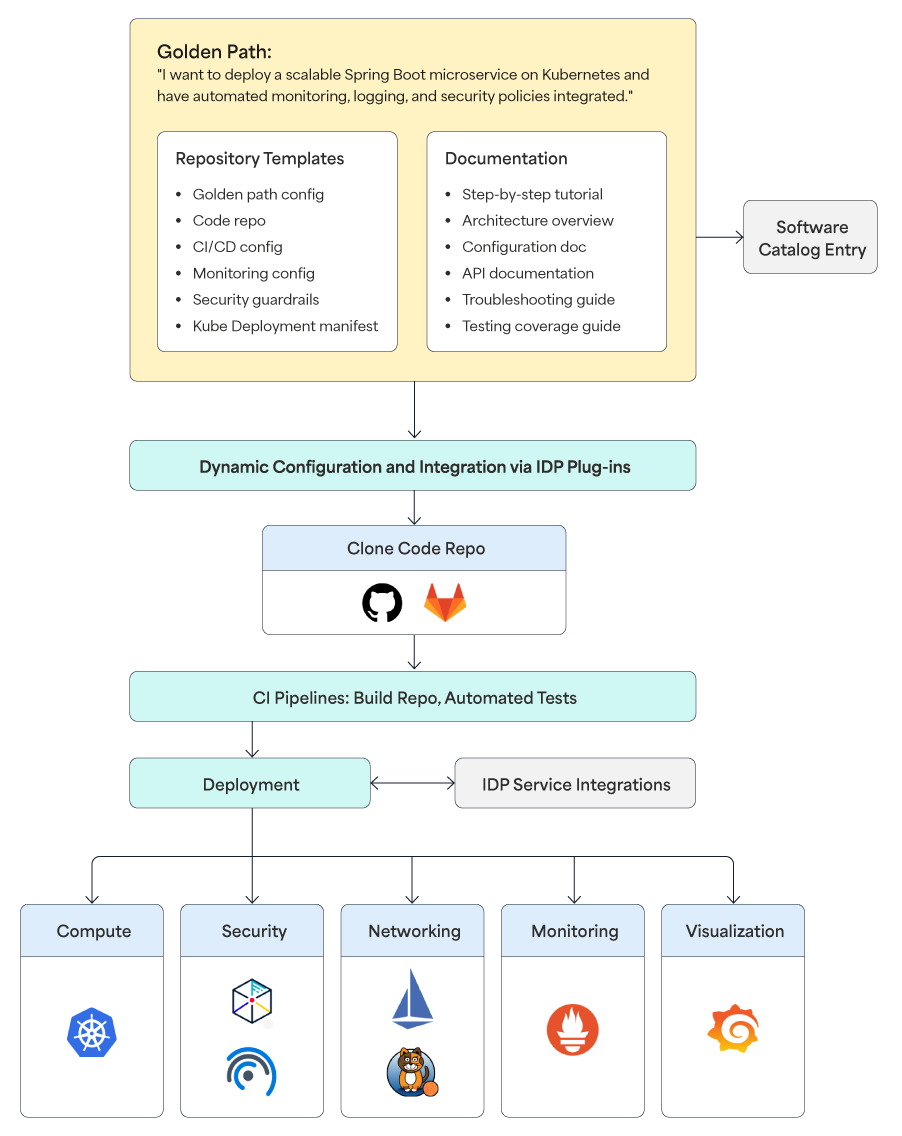
Abstract Illustration of Golden Path Example
Software/Service Catalog
Service catalogs help avoid duplicated efforts by making projects and resources visible across teams. As projects, products, and teams evolve, projects can become orphaned. Inventories help address these issues by acting as a single source of truth. Inventories improve security, promote reuse, and make discovery easier. An inventory is a tool or system used to track, manage, and organize an organization's technical assets, including code, templates, APIs, containers, VMs, and team permissions. The open-source portal framework, Backstage.io, refers to this capability as a software catalog while other products may use terms like service or software inventory.
Failing to track running assets leads to technical sprawl because existing deployments are not easily discoverable. For example, an organization might have numerous containers and VM instances running without knowing which ones can be safely decommissioned. Proper metadata tagging can help identify the owners or teams responsible for these assets, ensuring all lifecycle decisions are well informed.
Simple software catalog implementations (e.g., wiki pages) can help track relationships between assets, but they quickly become outdated and require significant manual effort. In platform engineering, service catalogs are typically maintained dynamically through platform integrations.
Software Catalog Example: Backstage.io
In Backstage, the catalog is kept up to date via a data ingestion process involving entity providers or processors that fetch raw entity data from external sources. When a developer creates Kubernetes resources using one of the available golden paths in Backstage, the new resources automatically generate entries in the software catalog through the Backstage entity provider plugin, which reads Kubernetes objects as Backstage entities. This dynamic maintenance ensures that the catalog remains current, provides a holistic view of the infrastructure, and reduces the manual effort required to keep it updated.
Documentation Repository
While development teams write documentation as part of their operations, they often face challenges, particularly in the areas of discoverability, completeness, and consistency. Platform engineering addresses these issues by integrating the “Docs-like-Code” or “Docs-as-Code” approach into the IDP. Engineers write documentation in Markdown, or sometimes AsciiDoc files, which reside alongside their code, commonly referred to as TechDocs. Repository templates provide everything needed to set up a documentation site with minimal configuration, resulting in a well-organized and easy-to-find doc site within the portal.
TechDocs is a Docs-as-Code solution (e.g., Backstage’s TechDocs) that retrieves documentation from service repositories and displays it in an easy-to-read and searchable format. This approach removes guesswork for developers as the IDP automatically pulls compatible documentation files from the repository, generates the HTML pages, and displays them on the appropriate service page. IDPs also provide powerful search functionality, making it easy to find and access documentation.
The documentation generation process typically involves:
- CI/CD pipeline that fetches Markdown files from the source code hosting provider (e.g., GitHub, GitLab)
- TechDocs generator that builds static HTML pages, including stylesheets and scripts, using static site generators like MkDocs
- TechDocs publisher that uploads the generated files to a cloud storage, which can be any of the public cloud providers
Managing access to documentation in cloud storage is very important for the security of the developer portal. As a best security practice, IDPs restrict access to the cloud storage and allow only the IDPs’ documentation component to fetch files. Authorized IDP users should have read-only access to the generated documentation while the CI/CD pipeline requires write permissions to publish the generated site files. Additionally, to protect against XSS attacks, TechDocs use XSS sanitizer libraries (e.g., DOMPurify) to sanitize the generated HTML.
Scorecards
Scorecards establish formal engineering standards to ensure that software meets expectations around security, reliability, operations, production readiness, compliance, and deployment. By defining these standards, scorecards eliminate the need for custom scripts and spreadsheets, enabling teams to track metrics based on service properties effectively.
The essence of scorecards lies in their underlying checks, which evaluate running applications to produce a score. Each scorecard consists of a set of rules, with each rule defining one or more conditions that must be met. This structured approach allows organizations to establish meaningful baselines while helping developers measure and improve their progress. By ingesting data via the software catalog and service integrations, scorecards enable the programmatic evaluation of these standards, providing teams with the visibility needed to align with internal policies. Automated checks run against source code and active APIs, identifying components that do not meet expectations and reporting these issues to the responsible owners.
Scorecards serve as a primary mechanism to audit the operational maturity, production readiness, and overall code quality of any entity in the catalog. For instance, they can determine whether:
- A service has an on-call defined
- Grafana is set up for the Kubernetes cluster
- The relationships of certain entities are empty
- Services are ready for production deployment
Scorecards can verify the presence of runbooks, dashboards, logs, on-call escalation policies, monitoring/alerting setups, and accountable owners. They can also group checks into higher-level abstractions, such as “Security OWASP Top 10 compliance - Level 1” or “Production SRE requirements - Level 3.” This makes it easier for teams to comprehend the maturity level of their services and receive guidance on how to improve their scores.
When scores are degraded, scorecards serve as an alert mechanism. This is particularly useful when software migrations or upgrades are performed to ensure they are completed correctly. By grading all entities within the IDP, the real-time reporting of scorecards provides a clear and up-to-date picture of progress and areas needing attention, ensuring that software remains reliable, secure, and compliant with organizational standards.
GenAI Capabilities “as a Service”
Generative AI (GenAI) capabilities are giving rise to intelligent IDPs that offer advanced, automation-first services. By embedding predictive copilots and companion features — such as automated code generation, contextual review, instant documentation, and augmented DevSecOps — these platforms accelerate SDLC workflows and maximize engineering velocity.
Intelligent IDPs can distribute large language model (LLM) prompts across engineering teams and separate lines of business. This capability enables teams to leverage collective technical expertise and insights. By establishing a shared prompt library, developers can rapidly replicate best practices and proven engineering patterns, resulting in optimized model utilization and compressed development cycles.
Granting machine learning models secure access to the local development environment helps platform teams design a far more compelling user experience. These optimized developer portals deliver a frictionless, self-service ecosystem with minimal operational overhead.