

Advanced Search and Filtering API Using Spring Data and MongoDB
In this tutorial, you will learn to implement filter/search Rest API for an existing Spring Boot application using Spring Data JPA and MongoDB.
It is common to have to perform complex searches in our API in production mode. Too much duplicate code has to be written to perform simple queries on each document.
Spring Data offers the ability to perform simple or complex queries on MongoDB documents.
In this tutorial, we will focus on dynamically building search and paging queries in MongoDB.
Prerequisites
- Spring Boot 2.4
- Maven 3.6.+
- Java 8+
- Mongo 4.4
Getting Started
We will start by creating a simple Spring Boot project from start.spring.io, with the following dependencies: Web, MongoDB, and Lombok.
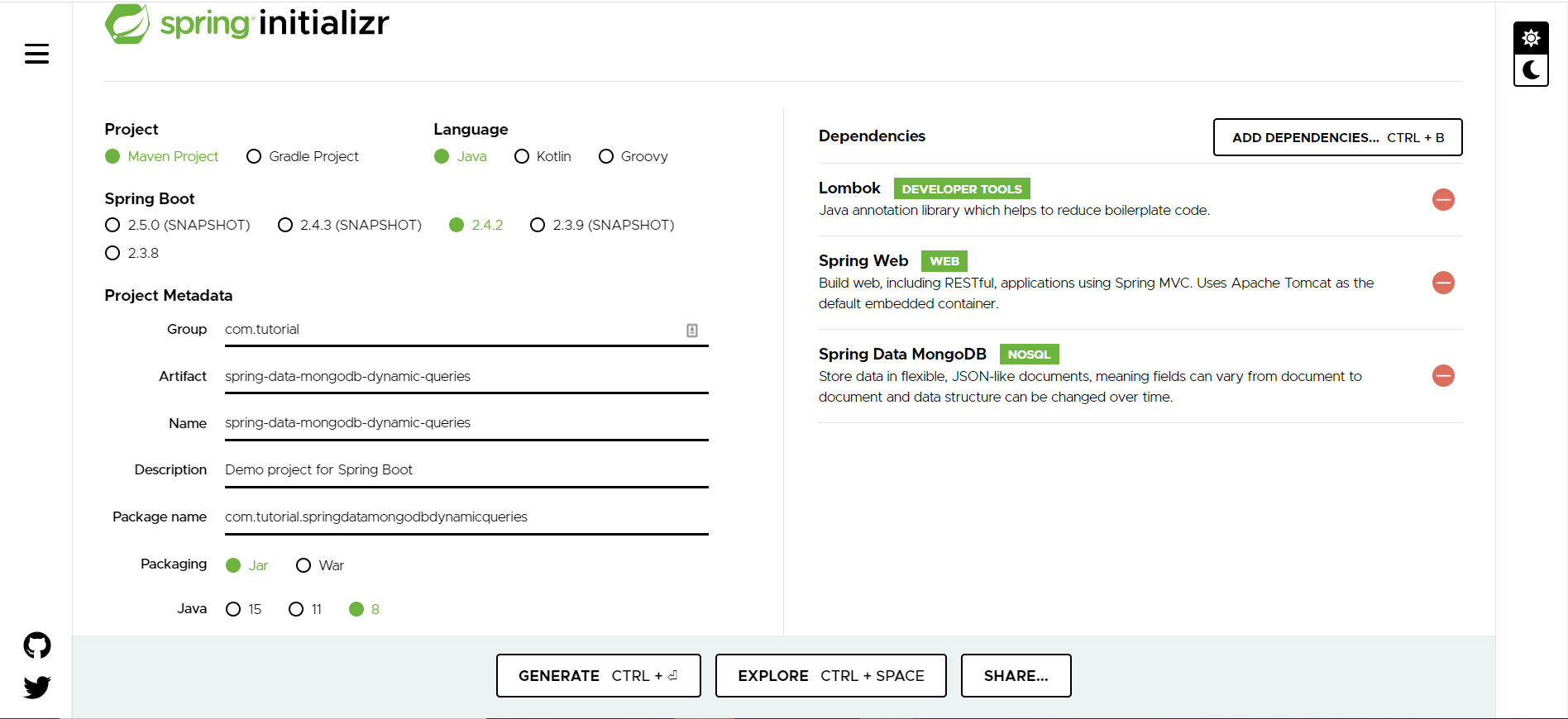
Project Structure
Here is our project structure:
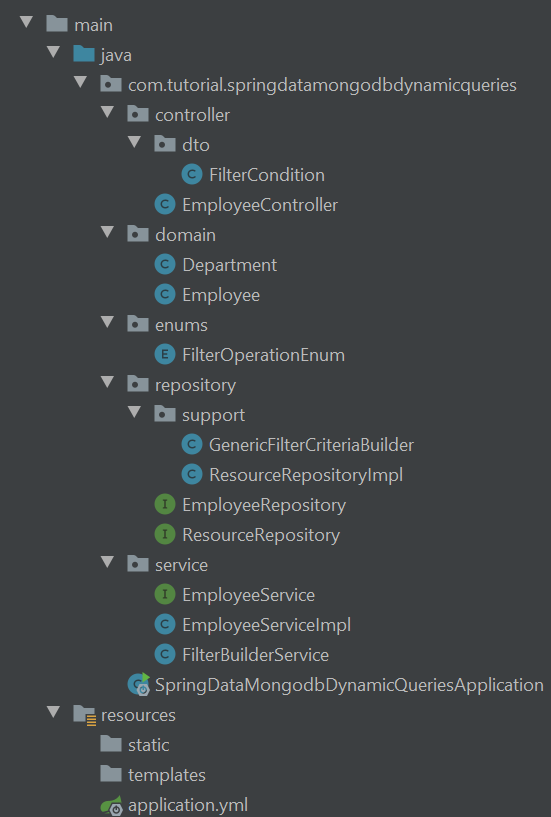
To get started, we need a model class. For this tutorial, we have an Employeemodel class in which the Department class is embedded.
public class Department {
private String code;
private String name;
}
xxxxxxxxxx
(chain = true)
(collection = "employee")
public class Employee {
private String id;
private String firstName;
private String lastName;
private String email;
private Department department;
}
We now have the common ResourceRepository interface which extends from MongoRepository and will include all custom methods.
xxxxxxxxxx
public interface ResourceRepository<T, I extends Serializable> extends MongoRepository<T, I> {
Page<T> findAll(Query query, Pageable pageable);
List<T> findAll(Query query);
}
EmployeeRepository will be extended to ResourceRepository. This will allow it to inherit the implicit methods provided by Spring Mongo Repository and ResourceRepository.
The Criteria and Query classes provide a way to query MongoDB with Spring Data by centralizing typed queries, which helps us avoid syntax errors.
We have, therefore, created a generic class, GenericFilterCriteriaBuilder, which will take care of building all the requests before sending them to Spring Data.
xxxxxxxxxx
/**
* This class is used to build all the queries passed as parameters.
* filterAndConditions (filter list for the AND operator)
* filterOrConditions (filter list for the OR operator)
*/
public class GenericFilterCriteriaBuilder {
private final List<FilterCondition> filterAndConditions;
private final List<FilterCondition> filterOrConditions;
private static final Map<String, Function<FilterCondition, Criteria>>
FILTER_CRITERIA = new HashMap<>();
// Create map of filter
static {
FILTER_CRITERIA.put("EQUAL", condition -> Criteria.where(condition.getField()).is(condition.getValue()));
FILTER_CRITERIA.put("NOT_EQUAL", condition -> Criteria.where(condition.getField()).ne(condition.getValue()));
FILTER_CRITERIA.put("GREATER_THAN", condition -> Criteria.where(condition.getField()).gt(condition.getValue()));
FILTER_CRITERIA.put("GREATER_THAN_OR_EQUAL_TO", condition -> Criteria.where(condition.getField()).gte(condition.getValue()));
FILTER_CRITERIA.put("LESS_THAN", condition -> Criteria.where(condition.getField()).lt(condition.getValue()));
FILTER_CRITERIA.put("LESSTHAN_OR_EQUAL_TO", condition -> Criteria.where(condition.getField()).lte(condition.getValue()));
FILTER_CRITERIA.put("CONTAINS", condition -> Criteria.where(condition.getField()).regex((String) condition.getValue()));
FILTER_CRITERIA.put("JOIN", condition -> Criteria.where(condition.getField()).is(new ObjectId((String) condition.getValue())));
}
public GenericFilterCriteriaBuilder() {
filterOrConditions = new ArrayList<>();
filterAndConditions = new ArrayList<>();
}
public Query addCondition(List<FilterCondition> andConditions, List<FilterCondition> orConditions) {
if (andConditions != null && !andConditions.isEmpty()) {
filterAndConditions.addAll(andConditions);
}
if (orConditions != null && !orConditions.isEmpty()) {
filterOrConditions.addAll(orConditions);
}
List<Criteria> criteriaAndClause = new ArrayList<>();
List<Criteria> criteriaOrClause = new ArrayList<>();
Criteria criteria = new Criteria();
// build criteria
filterAndConditions.stream().map(condition -> criteriaAndClause.add(buildCriteria(condition))).collect(Collectors.toList());
filterOrConditions.stream().map(condition -> criteriaOrClause.add(buildCriteria(condition))).collect(Collectors.toList());
if (!criteriaAndClause.isEmpty() && !criteriaOrClause.isEmpty()) {
return new Query(criteria.andOperator(criteriaAndClause.toArray(new Criteria[0])).orOperator(criteriaOrClause.toArray(new Criteria[0])));
} else if (!criteriaAndClause.isEmpty()) {
return new Query(criteria.andOperator(criteriaAndClause.toArray(new Criteria[0])));
} else if (!criteriaOrClause.isEmpty()) {
return new Query(criteria.orOperator(criteriaOrClause.toArray(new Criteria[0])));
} else {
return new Query();
}
}
/**
* Build the predicate according to the request
*
* @param condition The condition of the filter requested by the query
* @return {{@link Criteria}}
*/
private Criteria buildCriteria(FilterCondition condition) {
Function<FilterCondition, Criteria>
function = FILTER_CRITERIA.get(condition.getOperator().name());
if (function == null) {
throw new IllegalArgumentException("Invalid function param type: ");
}
return function.apply(condition);
}
}
Let's Test
Suppose we have the «employee» collection with all the documents like this:
/* 1 */
{
"_id" : ObjectId("600f4997e3a11bc10091f786"),
"firstName" : "Ferdinand",
"lastName" : "Wynne",
"email" : "[email protected]",
"department" : {
"code" : "IT",
"name" : "IT department"
},
"_class" : "com.tutorial.springdatamongodbdynamicqueries.domain.Employee"
}
/* 2 */
{
"_id" : ObjectId("600f49a1a5bd0e51ceb6c2d3"),
"firstName" : "Grant",
"lastName" : "Quinlan",
"email" : "[email protected]",
"department" : {
"code" : "IT",
"name" : "IT department"
},
"_class" : "com.tutorial.springdatamongodbdynamicqueries.domain.Employee"
}
/* 3 */
{
"_id" : ObjectId("600f49b6ff49b4e466efb4c4"),
"firstName" : "Brielle",
"lastName" : "Hanae",
"email" : "[email protected]",
"department" : {
"code" : "IT",
"name" : "IT department"
},
"_class" : "com.tutorial.springdatamongodbdynamicqueries.domain.Employee"
}
/* 4 */
{
"_id" : ObjectId("600f49aee40e8fd42bbf3e8f"),
"firstName" : "Morgan",
"lastName" : "Ivory",
"email" : "[email protected]",
"department" : {
"code" : "RAD",
"name" : "research and development team"
},
"_class" : "com.tutorial.springdatamongodbdynamicqueries.domain.Employee"
}
/* 5 */
{
"_id" : ObjectId("600f49c16c3c8f51ff49d30e"),
"firstName" : "Alexa",
"lastName" : "Colorado",
"email" : "[email protected]",
"department" : {
"code" : "RAD",
"name" : "research and development team"
},
"_class" : "com.tutorial.springdatamongodbdynamicqueries.domain.Employee"
}
/* 6 */
{
"_id" : ObjectId("600f49cc2eabbc1a8b9b7ead"),
"firstName" : "Mercedes",
"lastName" : "Zeph",
"email" : "[email protected]",
"department" : {
"code" : "RAD",
"name" : "research and development team"
},
"_class" : "com.tutorial.springdatamongodbdynamicqueries.domain.Employee"
}
/* 7 */
{
"_id" : ObjectId("600f49d3b5d8765523b9a17e"),
"firstName" : "Chancellor",
"lastName" : "Myra",
"email" : "[email protected]",
"department" : {
"code" : "RAD",
"name" : "research and development team"
},
"_class" : "com.tutorial.springdatamongodbdynamicqueries.domain.Employee"
}
/* 8 */
{
"_id" : ObjectId("600f49ddc441d3b63d2f3f15"),
"firstName" : "Leroy",
"lastName" : "Dillon",
"email" : "[email protected]",
"department" : {
"code" : "RAD",
"name" : "research and development team"
},
"_class" : "com.tutorial.springdatamongodbdynamicqueries.domain.Employee"
}
/* 9 */
{
"_id" : ObjectId("600f49e6687e2ce48b81831a"),
"firstName" : "Cole",
"lastName" : "Xander",
"email" : "[email protected]",
"department" : {
"code" : "RAD",
"name" : "research and development team"
},
"_class" : "com.tutorial.springdatamongodbdynamicqueries.domain.Employee"
}
/* 10 */
{
"_id" : ObjectId("600f49efecb77b12d517b519"),
"firstName" : "Eleanor",
"lastName" : "Paul",
"email" : "[email protected]",
"department" : {
"code" : "MK",
"name" : "marketing"
},
"_class" : "com.tutorial.springdatamongodbdynamicqueries.domain.Employee"
}
/* 11 */
{
"_id" : ObjectId("600f49f9be0c3402ac8f7416"),
"firstName" : "TaShya",
"lastName" : "Stewart",
"email" : "[email protected]",
"department" : {
"code" : "TS",
"name" : "technical support team"
},
"_class" : "com.tutorial.springdatamongodbdynamicqueries.domain.Employee"
}
This is the structure of the server-side pagination result from the APIs:

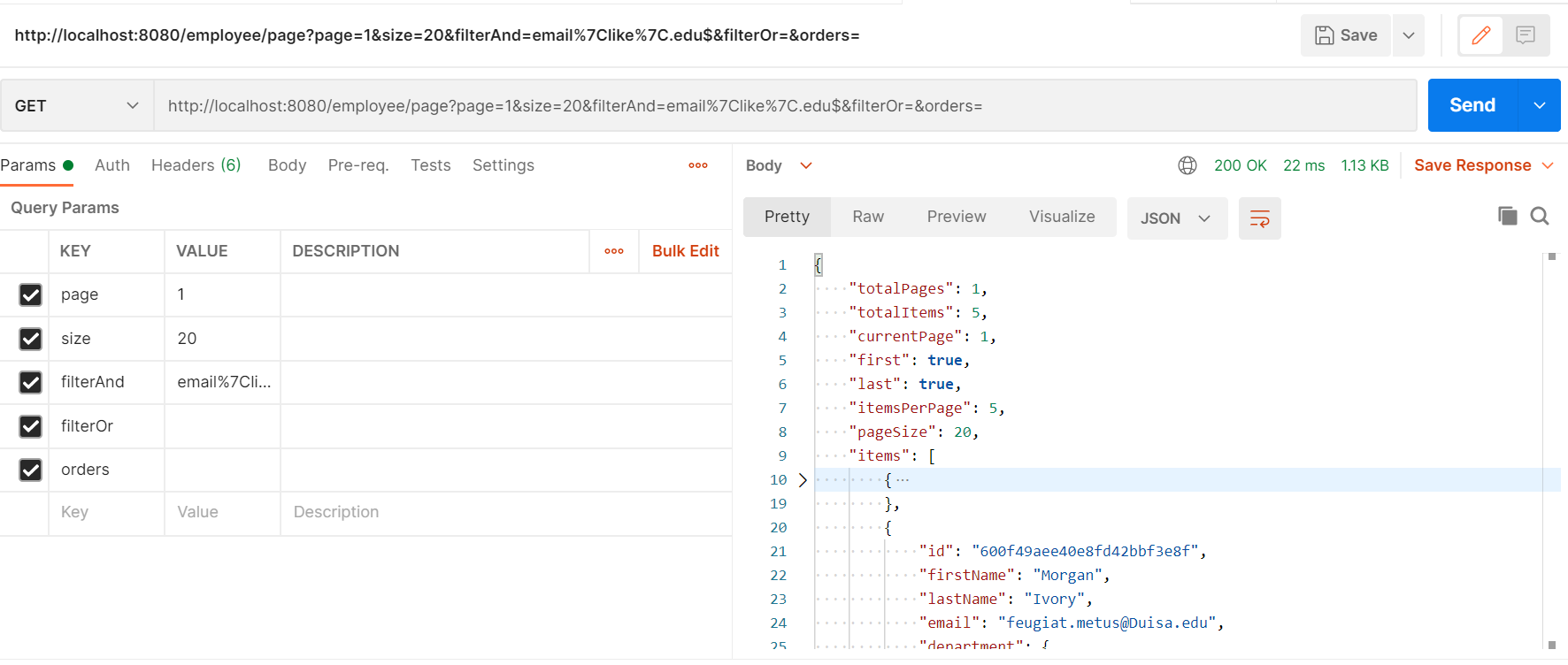
For each paging endpoint we have the following Params:
- page=0: page index (default value 0)
- size=20: page size (default value 20)
- filterAnd= : And filters conditions (e.g. lastName|eq|john)
- filterOr= : Or filters conditions (e.g. lastName|eq|john)
- orders= : filters Orders
* replace | by the code %7C
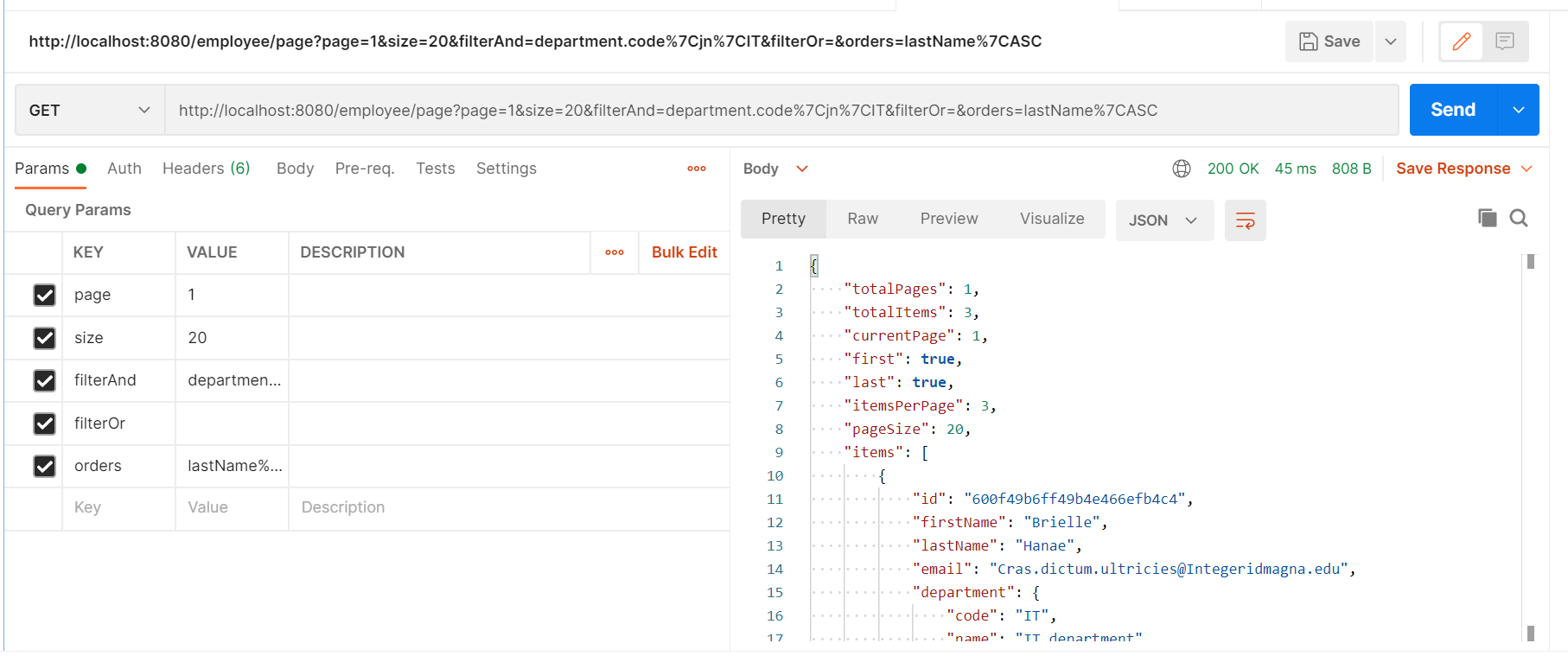
- Get all the employees of the IT department order by
lastName:
- Get all the employees of IT and TS (technical support team) order by
lastName

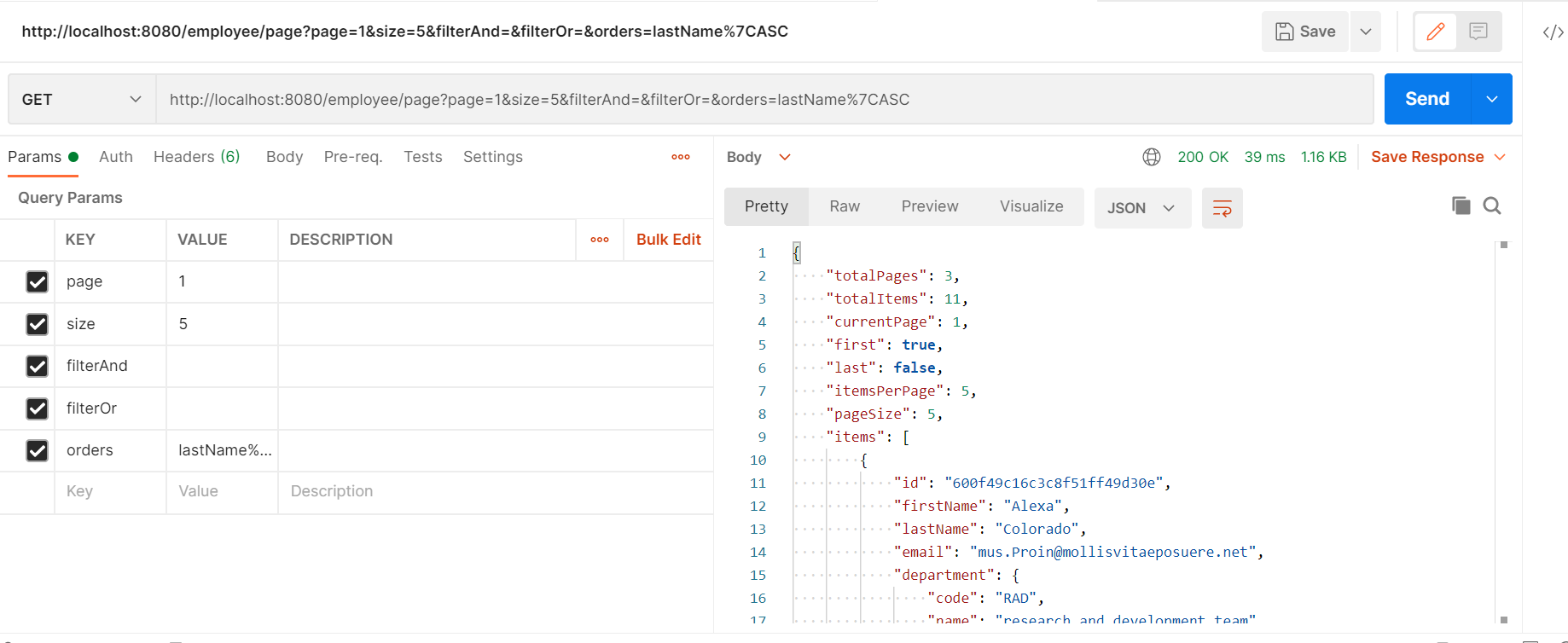
- Get the first five employees ordered by name:
- Get all the employees whose email contains .edu:
And we're done.
In this post, we have learned how to implement a filter/search REST API in a Spring Boot application using Spring Data JPA and MongoDB.
Full source code can be found on GitHub.
Opinions expressed by DZone contributors are their own.