

How to Build an AI-Powered Chatbot With Retrieval-Augmented Generation (RAG) Using LangGraph
RAG with LangGraph boosts LLM accuracy by retrieving data at runtime. Using OpenAI, FAISS, and modular nodes, it builds fast, factual, domain-aware chatbots.
Join the DZone community and get the full member experience.
Join For FreeWhy RAG?
Large language models (LLMs) like GPT-4 can produce fluent, grammatically accurate text; however, without access to external, updated knowledge, they frequently hallucinate or fabricate facts. This turns into a prime issue in high-stakes environments — like legal, medical, or business enterprise contexts — in which accuracy and accept as true with are non-negotiable.
Retrieval-augmented generation (RAG) resolves this problem by fetching relevant, trusted information from your own knowledge base (e.g., documents, PDFs, internal databases) and injecting it into the LLM prompt. This method grounds the model`s outputs, dramatically lowering hallucinations whilst tailoring responses to your domain.
Use cases include:
- Technical support bots that answer from internal docs
- Legal assistants referencing compliance documents
- Enterprise Q&A based on company SOPs
Here’s the basic flow:
- LangGraph – A graph-based orchestration library built for modular, stateful AI workflows.
- OpenAI – For embeddings and GPT-4-based generation.
- FAISS – A fast vector store for similarity search.
- dotenv – For securely loading API keys.
What Is LangGraph?
LangGraph is a graph-based orchestration framework for building stateful, composable LLM pipelines. It builds on the primitives introduced by LangChain but is more suited for production workflows.
Unlike LangChain’s sequential chains, LangGraph uses state machines to define workflows as directed graphs. Each node performs a step (e.g., retrieve, generate), and edges define transitions based on conditions or outputs.
Benefits of LangGraph include:
- Full control over workflow logic (e.g., branching, retries)
- Support for asynchronous operations
- Easier debugging and modularity
Example use case: Build a chatbot that first checks document relevance. If no documents are found, return a fallback message; otherwise, invoke GPT-4 with retrieved context.
System Architecture
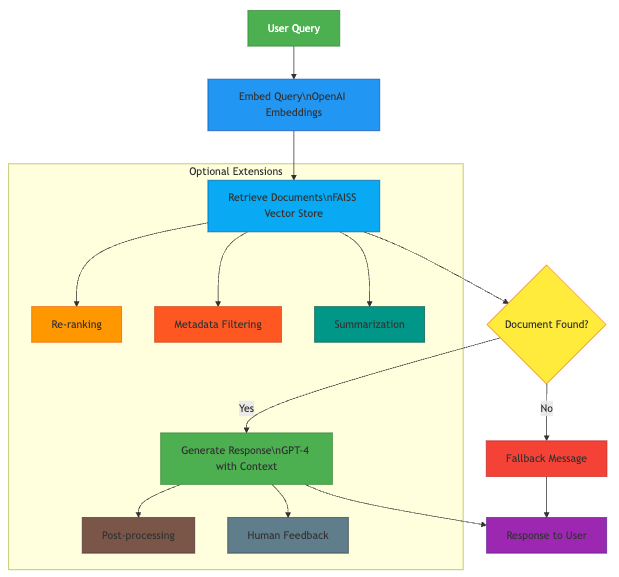
RAG flow with LangGraph
Here’s how a RAG system works with LangGraph:
- The user submits a query.
- The query is embedded into a vector using OpenAI embeddings.
- FAISS vector store retrieves the top relevant document chunks.
- GPT-4 is prompted with both the query and document context.
- A grounded, context-aware response is generated.
You can extend this architecture with nodes for:
- Re-ranking results
- Filtering based on metadata
- Summarization pipelines
- Memory-aware conversation agents
We’ll implement this using LangGraph nodes and states.
Step-by-Step Implementation
1. Install Dependencies
pip install langgraph openai faiss-cpu python-dotenv
2. Set Your API Key
Create a .env file:
OPENAI_API_KEY=your_openai_key_here
Load it in Python:
from dotenv import load_dotenv

load_dotenv()
3. Ingest and Embed Documents
from langchain_community.document_loaders import TextLoader
from langchain_text_splitters import CharacterTextSplitter
from langchain.vectorstores import FAISS
from langchain.embeddings import OpenAIEmbeddings

# Load documents
loader = TextLoader("docs/my_knowledge.txt")
docs = loader.load()

text_splitter = CharacterTextSplitter(chunk_size=500, chunk_overlap=50)
chunks = text_splitter.split_documents(docs)

# Embed and store in FAISS
embedding = OpenAIEmbeddings()
db = FAISS.from_documents(chunks, embedding)
db.save_local("faiss_index")
You can also use PyPDFLoader, UnstructuredLoader, or DirectoryLoader for multiple formats.
Make sure your chunks are small enough (typically ~500 tokens) to fit in GPT’s context window, especially if combining with long queries.
4. Build the Retrieval Chain
from langchain.chat_models import ChatOpenAI
from langchain.vectorstores import FAISS

llm = ChatOpenAI(model_name="gpt-4", temperature=0)
retriever = FAISS.load_local("faiss_index", embedding).as_retriever()
5. Define Node Functions
def retrieve_node(state):
    query = state["query"]
    docs = retriever.get_relevant_documents(query)
    return {"query": query, "docs": docs}

def generate_node(state):
    query = state["query"]
    docs = state["docs"]
    context = "\n\n".join([doc.page_content for doc in docs])

    prompt = f"""
You are an assistant. Use the context from below to answer the question.
If you are unsure, say "My knowledge base does not have answer to this question at this point in time.".

Context:
{context}

Question:
{query}

Answer:
"""
    response = llm.invoke(prompt)
    return {"response": response.content}
6. Build the LangGraph Workflow
from langgraph.graph import StateGraph, END

# Define graph state schema
state_schema = {"query": str, "docs": list, "response": str}

# Build
builder = StateGraph(state_schema)
builder.add_node("retrieve", retrieve_node)
builder.add_node("generate", generate_node)

# Define flow between nodes
builder.set_entry_point("retrieve")
builder.add_edge("retrieve", "generate")
builder.add_edge("generate", END)

# Compile
graph = builder.compile()
7. Ask a Question
query = "What is the difference between RAG and fine-tuning?"
result = graph.invoke({"query": query})
print(result["response"])
This structure is easy to extend with additional nodes for filtering, summarization, re-ranking, or tool use.
Advanced Workflow Customization
Conditional Branching
Use logic to route state through different nodes depending on confidence ranking or metadata.
def decision_node(state):
    if len(state["docs"]) == 0:
        return "no_docs"
    return "generate"

builder.add_node("decision", decision_node)
builder.add_edge("retrieve", "decision")
builder.add_conditional_edges("decision", {
    "generate": "generate",
    "no_docs": END
})
Metadata Filtering
Add filters for smarter retrieval:
retriever = FAISS.load_local("faiss_index", embedding).as_retriever(
    search_kwargs={"filter": {"topic": "NLP"}, "k": 5}
)
Useful for date-based, category-based, or role-based document filtering.
Metadata filtering allows your retriever to narrow search results to only those document chunks that match specific attributes, such as topic, date, author, tags, or any custom field you define during ingestion.
This is especially useful in scenarios like:
- Filtering documents by department (e.g., HR vs. engineering)
- Restricting results by date range (e.g., only show 2023 documents)
- Segmenting content by access level or confidentiality tags
- Language- or locale-specific filtering (e.g., only retrieve French content)
When storing documents in FAISS, you can attach metadata to each chunk. The retriever can then use these fields to filter relevant documents before calculating vector similarity.
Retrieving With Filters (Optional)
Once your FAISS store has metadata indexed, you can use filters when retrieving:
retriever = FAISS.load_local("faiss_index", embedding).as_retriever(
    search_kwargs={
        "k": 5,
        "filter": {
            "topic": "DevOps",
            "department": "engineering"
        }
    }
)
You can filter by exact match on any metadata key. For more advanced filtering (e.g., date ranges), you'd need to preprocess documents accordingly or move to a hybrid search engine like Weaviate, Qdrant, or ElasticSearch, which support more complex query operators.
Dynamic Filtering in LangGraph Nodes (Optional)
You can also make filters dynamic inside a LangGraph node. For example:
def retrieve_node_with_filter(state):
    query = state["query"]
    department = state.get("department", "engineering")  # fallback default

    filtered_docs = retriever.get_relevant_documents(
        query=query,
        search_kwargs={
            "filter": {"department": department}
        }
    )
    return {"query": query, "docs": filtered_docs}
This makes your retrieval logic more adaptive to user roles, intents, or session context.
Use Case: Role-Based Access
In organization scenarios, metadata filtering helps access control. For example, a chatbot can have limitations on retrieval to:
- Legal docs for legal team users
- Finance reviews for finance users
- Internal tools for engineers
This avoids accidentally displaying exclusive content material to the incorrect customers and keeps solutions tightly scoped.
Modular Graph Expansion
Add nodes for:
- Summarization (summarize_node)
- Post-processing (format_node)
- Document ranking or re-ranking
- Human feedback collection
Deployment
Combine LangGraph with any present-day deployment stacks:
- Streamlit/Gradio for building interactive UIs.
- FastAPI for RESTful endpoints.
- LangServe (from LangChain) to expose LangGraph as a remote service.
Conclusion
LangGraph and RAG offer you a robust, modular manner to construct grounded, wise assistants. You have the power to outline fine-grained workflows, async handling, and multi-agent logic — all at the same time, as avoiding hallucinations.
With some nodes and edges, you may begin with a primary RAG pipeline and scale up to:
- Conversational reminiscence agents
- Live seek bots
- Multi-modal assistants
- Human-in-the-loop comments systems
LangGraph turns RAG right into a production-grade framework — making it clean to iterate, debug, extend, and install assistants that understand your information internally and out.
Opinions expressed by DZone contributors are their own.
Comments