

Deploying an Enterprise LLM Chatbot on Databricks With RAG, MLflow, Vector Search, and Model Serving
Build and ship a production chatbot: author the RAG chain, log it with MLflow, register it to Unity Catalog, trace it, then deploy to Model Serving.
Join the DZone community and get the full member experience.
Join For FreeThe demo always works. Someone wires a vector index to a foundation model in a notebook, asks it three questions about the employee handbook, gets three crisp answers, and the room nods. Then the request becomes "ship it to 4,000 employees," and the notebook quietly dies. There's no endpoint, no auth, no version history, no way to see why a particular answer was wrong, and no story for when legal asks how you'll roll back the prompt that started citing the 2019 PTO policy.
I've watched several teams hit this wall. The RAG part — chunk, embed, retrieve, stuff the context, generate — they understand cold. What they're missing is the boring half: how do you turn a chain that runs in a notebook cell into a governed, versioned, monitored REST endpoint that a chat UI can call, that survives a 3 a.m. page, and that you can A/B test next month without redeploying the universe? This article is about that boring half. We'll assume you know RAG conceptually and walk the full Databricks path: author the chain, log it to MLflow, register it to Unity Catalog, deploy it to a Model Serving endpoint, trace every retrieval and generation, and operate the thing once it's live.
The Serving-Time Architecture (It's Not Your Dev-Time Architecture)
Most RAG diagrams describe build time — the batch job that chunks PDFs and populates a vector index. That's necessary, but it's not what answers a user's question at 2 p.m. on a Tuesday. The serving-time path is a different graph, and conflating the two is how teams end up surprised that their "deployed model" is re-embedding the entire knowledge base on every request.
At serving time, a request arrives at a Model Serving endpoint. Inside it runs your logged chain: it embeds the user's question (or hands the raw text to a managed-embedding index), runs a similarity search against a Vector Search index, assembles a prompt from the retrieved chunks plus the conversation history, calls a Foundation Model API endpoint for generation, and returns a chat-shaped response. Every hop is a span in an MLflow trace. The knowledge base behind the index is kept fresh by a separate, asynchronous Delta Sync pipeline that the request path never touches.
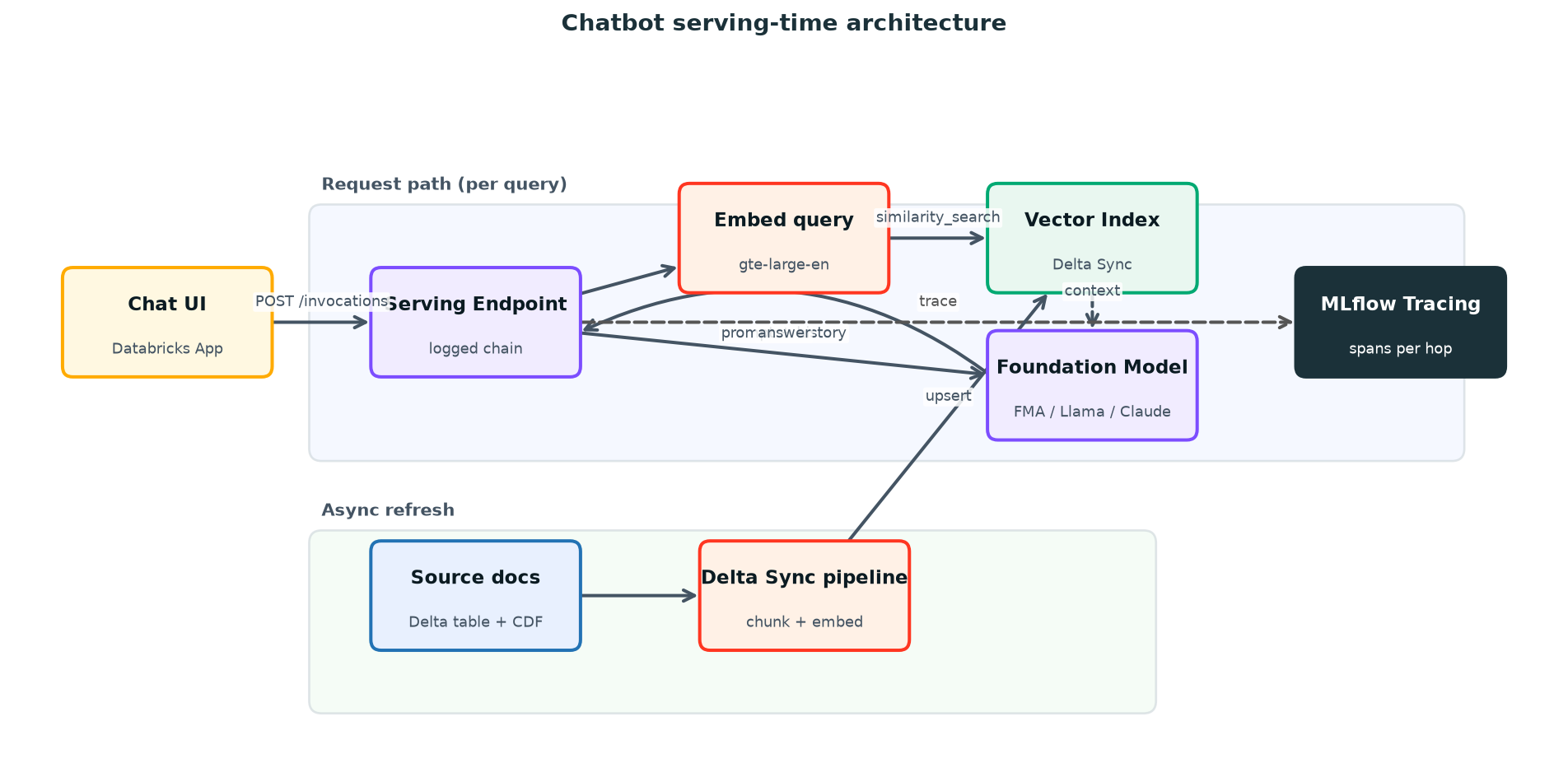
Figure 1. Serving-time request flow for the chatbot. The retriever, foundation model, and orchestration chain all live behind one Model Serving endpoint; the index is refreshed out-of-band by Delta Sync.
Two design decisions matter here. First, the retriever lives inside the served model, not in your app code — that keeps retrieval and generation versioned together, so a trace always reflects exactly the chain that produced the answer. Second, the vector index is fed by a Delta Sync index with pipeline_type set to TRIGGERED or CONTINUOUS, backed by a Delta table with Change Data Feed enabled. Your request path reads from the index; it never writes. New documents flow in through the sync pipeline on whatever cadence you choose.
|
NOTE: Keep the embedding model for ingestion and query identical. If you index with databricks-gte-large-en (1024-dim) but embed queries with a different model, similarity scores are meaningless — the vectors live in different spaces. Managed-embedding Delta Sync indexes sidestep this by embedding both sides with the same endpoint. |
Authoring the Chain and Logging It to MLflow
MLflow 3.x is the unit of deployment. You don't ship a notebook; you log a model — a self-contained artifact with a signature, an environment, its dependencies, and a declaration of the Databricks resources it needs. For a RAG chatbot, you have a few flavors to choose from: the LangChain flavor if your chain is a LangChain/LangGraph object, a plain pyfunc PythonModel if you want full control, or MLflow 3's ResponsesAgent interface, which gives you an OpenAI-compatible request/response shape, streaming, and built-in tracing for free. For an enterprise chatbot, I default to ResponsesAgent — the chat contract is standardized, so your UI and your A/B harness don't care which version is behind the endpoint.
Here's the chain itself: a LangGraph agent that binds a Vector Search retriever tool to a Databricks-hosted foundation model. The retriever is VectorSearchRetrieverTool from databricks_langchain, which calls your index at runtime; the LLM is ChatDatabricks pointed at a Foundation Model API endpoint. mlflow.langchain.autolog() instruments the whole thing so every step shows up as a trace span.
# chain.py — authored as a file so MLflow can log it "from code"
import mlflow
from mlflow.pyfunc import ResponsesAgent
from mlflow.types.responses import (
    ResponsesAgentRequest, ResponsesAgentResponse,
    output_to_responses_items_stream, to_chat_completions_input,
)
from databricks_langchain import ChatDatabricks, VectorSearchRetrieverTool
from langchain_core.messages import AIMessage
from langchain_core.runnables import RunnableLambda
from langgraph.graph import END, StateGraph
from langgraph.graph.message import add_messages
from langgraph.prebuilt.tool_node import ToolNode
from typing import Annotated, Generator, Sequence, TypedDict

LLM_ENDPOINT = "databricks-meta-llama-3-3-70b-instruct"   # a Foundation Model API endpoint
VS_INDEX     = "prod.support.kb_docs_index"               # catalog.schema.index

SYSTEM_PROMPT = (
    "You are an internal support assistant. Answer ONLY from the retrieved "
    "context. If the context doesn't contain the answer, say you don't know "
    "and suggest filing a ticket. Cite the doc title for every claim."
)

class State(TypedDict):
    messages: Annotated[Sequence, add_messages]

class SupportBot(ResponsesAgent):
    def __init__(self):
        self.llm = ChatDatabricks(endpoint=LLM_ENDPOINT, temperature=0.1)
        self.retriever = VectorSearchRetrieverTool(
            index_name=VS_INDEX,
            num_results=5,
            columns=["content", "title", "doc_uri"],
        )
        self.llm_with_tools = self.llm.bind_tools([self.retriever])

    def _graph(self):
        def call_model(state):
            msgs = [{"role": "system", "content": SYSTEM_PROMPT}] + state["messages"]
            return {"messages": [self.llm_with_tools.invoke(msgs)]}
        def route(state):
            last = state["messages"][-1]
            return "tools" if isinstance(last, AIMessage) and last.tool_calls else "end"
        g = StateGraph(State)
        g.add_node("agent", RunnableLambda(call_model))
        g.add_node("tools", ToolNode([self.retriever]))
        g.set_entry_point("agent")
        g.add_conditional_edges("agent", route, {"tools": "tools", "end": END})
        g.add_edge("tools", "agent")
        return g.compile()

    def predict_stream(self, req: ResponsesAgentRequest) -> Generator:
        msgs = to_chat_completions_input([m.model_dump() for m in req.input])
        for kind, payload in self._graph().stream({"messages": msgs}, stream_mode=["updates"]):
            if kind != "updates":
                continue
            for node in payload.values():
                if node.get("messages"):
                    yield from output_to_responses_items_stream(node["messages"])

    def predict(self, req: ResponsesAgentRequest) -> ResponsesAgentResponse:
        items = [ev.item for ev in self.predict_stream(req)
                 if ev.type == "response.output_item.done"]
        return ResponsesAgentResponse(output=items)

mlflow.langchain.autolog()          # trace every retrieval + generation
mlflow.models.set_model(SupportBot())# log_and_register.py
import mlflow
from mlflow.models.resources import (
DatabricksServingEndpoint, DatabricksVectorSearchIndex,
)
from mlflow.tracking import MlflowClient
from chain import LLM_ENDPOINT, VS_INDEX
mlflow.set_registry_uri("databricks-uc") # register into Unity Catalog
mlflow.set_experiment("/Users/[email protected]/support_bot")
UC_MODEL = "prod.support.support_bot" # catalog.schema.model
with mlflow.start_run(run_name="support-bot-v1"):
info = mlflow.pyfunc.log_model(
name="chain",
python_model="chain.py", # logged "from code"
resources=[ # auto-auth — DO NOT skip
DatabricksServingEndpoint(endpoint_name=LLM_ENDPOINT),
DatabricksVectorSearchIndex(index_name=VS_INDEX),
],
input_example={"input": [
{"role": "user", "content": "How do I reset my VPN token?"}
]},
pip_requirements=[
"mlflow>=3.0", "databricks-langchain",
"langgraph", "databricks-agents", "pydantic>=2",
],
registered_model_name=UC_MODEL, # creates version in UC
)
# Pre-deploy validation: rebuild the env in isolation and run one request.
# Catches missing deps / bad signature BEFORE you wait 15 min on a deploy.
mlflow.models.predict(
model_uri=info.model_uri,
input_data={"input": [{"role": "user", "content": "ping"}]},
env_manager="uv",
)
# Promote with an alias instead of a magic version number.
client = MlflowClient(registry_uri="databricks-uc")
version = info.registered_model_version
client.set_registered_model_alias(UC_MODEL, "champion", version)
print(f"Registered {UC_MODEL} v{version} as @champion")The model now lives at prod.support.support_bot in Unity Catalog with an alias @champion. Aliases are the trick that keeps your operations sane: downstream config references prod.support.support_bot@champion, never version 7. Promoting a new build is a one-line alias move, and rollback is moving the alias back. Unity Catalog also gives you lineage, access control, and an audit trail on the model itself — the same governance you already apply to tables now covers the chatbot.
|
TIP: That mlflow.models.predict(..., env_manager="uv") call is cheap insurance. It rebuilds the model's environment from scratch and runs a real request locally before you ever touch a serving endpoint. A missing pip requirement that would otherwise surface 15 minutes into a deploy fails here in 90 seconds. |
Tracing: Debugging Retrieval and Generation Separately
When a RAG answer is wrong, there are exactly two suspects: the retriever pulled the wrong chunks, or the model botched a good context. You cannot tell which from the final answer alone, and this is the single biggest reason RAG debugging is miserable without tracing. MLflow Tracing splits the request into a tree of spans — one for retrieval (with the actual query, the returned documents, and their scores) and one for generation (with the assembled prompt, the model, token counts, and latency). You look at the trace and the culprit is obvious in seconds.
Because the chain calls mlflow.langchain.autolog(), the retriever and LLM spans are captured automatically. For any custom logic that isn't a framework call — a reranker, a query rewriter, a PII filter — wrap it with @mlflow.trace, and it joins the same tree.
import mlflow

# Autolog handles the LangChain retriever + LLM spans. Add custom spans for
# anything hand-rolled so it shows up in the same trace tree.

@mlflow.trace(span_type="RERANKER")
def rerank(query: str, docs: list[dict]) -> list[dict]:
    # ... cross-encoder rerank ...
    return sorted(docs, key=lambda d: d["rerank_score"], reverse=True)[:3]

@mlflow.trace(span_type="PARSER")
def redact_pii(text: str) -> str:
    # ... scrub emails / tokens before they hit the prompt ...
    return text

# In production, query traces from the serving endpoint's experiment to
# spot bad retrievals across real traffic:
traces = mlflow.search_traces(
    experiment_ids=["<serving-experiment-id>"],
    filter_string="attributes.status = 'OK'",
    max_results=100,
)
# Each trace exposes spans: inspect RETRIEVER inputs/outputs vs the final answer.
The table below is the checklist I hand teams for what to capture. Trace the things that fail in interesting ways; skip the things that don't.
| Span/Signal | what to capture | what it tells you |
|---|---|---|
|
Retriever |
query text, returned doc IDs + titles, similarity scores, num_results |
Whether retrieval found the right context — the #1 RAG failure |
|
Generation (LLM) |
assembled prompt, model endpoint, input/output tokens, latency |
Whether the model used the context or hallucinated past it |
|
Reranker / rewriter |
before/after ordering, dropped chunks |
Whether your custom retrieval logic is helping or hurting |
|
Guardrail / PII filter |
input vs redacted output, block decisions |
Whether unsafe content reached the model or the user |
|
End-to-end trace |
total latency, span tree, final answer, request ID |
User-facing latency budget and a replay handle for any complaint |
|
User feedback |
thumbs up/down + comment linked to trace_id |
Ground-truth labels to build an eval set from real traffic |
Capturing the trace_id and returning it (or logging it) is what makes a support ticket actionable. When someone reports "the bot gave me the wrong VPN steps," you don't reproduce from a vague description — you pull the exact trace, see the chunks it retrieved, and know within a minute whether to fix the index or the prompt. Log a thumbs-down against that trace with mlflow.log_feedback() and you've started building an evaluation set out of real failures.
Choosing How to Serve: Foundation Model, Provisioned Throughput, or Custom
Two serving questions hide inside one chatbot. There's the generation model (the LLM doing the reasoning), and there's the chain (your logged RAG model). The chain always deploys as a custom Model Serving endpoint. The LLM behind it is what you actually choose, and the choice is a cost-versus-control tradeoff.
| Option | how it bills | latency/throughput | use when |
|---|---|---|---|
|
Pay-per-token (FMA) |
Per input/output token, no idle cost |
Shared capacity; fine for low/spiky traffic |
Prototyping, internal tools, bursty load — start here |
|
Provisioned throughput |
Per hour of reserved GPU capacity |
Guaranteed tokens/sec, predictable tail latency |
Steady high traffic or strict latency SLOs |
|
Custom model endpoint |
Per hour of compute (CPU or GPU) |
You size the workload; scale-to-zero optional |
The RAG chain itself, or a fine-tuned / self-hosted LLM |
A practical pattern: serve the LLM via a pay-per-token Foundation Model API endpoint while you're proving the thing out (the databricks-meta-llama-3-3-70b-instruct style endpoints in the system.ai catalog need zero setup), and serve the RAG chain as a custom endpoint with scale-to-zero enabled. Scale-to-zero means the chain's compute spins down to nothing when idle and bills you only when traffic arrives — exactly right for an internal bot that's quiet overnight. The tradeoff is a cold-start delay on the first request after idle. When the bot graduates to steady, latency-sensitive production traffic, move the LLM to provisioned throughput for a predictable tail and turn scale-to-zero off on the chain endpoint so there's no cold start.
Deploying the registered model is one call. Because we logged a ResponsesAgent, databricks.agents.deploy() is the cleanest route — it creates the endpoint, wires up tracing and the review app, and handles the passthrough auth from the resources= list. It takes ~15 minutes, so run it as a job rather than blocking your session.
# deploy.py  — submit as a serverless job; deploy() blocks ~15 min
from databricks import agents
from mlflow.tracking import MlflowClient

UC_MODEL = "prod.support.support_bot"
client = MlflowClient(registry_uri="databricks-uc")
version = client.get_model_version_by_alias(UC_MODEL, "champion").version

deployment = agents.deploy(
    UC_MODEL,
    version,
    endpoint_name="support-bot",          # name it explicitly
    scale_to_zero=True,                    # idle -> 0 compute; cold start on wake
    tags={"team": "support", "env": "prod"},
)
print(deployment.endpoint_name, deployment.query_endpoint)
If you'd rather drive serving directly — say the chain is a plain pyfunc and you want explicit control over scaling and traffic splits — create the endpoint with the serving API. Note scale_to_zero_enabled and the traffic_config routes, which we'll lean on for A/B testing in a moment.
# Discover the exact flags first — don't guess the JSON spec
databricks serving-endpoints create -h

databricks serving-endpoints create support-bot --json '{
  "served_entities": [{
    "name": "champion",
    "entity_name": "prod.support.support_bot",
    "entity_version": "7",
    "workload_size": "Small",
    "scale_to_zero_enabled": true
  }],
  "traffic_config": {
    "routes": [{ "served_entity_name": "champion", "traffic_percentage": 100 }]
  }
}' --profile prod

# Endpoint provisions for a few minutes. Poll until ready before querying.
databricks serving-endpoints get support-bot --profile prod -o json
# ready when: state.ready == "READY" AND state.config_update == "NOT_UPDATING"
Once it reports READY, query it. The chain is OpenAI-compatible, so the same payload shape works from the CLI, the REST API, the SDK, or any OpenAI client pointed at the workspace's /serving-endpoints/ base URL.
databricks serving-endpoints query support-bot --json '{
  "input": [{"role": "user", "content": "How do I reset my VPN token?"}]
}' --profile prod

# Streaming, for a responsive UI:
databricks serving-endpoints query support-bot --stream --json '{
  "input": [{"role": "user", "content": "What is the PTO carryover limit?"}]
}' --profile prod
Securing the Endpoint and Wiring a Chat UI
An enterprise chatbot is an access-control problem wearing a chat bubble. The endpoint is governed by Unity Catalog and serving permissions: grant CAN_QUERY to the principals that should call it and nothing more. The resources= list you declared at log time means the endpoint's service principal — not each end user — holds the credentials to the LLM and the vector index, so users never get direct access to the underlying index. Put rate limits and usage tracking on the endpoint through the AI Gateway (put-ai-gateway) so a runaway client can't exhaust your token budget, and so you get per-request usage attribution.
|
WATCH OUT: Retrieval can leak. If your knowledge base mixes documents with different sensitivity, an unscoped index will happily surface a restricted doc to anyone who asks the right question. Enforce row-level filters at query time (e.g. filters on the user's entitlement groups) — don't rely on the model to keep a secret it was handed in context. The model has no concept of who is asking. |
For the UI, the smallest path that stays inside the platform is a Databricks App — a FastAPI or Streamlit front end deployed alongside your workspace, declared with an app.yaml and a serving_endpoint resource so it can call the bot with CAN_QUERY and nothing broader. The app handles user identity, renders the conversation, captures thumbs up/down, and forwards each turn to the endpoint. That's a whole article on its own; the point here is that the serving endpoint is the contract, and the UI is just one of potentially many clients (Slack bot, internal portal, IDE plugin) that speak the same OpenAI-compatible shape.
# databricks.yml — declare the endpoint as an App resource (least privilege)
resources:
  apps:
    support_bot_ui:
      resources:
        - name: support-bot-endpoint
          serving_endpoint:
            name: support-bot
            permission: CAN_QUERY
---
# app.yaml — inject the endpoint name; the App SP holds the creds
env:
  - name: SERVING_ENDPOINT
valueFrom: support-bot-endpoint
Operating It: Versioning, A/B, and Watching for Drift
Shipping v1 is the beginning. The lifecycle that keeps a chatbot healthy is a loop: a new build gets logged as a new Unity Catalog version, validated, deployed to a fraction of traffic, watched through its traces, and either promoted to @champion or rolled back. None of this requires recreating the endpoint.
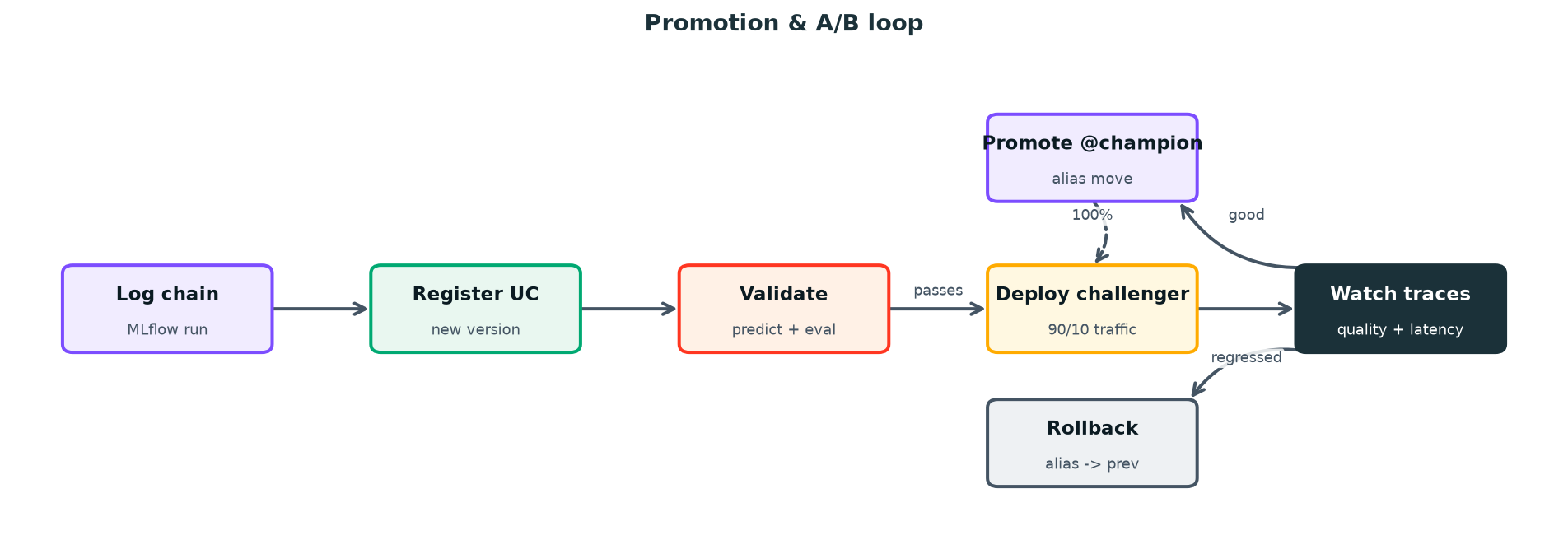 Figure 2. MLOps promotion loop. New versions register into Unity Catalog, deploy as a challenger behind a traffic split, and earn the @champion alias only after their traces look good against the incumbent.
A/B testing is a traffic split, not a second endpoint. Add the challenger as a second served entity on the same endpoint and route, say, 10% of traffic to it. Both versions write traces to the same experiment, so you can compare answer quality, latency, and token cost on real production traffic before committing. When the challenger wins, push it to 100% and move the @champion alias; when it loses, drop its route to 0. Config updates are zero-downtime — the old config keeps serving until the new one is ready.
# Add v8 as a challenger and split traffic 90/10 — zero downtime.
databricks serving-endpoints update-config support-bot --json '{
  "served_entities": [
    {"name": "champion",  "entity_name": "prod.support.support_bot", "entity_version": "7", "workload_size": "Small", "scale_to_zero_enabled": true},
    {"name": "challenger","entity_name": "prod.support.support_bot", "entity_version": "8", "workload_size": "Small", "scale_to_zero_enabled": true}
  ],
  "traffic_config": {"routes": [
    {"served_entity_name": "champion",   "traffic_percentage": 90},
    {"served_entity_name": "challenger", "traffic_percentage": 10}
  ]}
}' --profile prod
Monitoring a RAG chatbot is not the same as monitoring a classifier. There's no single accuracy number; the signals are span-level and behavioral. Watch retrieval health (are similarity scores trending down because the knowledge base drifted away from how users phrase questions?), generation quality (the rate of "I don't know" answers, hallucination flags from an LLM-judge run over sampled traces), latency at the tail (not the mean — the p95 is what users feel), and the cost curve (tokens per conversation creeping up as prompts grow). MLflow's LLM-judge scorers can run continuously over a sample of production traces to give you an automated quality signal without a human in the loop on every turn.
Guardrails belong in two places. Inside the chain, the system prompt should refuse to answer outside the retrieved context and cite sources — cheap and effective against the most common hallucination. Around the chain, the AI Gateway enforces rate limits, and you can add input/output filters for prompt injection and PII. Neither alone is sufficient; together they keep the bot inside its lane.
The Takeaway
The gap between a RAG demo and a deployed chatbot isn't the retrieval logic — it's everything that makes the retrieval logic operable. Log the chain as an MLflow model with a resources= declaration, register it to Unity Catalog with an alias, deploy it to a Model Serving endpoint with scale-to-zero, and instrument every hop with tracing. Do that, and you get the things the demo never had: a versioned artifact you can roll back, an endpoint you can secure and rate-limit, traces that tell you whether retrieval or generation failed, and a traffic-split mechanism to ship the next version without holding your breath.
Start small: serve the LLM pay-per-token, run the chain scale-to-zero, and deploy a single champion. Add the challenger split and the LLM-judge scorers once you have real traffic to compare against. The Databricks docs on MLflow 3 model logging, Vector Search, and Model Serving walk through each step in depth — stand up the endpoint, ask it a question, then open the trace and watch the retrieval and generation light up. That first trace is the moment the boring half stops being scary.
Opinions expressed by DZone contributors are their own.
Comments