

Next-Gen DevOps: Rule-Based AI Auto-Fixes for PMD, Veracode, and Test Failures
Learn how to build self-healing CI/CD pipelines that fix minor code issues automatically, reduce developer toil, and keep your DevOps flow fast and reliable.
Join the DZone community and get the full member experience.
Join For FreeLet Your Pipeline Fix the Small Stuff: A Practical Guide to Self-Healing DevOps
Think back to your last deployment. Everything looked great — until a small test failed or a static analysis tool threw a warning. Suddenly, the whole pipeline froze. Someone had to stop what they were doing, dig through logs, make a tiny fix, and restart the process. It’s not a disaster, but it’s death by a thousand cuts.
Over the past decade, our CI/CD pipelines have gotten incredibly sophisticated. We run static analysis tools like PMD or SonarQube, security scanners such as Snyk or Veracode, and layer in unit and integration tests to catch regressions early. These gates keep our code safe and compliant, but they also introduce a familiar bottleneck: one small failure can stall the entire flow.
The result? Developers spending hours fixing the tiniest issues — unused imports, formatting mistakes, or flaky tests — when they could be solving real business problems.
So here’s the question: what if the pipeline could handle those low-stakes fixes on its own?
What’s Really Broken in “Perfectly Good” Pipelines
Let’s walk through a typical flow after a commit:
- Static analysis runs.
- Security scans execute.
- Unit and integration tests follow.
- Code coverage and quality gates decide whether you can deploy.
Everything works fine — until a minor issue pops up. Maybe a variable isn’t named correctly, or there’s an extra space somewhere. The whole process stops cold. Someone cleans it up, commits again, and waits for another build. It’s rigorous but painfully repetitive. Multiply that across a big team, and it adds real drag to delivery speed.
That’s where self-healing pipelines come in.
What “Self-Healing” Actually Means
A self-healing service acts as a smart middle layer between your scans and your repository. When a pipeline fails, it:
- Reads the error or scan results.
- Decides whether the problem is safe to fix automatically.
- Uses an AI coding assistant (GitHub Copilot, ChatGPT, or another) to generate a patch.
- Applies the change, commits it, and restarts the pipeline.
The point isn’t to replace developers — it’s to save them from the repetitive work that slows everything down. Engineers still stay in control through review and approval gates.
Guardrails That Make It Work
For a system like this to earn trust, it needs boundaries. Here’s what that looks like:
1. Rule-Driven Fixes Only
The pipeline should only repair issues you explicitly allow — like unused imports, missing semicolons, or basic naming violations. Anything more complex, like architecture changes or potential security flaws, stays off-limits.
2. Tool-Agnostic AI
Don’t tie yourself to one AI provider. Build the service so you can switch tools without rewriting your pipeline.
3. Built-In Governance
Every AI-generated change should come with a summary report, and the pipeline shouldn’t move forward until a developer or team lead approves it.
4. Fail Fast for Off-Limit Issues
If a problem isn’t on the allow-list, the pipeline stops right away and reports exactly what needs human review.
These rules make sure automation helps without introducing new risks.
How It Fits Into Your Pipeline
Here’s the high-level flow:
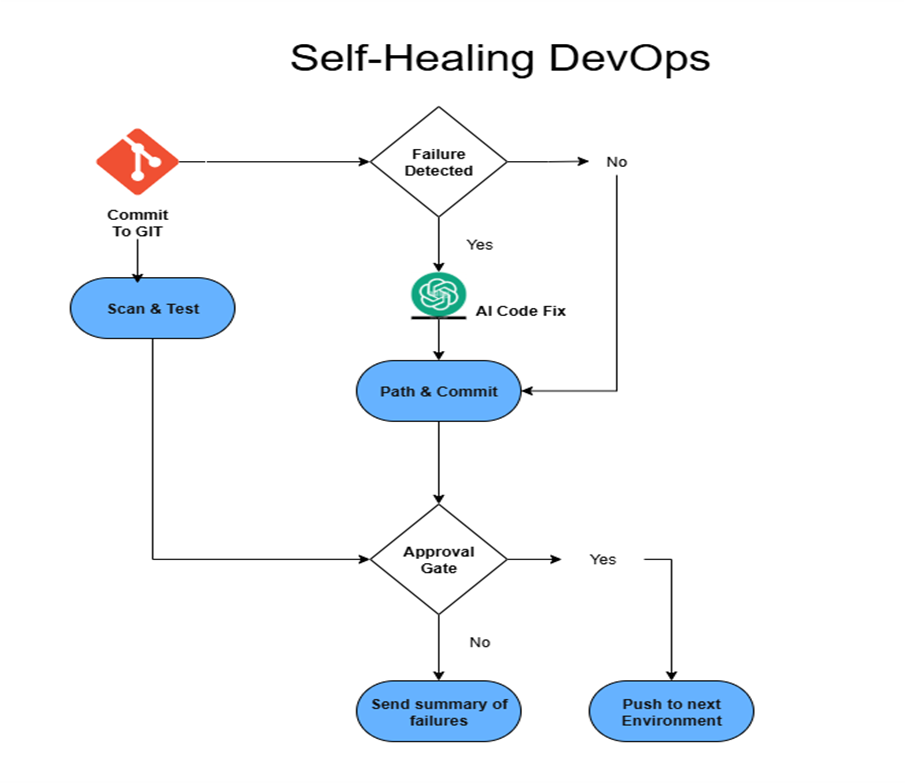
Commit → Scan/Test → Self-Heal → Approval → Resume
- Commit to Git: The pipeline starts as usual.
- Scan and test: Static analysis, security scans, and tests run.
- Failure detected: Results go to the self-healing service.
- Rule evaluation:
- Eligible issues → queued for auto-fix.
- Non-eligible → fail and report.
- AI code fixes: The AI assistant proposes patches.
- Patch and commit: The service applies them and restarts the pipeline.
- Approval gate: A short summary describes what changed. A developer reviews and approves before promotion.
Two Real-World Scenarios
Routine Cleanup
Imagine the pipeline flags ten PMD violations—mostly unused imports and a few naming errors. The self-healing service auto-fixes them, commits the patch, and posts a quick report:
- Fixed: 10 issues
- Impact: No business logic changes
A developer reviews and approves, and the pipeline rolls on without any manual cleanup.
Serious Vulnerability
Now imagine a security scan finds a possible SQL injection. That’s too risky to auto-fix. The pipeline stops, alerts the team, and waits for a human to intervene. Governance stays intact, and risk is clearly surfaced.
Why Teams Adopt It Quickly
- Shorter cycle times: Minor blockers disappear without manual effort.
- Less tech debt: Small issues don’t snowball into bigger ones.
- Happier developers: Engineers focus on meaningful work instead of repetitive fixes.
- Transparent control: Approval gates and reports keep oversight clear.
- Scalable improvement: Start with safe fixes, then expand over time.
Beyond the Tools: The Culture Shift
Speed has become a competitive advantage. The faster teams can deliver high-quality code, the stronger their position. Self-healing pipelines reflect a deeper change in how we work with AI — not as a novelty, but as a core teammate that maintains quality, security, and consistency.
Done right, it reduces fatigue and helps teams stay sharp. Developers get to focus on architecture, performance, and innovation instead of the endless cycle of re-running builds for trivial issues.
What Comes Next
Self-healing pipelines are only the start. As AI tools mature, they’ll safely handle:
- Routine dependency upgrades.
- Auto-generated unit tests for uncovered paths.
- Simple, rule-based refactors.
The key is steady evolution. Add capabilities slowly, with clear rules and human approval. Over time, self-healing will feel as standard as your unit tests — a quiet, reliable way to keep your pipeline healthy and your delivery velocity high.
Opinions expressed by DZone contributors are their own.
Comments