

Anypoint File Connector With Mulesoft
File Connector can act as an inbound endpoint. It can also read directories for new files after a certain interval of time and process them.
File Connector has the ability to read and write files to a local system. It can be implemented as an inbound endpoint (such as a Message Source) or as an outbound endpoint. It can be only used as a one-way pattern.
Read files at certain periods of time and delete, move, or leave the file as it is processed.
Append the output to existing files.
Copy files from one directory to another.
Read input files and save input files to backup.
Create new files with specific names.
File Connector as an Inbound Endpoint
File Connector can act as an inbound endpoint if you place the file endpoint at the beginning of the flow. It will read the directory for new files after a certain interval of time and process them. By default, it uses streaming. The Payload is InputFileStream.
Place the file endpoint to the source section of the flow.
It will check for a file in the directory after a certain interval of time. This can be configured according to your need.
It triggers the flow when receives a file.
It reads the file into payload and dispatches message to the next processor in the flow.
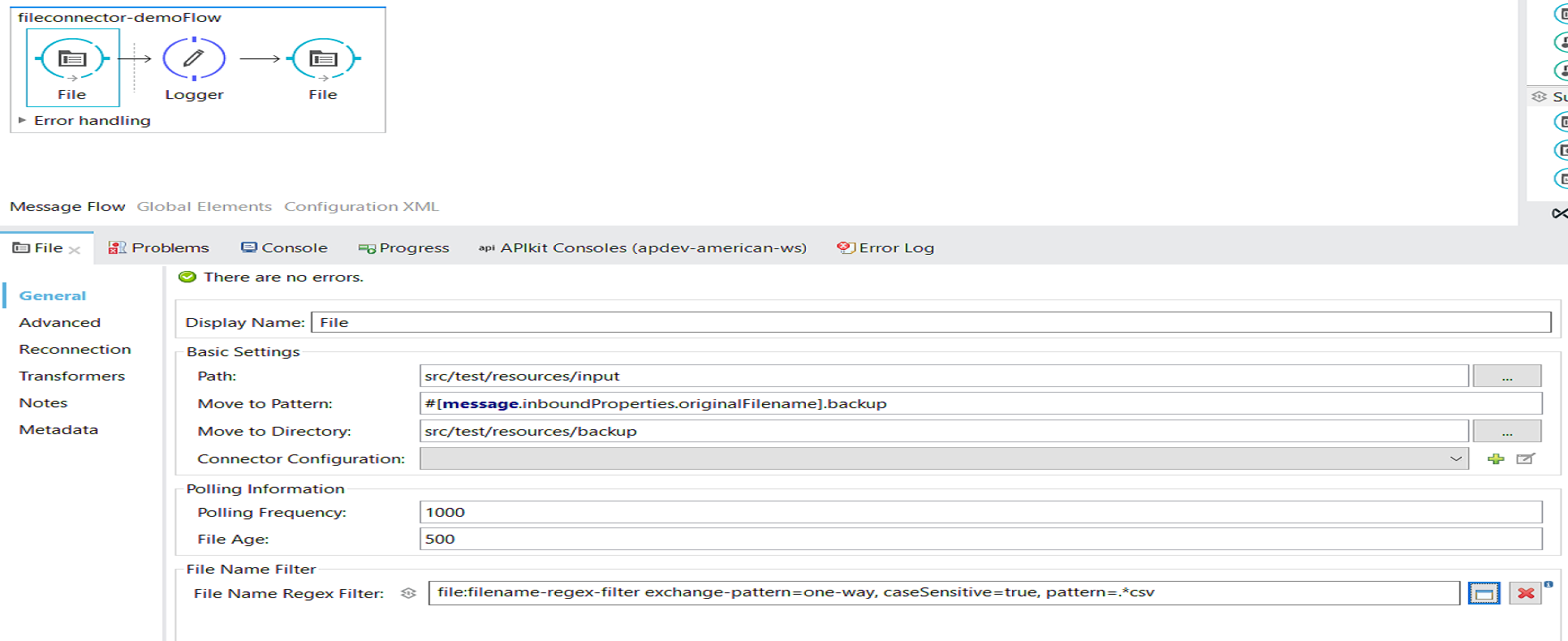
Path is a target directory on a connected file system. Basically, this is the location on a connected system where the file will be placed to read by Message Source in Mule Flow.
Move to directory is used when we need to back up or move a file to any another directory. Here, you can specify the path where you need to back up or move your input file.
Move to pattern is used when moving a file according to Move to Directory property. For example, if we are using the pattern
#[message.inboundProperties.originalFilename].backup, you are appending the.backuptoOriginalFileName. If your file name isstudent.csv, it will the move file to the directory with a new FileNamestudent.csv.backup.Polling frequency specifies how often the endpoint should check for incoming files. The default value is 1000ms.
File name regex filter is used to configure a filter to restrict the files being processed. For example, if you have set pattern
.*csv, the inbound endpoint will only pick the file with extension.csvand ignore rest of the file like.txt,.xlsx, etc.
File Connector as an Outbound Endpoint
File Connector acts as an outbound endpoint if you place a building block at the middle or end of the Mule flow (basically in the Message Processor Region), passing the file to the connected file system.
Place the File Connector in the Message Processor of the Mule Flow to act as an Outbound Endpoint.
It is capable of creating new files or appending the message to existing file.
FileName can be set at a runtime.
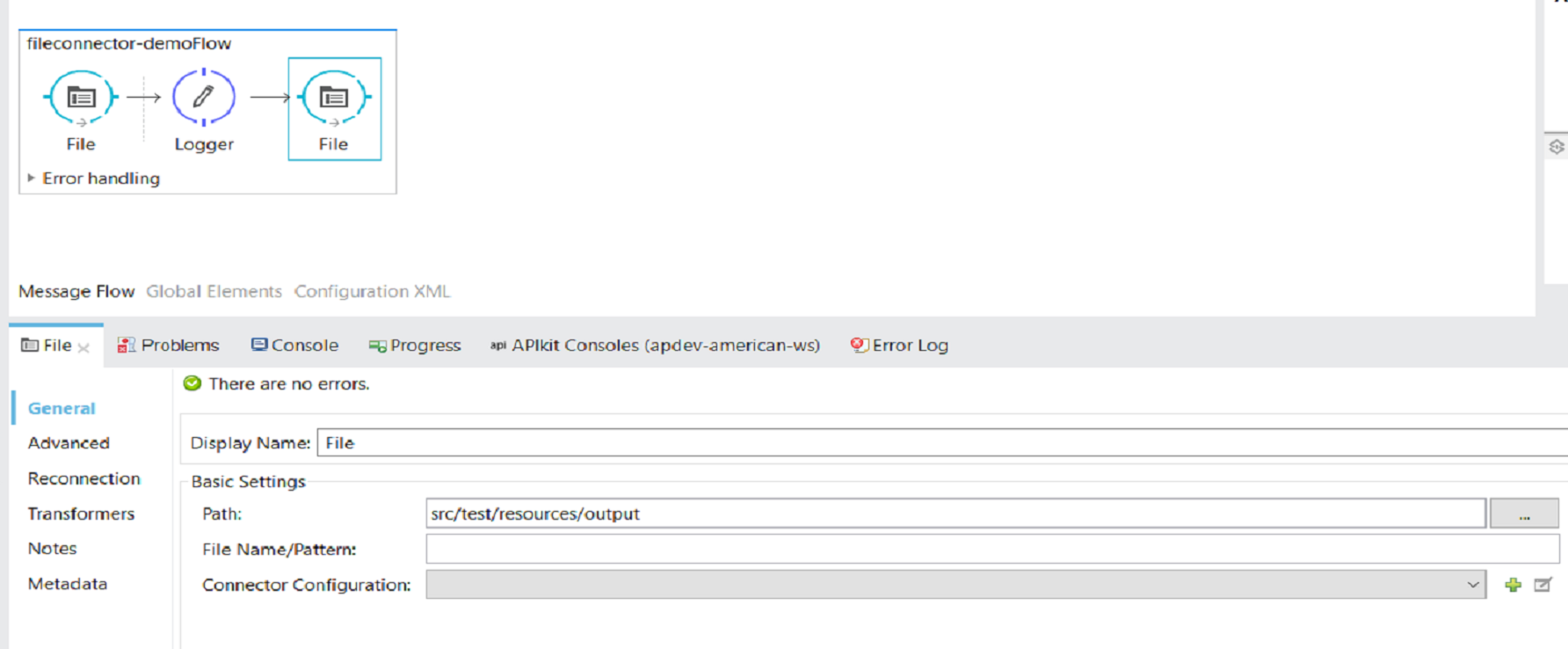
Path is the target directory on the connected file system where we need to create new files or appending the data to existing files.
File name/pattern is used to specify a filename or pattern for naming files that are sent from the File endpoint to the connected file system. If not set, by default, it will use the same file-name pattern used for incoming files.
<?xml version="1.0" encoding="UTF-8"?>
<mule
	xmlns:file="http://www.mulesoft.org/schema/mule/file"
	xmlns="http://www.mulesoft.org/schema/mule/core"
	xmlns:doc="http://www.mulesoft.org/schema/mule/documentation"
	xmlns:spring="http://www.springframework.org/schema/beans"
	xmlns:xsi="http://www.w3.org/2001/XMLSchema-instance"
xsi:schemaLocation="http://www.springframework.org/schema/beans http://www.springframework.org/schema/beans/spring-beans-current.xsd
http://www.mulesoft.org/schema/mule/core http://www.mulesoft.org/schema/mule/core/current/mule.xsd
http://www.mulesoft.org/schema/mule/file http://www.mulesoft.org/schema/mule/file/current/mule-file.xsd">
	<flow name="fileconnector-demoFlow">
		<file:inbound-endpoint path="src/test/resources/input" moveToPattern="#[message.inboundProperties.originalFilename].backup" moveToDirectory="src/test/resources/backup" responseTimeout="10000" doc:name="File">
			<file:filename-regex-filter pattern=".*csv" caseSensitive="true"/>
		</file:inbound-endpoint>
		<logger level="INFO" doc:name="Logger"/>
		<file:outbound-endpoint path="src/test/resources/output" responseTimeout="10000" doc:name="File"/>
	</flow>
</mule>
I hope this article helps you understand how you can use File Connector as an inbound as well as an outbound endpoint.
Opinions expressed by DZone contributors are their own.