

The Dark Side of Apache Iceberg’s Data Time Travel Feature
This article talks about the hidden aspects of the Apache Iceberg Time Travel Query feature. It also highlights how to address those hidden negative aspects.
Join the DZone community and get the full member experience.
Join For FreeOverview
Apache Iceberg is a high-performance open table format for large analytic tables that supports expressive SQL, full schema evolution, hidden partitioning, time travel and rollback, data compaction, and interoperability through the Iceberg REST catalog. With its robust features, Iceberg is becoming popular in the Data Lake and Lakehouse industries.
In this article, we are going to discuss the pros and cons of the most fascinating feature, “Time Travel Query.” We will also discuss the precautions while adopting time travel features.
What Is Time Travel Query?
We can retrieve the data from a table for a given point in time or for a given version. In simple language, using time travel, we can query historical data. Companies use time travel query features to track the data and schema changes (Change Data Capture), lineage, or regulatory audits. Accidental data recovery is the prime use case of the time travel capability.
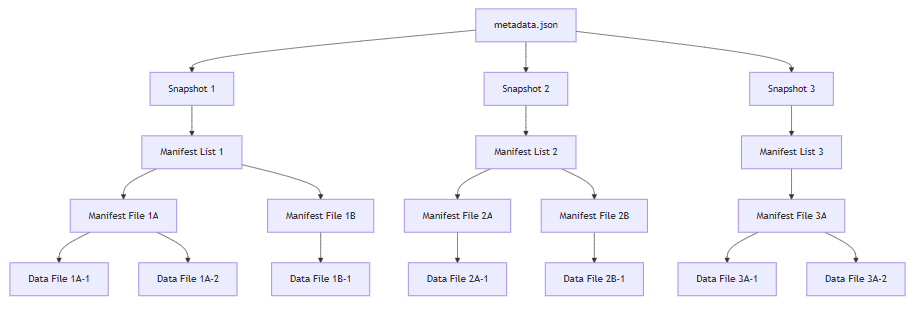
Iceberg supports time travel features using metadata files, which help to maintain the immutable snapshots of the stored data. Let’s understand the snapshot at a high level. Every time an Iceberg table is updated through insert, delete, or update, Iceberg creates a new snapshot.
Each snapshot leads to the creation of these files:
- Root metadata file: It is the central metadata file containing the entire table state and schema
- Manifest lists: These are files referenced by the root metadata file that point to manifest files.
- Manifest files: These files contain the path of actual data files (such as Parquet).
- Data files: They contain the actual table data stored as Parquet files.
Using the time-based relationship and hierarchy on the above-mentioned files, Iceberg enables the time travel capability.
Metadata files hierarchy for snapshots:
What Is the Dark Side?
The time travel feature does not come free; rather, it has some additional storage cost, operational/performance overhead, and compliance risks. It is very important to know these challenges in detail before deciding the time window for the time/version travel.
- Increased storage cost: Even small changes in the data can result in the creation of new versions of data and metadata files. Storing multiple snapshots and versions of data files increases the storage usage.
- Data management complexity: More metadata and data files need to be identified, expired, and cleaned up on a regular basis. Also, requires careful configurations to avoid accidental deletion and over retention.
- Performance overhead: Time travel queries may be slower, especially if many snapshots are presented for a specified range in the query. Also, cleaning up the snapshots and old data files consumes the computers, which can further degrade the overall system performance.
- Security and compliance risks: This is a serious area that should not be ignored and must be addressed properly. Regulatory compliance, like FINRA, GDPR, CCPA, and PCI DSS, has strict data retention, deletion, and archival rules. Old snapshots may retain sensitive or deleted data. Also, non-compliant data can only be deleted from the current snapshot, not from all the historical snapshots. Any user can perform the time travel query and access the deleted data. It is imperative to detect and remove all the older snapshots that have the deleted sensitive data. Most of the time, the history of non-deleted data will be lost if older snapshots are deleted. So, proper analysis and solution design are required to deal with this scenario.
- Operational complexity: If your system needs a backup and restore strategy, then it will be a complex task to account for multiple versions. Also, in case of queries, different users can see different results if they are using different snapshots in the query.
- Metadata performance degradation: Over the period, snapshots accumulate, and metadata files grow larger. The content of metadata files becomes complex, hence it increases memory requirements for query planning. This makes any table operation very slow.
- Accidental data exposure: Users may sometimes accidentally query or restore to the too-old snapshots, which will lead to data inconsistency.
Steps to Consider While Opting for the Time Travel Feature
Ideally, it depends on the use cases, but here I am listing down some generic bullet points to be considered in the solution.
- Analyze the write and read pattern on the table. Some use cases might need CDC (Change Data Capture) using time travel features, while some data analysis may be done using time travel. Some rollback to a specific snapshot might be required. So set an expectation with proper SLA (Service Level Agreements) for the life of the snapshots.
- Time travel is not a replacement for SCD Type-2. Prefer to design the Slowly Changing Dimension Schema Type-2 (SCD Type2) properly rather than relying on time travel to capture the data changes.
- During the Iceberg table creation, define the retention period (based on the agreed-upon SLA) of the snapshots in the table properties.
- Automate the Snapshot expiration as part of table maintenance activities. This can be scheduled, on demand, or event driven.
- Track and monitor who accesses what. Have proper audit trails in place using an approved framework and tools.
- Ensure that data subjects subject to regulatory compliance are deleted from all current and historical snapshots. Deletion will create another snapshot, so make sure to expire immediately.
- Monitor the snapshot storage usage through a set of proper observability tools.
- If required, budget for the increased storage considering the time travel requirements.
- Keep proper lineage and tracings to record the schema and data changes.
- Have clear documentation and guidelines in place to educate the users on best practices, Snapshots concepts, complexity, and pros and cons.
Sample Codes for Reference
Time travel query:
SELECT * FROM iceberg_table FOR TIMESTAMP AS OF TIMESTAMP '2020-01-01 10:00:00 UTC'
Version travel query:
SELECT * FROM iceberg_table FOR VERSION AS OF 949530903748831860
Rollback db.sample to a specific day and time:
CALL catalog_name.system.rollback_to_timestamp('db.sample', TIMESTAMP '2021-06-30 00:00:00.000');
Rollback table db.sample to snapshot ID 1:
CALL catalog_name.system.rollback_to_snapshot('db.sample', 1);
Remove snapshots older than a specific day and time, but retain the last 100 snapshots:
CALL hive_prod.system.expire_snapshots('db.sample', TIMESTAMP '2021-06-30 00:00:00.000', 100)
Remove snapshots with snapshot ID 123:
CALL hive_prod.system.expire_snapshots(table => 'db.sample', snapshot_ids => ARRAY(123))
Create table with snapshot properties:
CREATE TABLE my_catalog.my_db.sample_table
(
id BIGINT,

data STRING,

event_ts TIMESTAMP

 ) USING iceberg

OPTIONS (

'format-version'='2',

'history.expire.max-snapshot-age-ms'='432000000',

‘history.expire.min-snapshots-to-keep’ = 5

)
Conclusion
Apache Iceberg's time travel capability is a very fascinating feature for performing historical data analysis and rollback. However, it requires proper requirements analysis and thoughtful implementation, along with regular management, to avoid any surprising costs and compliance risks. Organizations should consider regulatory compliance requirements as well as operational complexity before expanding the time travel windows for the historical data analysis and recovery.
Opinions expressed by DZone contributors are their own.
Comments