

Integrating Apache Kafka in KRaft Mode With RisingWave for Event Stream Processing
Install and configure the latest version of Apache Kafka on a single-node cluster running on Ubuntu-22.04, and subsequently integrate it with RisingWave.
 CORE
·
CORE
·
Join the DZone community and get the full member experience.
Join For FreeOver the past few years, Apache Kafka has emerged as the top event streaming platform for streaming data/event ingestion. However, in an earlier version of Apache Kafka, 3.5, Zookeeper was the additional and mandatory component for managing and coordinating the Kafka cluster. Relying on ZooKeeper on the operational multi-node Kafka cluster introduced complexity and could be a single point of failure.
ZooKeeper is completely a separate system having its own configuration file syntax, management tools, and deployment patterns. In-depth skills with experience are necessary to manage and deploy two individual distributed systems and an eventually up-and-running Kafka cluster. Having expertise in Kafka administration without ZooKeeper won’t be able to help to come out from the crisis, especially in the production environment where ZooKeeper runs in a completely isolated environment (Cloud).
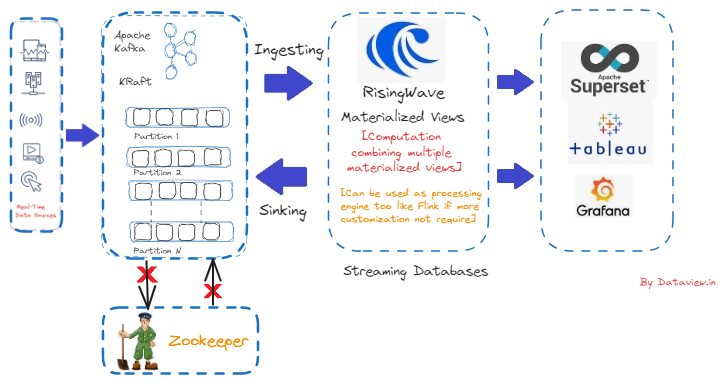
Kafka's reliance on ZooKeeper for metadata management was eliminated by introducing the Apache Kafka Raft (KRaft) consensus protocol. This eliminates the need for and configuration of two distinct systems — ZooKeeper and Kafka — and significantly simplifies Kafka's architecture by transferring metadata management into Kafka itself. Apache Kafka has officially deprecated ZooKeeper in version 3.5 and the latest version of Kafka which is 3.8, improved the KRaft metadata version-related messages. There is no use unless we consume the ingested events from the Kafka topic and process them further to achieve business value.
RisingWave, on the other hand, makes processing streaming data easy, dependable, and efficient once event streaming flows to it from the Kafka topic. Impressively, RisingWave excels in delivering consistently updated materialized views, which are persistent data structures reflecting the outcomes of stream processing with incremental updates.
In this article, I am going to explain step by step how to install and configure the latest version of Apache Kafka, version 3.8, on a single-node cluster running on Ubuntu-22.04, and subsequently integrate it with RisingWave that was also installed and configured on the same node.
Assumptions
- OpenJDK version 17.0.12 has been installed and configured including setting
JAVA_HOMEon ~/.bashrc file.

- SSH connection has been installed and configured. Later, this node could be clubbed with a multi-node cluster on-prem.
- PostgreSQL client version 14.12 (not the PostgreSQL server) has been installed and configured. This is mandatory to connect via psql with the RisingWave streaming database. psql is a command-line interface for interacting with PostgreSQL databases that is included in the PostgreSQL package. Since RisingWave is wire-compatible with PostgreSQL, by using psql, we will connect to RisingWave so that SQL queries can be issued and manage database objects. You can refer here to install and configure psql on Ubuntu.

Installation and Configuration of Apache Kafka-3.8 With KRaft
- The binary version of Kafka 3.8, which is the latest, can be downloaded here.
- Extract the tarball, and after extraction, the entire directory, “kafka_2.13-3.8.0”, is moved to /usr/local/kafka. Make sure we should have “root” privilege.
- We can create a location directory as "kafka-logs" where Kafka logs will be stored under /usr/local. Make sure the created directory has read-write permissions.
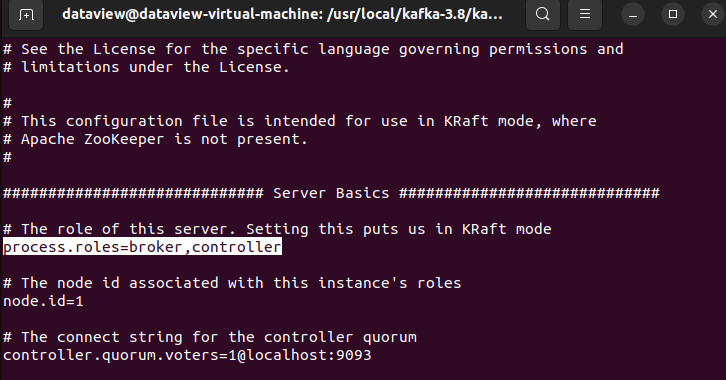
- As a configuration step, navigate to “kraft” directory available inside “/usr/local/kafka_2.13-3.8.0/config” and open the server.properties in the vi editor to manipulate/update key-value pair. The following keys should have the corresponding values.
- In KRaft mode, each Kafka server can be configured as a controller, a broker, or both using the
process.rolesproperty. Since it is a single-node cluster, I am setting bothbrokerandcontroller.
process.roles=broker,controllerAnd, subsequently, node.id=1, num.partitions=5, and delete.topic.enable=true.
Start and Verify the cluster
- The unique cluster ID generation and other required properties can be created by using the built-in script
kafka-storage.shavailable inside thebindirectory.

- Make sure the files
bootstrap.checkpointandmeta.propertieswere generated inside the created directorykafka-logs. A unique cluster ID is available insidemeta.propertiesfile.

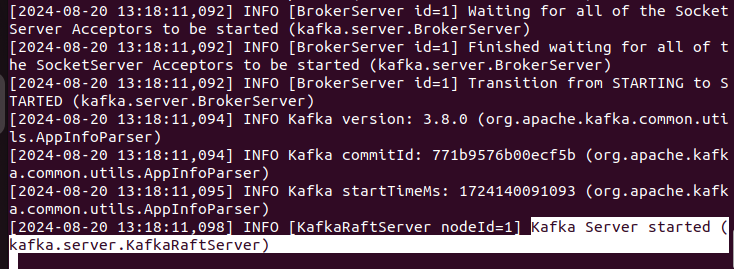
- Start the broker using the following command from the terminal.

- Make sure the following should be displayed on the terminal.
Topic Creation
Using Apache Kafka’s built-in script, kafka-topics.sh, available inside the bin directory, I can create a topic on the running Kafka broker using the terminal. Create one topic named UPIStream with the number of partitions 3.

- Make RisingWave functional as a single instance in standalone mode.
As said above, RisingWave in the standalone mode has been installed and configured on the same node where Kafka 3.8 on KRaft mode is operational. The RisingWave in standalone mode leverages the embedded SQLite database to store metadata and data in the file system. Before that, we need to install and configure the PostgreSQL client as mentioned in the assumptions.
- Open a terminal and execute the following
curlcommand:
$ curl https://risingwave.com/sh | sh
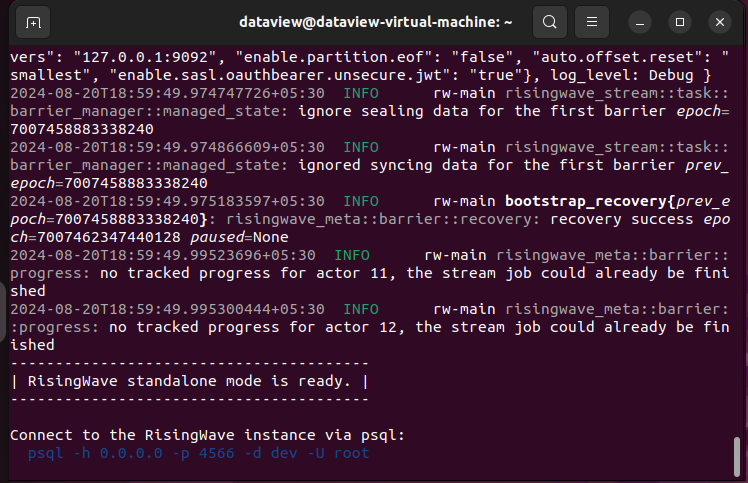
- We can start a RisingWave instance by running the following command on the terminal:
$./risingwave
- Open a terminal to connect to RisingWave using the following command:
$ psql -h 127.0.0.1 -p 4566 -d dev -U root
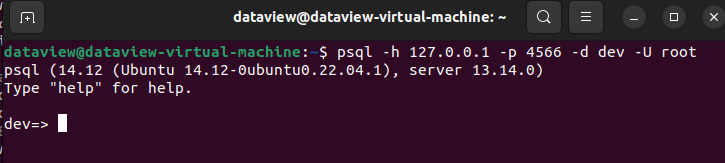
Connecting Kafka Broker With RisingWave
Here, I am going to connect RisingWave with the Kafka broker that I want to receive events from the created topic UPIStream. I need to create a source in RisingWave using the CREATE SOURCE command. When creating a source, I can choose to persist the data from the Kafka topic in RisingWave by using the CREATE TABLE command and specifying the connection settings and data format. There are more additional parameters available while connecting to the Kafka broker. You can refer here to learn more.
Adding the following to simply connect the topic UPIStream on the psql terminal.
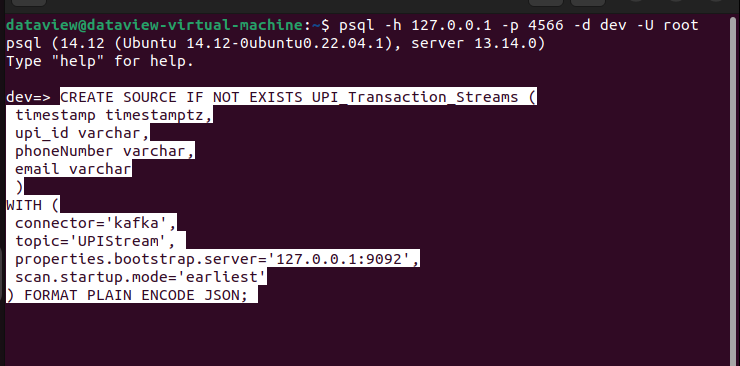
Continuous Pushing of Events From Kafka Topic to RisingWave
Using a developed simulator in Java, I have published a stream of UPI transaction events at an interval of 0.5 seconds in the following JSON format to the created topic UPIStream. Here is the one stream of events.
{"timestamp":"2024-08-20 22:39:20.866","upiID":"9902480505@pnb","name":"Brahma Gupta Sr.","note":" ","amount":"2779.00","currency":"INR","Latitude":"22.5348319","Longitude":"15.1863628","deviceOS":"iOS","targetApp":"GPAY","merchantTransactionId":"3619d3c01f5ad14f521b320100d46318b9","merchantUserId":"11185368866533@sbi"}Verify and Analyze Events on RisingWave
Move to the psql terminal that is already connected with the RisingWave single instance consuming all the published events from the Kafka topic UPIStream and storing on the source UPI_Transaction_Stream. On the other side, the Java simulator is running and continuously publishing individual events with different data to the topic UPIStream at an interval of 0.5 seconds, and subsequently, each event is getting ingested to the RisingWave instance for further processing/analyzing.
After processing/modifying the events using the Materialized views, I could sink or send those events back to the different Kafka topics so that downstream applications can consume those for further analytics. I’ll articulate this in my upcoming blog, so please stay tuned.
Since I have not done any processing, modification, or computations on the ingested events in the running RisingWave instance, I created a simple Materialized view to observe a few fields in the events to make sure integration with Apache Kafka on KRaft mode with RisingWave is working absolutely fine or not. And the answer is a big YES. 
Final Note
Especially for the on-premises deployment of a multi-node Kafka cluster, Apache Kafka 3.8 is an excellent release where we completely bypass the ZooKeeper dependency. Besides, it's easy to set up a development environment for those who want to explore more about event streaming platforms like Apache Kafka. On the other hand, RisingWave functions as a streaming database that innovatively utilizes materialized views to power continuous analytics and data transformations for time-sensitive applications like alerting, monitoring, and trading. Ultimately, it's becoming a game-changer as Apache Kafka joins forces with RisingWave to unlock business value from real-time stream processing.
I hope you enjoyed reading this. If you found this article valuable, please consider liking and sharing it.
Published at DZone with permission of Gautam Goswami. See the original article here.
Opinions expressed by DZone contributors are their own.
Comments