

Apache Spark 4.0: Transforming Big Data Analytics to the Next Level
Apache Spark 4.0 brings PySpark plotting, polymorphic UDTFs, improved SQL scripting, and Python API updates to enhance real-time analytics and usability.
 CORE
·
CORE
·
Join the DZone community and get the full member experience.
Join For FreeHurray! Apache Spark 4.0, released in 2025, redefines big data processing with innovations that enhance performance, accessibility, and developer productivity. With contributions from over 400 developers across organizations like Databricks, Apple, and NVIDIA, Spark 4.0 resolves thousands of JIRA issues, introducing transformative features: native plotting in PySpark, Python Data Source API, polymorphic User-Defined Table Functions (UDTFs), state store enhancements, SQL scripting, and Spark Connect improvements. This report provides an in-depth exploration of these features, their technical underpinnings, and practical applications through original examples and diagrams.
The Evolution of Apache Spark
Apache Spark’s in-memory processing delivers up to 100x faster performance than Hadoop MapReduce, making it a cornerstone for big data analytics. Spark 4.0 builds on this foundation by introducing optimizations that enhance query execution, expand Python accessibility, and improve streaming capabilities. These advancements make it a versatile tool for industries like finance, healthcare, and retail, where scalability and real-time analytics are critical. The community-driven development ensures Spark 4.0 meets enterprise needs while remaining accessible to diverse users, from data scientists to engineers.
Why Spark 4.0 Excels
- Performance: Optimizations in query execution and state management reduce latency for large-scale workloads.
- Accessibility: Python-centric features lower the barrier for data scientists and developers.
- Scalability: Enhanced streaming supports high-throughput, real-time applications.
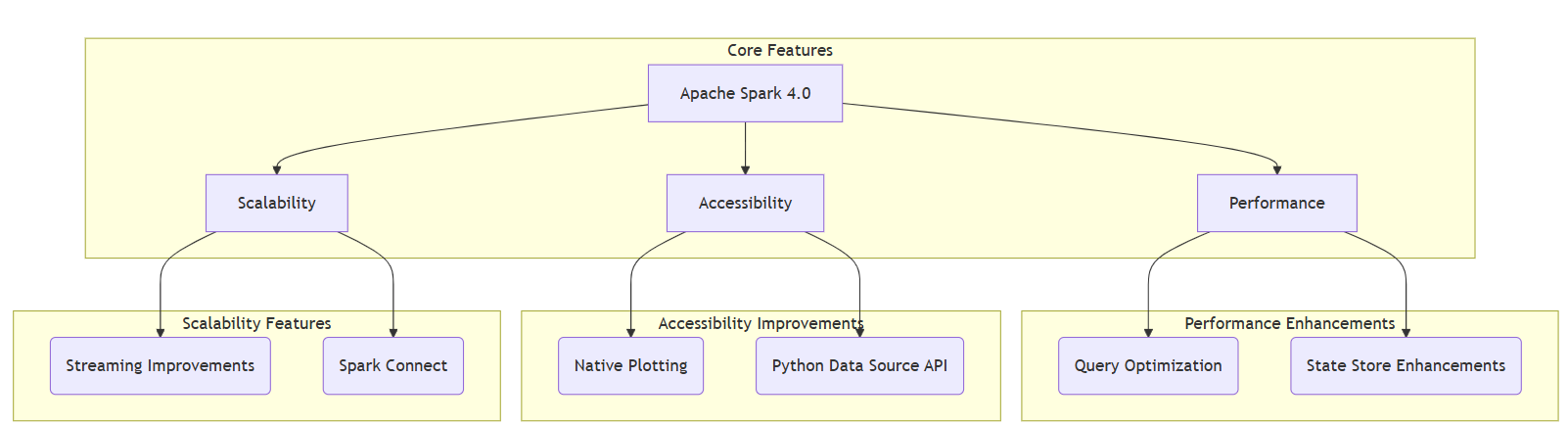
Diagram 1: Core pillars of Apache Spark 4.0, showcasing key features with full labels.
Native Plotting in PySpark
Spark 4.0 introduces native plotting for PySpark DataFrames, enabling users to create visualizations like histograms, scatter plots, and line charts directly within Spark without external libraries like matplotlib. Powered by Plotly as the default backend, this feature streamlines exploratory data analysis (EDA) by integrating visualization into the Spark ecosystem. It automatically handles data sampling or aggregation for large datasets, ensuring performance and usability. This is particularly valuable for data scientists who need rapid insights during data exploration, as it reduces context-switching and improves workflow efficiency. For example, analysts can quickly visualize trends or anomalies in large datasets without exporting data to external tools.
Use Case
In retail, analysts can visualize customer purchase patterns to identify regional spending differences or seasonal trends, enabling faster decision-making directly within a Spark notebook.
Example: Visualizing Customer Spending
from pyspark.sql import SparkSession
spark = SparkSession.builder.appName("CustomerAnalysis").getOrCreate()
data = [(1, 50, "North"), (2, 75, "South"), (3, 60, "East"), (4, 90, "West")]
df = spark.createDataFrame(data, ["id", "spend", "region"])
df.plot(kind="scatter", x="id", y="spend", color="region")
This code generates a scatter plot of customer spending by region, rendered seamlessly in a Spark notebook using Plotly.
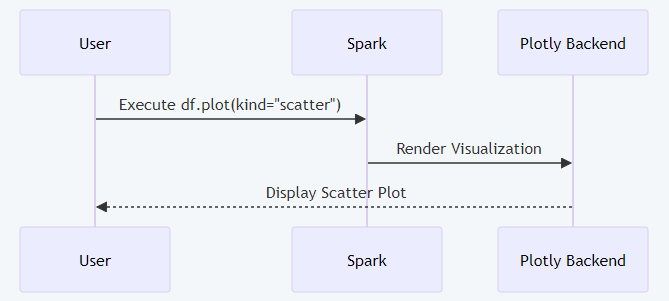
Diagram 2: Native plotting workflow in PySpark with full labels
Python Data Source API
The Python Data Source API enables Python developers to create custom data sources for batch and streaming workloads, eliminating the need for Java or Scala expertise. This feature democratizes data integration, allowing teams to connect Spark to proprietary formats, APIs, or databases. The API provides a flexible framework for defining how data is read, supporting both structured and streaming data, which enhances Spark’s extensibility for modern data pipelines. It simplifies integration with external systems, reduces development time for Python-centric teams, and supports real-time data ingestion from custom sources, making it ideal for dynamic environments.
Technical Benefits
- Extensibility: Connects Spark to custom APIs or niche file formats with minimal overhead.
- Productivity: Allows Python developers to work in their preferred language, avoiding JVM-based coding.
- Streaming Support: Enables real-time data pipelines with custom sources.
Example: Custom CSV Data Source
from pyspark.sql.datasource import DataSource, DataSourceReader
class CustomCSVSource(DataSource):
    def name(self):
        return "custom_csv"
    def reader(self, schema):
        return CustomCSVReader(self.options)
class CustomCSVReader(DataSourceReader):
    def __init__(self, options):
        self.path = options.get("path")
    def read(self, spark):
        return spark.read.csv(self.path, header=True)
spark._jvm.org.apache.spark.sql.execution.datasources.DataSource.registerDataSource(
    "custom_csv", CustomCSVSource)
df = spark.read.format("custom_csv").option("path", "data.csv").load()
This code defines a custom CSV reader, demonstrating how Python developers can extend Spark’s data connectivity.
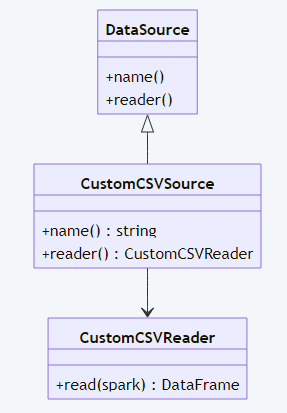
Diagram 3: Custom CSV data source structure with complete labels.
Polymorphic Python UDTFs
Polymorphic User-Defined Table Functions (UDTFs) in PySpark allow dynamic schema outputs based on input data, offering flexibility for complex transformations. Unlike traditional UDFs with fixed schemas, polymorphic UDTFs adapt their output structure dynamically, making them ideal for scenarios where output varies based on input conditions, such as data parsing, conditional processing, or multi-output transformations. This feature empowers developers to handle diverse data processing needs within Spark, enhancing its utility for advanced analytics.
Use Case
In fraud detection, a UDTF can process transaction data and output different schemas (e.g., flagged transactions with risk scores or metadata) based on dynamic criteria, streamlining real-time analysis.
Example: Dynamic Data Transformation
from pyspark.sql.functions import udtf
@udtf(returnType="id: int, result: string")
class DynamicTransformUDTF:
    def eval(self, row):
        yield row.id, f"Transformed_{row.value.upper()}"
df = spark.createDataFrame([(1, "data"), (2, "test")], ["id", "value"])
result = df.select(DynamicTransformUDTF("id", "value")).collect()
This UDTF transforms input strings to uppercase with a prefix, showcasing dynamic schema handling.
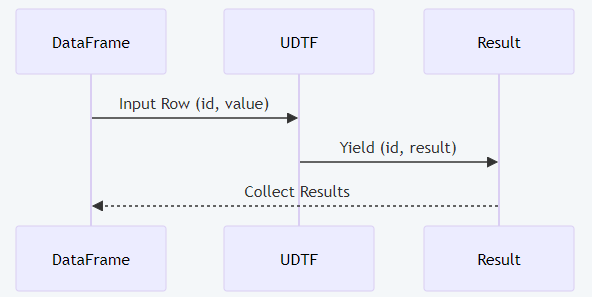
Diagram 4: UDTF processing flow with full labels.
State Store Enhancements
Spark 4.0 boosts stateful streaming through better reuse of Static Sorted Table (SST) files, smarter snapshot handling, and overall performance improvements. These reduce latency in real-time applications and improve debugging through enhanced logging. The state store efficiently manages incremental updates, making it suitable for applications like real-time analytics, IoT data processing, or event-driven systems. SST file reuse minimizes disk I/O, snapshot management ensures fault tolerance, and detailed logs simplify troubleshooting.
Technical Benefits
- Efficiency: SST file reuse reduces I/O overhead, speeding up state updates.
- Reliability: Snapshot management ensures consistent state recovery.
- Debugging: Enhanced logs provide actionable insights into streaming operations.
Example: Real-Time Sales Aggregation
from pyspark.sql import SparkSession
spark = SparkSession.builder.appName("RealTimeSales").getOrCreate()
stream_df = spark.readStream.format("rate").option("rowsPerSecond", 5).load()
query = stream_df.groupBy("value").count().writeStream \
    .outputMode("complete").format("console").start()
query.awaitTermination()
This streaming aggregation leverages optimized state management for low-latency updates.

Diagram 5: Streaming state store enhancements with complete labels.
SQL Language Enhancements
Spark 4.0 introduces SQL scripting with session variables, control flow, and PIPE syntax, aligning with ANSI SQL/PSM standards. These features enable complex workflows, such as iterative calculations or conditional logic, directly in SQL, reducing reliance on external scripting languages. Session variables allow dynamic state tracking, control flow supports looping and branching, and PIPE syntax simplifies multi-step queries, making Spark SQL more powerful for enterprise applications.
Use Case
In financial reporting, SQL scripting can compute running totals, apply business rules, or aggregate data across datasets without leaving the Spark SQL environment, improving efficiency.
Example: Revenue Calculation
SET revenue = 0;
FOR row IN (SELECT amount FROM transactions)
DO
SET revenue = revenue + row.amount;
END FOR;
SELECT revenue AS total_revenue;
This calculates total revenue using control flow, showcasing SQL’s advanced capabilities.
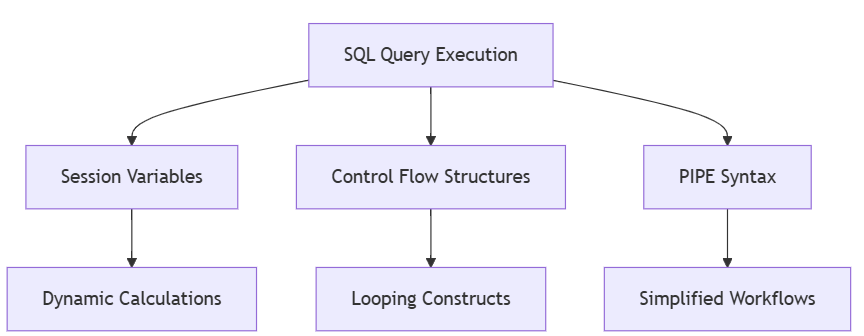
Diagram 6: SQL scripting features with full labels.
Spark Connect Improvements
Spark Connect’s client-server architecture achieves near-parity with Spark Classic, enabling remote connectivity and client-side debugging. By decoupling applications from Spark clusters, it supports flexible deployments, such as running jobs from lightweight clients or cloud environments. This is ideal for distributed teams or applications requiring low-latency access to Spark clusters without heavy dependencies.
Technical Benefits
- Flexibility: Remote execution supports diverse deployment scenarios.
- Debugging: Client-side tools simplify error tracking and optimization.
- Scalability: Minimal setup enables distributed environments.
Example: Remote Data Query
from pyspark.sql.connect import SparkSession
spark = SparkSession.builder.remote("sc://spark-cluster:15002").getOrCreate()
df = spark.sql("SELECT * FROM customer_data")
df.show()
This connects to a remote Spark cluster, demonstrating deployment flexibility.
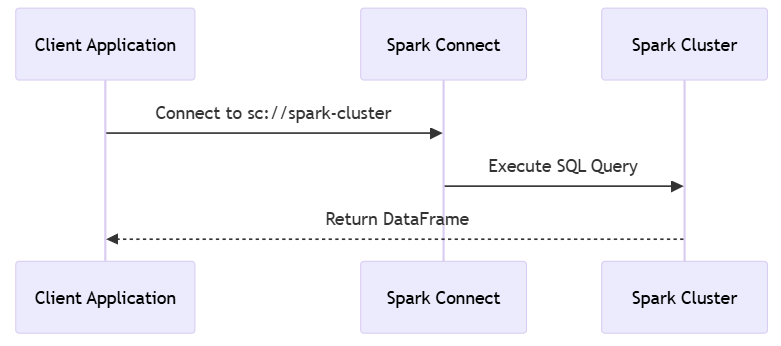
Diagram 7: Spark Connect workflow with complete labels.
Productivity Enhancements
Spark 4.0 enhances developer experience with error logging, memory profiling, and intuitive APIs. These features reduce debugging time, optimize resource usage, and streamline development, particularly for complex pipelines involving large datasets or custom logic.
Example: UDF Error Logging
from pyspark.sql.functions import udf
@udf("string")
def process_text(text):
    return text.upper()
df = spark.createDataFrame([("example",)], ["text"]).select(process_text("text"))
spark.sparkContext._jvm.org.apache.spark.util.ErrorLogger.log(df)
This logs errors for a UDF, leveraging Spark 4.0’s debugging tools.
Industry Applications
Spark 4.0’s features enable transformative use cases:
- Finance: Real-time fraud detection with streaming enhancements, processing millions of transactions per second.
- Healthcare: Visualizing patient data with native plotting for rapid insights into trends or anomalies.
- Retail: Custom data sources for personalized recommendations, integrating diverse data formats like APIs or proprietary files.
Future Trends
Spark 4.0 is the foundation for AI-driven analytics, cloud-native deployments, and deeper Python integration. Its scalability and accessibility position it as a leader in big data processing. Developers can explore Spark 4.0 on Databricks Community Edition to build next-generation data pipelines.
Conclusion
Apache Spark 4.0 revolutionizes big data analytics with native plotting, Python APIs, SQL enhancements, and streaming optimizations. Detailed explanations, practical examples, and diagrams with full labels illustrate its capabilities, making it accessible to data professionals across expertise levels.
References
- Introducing Apache Spark 4.0 | DataBricks blog. (n.d.). Databricks. https://www.databricks.com/blog/introducing-apache-spark-40
- Apache Spark Official Documentation
- X Community Discussions: @ApacheSpark
Opinions expressed by DZone contributors are their own.
Comments