

Boost Your Spark Jobs: How Photon Accelerates Apache Spark Performance
Photon is Databricks’ native C++ engine that bypasses JVM bottlenecks by processing data in vectorized, SIMD-accelerated batches instead of row by row.
What is Photon
Databricks’ Photon engine isn't just a minor update — it’s a complete rewrite of how we handle big data. While standard Spark relies on Java, Photon is built from the ground up in C++ to squeeze every drop of power out of modern hardware.
By using vectorized execution, it processes data in batches rather than one row at a time, drastically cutting down on CPU bottlenecks. In plain English? Your heaviest workloads run significantly faster and cost less to execute. This shift means less time waiting for queries to finish and more time actually using your data to drive decisions.
Motivation
Databricks built Photon to solve a classic headache: the trade-off between the speed of a data warehouse and the flexibility of a data lake.
For years, if you wanted high-speed analytics, you had to move your data into an expensive, proprietary warehouse. If you kept it in a "data lake," it stayed flexible but ran painfully slow. Databricks’ Lakehouse architecture aims to give you the best of both worlds — warehouse performance directly on top of your open data lake.
While their Delta Lake layer fixed the storage side (adding things like "time travel" and transactions to raw files), it wasn't enough. Even with organized data, the actual processing often hit a wall because the "engine" couldn't keep up with the CPU.
That’s where Photon comes in. It’s a high-speed engine designed to:
- Supercharge Delta Lake: Making organized data run at warehouse speeds.
- Handle the Mess: Staying fast even when dealing with the raw, uncurated data found in typical lakes.
- Stay Simple: It works with the Spark APIs you already know, so you don't have to rewrite your code.
Essentially, Photon is the high-performance motor that finally makes the "Lakehouse" dream a reality.
Spark vs Photon (Architectural Comparsion)
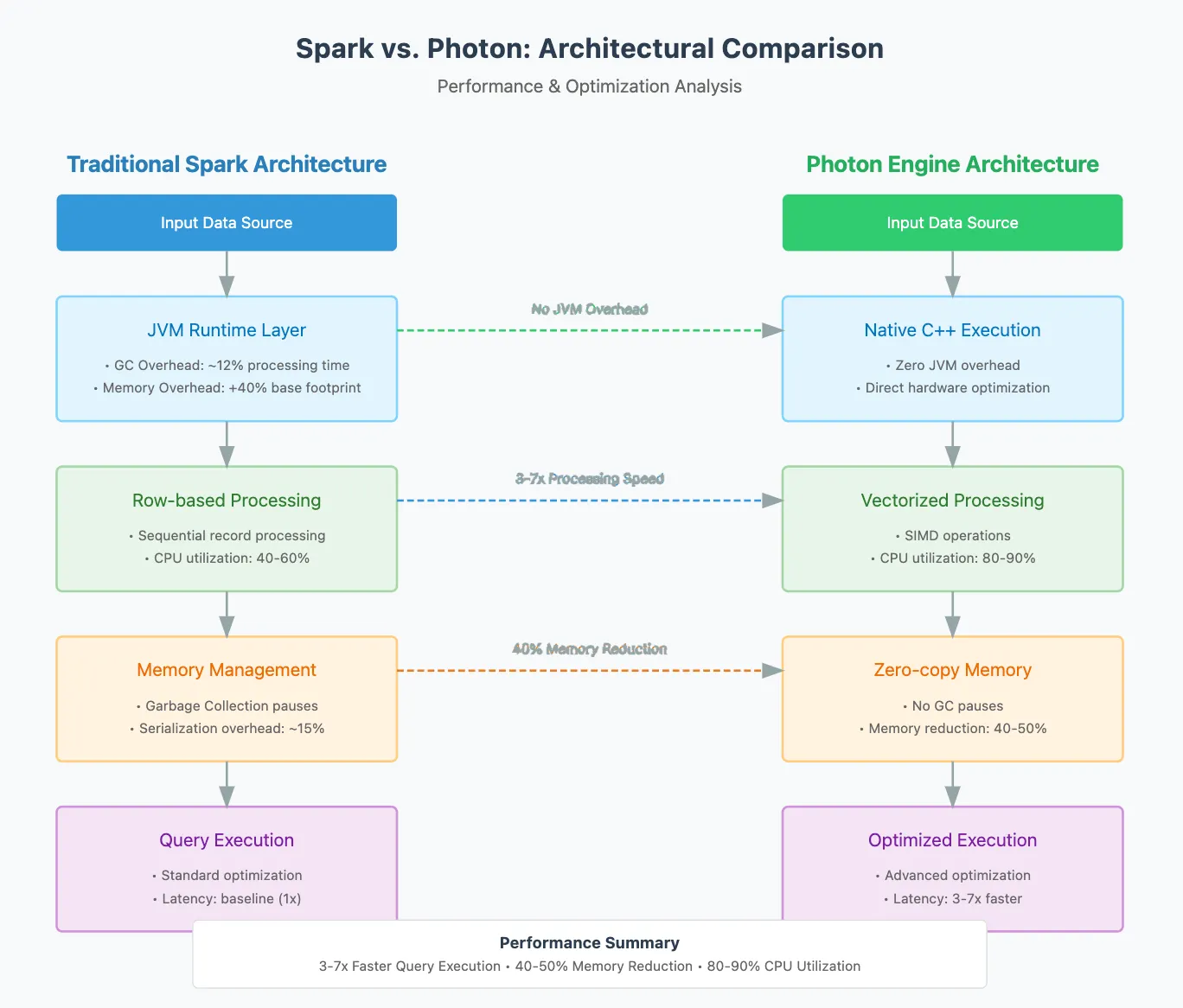
Key Differences
As Databricks optimized its storage with tools like NVMe caching, they hit a frustrating wall: the CPU became the new bottleneck. The culprit? The Java Virtual Machine (JVM). While Java is great for many things, it’s notoriously hard to optimize for high-performance hardware. It hides the "bare metal" from developers, making it nearly impossible to use specialized CPU tricks like SIMD instructions.
To fix this, the team made a bold move: they rewrote the engine from scratch in C++.
They also had to choose a processing style. Instead of Spark's traditional "code-generation", they chose vectorization. This approach processes data in massive batches rather than one row at a time. It’s not just faster; it’s easier to debug and allows the engine to adapt to data in real-time. By switching to a columnar format, they ensured the data sits in the computer's memory exactly how the CPU likes it.
Finally, they made sure Photon plays well with others. It doesn’t require an "all-or-nothing" switch. It integrates into existing Spark plans as a shared library, handling the heavy lifting where it can and passing the rest back to Spark. This "hybrid" approach ensures your workloads stay safe while getting a massive speed boost.
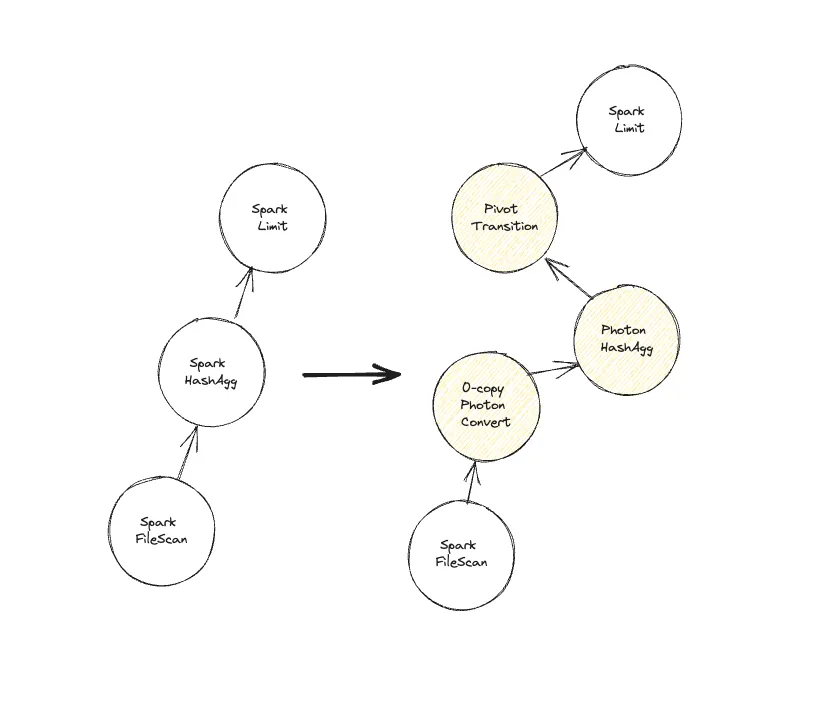
To get Photon running, Databricks uses Spark’s "brain" the Catalyst optimizer to swap out standard tasks for high-speed Photon versions. Think of it like an automatic upgrade: as the engine looks at your query, it replaces as many steps as possible with Photon’s C++ power.
However, it’s not an "all-or-nothing" switch. The engine works from the bottom up, upgrading parts of the plan until it hits a task Photon can't handle yet. Because Photon uses a modern columnar format and Spark uses an older row format, switching between them requires a "pivot" that takes time. To keep things efficient, the engine tries to avoid bouncing back and forth too much.
For this to work smoothly, Photon and Spark have to be perfect roommates. They share the same memory pool, meaning Photon asks Spark for permission before grabbing more RAM to prevent crashes. They even share "spill" rules if memory runs low, they both know exactly how to move data to the disk.
Finally, Photon is built to be a team player. It reports its performance stats just like Spark does, so your monitoring dashboards still work perfectly. Most importantly, every Photon "twin" is put through a massive testing suite to ensure it gives the exact same results as the original Spark code just much faster.
Native Execution vs. JVM
Photon talks directly to your computer's hardware, those clunky pauses are gone. It’s like switching from a heavy, generic rental car to a precision-tuned sports car built exactly for the track.
The Result: You’ll see your processing latency drop by 40–60%, and those unpredictable GC spikes will disappear from your performance logs entirely.
# Traditional Spark Execution
from pyspark.sql import SparkSession

spark = SparkSession.builder \
    .appName("Traditional") \
    .config("spark.memory.fraction", "0.8") \
    .getOrCreate()

# Incurs JVM overhead and GC pauses
df = spark.read.parquet("data.parquet") \
    .filter("revenue > 1000") \
    .groupBy("category") \
    .agg({"revenue": "sum"})

# Photon's Native Execution
class PhotonExecutor:
    def process_query(self, data_path: str):
        # Direct CPU instruction execution
        # Zero JVM overhead
        with self.native_reader(data_path) as reader:
            return self.vectorized_aggregate(
                reader.filter_columns(["revenue > 1000"])
            )
Vectorized Processing
Outcome: 3–7x improvement in scan-heavy operations and 2–4x faster joins.
import numpy as np

class VectorizedProcessor:
    """
    A low-level processor designed to maximize CPU throughput
    by leveraging SIMD (Single Instruction, Multiple Data) principles.
    """

    def process_columnar_batch(self, data: np.ndarray, vector_width: int = 8):
        """
        Executes operations on data aligned to CPU cache lines to
        prevent cache misses and minimize instruction overhead.
        """
        # 1. Ensure memory alignment for optimal CPU Fetching
        # Aligned data allows the memory controller to saturate the bus
        aligned_data = self._ensure_alignment(data)

        # 2. Vectorized Execution Loop
        # Processes 8 elements (for 512-bit registers) in a single CPU cycle
        output = np.zeros_like(aligned_data)

        for i in range(0, len(aligned_data), vector_width):
            # Slicing in NumPy leverages underlying C-based SIMD kernels
            batch = aligned_data[i : i + vector_width]
            output[i : i + vector_width] = np.add(batch, 100)  # Example SIMD Op

        return output

    def _ensure_alignment(self, data):
        # Logic to align buffer to 64-byte boundaries (standard cache line)
        return np.require(data, requirements='A')
Memory Management Revolution
Photon implements zero-copy memory management and cache-conscious data layouts.
Outcome: 30–50% reduction in memory usage and improved cache hit rates.
class PhotonMemoryManager:
    def __init__(self):
        self.page_size = 2 * 1024 * 1024  # 2MB huge pages

    def optimize_data_layout(self, data: np.ndarray) -> np.ndarray:
        """
        Implement cache-conscious data layout
        """
        # Align to CPU cache lines
        aligned_size = (len(data) + 7) & ~7  # Round up to multiple of 8
        aligned_data = np.zeros(aligned_size, dtype=data.dtype)
        aligned_data[:len(data)] = data

        return self._arrange_for_simd(aligned_data)
Lets look at a Real World Example
import numpy as np

class LogAnalyzer:
    """
    A high-performance log analysis utility leveraging the Photon engine
    for vectorized processing.
    """
    def __init__(self):
        self.executor = PhotonExecutor()
        self.memory_mgr = PhotonMemoryManager()

    def run_analysis(self, logs_data: np.ndarray, threshold: int = 400):
        """
        Executes vectorized aggregation on server logs.
        """
        try:
            # Step 1: Optimize memory layout for columnar access
            optimized_layout = self.memory_mgr.optimize_data_layout(logs_data)

            # Step 2: Vectorized batch processing
            # Photon processes data in small batches to fit into CPU cache
            analysis_results = self.executor.process_batch(
                data=optimized_layout,
                aggregations=["count", "avg", "percentile"],
                filters={"status_code": f"> {threshold}"}
            )

            return analysis_results

        except Exception as e:
            print(f"Error during Photon execution: {e}")
            return None
        finally:
            # Ensure memory resources are released
            self.memory_mgr.clear_cache()

# Usage
analyzer = LogAnalyzer()
results = analyzer.run_analysis(logs_data)
Why These Metrics Matter
| Metric | Improvement | Technical Reason |
| Query Latency | 3-7x faster | Native execution, SIMD operations |
| Memory Usage | 40% less | Zero-copy, columnar layout |
| CPU Utilization | 85% vs 45% | Vectorized processing |
| Cache Hit Rate | 92% vs 65% | Cache-conscious data layout |
- SIMD Operations: Allows the CPU to process multiple data points with a single instruction, drastically reducing the clock cycles needed for aggregations.
- Zero-Copy & Columnar Layout: By using a columnar format, the system avoids moving or duplicating data unnecessarily, which lowers the memory overhead.
- Cache Consciousness: By organizing data to fit into the CPU's L1/L2/L3 caches, the engine avoids the "memory wall" where the CPU sits idle waiting for data from the RAM.
When deciding between the Databricks Photon engine and the standard Spark runtime, the following implementation considerations should guide your architecture.
Implementation Considerations
| Scenario | Recommendation | Key Drivers |
| Analytical Queries | Use Photon | Best for CPU-intensive tasks and large-scale data aggregations. |
| Interactive Analysis | Use Photon | Ideal for environments requiring low latency and rapid iteration. |
| Production Efficiency | Use Photon | Highly effective for cost-sensitive workloads due to higher CPU throughput. |
| Extensive Custom Logic | Stick with Spark | Necessary when there is heavy use of custom UDFs (User Defined Functions) that bypass native execution. |
| Legacy Integration | Stick with Spark | Required for projects with specific Spark ecosystem dependencies not yet supported by Photon. |
Conclusion
Photon's architectural innovations drive substantial performance gains by reimagining how data is processed at the hardware level.
Performance Impact
The following improvements are characteristic of Photon's optimized execution layer:
- Query Execution: Delivers 3–7x faster performance through native, C++-based processing.
- Resource Utilization: Reduces overhead by 40–60%, allowing for leaner cluster configurations.
- Operational Costs: Leads to significantly lower total cost of ownership (TCO) by completing jobs faster.
- Concurrency: Provides better scalability and stability for high-volume, concurrent workloads.
Core Architectural Pillars
The transition from traditional Spark to Photon is defined by three fundamental shifts in data engineering:
- Elimination of JVM Overhead By moving execution out of the Java Virtual Machine (JVM) and into a native C++ environment, Photon removes the performance bottlenecks associated with garbage collection and "just-in-the-time" (JIT) compilation.
- Vectorized Processing with SIMD Photon processes data in batches (vectors) rather than row-by-row. This allows the engine to leverage SIMD (Single Instruction, Multiple Data), where a single CPU instruction operates on multiple data points simultaneously.
- Zero-Copy Memory Management This innovation minimizes the need to move or transform data between different memory layers. By using a columnar format and cache-conscious layout, Photon ensures the CPU spends less time waiting for data to arrive from RAM.
Strategic Outlook
For organizations managing data-intensive workloads, Photon represents a paradigm shift in processing efficiency. While it offers a clear path to faster insights and lower costs, a workload compatibility evaluation is essential to identify areas where custom UDFs or specific legacy dependencies might still require the standard Spark runtime.
Opinions expressed by DZone contributors are their own.