

Architectural View Model for Integration Projects
An experienced senior consultant explains how to document enterprise integration solutions for a MuleSoft/Integration project.
Join the DZone community and get the full member experience.
Join For FreeBeing an Integration Architect or an SME is crucial, or I must say, an essential skill to document the business problems/scenarios and the solutions architecture properly. The documentation can mean different things to a different set of people, for example, you cannot discuss a class diagram with a business owner, similarly business scenarios with a systems engineer.
Thus, it's fair to say that it's the responsibility of a solutions architect to create illustrations targeted to a specific audience group to get the most out of the discussions and get the solution 'accepted' globally.
Designing integration solutions is only 50% of the work in the consulting world and the rest goes in presenting it and getting the buy-in. It is rightly said:
No solution is better then other if you cannot present it well
Thus documenting the Architectural View Model is essential in the consulting world. Now next question arises:
Is there a standard way of documenting such a view model that can be used as a blueprint?
The answer is not very straightforward but yes, integration platform giants such as Mulesoft suggest using a seasoned solution such as the 4+1 View model to document the use cases. In this approach, you have below views defined for an integration solution:
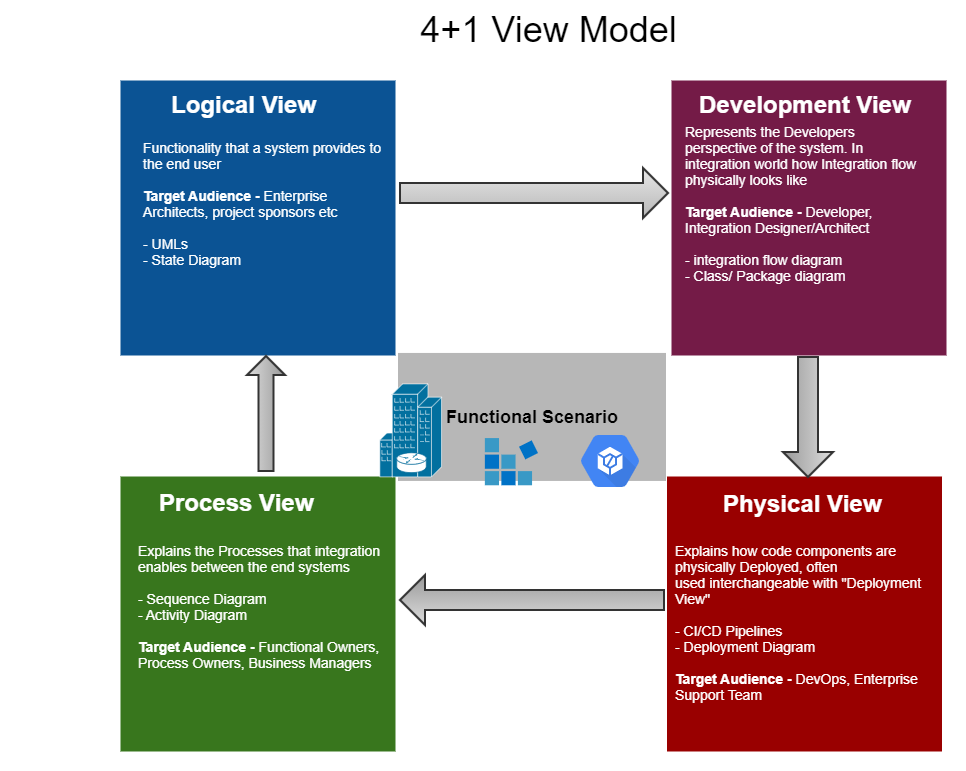
Let us now have a close look at the view models and how they are done during different phases of project execution:
During Requirement Gathering Phase
- Scenarios View: These are the starting point of the integration documentation and requirement analysis. It basically shows the behaviour of the system from an end-user perspective. Usually, in the integration projects, there is interaction with an end system rather than an end-user but the user-stories work well in the case too.

This view helps to validate the 'need' of the solution by the business owners/key stakeholders.
Scenarios can be documented easily by user stories and use case diagrams.
- Logical View: Denotes the functionality a system provides to the end-user. The view defines and documents systems, stakeholders, interfaces, and their relationships. It provides a big picture view of how the solution fits in the enterprise architecture.
This view helps you to convince enterprise architects that the solution architecture fits well within the enterprise architecture and goals.
The logical view can be documented easily using the sequence diagrams and activity diagrams. For integration projects sequence diagrams makes sense as it clearly depicts the flow of information between systems e.g. communication between a computer and a server:

During Implementation Phase
- Process View: Talks about the process the integration facilitates/enables between the end systems. This view is typically very important as it is the link between the business problem and the technical solution.
Sequence Diagrams and Activity Diagrams represent the process view:

Target audience: Functional Owners, Business Owners
- Development View: This view is about document how to code the 'solution', this documents the code and the packages involved in the project. For an integration solution, this view would generally contain the drag and drop flow or class interaction diagram between different components. Sometimes this view can be extended to show the branching/merging strategies as well.

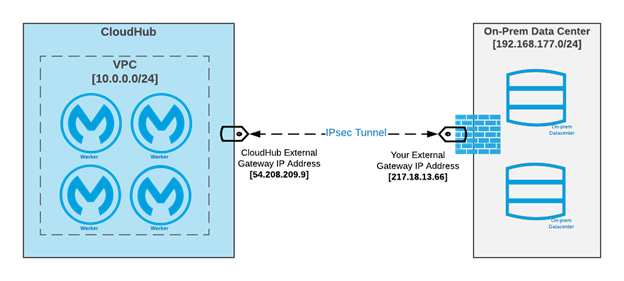
- Physical View: Also known as the deployment view, this view is for a systems engineer or a DevOps person showing different aspects of the system involved. Usually, for an integration project, the physical view can be used in conjunction with the deployment view where different 'physical aspects' of the system are shown and how they interact with each other.
Target audience: DevOps Team, Enterprise Support Team, System Engineers.
Conclusion
As we move more and more into the 'agile' way of working we tend to ignore these important aspects of software engineering. In my view as an architect, these views should be taken into consideration while craking on with the project. This would immensely help to get a clear view of the project to different audience group and how it fits in the landscape of their enterprise IT.
Opinions expressed by DZone contributors are their own.
Comments