

Audit Database Changes With Debezium
In this article, we will explore Debezium to capture data changes. Debezium is a distributed open-source platform for change data capture. Point the Debezium...

In this article, we will explore Debezium to capture data changes. Debezium is a distributed open-source platform for change data capture. Point the Debezium connector to the database and start listening to the change data events like inserts/updates/deletes right from the database transaction logs that other applications commit to your database.
Debezium is a collection of source connectors of Apache Kafka Connect. Debezium's log-based Change Data Capture() allows ingesting the changes directly from the database's transaction logs. Unlike other approaches, such as polling or dual writes, the log-based approach brings the below features.
- Ensures that all data changes are captured. The data changes may come from multiple applications, SQL editors, etc. Debezium captures every change event.
- Produces change events with a very low delay while avoiding increased CPU usage required for frequent polling.
- As the changes are captured at the database transaction log level, no changes required to your data model, such as a 'Last Updated' column.
- It captures deletes.
Use Case
Let us discuss a use case to audit the database table changes for compliance purposes. There are different approaches to audit the databases.
- Using database triggers to monitor the DDL/DML changes. But, database triggers come with pain if you don't use them wisely and hence lot of enterprise applications avoid them.
- Envers. The Envers module aims to provide an easy auditing/versioning solution for entity classes. It does a good job but, below are the issues we have.
- The audit logging is synchronous.
- The audit logging and the actual database changes for business logic need to be wrapped with the same transaction. If the audit logging fails, the whole transaction needs to be rolled back.
- If we decide to push the changes to another database instance, we might end up using distributed transactions. This will add performance overhead to the application.
- If we need to push the changes to other systems like analytics, search, etc. will be problematic.
- Mixing audit logging with the actual business logic creates a codebase maintenance issue.
- Not able to capture the changes coming from other applications/SQL shell.
- Writing our own audit framework to capture the data changes. This works but, has the same issues highlighted on #2 above.
Change Data Capture with Debezium
Now, let us see how Debezium solves the use case of database audit. The below design depicts the components involved to audit the DB with Debezium.
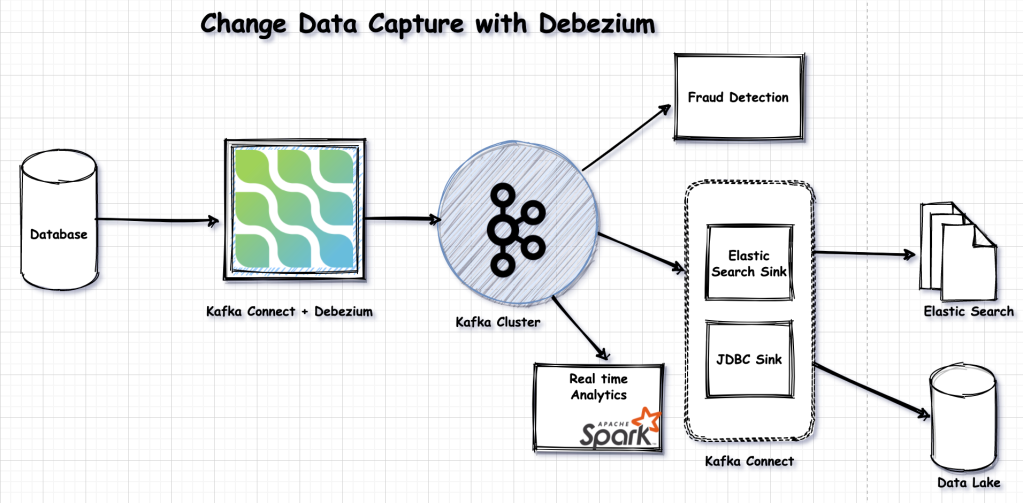
Follow the below steps to set up the Debezium connector.
Step 1
Download the connectors from https://debezium.io/releases/1.4/#installation. In this example, I am using MySql. Hence, I downloaded the Debezium MySql connector. Debezium has connectors for a variety of databases.
Step 2
Install Kafka cluster. I used a simple Kafka cluster with one Zookeeper and one broker. Under the same Kafka installation, you will find Kafka connect related properties. Set the Debezium related jar files into the Kafka connect classpath by updating the plugin.path under connect-distributed.properties file.
Step 3
Enable the bin log for the MySQL database.
Step 4
Launch the Kafka cluster and the Kafka connect by launching the below commands.
#To start the Zookeeper
bin/zookeeper-server-start.sh config/zookeeper.properties
#To start the Kafka broker
/bin/kafka-server-start.sh /config/server.properties
#To start the Kafka connect
/bin/connected-distributed.sh /config/connected-distributed.properties
Step 5
Add the MySQL source connector configuration to the Kafka connect.
xxxxxxxxxx
curl -k -X POST -H "Accept:application/json" -H "Content-Type:application/json" http://localhost:8083/connectors/ -d '{
"name": "mysql-connector-demo",
"config": {
"connector.class": "io.debezium.connector.mysql.MySqlConnector",
"database.hostname": "localhost",
"database.port": "3306",
"database.user": "debezium",
"database.password": "dbz",
"database.server.id": "1",
"database.server.name": "dbserver1",
"database.history.kafka.bootstrap.servers": "localhost:9092",
"database.history.kafka.topic": "customers_audit",
"table.include.list": "inventory.customers",
"transforms": "Reroute",
"transforms.Reroute.type": "io.debezium.transforms.ByLogicalTableRouter",
"transforms.Reroute.topic.regex": "([^.]+)\\.([^.]+)\\.([^.]+)",
"transforms.Reroute.topic.replacement": "$3"
}
}'
The details of the configuration are explained below:
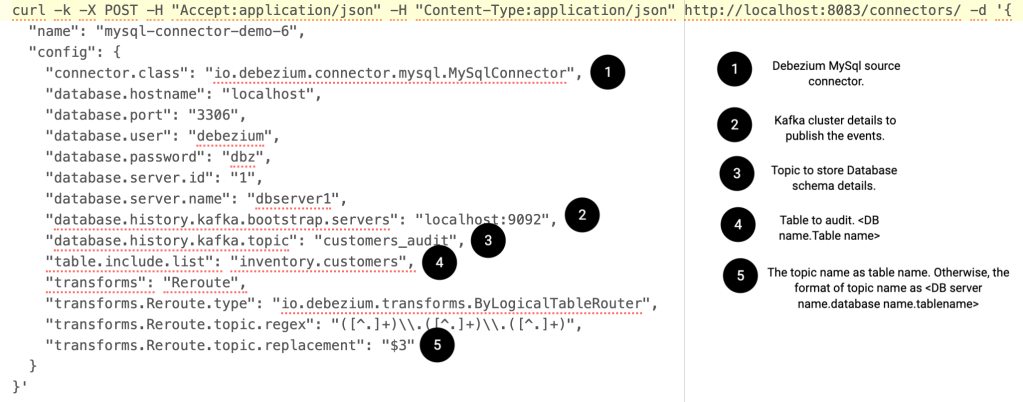
Step 6
Now, run some inserts/updates/deletes on the table which we configured to audit to see the events on the topic.
Below are some of the events we received on the topic for insert/update/delete DML. The actual JSON will have other properties. But, I am showing the trimmed version for simplicity.
xxxxxxxxxx
{
"before": null,
"after": {
"id": 1016,
"first_name": "Smart",
"last_name": "Techie",
"email": "[email protected]"
},
"source": {
"version": "1.4.2.Final",
"connector": "mysql",
"name": "dbserver1",
"ts_ms": 1615928467000,
"snapshot": "false",
"db": "inventory",
"table": "customers",
"server_id": 223344,
"gtid": null,
"file": "mysql-bin.000003",
"pos": 4015,
"row": 0,
"thread": 36,
"query": null
},
"op": "c",
"ts_ms": 1615928467236,
"transaction": null
}
xxxxxxxxxx
{
"before": {
"id": 1016,
"first_name": "Smart",
"last_name": "Techie",
"email": "[email protected]"
},
"after": {
"id": 1016,
"first_name": "Smart",
"last_name": "Techie",
"email": "[email protected]"
},
"source": {
"version": "1.4.2.Final",
"connector": "mysql",
"name": "dbserver1",
"ts_ms": 1615928667000,
"snapshot": "false",
"db": "inventory",
"table": "customers",
"server_id": 223344,
"gtid": null,
"file": "mysql-bin.000003",
"pos": 4331,
"row": 0,
"thread": 36,
"query": null
},
"op": "u",
"ts_ms": 1615928667845,
"transaction": null
}
xxxxxxxxxx
{
"before": {
"id": 1016,
"first_name": "Smart",
"last_name": "Techie",
"email": "[email protected]"
},
"after": null,
"source": {
"version": "1.4.2.Final",
"connector": "mysql",
"name": "dbserver1",
"ts_ms": 1615928994000,
"snapshot": "false",
"db": "inventory",
"table": "customers",
"server_id": 223344,
"gtid": null,
"file": "mysql-bin.000003",
"pos": 4696,
"row": 0,
"thread": 36,
"query": null
},
"op": "d",
"ts_ms": 1615928994823,
"transaction": null
}
You can find a list of clients who uses Debezium here. I hope you enjoyed this article. We will meet in another blog post. Till then, Happy Learning!!
Published at DZone with permission of Siva Prasad Rao Janapati. See the original article here.
Opinions expressed by DZone contributors are their own.