

Azure Cosmos DB Change Feed: A Zero Downtime Data Migration Story
Check out why the Azure's Cosmos DB Change Feed could be for you.

Azure Cosmos DB is a fully managed, highly scalable, multi-model PaaS database solution offered by Microsoft as part of the Azure platform stack.
Azure Cosmos DB offers many useful features that can be easily enabled/disabled via feature toggles and fine-tuned through the Azure portal; the one we're going to talk about today is called Change Feed.
What’s a Change Feed?
Change Feed is a system that allows you to listen to all insertion and update events that happen on records (documents) inside any given Azure Cosmos DB collection.
You can imagine it as a sort of commit log that can be queried at any time to retrieve useful information about whatever happens to your collection of interest.
You may also like: Experience Using Azure Cosmos DB in a Commercial Project.
When Should I Use a Change Feed?
There are several common use cases for employing a Change Feed as an event sourcing mechanism.
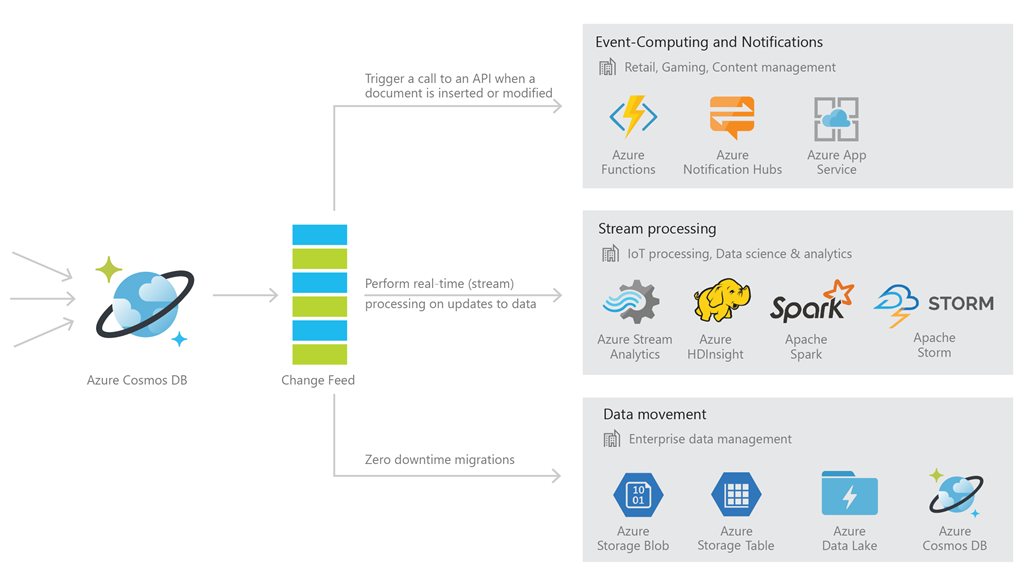
- Pulling data from the Change Feed as it comes, and triggering calls to external APIs (including Azure Functions, Azure Logic Apps and the like!) as a consequence.
Imagine a system that needs to send out notification emails to all of your subscribers whenever a new article (that gets stored on Azure Cosmos DB) has been published, consuming the Change Feed and channeling it into an Azure Function which in turn triggers an Azure Logic App that uses an Office 365 Outlook connector would make for a very elegant, highly scalable and fully serverless solution! - Data ingestion and almost-real time processing via tools such as Azure Stream Analytics or Apache Spark. When using the right API for the task, it is possible to fine-tune parameters, such as the Change Feed polling window and the max item count for a given polling window, leaving us with a quite predictable and controlled stream of data that can be used for further elaboration without fear of stressing the system beyond its possibilities.
- Finally, my favourite scenario: zero downtime data migrations can be easily performed by consuming the Change Feed and replicating all insertion and update events coming from it into another persistence solution (eg. Azure Redis Cache). This allows users to have multiple applications that are able to work on the same data at any given time, laying the basis for a resilient system with a solid disaster recovery plan with zero waiting time.
How to Use the Azure Cosmos DB Change Feed
There are three main ways you can interact with the Azure Cosmos DB Change Feed:
- Using the SQL API SDK library for Java or .NET, and specifically the AsyncDocumentClient.queryDocumentChangeFeedAPI; this is the low-level approach. You have full control over the Change Feed interaction, but at a very significant price: you must re-invent the wheel!
You’ll have to implement your own polling and leasing mechanisms if you want to use this API to continuously consume the Change Feed. It is really only advised to use this API for scenarios where you need to query the Change Feed just once. - Again, using the SQL API SDK library for Java/.NET, but this time invoking the high-level ChangeFeedProcessor API. The
ChangeFeedProcessoris quite easy to use, as it doesn’t require a large amount of code in order to work properly and has polling, leasing, and customization mechanisms already in place. - Finally, the highest-level solution is to use Azure Functions that are invoked by Azure Cosmos DB Change Feed triggers automatically. This is the full serverless approach and should be the way to go when the scenario to be handled is fairly simple and there is no useful code in your applications that should be re-used (the lower-level APIs could directly interact with your existing code as they would live within the same codebase, whereas an Azure Function would have to perform an HTTP request against your application or invoke its services by producing events, making it less efficient for the task at hand).
Change Feed Processor
Of the three ways we just talked about, my personal favorite for tricky scenarios would have to be the ChangeFeedProcessor API, since it offers the best compromise between ease of use and customizability.
Polling, Leasing, and Customization
One of the main things that makes the ChangeFeedProcessor such a great API is the fact that polling and leasing are already implemented for us. As far as polling is concerned, the Change Feed is queried by the ChangeFeedProcessor under the hood every feed poll delay seconds. We can easily change the feed poll delay, which is set to five seconds by default.
Leasing is the mechanism through which a ChangeFeedProcessor acquires unique ownership of one or more partition ranges within a Change Feed, distributing work evenly amongst multiple ChangeFeedProcessors — making sure they don’t end up consuming the same events — and keeping track of the last eventthat was successfully read from the Change Feed so that you can resume consuming the feed from that event in case of a failover scenario (once the lease has been freed up by its previous owner, that is — either actively or through lease expiration, where the default lease expiration interval is 60 seconds).
Leasing can be performed by relying on a technical collectionthat must be preemptively created and is used to store all the leases for a given Change Feed, their current owners, and the related continuation tokens. It doesn’t need any special name and the minimum RU provisioning will most likely suffice for the vast majority of use cases.
It should also be noted that it’s possible to have multiple ChangeFeedProcessors consume the same events from the Change Feed by configuring them to use different lease prefixes.
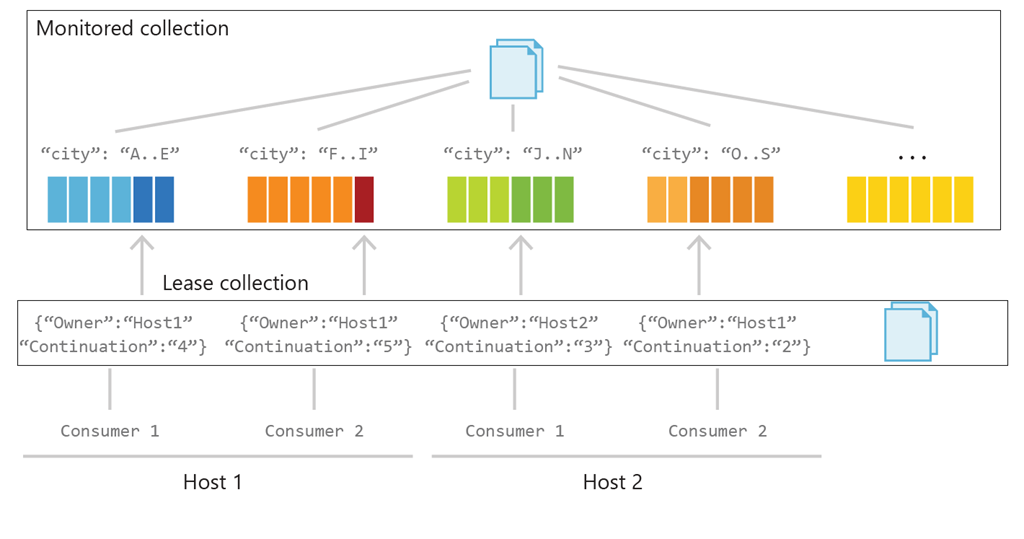
The diagram above shows two different hosts (eg. μservices), one ChangeFeedProcessor for each, then gaining ownership of two leases each (each lease is represented as a single document inside the leases technical collection), therefore equally distributing the work by consuming events from different partition ranges within the Change Feed (eg. host 1 will only consume events for cities that start with A..I, whereas host 2 will only consume events for cities that start with J..S).
Customization is possible via the ChangeFeedProcessorOptions API, which lets us tune all sorts of things, from the feed poll delay to the max item count, lease prefix and lease expiration interval.
It can also be used to specify if the Change Feed should be consumed starting from the beginning, from a certain date-time or from the stored continuation token within the lease (the latter is default behaviour)!
Using the ChangeFeedProcessor
First of all, import the required SQL API SDK dependency for Java by adding the snippet below to your pom.xml:
<dependency>
<groupId>com.microsoft.azure</groupId>
    <artifactId>azure-cosmos</artifactId>
    <version>3.2.1</version>
</dependency>
Then build a CosmosClient, with your connection properties:
public static CosmosClient getCosmosClient() {
  return CosmosClient.builder()
    .endpoint("my-cosmosdb-endpoint")
    .key("my-cosmosdb-master-key")
    .connectionPolicy(ConnectionPolicy.defaultPolicy())
    .consistencyLevel(ConsistencyLevel.EVENTUAL)
    .build();
}
Finally, build and start your ChangeFeedProcessor, providing at least: the hostname that will be used as an identifier for lease ownership, the feedContainer (the collection that should provide the Change Feed), and the leaseContainer (the technical collection used to store the leases):
public static void startChangeFeedProcessor(String hostName, CosmosContainer feedContainer, CosmosContainer leaseContainer) {
    ChangeFeedProcessor.Builder()
        .hostName(hostName)
        .feedContainer(feedContainer)
        .leaseContainer(leaseContainer)
        .options(new ChangeFeedProcessorOptions().leasePrefix("my-lease-prefix")) //not required
        .handleChanges(docs -> {
            for (CosmosItemProperties document : docs) {
                System.out.println("Read document from Change Feed: " + document.toJson(SerializationFormattingPolicy.INDENTED));
            }
        })
        .build()
        .start()
        .subscribe();
}
This is really all there is to it!
Once the ChangeFeedProcessor has been started, it will keep receiving events from the Change Feed until it is gracefully stopped by invoking the ChangeFeedProcessor#stop() method, which releases the leases that were owned by that particular ChangeFeedProcessor so that the others can immediately gain their ownership and keep consuming events as they come without having to wait for the expiration interval.
Conclusion
The Azure Cosmos DB Change Feed is a nifty feature that can be used to forge elegant, resilient and scalable solutions for a specific set of use cases.
It should not be overlooked, especially when your requirements call for its usage and you already rely on Azure Cosmos DB for other purposes!
Further Reading
Published at DZone with permission of Domenico Sibilio. See the original article here.
Opinions expressed by DZone contributors are their own.