

A Deep Dive into Behavior-Driven Development
Behavior-Driven Development (BDD) bridges the gap between technical and non-technical stakeholders by using plain-language scenarios to define and test software behavior.
 ·
·
Join the DZone community and get the full member experience.
Join For FreeBehavior-Driven Development (BDD) fosters integration between developers, testers, product owners, and business analysts. Scenario participation ensures a common understanding of system functionality among all participants. In this article, we focus on BDD, its definition, importance, and strategies for implementing it in current projects.
Understanding the Problem
In software engineering, fulfilling both a product's technical requirements and the business objectives is essential.
All of the earlier development methods, such as Waterfall or even Agile variants like Test-Driven Development (TDD), encounter difficulties in resolving the interplay of developers and stakeholders who do not speak the same language.
BDD attempts to solve this by providing a collaborative, example-driven solution. One of the most impactful trends and practices of BDD nowadays is its adoption in almost all industries in the entangled world of business and information technology.
What is Behavior Driven Development (BDD)?
BDD is an extension of TDD that leverages plain English phrases to describe an application's functionality and requirements from the end-user's standpoint. In contrast, in TDD, the unit tests are written for each single code unit.
BDD revolves around defining behaviors regarding an application's functionalities, collaboration, and communication. This is to reach a common understanding among technical and non-technical team members and conducting automated testing based on these behaviors.
BDD uses simple domain-specific languages to ensure that software is developed based on the expected behaviors or specifications. BDD uses written natural language to describe the system's expected behavior in human-readable and comprehensible contexts.
The scenarios capture the problem definition in a straightforward and understandable format for the developers, testers, product owners, and business analysts involved in the project.
Why Do We Need BDD?
BDD provides an adaptable, systematic approach that addresses the challenges encountered in contemporary software development. Through team collaboration, BDD enables the alignment of software engineering tasks with corporate goals. It integrates technical and non-technical stakeholders so that the product can be delivered as expected without problems.
Though challenging to plan and execute, the benefits of adopting the approach (enhanced product quality, accelerated iterations, and bolstered stakeholder satisfaction) far outweigh the planning and skilled execution required.
How Does BDD Work?
Here are a few points that describe how BDD works:
- The behavior of a system is captured and analyzed from the business stakeholder's perspective
- Meetings aimed at bridging the knowledge gap among technical and business personnel
- Tests that verify the behavior of the system are automated
Key Concepts of BDD
A feature is the description of a particular application functionality.
- Scenario: A scenario describes how a specific system behaves at runtime in a given context.
- Step: A scenario comprises several steps that act as phrases (Given, When, Then)
- Given: This is used to describe the problem and provide the context.
- When: This is defined as actions to be taken by an actor or an occurrence.
- Then: This describes the expectations after the operations or actions.
Key Benefits
The key benefits of BDD include the following:
Encouraged Collaboration
With BDD Testing, the business stakeholders, the developers, and the testers all work together. Every participant in the software development lifecycle is synchronized and collaborates toward achieving the business goals and objectives.
Communications gaps between technical and non-technical personnel are eliminated with BDD. A business analyst collaborates with a QA engineer and a developer to draft a detailed test scenario, illustrating shared understanding of the project milestones.
Better Clarity
BDD testing is easy for non-technical stakeholders as it employs plain language syntax. It enhances a business stakeholder's ability to articulate their requirements and expectations to the development team, which is crucial in ensuring every party is aligned.
BDD allows teams to focus on incremental value delivery. Continuous testing guarantees that newly implemented features operate correctly and safeguards the integrity of pre-existing business rules.
Enhanced Test Coverage
Testing a software system's behavior enhances scenario coverage. BDD Tests help mitigate risks related to bugs and other software issues.
Quick Feedback
With BDD testing, developers receive feedback swiftly. Fast feedback reduces the developer's time to resolve issues, thus aiding in the timely and budget-friendly delivery of the software.
Cost Reduction
With BDD testing, all attention is focused on detection and fixes during the development process. Issues that arise in the later stages of development are usually far more expensive because of the multiple stages of additional work involved. Therefore, catching issues early lowers costs.
Increased Agility
As business goals and priorities shift, BDD testing perfectly matches those adjustments while still offering plenty of flexibility and agile adaptation. This ensures that the target output always aligns with business objectives.
Improved Quality
With BDD testing, you can build high-quality software that meets the business standards and objectives. The result is an application is easy to use, reliable, and can meet the requirements of the end users.
Understanding the BDD Life Cycle
A typical BDD life cycle follows the steps given below:
- Describe behavior: This captures the essence and vision of how the product flows and its features.
- Define requirements: This defines the business rules based on the requirements.
- Create test cases: In this phase, you should define the test cases based on behaviors.
- Write code: This is where you write the code to implement BDD.
- Run the tests: Create and execute the defined test cases.
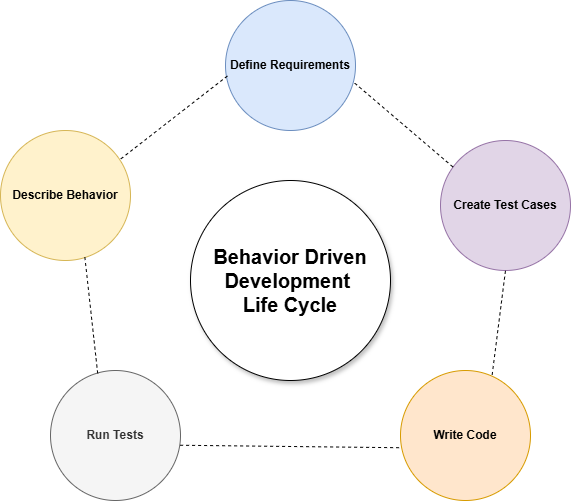
Figure 1: The BDD Life Cycle
Implementing Behavior Driven Development
To implement BDD, you can take advantage of any of the popular tools around, such as Cucumber, Behave, or SpecFlow. Once you've decided on the tool, the next step is to write the features.
1. Create the Feature
A feature is defined as a particular functionality of the application and is described in a file that has a feature suffix. Let us define a feature in a file:
Feature: User login

  Given the user is an application user

  When the user enters the login credentials

  And clicks on the Login button

  Then the application should authenticate the user
A feature comprises one or more acceptance criteria or scenarios. A scenario is an example of how a system should behave in a given context.
Let us now rewrite the feature by including a scenario:
Feature: User Login

  Scenario: Successful login with valid credentials

    Given the user is on the login page

    When the user enters a valid username and password

    And clicks on the login button

    Then the user should be redirected to the dashboard

  Scenario: Unsuccessful login with invalid credentials

    Given the user is on the login page

    When the user enters an invalid username or password

    And clicks on the login button

    Then an error message should be displayed
2. Set Up Your Project
Create a new Maven project in your favorite IDE (such as IntelliJ IDEA or Eclipse). You can also generate one using the command line.
3. Add Cucumber to Your Project
The next step is to add the Cucumber dependencies as shown below:
<dependencies>

    <!-- Cucumber dependencies -->

    <dependency>

        <groupId>io.cucumber</groupId>

        <artifactId>cucumber-java</artifactId>

        <version>7.11.2</version>

        <scope>test</scope>

    </dependency>

    <dependency>

        <groupId>io.cucumber</groupId>

        <artifactId>cucumber-junit</artifactId>

        <version>7.11.2</version>

        <scope>test</scope>

    </dependency>


    <!-- JUnit dependency -->

    <dependency>

        <groupId>junit</groupId>

        <artifactId>junit</artifactId>

        <version>4.13.2</version>

        <scope>test</scope>

    </dependency>

</dependencies>
4. Implementing Step Definitions Using Java and Cucumber
Now, implement the step definitions for the scenarios described in your feature file. The following code shows how you can define the methods using Java and Cucumber:
package stepdefinitions;

import io.cucumber.java.en.Given;

import io.cucumber.java.en.When;

import io.cucumber.java.en.Then;


class LoginStepDefinitions {

   @Given("User is on the Login page")

   public void user_is_on_the_login_page() {

      // Logic to check if user landed on the login page

   }


   @When("User enters valid username and password")

   public void user_enters_valid_username_and_password() {

      // Logic to allow the user to enter and submit username and password

   }


   @Then("User is navigated to the HomePage")

   public void user_is_navigated_to_the_homepage() {

      // User should be on home page, add implementation to verify.

   }


   @When("User enters invalid username and password")

   public void user_enters_invalid_username_and_password() {

      // Logic to determine if the credentials are invalid

   }


   @Then("An error message is displayed")

   public void an_error_message_is_displayed() {

      // Logic to determine if there are any error message(s)

   }

}
Following these steps, we've defined the behavior scenarios for login functionality in a feature file and implemented them in Java using Cucumber for BDD. Through these, we ensure that our requirements meet our users' expectations and needs.
5. Running the Tests
Finally, you can run the tests by creating a runner class and running the tests from the command line with Maven as shown below:
package runner;

import io.cucumber.junit.Cucumber;

import io.cucumber.junit.CucumberOptions;

import org.junit.runner.RunWith;


@RunWith(Cucumber.class)

@CucumberOptions(

    features = "src/test/resources/features",

    glue = "loginstepdefinitions"

)

public class TestRunner {

}
Best Practices for BDD
The following are the key best practices you should follow when using BDD:
- Involve stakeholders early and often: Collaborative define the scenarios for your feature.
- Keep scenarios focused and clear: Ensure that you've defined one behavior per scenario.
- Relate to user requirements: The scenario you define should relate to the user's requirements.
- Avoid technical jargon: Write for everyone, not just developers.
- Refactor regularly: Clean up steps and reuse them when possible.
Takeaway
BDD improves collaboration within software development teams and fosters improved communication during development processes. This results in automated tests, quicker development cycles, better code quality, and consistent attainment of business goals throughout the Software Development Life Cycle (SDLC).
Are you ready to try BDD in your next project? If so, you should start small, define a single feature collaboratively, and automate it with a BDD framework. Once you've defined and implemented your scenarios, you'll quickly see the clarity and confidence it brings to your development process.
Opinions expressed by DZone contributors are their own.
Comments