

Building an Identity-Aware MCP Server in Python
Our identity-aware MCP server built in Python rejects anonymous agents, validates OAuth 2.1 via JWKS, enforces tool-level scopes/roles, and logs full delegation chain.
Join the DZone community and get the full member experience.
Join For FreeThe Model Context Protocol connects AI agents to your databases, APIs, and file systems. Out of the box, it connects them with no identity, no scoping, and no audit trail. The MCP specification acknowledges this gap explicitly. Its OAuth 2.1 authorization spec marks authentication as optional.
The result, according to research published on Security Boulevard in April 2026, is that 53 percent of open-source MCP implementations ship with static API keys. Eighty-eight percent require backend authentication, but only 8.5 percent implement proper credential management. Every one of those static keys is a credential waiting to be stolen, a scope waiting to be abused, and an audit entry that will read "unknown agent executed query" when the incident report is written.
This article builds the alternative. We will build an MCP server in Python that accepts tool calls only from authenticated agents, validates OAuth 2.1 Bearer tokens using stateless JWKS-based validation, enforces tool-level scopes and roles, maintains an infrastructure-level tool allow-list, and logs every access decision with the full delegation chain back to the human who authorized it. The complete companion project, roughly 350 lines of Python with a 13-test suite, is available on GitHub.
Prerequisites
You will need Python 3.12 or later and an OIDC-compatible identity provider. The examples use Auth0 (free tier works), but Okta, Keycloak, Entra ID, or any provider that exposes a /.well-known/jwks.json endpoint will work. Basic familiarity with OAuth 2.1 concepts and MCP server architecture is assumed. All code shown is extracted from the companion project. File paths reference code/src/.
Architecture
Every tool call flows through five gates before reaching your business logic:
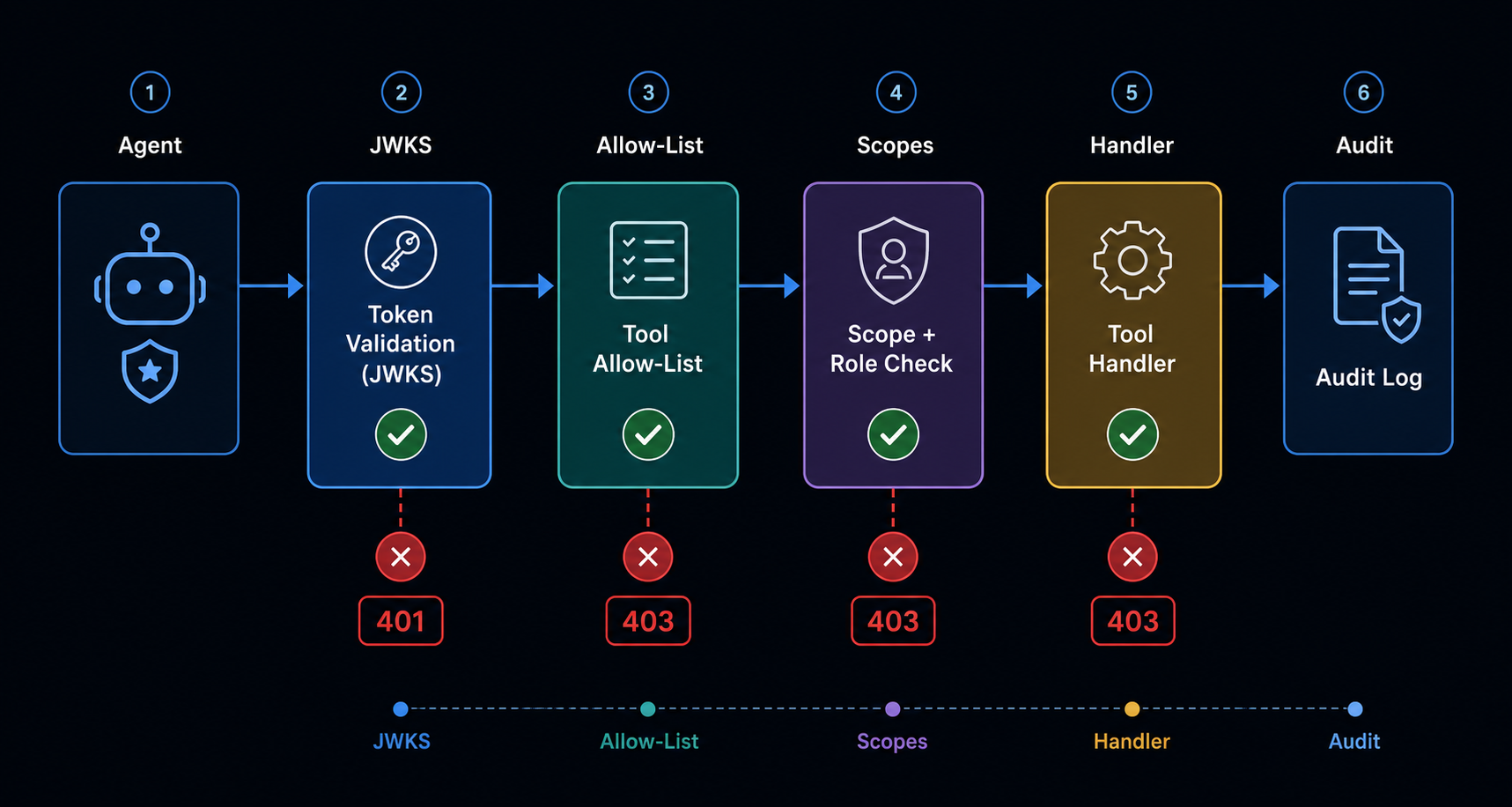
Gates two and three are infrastructure-level controls. System prompts are not security controls. An MCP server the agent has not been explicitly authorized to call should be unreachable. Period. Regardless of what the LLM decides to invoke.
Part 1: JWKS-Based Token Validation
The foundation of an identity-aware MCP server is stateless JWT validation. Every request carries a Bearer token issued by your OAuth 2.1 authorization server. The MCP server validates it against the provider's JSON Web Key Set, a public key document that lets you verify signatures without a network call to the IdP on every request.
The JWKS Cache
Create src/auth/middleware.py. We start with a cache that fetches the JWKS once and holds it in memory, refreshing every five minutes or on-demand when an unknown key ID appears (key rotation):
class JWKSCache:
    """Cached JWKS with automatic refresh on unknown key id."""

    def __init__(self, jwks_url: str, cache_ttl: int = 300):
        self._url = jwks_url
        self._ttl = cache_ttl
        self._keys: dict[str, dict] = {}
        self._last_fetch: float = 0

    async def get_key(self, kid: str) -> dict:
        if not self._keys or (time.monotonic() - self._last_fetch) > self._ttl:
            await self._refresh()
        key = self._keys.get(kid)
        if key is None:
            logger.info("Unknown kid '%s', forcing JWKS refresh", kid)
            await self._refresh()
            key = self._keys.get(kid)
        if key is None:
            raise AuthError(f"Key '{kid}' not found in JWKS", 401)
        return key

    async def _refresh(self) -> None:
        if self._url.startswith("http"):
            async with httpx.AsyncClient() as client:
                resp = await client.get(self._url, timeout=10)
                resp.raise_for_status()
                jwks = resp.json()
        else:
            with open(self._url) as fh:
                jwks = json.load(fh)
        self._keys = {k["kid"]: k for k in jwks.get("keys", [])}
        self._last_fetch = time.monotonic()
The get_key method is where the key rotation logic lives. When a token arrives with a kid the cache has never seen, we force a refresh before rejecting it. An unknown kid could mean a legitimate rotation, not an attack. We try once more before failing.
In practice, this means you never need to restart your MCP server when your identity provider rotates signing keys.
The Token Validator
The validator uses the cache to verify every Bearer token. It checks five things, and the order matters: header validity, signature, issuer, audience, and expiry:
class TokenValidator:
    def __init__(self, jwks_url: str, issuer: str, audience: str,
                 clock_tolerance: int = 30):
        self._jwks = JWKSCache(jwks_url)
        self._issuer = issuer
        self._audience = audience
        self._clock_tolerance = clock_tolerance

    async def validate(self, token: str) -> ValidatedToken:
        # 1. Decode header to get the key id.
        unverified = jwt.get_unverified_header(token)
        kid = unverified.get("kid")
        if not kid:
            raise AuthError("Token header missing 'kid' claim", 401)

        # 2. Fetch the matching public key.
        jwk = await self._jwks.get_key(kid)

        # 3. Verify signature + standard claims.
        claims = jwt.decode(
            token, jwk, algorithms=["RS256"],
            issuer=self._issuer, audience=self._audience,
            options={"verify_exp": True,
                     "require": ["exp", "iss", "sub", "aud"]},
        )

        # 4. Clock-tolerance check (belt-and-suspenders with the library).
        now = int(time.time())
        if claims["exp"] + self._clock_tolerance < now:
            raise AuthError("Token has expired", 401)

        # 5. Extract scopes, roles, and delegation chain.
        scope_str = claims.get("scope", "")
        token_scopes = set(scope_str.split())
        roles = claims.get("roles", [])
        delegation_chain = self._extract_delegation(claims)
        return ValidatedToken(
            subject=claims["sub"], email=claims.get("email"),
            roles=roles, scopes=token_scopes,
            delegation_chain=delegation_chain,
        )
The iss (issuer) check prevents tokens from a different authorization server from being accepted. The aud (audience) check prevents tokens intended for a different service from being replayed against yours. The exp check with clock tolerance handles the reality that clocks drift. Thirty seconds of tolerance is the pragmatic default recommended by the Upstash MCP OAuth deep-dive.
The delegation chain extraction is worth examining separately. When an agent acts on behalf of a human who authorized it, RFC 8693's act claim carries that nesting. We recursively unpack it:
def _extract_delegation(self, claims: dict) -> list[str]:
    chain = []
    act = claims.get("act", {})
    while act:
        sub = act.get("sub", "")
        if sub:
            chain.append(sub)
        act = act.get("act", {})
    return chain
A token issued directly to a human will have an empty delegation chain. A token issued to an agent acting on behalf of "[email protected]" will carry ["[email protected]"]. A multi-hop chain, human to orchestrator agent to sub-agent, carries both identifiers in order. This is what lets your audit logs trace every action back to a person.
Part 2: The Two Mandatory Discovery Endpoints
An MCP client connecting to your server needs to discover two things: that authentication is required, and where to get tokens. The MCP specification mandates two well-known endpoints for this, defined in RFC 9728 and RFC 8414, respectively.
Create src/auth/discovery.py:
def build_discovery_routes(
    resource_url: str,
    authorization_server_url: str,
    scopes_supported: list[str] | None = None,
) -> dict:
    async def protected_resource(request: Request) -> JSONResponse:
        return JSONResponse({
            "resource": resource_url,
            "authorization_servers": [authorization_server_url],
            "bearer_methods_supported": ["authorization_code"],
        })

    async def authorization_server(request: Request) -> JSONResponse:
        return JSONResponse({
            "issuer": authorization_server_url,
            "authorization_endpoint":
                f"{authorization_server_url}/authorize",
            "token_endpoint":
                f"{authorization_server_url}/oauth/token",
            "jwks_uri":
                f"{authorization_server_url}/.well-known/jwks.json",
            "scopes_supported": scopes_supported or [
                "database.read", "database.write",
                "email.send", "admin.users.read",
            ],
            "response_types_supported": ["code"],
            "grant_types_supported":
                ["authorization_code", "client_credentials"],
            "code_challenge_methods_supported": ["S256"],
            "token_endpoint_auth_methods_supported": ["none"],
        })

    return {
        "/.well-known/oauth-protected-resource": protected_resource,
        "/.well-known/oauth-authorization-server": authorization_server,
    }
Without these endpoints, MCP clients cannot auto-discover your authentication configuration. The client first hits your server without a token, receives a 401 with a WWW-Authenticate header pointing to the protected resource metadata, fetches it to confirm auth is required, then reads the authorization server metadata to learn the token endpoint and supported grant types.
code_challenge_methods_supported: ["S256"] is not optional. MCP clients are public clients. They cannot keep a client secret, so PKCE is the only defense against authorization code interception. The NAPTHA AI reference implementation explicitly documents this.
Part 3: Tool Definitions With Scope and Role Requirements
Now we define the tools themselves. Each tool declares what scopes and roles are required to invoke it. These declarations live alongside the tool code, not in a separate config file. Proximity reduces the chance of drift between a tool and its authorization requirements.
Create src/tools/database.py:
# Each tool is a handler with declared requirements.
TOOL_REGISTRY: dict[str, tuple[list[str], list[str], callable]] = {
    "read_customer_record": (
        ["database.read"],        # required scopes
        [],                        # required roles
        read_customer_record,      # handler
    ),
    "update_customer_plan": (
        ["database.write"],
        [],
        update_customer_plan,
    ),
    "list_all_customers": (
        ["admin.users.read"],
        ["admin"],                 # admin role required
        list_all_customers,
    ),
}
A developer with database.read scope can read customer records but cannot update plans. A contractor with no scopes gets blocked from everything. An admin with admin.users.read scope and the admin role can list all customers. The registry is the single source of truth for access control. The server enforces it at request time without consulting a database.
Here is one tool handler showing resource-level constraint enforcement:
async def read_customer_record(customer_id: int, *, _token=None) -> dict:
    # Optional: enforce per-resource constraints from the token.
    if _token and hasattr(_token, "raw_claims"):
        constraint = _token.raw_claims.get("resource_constraints", {})
        allowed_id = constraint.get("customer_id")
        if allowed_id is not None and customer_id != allowed_id:
            raise PermissionError(
                f"Token scoped to customer {allowed_id}, "
                f"requested customer {customer_id}"
            )
    record = _CUSTOMER_DB.get(customer_id)
    if record is None:
        raise ValueError(f"Customer {customer_id} not found")
    return record
The resource_constraints claim in the token is what turns "this agent can read customer data" into "this agent can read customer 48291 for the next sixty seconds." It is the difference between scoping to a database table and scoping to a row.
Part 4: The Tool Allow-List Gate
System prompts are not security controls. A prompt injection can rewrite an agent's intent mid-session and convince it to call a tool it was never meant to access. The only reliable defense is an infrastructure-level allow-list that rejects unauthorized tool calls regardless of what the LLM decides.
The allow-list is derived directly from the tool registry. Any tool not in the registry is unreachable:
ALLOWED_TOOLS: set[str] = set(TOOL_REGISTRY.keys())This set is checked before scope and role evaluation. A tool that is not in the registry cannot be called, period. A tool that is in the registry but requires scopes the token does not carry gets a 403. A tool that is in the registry and the token carries the right scopes goes through.
The distinction between "tool not in allow-list" and "tool forbidden for this agent" matters for debugging and audit. The first indicates a misconfiguration or an attack. The second indicates a legitimate agent attempting an unauthorized operation, which itself is worth logging.
Part 5: The Audit Logger
Every tool call, successful or blocked, produces an audit log entry with the full delegation chain. The format is JSON Lines: one JSON object per line, ingestible by any SIEM, Splunk, or grep.
Create src/audit/logger.py:
class AuditLogger:
    def __init__(self, filepath: str | Path = "audit.log") -> None:
        self._path = Path(filepath)
        self._path.touch(exist_ok=True)

    def record(self, event: str, token: ValidatedToken,
               tool_name: str = "", tool_args: dict | None = None,
               result_summary: str = "", error: str = "") -> None:
        entry = {
            "timestamp": time.strftime("%Y-%m-%dT%H:%M:%SZ", time.gmtime()),
            "event": event,
            "correlation_id": str(uuid.uuid4()),
            "subject": token.subject,
            "email": token.email,
            "roles": token.roles,
            "scopes": sorted(token.scopes),
            "delegation_chain": token.delegation_chain,
            "tool": tool_name,
            "tool_args": tool_args or {},
            "result": result_summary,
            "error": error,
        }
        with open(self._path, "a") as fh:
            fh.write(json.dumps(entry, default=str) + "\n")
When an auditor asks "who authorized this data access," the answer is in the log, not in a code review three weeks later. A correctly logged tool call looks like this:
{
  "timestamp": "2026-06-14T14:04:00Z",
  "event": "tool_call",
  "subject": "alice-developer",
  "email": "[email protected]",
  "roles": ["developer"],
  "scopes": ["database.read", "email.send"],
  "delegation_chain": ["bob-admin"],
  "tool": "read_customer_record",
  "tool_args": {"customer_id": 1001},
  "result": "ok"
}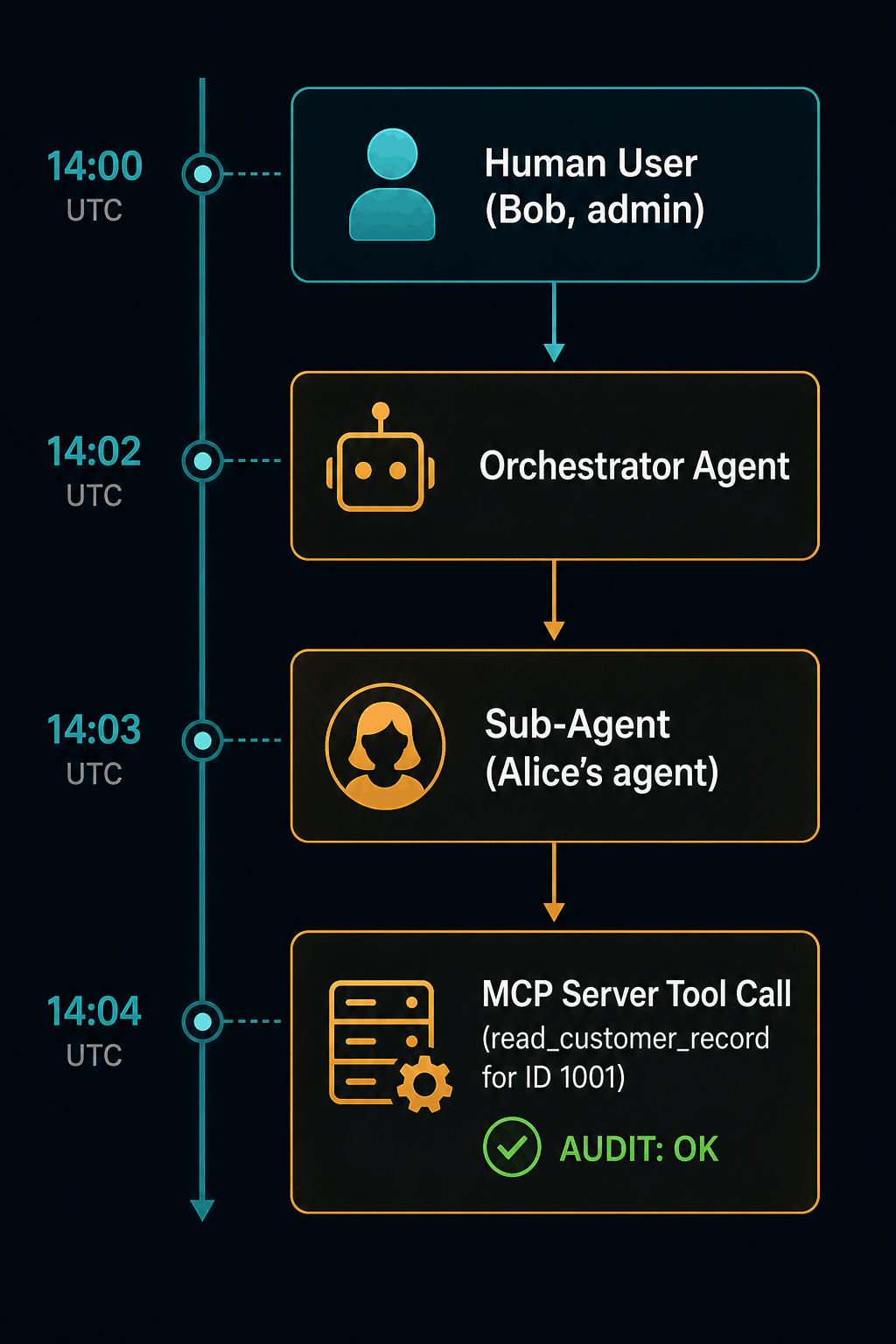
The delegation chain reads: Bob (admin) delegated to Alice's developer agent, which called read_customer_record for customer 1001 at 14:04 UTC. If your logs cannot produce that sentence, your AI identity program is not operational.
Part 6: Assembling the Server
The main server wires together the token validator, the tool allow-list, the scope and role checks, the tool handlers, and the audit logger. Every request flows through them in order.
Create src/server.py. Here is the core request path:
token_validator = TokenValidator(
    jwks_url=OIDC_JWKS_URL,
    issuer=OIDC_ISSUER,
    audience=OIDC_AUDIENCE,
    clock_tolerance=30,
)

audit = AuditLogger(AUDIT_LOG_FILE)

async def mcp_tool_endpoint(request: Request) -> JSONResponse:
    # 1 — Extract and validate the Bearer token.
    auth = request.headers.get("Authorization", "")
    if not auth.startswith("Bearer "):
        raise AuthError("Missing Bearer token", 401)
    token_str = auth[7:]

    try:
        token = await token_validator.validate(token_str)
    except AuthError:
        audit.record("auth_failure", ...)
        raise

    # 2 — Parse the tool invocation.
    body = await request.json()
    tool_name = body.get("tool", body.get("name", ""))
    tool_args = body.get("arguments", body.get("args", {}))

    # 3 — Tool allow-list enforcement.
    if tool_name not in ALLOWED_TOOLS:
        audit.record("tool_allow_list_block", token, tool_name=tool_name)
        return JSONResponse(
            {"error": f"Tool '{tool_name}' is not authorized"},
            status_code=403,
        )

    # 4 — Scope + role authorization.
    required_scopes, required_roles = get_tool_requirements(tool_name)
    if required_scopes and not token.has_any_scope(required_scopes):
        return JSONResponse(
            {"error": "Insufficient scopes",
             "required": required_scopes,
             "granted": sorted(token.scopes)},
            status_code=403,
        )
    if required_roles:
        if not (set(token.roles) & set(required_roles)):
            return JSONResponse(
                {"error": "Insufficient role",
                 "required_one_of": required_roles,
                 "have": sorted(token.roles)},
                status_code=403,
            )

    # 5 — Execute and audit.
    handler = TOOL_REGISTRY[tool_name][2]
    result = await handler(**tool_args, _token=token)
    audit.record("tool_call", token, tool_name=tool_name,
                 tool_args=tool_args, result_summary=str(result)[:200])
    return JSONResponse({"result": result})
The 401 response format is specified by the MCP specification. The WWW-Authenticate header with resource_metadata is how clients discover that authentication is required:
async def auth_error_handler(request, exc):
    return Response(
        content='{"error":"' + exc.args[0] + '"}',
        status_code=401,
        media_type="application/json",
        headers={
            "WWW-Authenticate": (
                f'Bearer resource_metadata='
                f'"{AUDIENCE}/.well-known/oauth-protected-resource",'
                f'error="invalid_token"'
            ),
        },
    )
Part 7: The Demo Agent
To verify the server end-to-end without configuring a real OAuth provider, the companion project includes a demo agent that generates self-signed tokens for three simulated identities. Run it with python demo/agent.py --demo.
The demo creates three agents with progressively restricted access:
Agent 1: Alice — developer, scopes: database.read + email.send
    ✓ Can read customer records
    ✗ Cannot update plans (missing database.write)
    ✗ Cannot list all customers (missing admin role)

Agent 2: Bob — admin, scopes: database.read + database.write + admin.users.read
    ✓ Can read customer records
    ✓ Can update plans
    ✓ Can list all customers

Agent 3: Carol — contractor, scopes: (none)
    ✗ Blocked from everything
This is not a theoretical exercise. In the Stryker attack of March 2026, a compromised admin credential, one identity, over-privileged, with no scoping, allowed attackers to remotely wipe 200,000 devices across 79 countries. The attack did not use malware. It used the platform's own legitimate wipe functionality. The credential had no scope limiting it to a subset of devices, no short lifetime, and no audit trail that would have surfaced the anomaly before tens of thousands of endpoints were erased.
Part 8: Testing
The companion project includes a 13-test suite that verifies every security gate. Run it with:
python -m pytest tests/ -vThe test matrix covers the decision table exhaustively:
| Test | Condition | Expected |
|---|---|---|
| No token | Missing Authorization header | 401 |
| Invalid token | Malformed JWT | 401 |
| Expired token | exp in the past |
401 |
| Valid token + correct scope | database.read calling read_customer_record |
200 |
| Valid token + wrong scope | email.send calling read_customer_record |
403 |
| Valid token + missing scope | database.read calling update_customer_plan |
403 |
| Valid token + correct scopes | database.read database.write calling update_customer_plan |
200 |
| Valid token + wrong role | developer role calling list_all_customers |
403 |
| Valid token + correct role | admin role calling list_all_customers |
200 |
| Unknown tool | delete_everything not in allow-list |
403 |
| Discovery: protected resource | Unauthenticated GET | 200 |
| Discovery: authorization server | Unauthenticated GET | 200 |
| Audit log entries | Tool call with delegation chain | Written with full chain |
Each test generates a real RSA key pair, signs a JWT with it, loads a matching JWKS, and sends a request through the full server stack using Starlette's TestClient. No mocking of the auth layer. The tests exercise the actual token validation code path.
Part 9: Common Pitfalls
localhost vs 127.0.0.1 redirect URI mismatch. MCP clients running locally often register 127.0.0.1 as their redirect URI, but the authorization server redirects to localhost (or vice versa). The Upstash OAuth deep-dive documents this as the most common integration failure. Normalize both addresses at registration and at token exchange.
Cursor re-registers OAuth clients on every connection. The Dynamic Client Registration endpoint must handle the same client identity registering repeatedly. Store by client identity, not by registration request. Idempotency is critical.
Clock skew causing spurious rejections. A 30-second clockTolerance is the pragmatic default. Distributed systems have clock drift. Rejecting a valid token because the IdP's clock is 12 seconds ahead of yours is a self-inflicted outage.
Forgetting to serve discovery endpoints over HTTPS. MCP clients will refuse to fetch well-known URIs over plain HTTP in production. If your server is behind a load balancer, ensure the resource_url reflects the externally visible HTTPS URL, not the internal service name.
Logging Bearer tokens. Sanitize the Authorization header from request logs. A leaked Bearer token in your logging pipeline is an identity compromise waiting to happen. The audit logger in this project intentionally records the validated identity, never the raw token.
Production Hardening
Before deploying to production, lock down the following:
- PKCE (S256) is mandatory. MCP clients are public clients without a client secret. PKCE is the only defense against authorization code interception.
- Short-lived tokens. Fifteen to sixty minutes, with refresh token rotation. Each use of a refresh token invalidates the previous one.
- HTTPS only. HTTP must be rejected at the network level. The MCP security best practices specification explicitly prohibits plaintext.
- Session-based authentication is prohibited. The MCP spec mandates token-based authentication. No cookies, no sessions.
- Audit log rotation and retention. JSON Lines accumulate quickly at production throughput. Configure log rotation and feed the audit stream to your SIEM.
What We Built
We built an MCP server that accepts tool calls only from authenticated agents. It validates OAuth 2.1 Bearer tokens using stateless JWKS-based validation with automatic key rotation. It enforces tool-level scopes and roles. A developer with database.read cannot write. A contractor with no scopes gets blocked from everything. An admin with the right role and scope can list all records. It maintains an infrastructure-level tool allow-list that rejects unauthorized tool calls regardless of what the LLM decides. It logs every access decision with the full delegation chain, so an auditor can trace any action back to the human who authorized it.
The standards to do this at scale are maturing rapidly. SPIFFE handles workload identity. RFC 8693 covers token exchange with delegation chains. The IETF AIMS framework addresses agent identity. The engineering to do it in a single Python file is deployable today.
The companion project is available on GitHub with setup instructions, a working demo, and a 13-test suite. Clone it, configure your OAuth provider, and you have an identity-aware MCP server in under 200 lines of application code.
GitHub repository: github.com/pravin-khandke/identity-aware-mcp-server
Clone it and run the demo in under two minutes:
git clone https://github.com/pravin-khandke/identity-aware-mcp-server.git
cd identity-aware-mcp-server
python3 -m venv .venv && source .venv/bin/activate
pip install -r requirements.txt
python demo/agent.py --demo
All code shown in this article is extracted from the repository. See src/auth/middleware.py for the JWKS validator, src/server.py for the full request pipeline, and tests/test_server.py for the 13-test suite.
Opinions expressed by DZone contributors are their own.
Comments