

Building a Video Evidence Layer: Moment Indexing With Timecoded Retrieval
Learn the Moment Indexing Pattern to build a Video Evidence Layer using OCR and ASR that provides verifiable, timecoded answers for knowledge management.
 ·
·
Join the DZone community and get the full member experience.
Join For FreeVideo has become a default knowledge source in many organizations. Whether it is trainings, internal demos, walkthroughs, webinars, or support screen recordings, most of the times, video is the only place where a procedure was ever explained end-to-end. It's fine, until we need one step in the video again, not the whole video, just one step. Our requirement in that moment isn't a summary of the video; it is: 'Tell me what to do, and show me exactly where it happens.
Most systems still treat video as a linear timeline, and timelines are fundamentally difficult to query. Even when you find the right section, it is hard to verify and share. Text search solved this for documents by making retrieval direct and citeable. Video is harder. Chapters and transcripts help with navigation, but they do not reliably answer the core question: given a query, locate the exact segment that supports the answer and cite it.
This article describes a practical pattern for doing that: build a Video Evidence Layer that indexes a video as small, retrievable moments and returns answers with timecoded evidence.
The Problem: The Transcript Gap
Most Video RAG implementations treat recordings as long-form transcripts. That baseline fails for two reasons: transcripts don’t eliminate timeline scrubbing, and they miss visual-only knowledge (UI paths, error codes, configuration values). The bigger issue is grounding. Without an evidence layer, LLMs will sometimes invent timestamps, which breaks the verification loop.
What Good Looks Like
A useful system moves from conversational summaries to actionable evidence . When a user asks: “Where do they fix the missing Advanced Mode option?” , the response should be granular:
"Enable Advanced Mode in Settings → Developer Options. Evidence: 07:18–07:26, If the option is missing, update firmware first. Evidence: 12:04–12:22"
Every claim should point to a segment the user can open immediately.
The Solution: The Moment Indexing Pattern
To achieve this, we move from a linear file to a "tiled" vector index. We define a Moment as a discrete, retrievable unit of knowledge, mostly 20–90 seconds long, short enough to cite, long enough to carry context. Moments become the atomic unit for retrieval, citation, and verification.
The Moment Schema
A moment record is the control surface the system uses to cite evidence. It should contain:
Time anchors: t_start and t_end (non-negotiable)
Textual layer: Aligned transcript slice + OCR text from frames
Visual layer: Factual frame captions and/or Visual embeddings
Metadata: Short summary, Video ID, and ACL/Provenance tags
This schema treats each Moment as a multimodal unit, not a transcript fragment. By combining aligned audio text with OCR and lightweight visual descriptors, retrieval can operate on what is shown as well as what is said, which is where transcript-only indexing typically fails.
A moment record can be stored as JSON (time anchors + transcript + OCR + visual cues + ACL), but the exact fields are less important than enforcing time-anchored evidence.
Two Rules for Reliability
Rule 1: Timecodes are retrieved, not generated. The model may format citations, but time ranges must come from retrieved moment records.
Rule 2: No claim without a cited moment. If retrieval does not return supporting evidence, the system must abstain (“Evidence not found”) rather than infer.
Implementation Architecture
The implementation follows a pipeline as below:
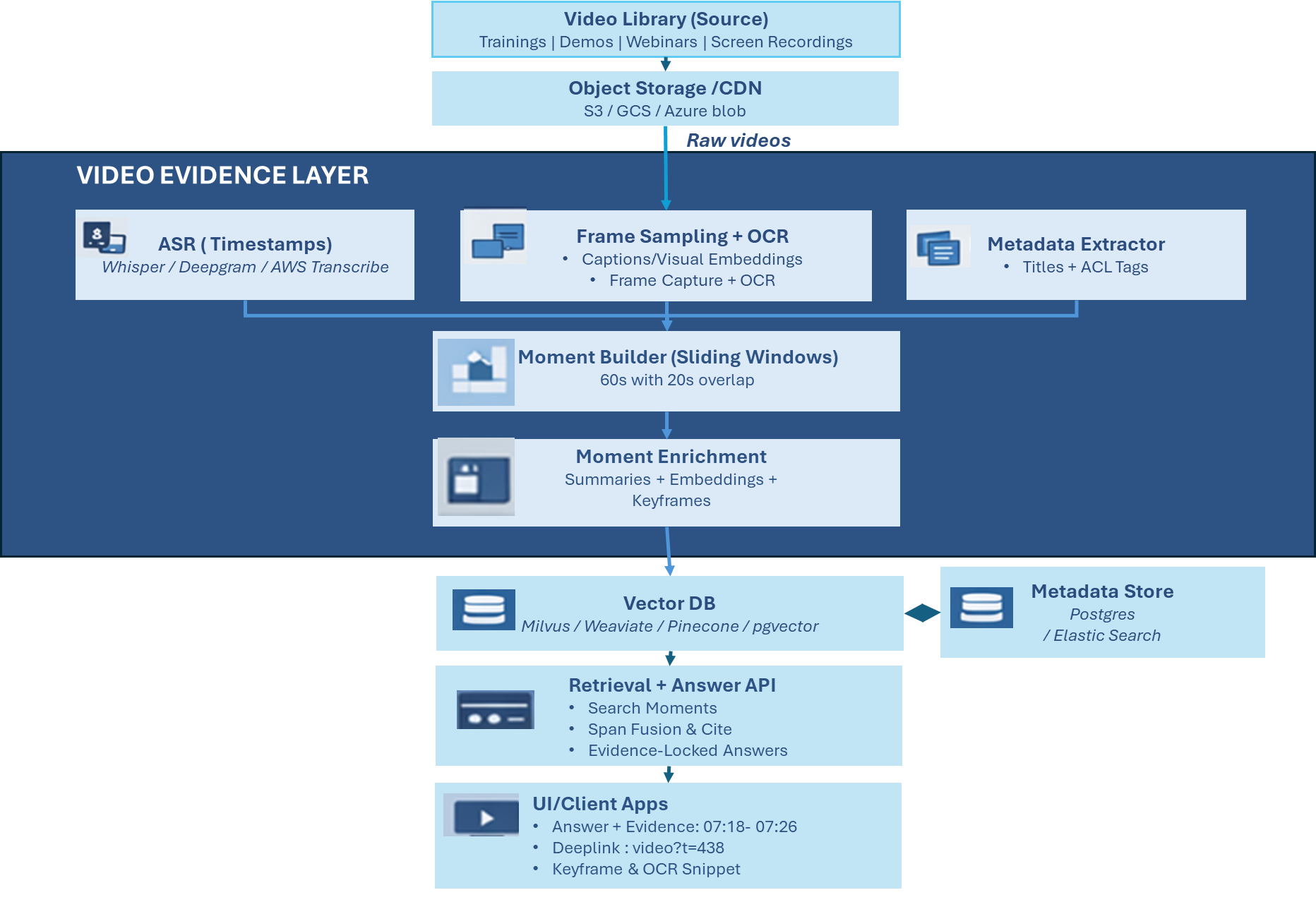
- Extract signals (ASR + frames/OCR)
- Build and enrich moments (overlap + embeddings)
- Store (vector + metadata) and answer (retrieve + fuse + evidence-lock)
Common Failure Modes and Fixes
Two common issues can occur, even in a small pilot.
Boundary Cuts
Steps often span moment boundaries. Fixed, non-overlapping cuts can return partial evidence. Use a sliding window with overlap (e.g., 60s window with 20s overlap). At query time, fuse adjacent high-scoring moments into a single cited span (or cite both contiguous ranges).
UI-Heavy / Visual Steps
Transcript retrieval underperforms when the key information is on screen. Moments need visual signals:
- OCR for on-screen text (menu labels, error codes, values)
- Short factual frame captions for UI state
- Visual embeddings when audio is sparse or vague
This allows retrieval to work on what is shown, not only what is spoken.
Extension: Video Library Retrieval
Users can search across a library and expect the system to identify the right videos before locating the right moments. This can be handled as a two-stage retrieval flow: Pick candidate videos (metadata filters and/or aggregated video embeddings), then retrieve moments within them. Apply ACL filters before the model sees results.
Production Realities: Cost and Quality
Two things decide whether this could work in production: cost containment and evidence quality.
Cost: Tier your enrichment. OCR for all content; reserve expensive visual captioning / vision embeddings for high-value, UI-heavy libraries.
Quality: Noisy audio and overlapping speakers degrade ASR alignment which lowers recall even when the right moment exists.
Non-negotiables: ACL enforced at retrieval time; evidence-locked citations (cite only retrieved time ranges).
Conclusion
Chapters and transcripts are useful when a user already has a direction. A Video Evidence Layer supports the opposite case: when a user has a question and needs the segment that supports the answer.
By shifting from linear timelines to indexed moments , we transform a library of "black box" recordings into a granular, evidence-backed knowledge base. This approach ensures that technical video content is no longer just something to watch, it is something to query, verify, and share with absolute precision.
Opinions expressed by DZone contributors are their own.
Comments