

Building Server in Julia and Connecting to a Database
Julia has Genie framework which makes building server absolutely easy. Connecting backend to a Database is also included in this article.
Join the DZone community and get the full member experience.
Join For FreeIntroduction
With the growing popularity of the internet, building a web server has been an absolutely required skillset for any developer. However, there are popular frameworks in some languages available (like Node.js or Django) to build the backend. Still, Julia, being a relatively new language, also provides a framework for the same purpose. Julia is still under active development phase and has closer compiler performance to C than other languages. Developers who have already implemented a machine learning or some data processing algorithm in Julia can now use the Julia Genie framework to expose APIs as well, which would help them use the same stack for the whole backend.
Installing Julia
If Julia is already installed in the system, typing $julia --version in the terminal should give version of Julia installed locally. Otherwise, official Julia documentation can be referred for installation. If installed properly, typing $julia in the terminal should start Julia in REPL mode.
Installing Genie
Installing Genie is the same as installing any Julia library. Typing Pkg.add("Genie") in REPL would install the Genie framework. Importing the package is performed by using Genie.
Getting a Basic Server Running
Let's create a working directory test_server and an empty file named server.jl inside test_server.
Starting a server using Genie is fairly simple. up(port_number, async = false) function starts a server listening to the mentioned port number. Type the following snippet in the server.jl and save.
x
using Genie
route("/path") do
return "Hello"
end
up(8001, async = false)
Now open a terminal from the test_server directory and start Julia REPL. Typing include("server.jl") in REPL would start the server in port number 8001. Opening http://localhost:8001/path in a browser would show the text Hello.
Adding More Routes
Let's take a use case of creating new users and getting a list of all existing users. For this we would need 2 APIs:
- One for creating a new user, which would be using the POST method
- Another for getting a list of existing users who would be using GET
So, modify the server.jl file with following content.
x
using Genie
route("/createuser", method = POST) do
return "POST OK"
end
route("/getusers") do
return "GET OK"
end
up(8001, async = false)
Accessing Request Parameters
We need to access the parameters and their values sent as payload in request body. To access a parameter we have getpayload(:param_key, "default_value") or postpayload(:param_key, "default_value") depending on whether it is a GET or POST request. Here param_key is the key of the parameter, and default_value is the value that would be considered if the parameter is not set in the request body.
Let's modify our server.jl with the following snippet.
x
using Genie
using Genie.Router, Genie.Renderer, Genie.Renderer.Html, Genie.Renderer.Json, Genie.Requests
function createUser(user_id, user_status)
end
route("/createuser", method = POST) do
createUser(postpayload(:user_id), postpayload(:user_status, "active"))
return "POST OK"
end
route("/getusers") do
return "GET OK"
end
up(8001, async = false)
Installing MySQL
We would be using MySQL for Database. Needless to say MySQL should be installed in system. Otherwise the official installation guide can be followed. Once MySQL server is up and running locally, create an empty database named test_user. From the MySQL command-line client, it would look like this.

Accessing MySQL Database
We can access and run query in a MySQL server using its Julia client. It can be installed by Pkg.add("MySQL") from Julia REPL. To initiate a connection to server, we can use the following function.
xxxxxxxxxx
using MySQL
conn = DBInterface.connect(MySQL.Connection, "localhost", "<user_name>", "<password>", db = "test_user")
This would return a connection object, which can be used to run a query.
x
cur = DBInterface.execute(conn, sql_query_statmnt)
Connecting the Dots
Summing all the above things up, we can create a Genie server, which would be inserting data to the Database upon creating a new user. To respond to a request of getting to respond query from the database and return the list of users as response.
Our server.Jl would look something like this. Before running the server.jl, install JSON, DataFrames and JSONTables in Julia.
x
using Genie
using Genie.Router, Genie.Renderer, Genie.Renderer.Html, Genie.Renderer.Json, Genie.Requests
using MySQL
using JSON
using DataFrames
using JSONTables
create_table_sql = """
CREATE TABLE IF NOT EXISTS USERS(
user_id VARCHAR(50) NOT NULL PRIMARY KEY,
user_status ENUM('active', 'inactive') DEFAULT 'active'
);
"""
conn = DBInterface.connect(MySQL.Connection, "localhost", "<user_name>", "<password>", db = "test_user")
cur = DBInterface.execute(conn, create_table_sql)
function createUser(user_id, user_status)
DBInterface.execute(conn, "INSERT INTO USERS (user_id, user_status) VALUES ('$user_id', '$user_status')")
end
function getUsers()
cur = DBInterface.execute(conn, "SELECT user_id, user_status FROM users")
df = DataFrame(cur)
stringified_json = arraytable(df)
return stringified_json
end
route("/createuser", method = POST) do
createUser(postpayload(:user_id), postpayload(:user_status, "active"))
return "POST OK"
end
route("/getusers") do
obj = getUsers()
return obj
end
up(8001, async = false)
Now we are ready to start the server by running include("server.jl").
Requesting Our Server
Our motive will not be complete until we would be requesting our server and get response from it. So for this purpose, we would be using Postman. If not installed, it can be installed following this guide.
Now, we would have to send a POST request on http://127.0.0.1:8001/createuser from Postman. The request body should have two parameters called user_id and user_status. The response should return the text POST OK.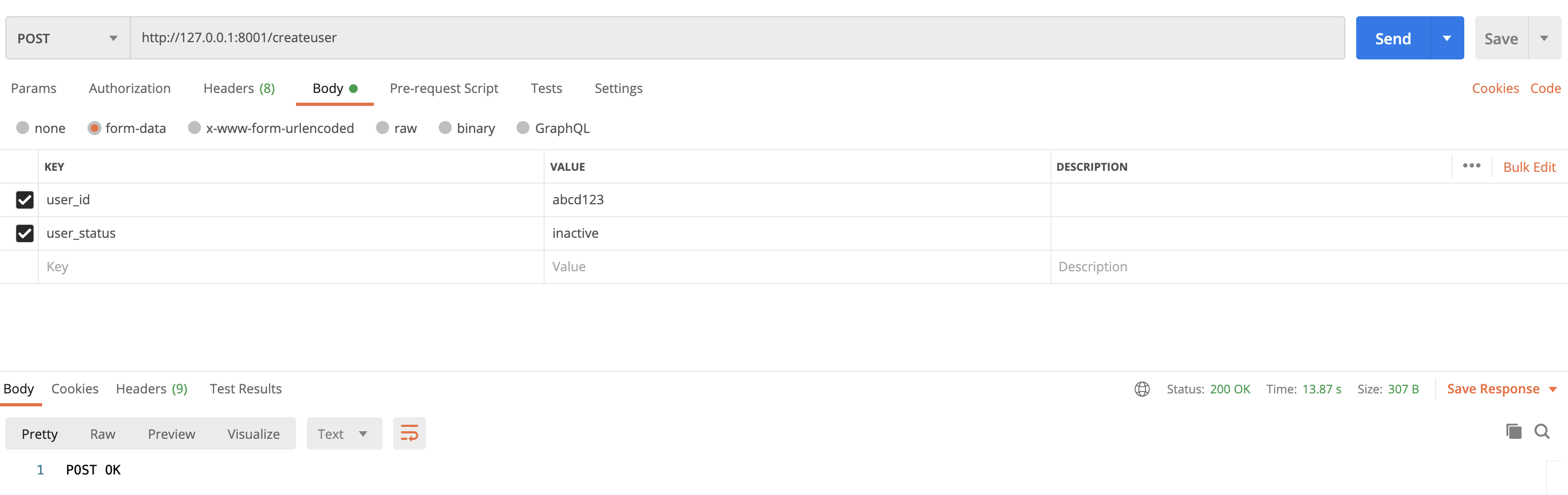
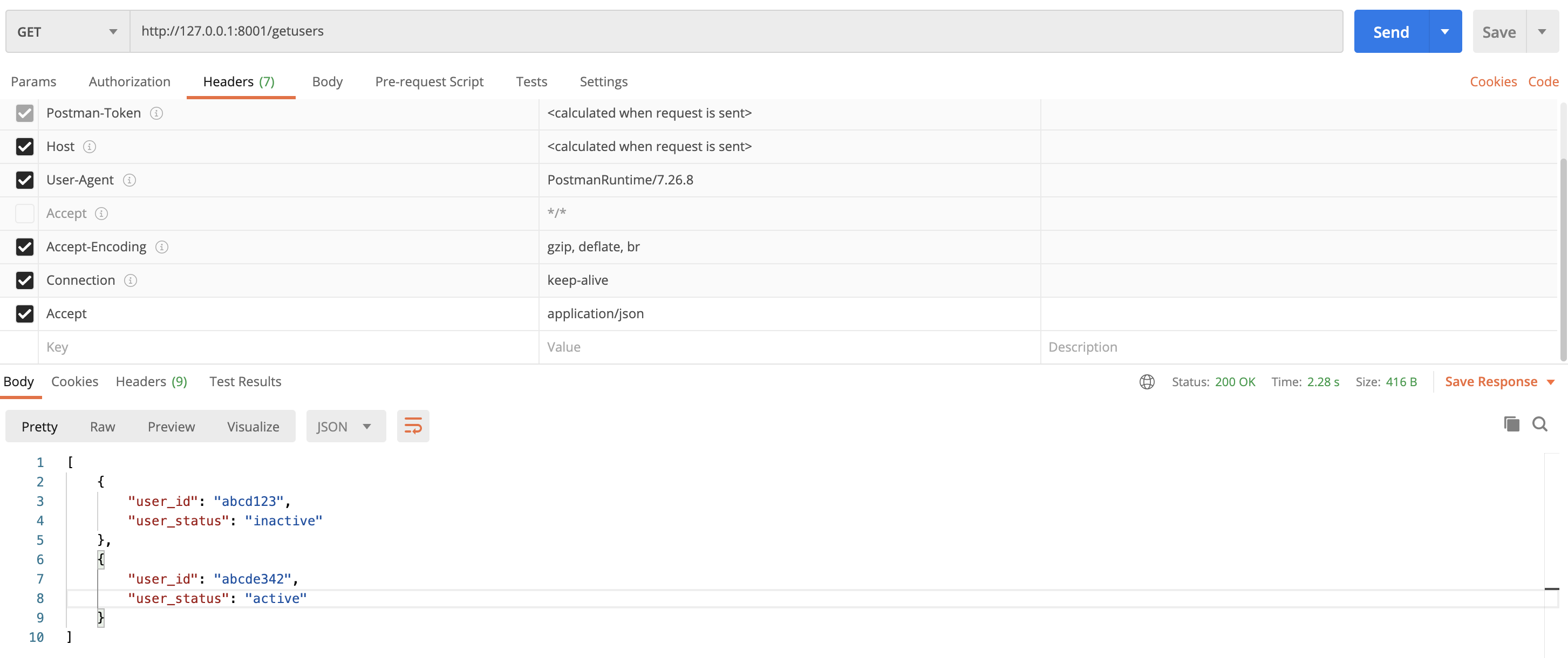
To send a GET request on http://127.0.0.1:8001/getusers, no request body is needed. However it is better to set Accept: application/json in our GET request header, so that the server's response is parsed as a JSON. The response should return list of all existing users in our Database.
Conclusion
This way, making a basic web server would be pretty easy in Julia; however, to serve a real-world use case will never be this much simple. But, hope this article helps you to have a starting point. Thanks and Happy Coding!
Opinions expressed by DZone contributors are their own.
Comments