

Liquibase: Database Change Management and Automated Deployments
Liquibase automates schema versioning and deployment via changelogs, enabling version-controlled, rollback-ready migrations with tracking for DevOps pipelines.
 ·
·
Join the DZone community and get the full member experience.
Join For FreeDatabase schema management is one of the most challenging aspect for modern Devops practices. Liquibase gives an open-source, database-solution for tracking, versioning, and deploying database changes across environments. This comprehensive guide explores Liquibase's architecture, implementation patterns, and automation strategies for CI/CD pipelines, with practical examples for enterprise deployment scenarios.
What is Liquibase?
Applying database schema changes with traditional SQL scripts is mostly manual, error-prone, and very hard to track. These scripts are typically lack version control, which make it very difficult to manage changes across all environments till production. Liquibase solves these problems by providing an open-source tool that standardizes how developers define, version, and deploy schema changes using simple configuration files. It brings consistency to change management with built-in rollback, change tracking, and support for multiple database systems.
Core Concepts
Changelog: The master file containing all database changes, organized sequentially. Can be XML, YAML, JSON, or SQL format.
ChangeSet: An atomic unit of change with a unique identifier (id + author). Each changeset executes once and is tracked in DATABASECHANGELOG table.
Preconditions: Conditional checks that must pass before executing changesets, ensuring safe deployments.
Contexts and Labels: Filtering mechanisms to control which changesets execute in specific environments (dev, certification/ Integration, prod).
Key Features
- Liquibase supports over 30 databases, including Oracle, MySQL, PostgreSQL, SQL Server, and DB2. This feature allows teams to work across different environments without compatibility issues.
- CHANGELOG is integrated directly with version control tools like Git and SVN, so they are stored in the application code repository. This approach confirms that changes are tracked and part of the development cycle.
- The platform provides robust rollback capabilities. This helps maintain system stability during updates.
- All DB Changes are tracked and handled using MD5 checksums, which prevent duplicate executions and unauthorized modifications. This ensures the integrity of database changes across environments.
- The system has ablity to compare database schemas across multiple environments and generate changelogs. This helps keep environments in sync and reduces manual effort for engineering teams.
Liquibase Architecture
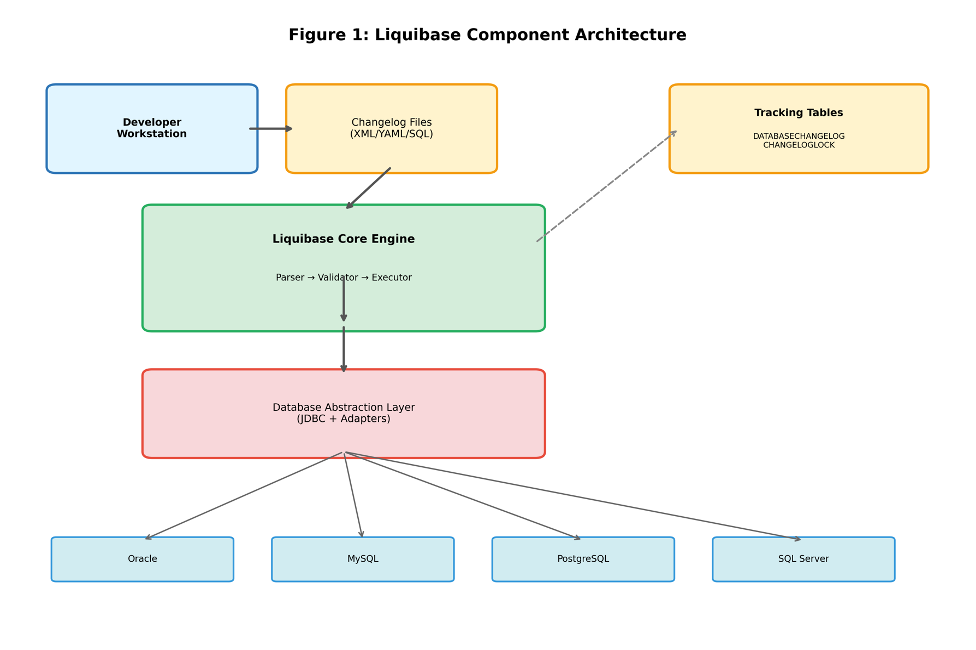
Figure 1: Liquibase's layered architecture showing how changelog files are processed through the core engine, abstracted to database-specific implementations, and tracked in specialized tables.
Implementing Liquibase
Basic Changelog Structure
A typical YAML changelog follows this structure:
databaseChangeLog:
  - changeSet:
      id: create-payment-table
      author: devops.team
      changes:
        - createTable:
            tableName: payment_transaction
            columns:
              - column:
                  name: id
                  type: varchar(50)
                  constraints:
                    primaryKey: true
                    nullable: false
              - column:
                  name: amount
                  type: decimal(15,2)
                  constraints:
                    nullable: false
              - column:
                  name: currency_code
                  type: char(3)
                  constraints:
                    nullable: false
              - column:
                  name: transaction_date
                  type: timestamp
                  defaultValueComputed: CURRENT_TIMESTAMP
              - column:
                  name: status
                  type: varchar(20)
                  constraints:
                    nullable: false
              - column:
                  name: created_at
                  type: timestamp
                  defaultValueComputed: CURRENT_TIMESTAMP
              - column:
                  name: updated_at
                  type: timestamp
      rollback:
        - dropTable:
            tableName: payment_transaction
Configuration Properties
Configure database connection in liquibase.properties:
liquibase-dev.properties:
# Development Environment
changeLogFile=db/changelog.yaml
url=jdbc:oracle:thin:@//localhost:1521/DEVDB
username=dev_user
password=dev_pass
contexts=dev,test
defaultSchemaName=DEV_SCHEMA
liquibase.dropFirst=true
liquibase.shouldRun=true
logLevel=DEBUG
Preconditions for Safe Deployment
Preconditions make sure database state is correct before applying changes. For example, checking if a column exists before adding it prevents errors:
--liquibase formatted sql

--changeset devops.team:add-merchant-id
--preconditions onFail:MARK_RAN onError:HALT
--precondition-sql-check expectedResult:0 SELECT COUNT(*) FROM information_schema.columns WHERE table_name = 'payment_transaction' AND column_name = 'merchant_id'

ALTER TABLE payment_transaction
ADD COLUMN merchant_id VARCHAR(50);

--rollback ALTER TABLE payment_transaction DROP COLUMN merchant_id;
Automating Database Deployments
Integrating Liquibase into CI/CD pipelines enables automated, consistent database deployments across all environments. Modern deployment strategies include Jenkins pipelines, GitLab CI/CD, and Kubernetes init containers.
CI/CD Pipeline Integration
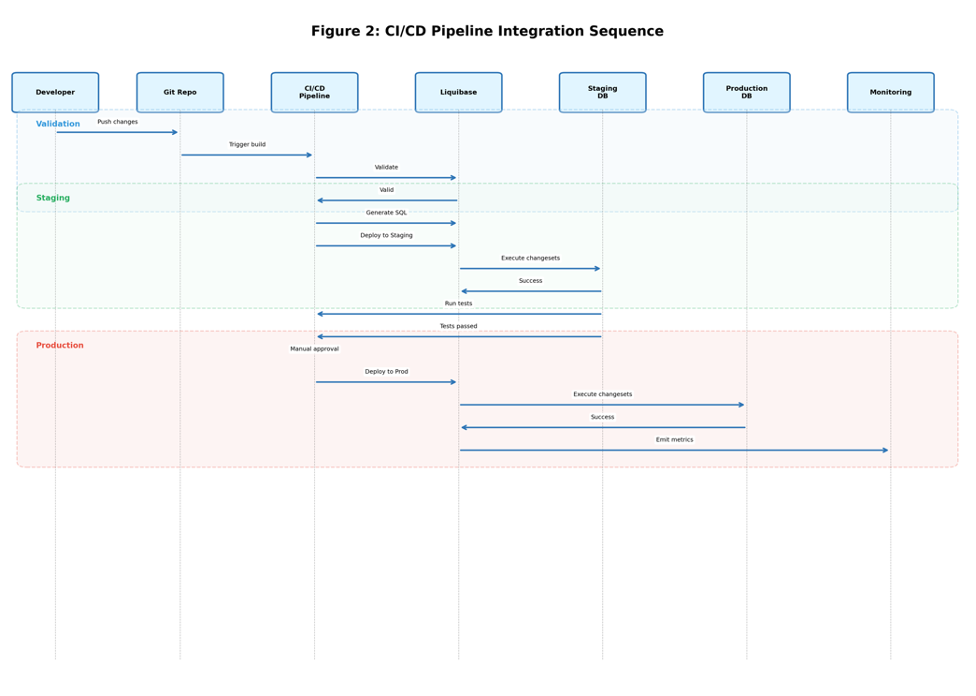
Figure 2: Complete CI/CD workflow showing validation, staging deployment with automated testing, and production release with manual approval gates and automatic rollback on failure.
Jenkins Pipeline Example
A declarative Jenkins pipeline automates the entire deployment workflow:
pipeline {
    agent any

    stages {
        stage('Validate') {
            steps {
                sh 'liquibase validate'
            }
        }

        stage('Deploy Staging') {
            steps {
                sh 'liquibase --contexts=staging update'
            }
        }

        stage('Deploy Production') {
            when {
                branch 'main'
            }
            steps {
                input 'Deploy to Production?'
                sh 'liquibase --contexts=prod update'
            }
        }
    }

    post {
        failure {
            sh 'liquibase rollbackCount 1'
        }
    }
Kubernetes Init Container Pattern
For cloud-native deployments, Liquibase runs as an init container which ensure schema updates complete before application startup:
apiVersion: apps/v1
kind: Deployment
metadata:
  name: payment-service
spec:
  template:
    spec:
      initContainers:
      - name: liquibase-migration
        image: liquibase/liquibase:4.25.0
        command:
        - liquibase
        - --url=jdbc:postgresql://$(DB_HOST):5432/$(DB_NAME)
        - --username=$(DB_USER)
        - --password=$(DB_PASSWORD)
        - update
        env:
        - name: DB_HOST
          valueFrom:
            secretKeyRef:
              name: db-credentials
              key: host
        - name: DB_NAME
          valueFrom:
            secretKeyRef:
              name: db-credentials
              key: database
        - name: DB_USER
          valueFrom:
            secretKeyRef:
              name: db-credentials
              key: username
        - name: DB_PASSWORD
          valueFrom:
            secretKeyRef:
              name: db-credentials
              key: password

      containers:
      - name: payment-service
        image: payment-service:latest
        ports:
        - containerPort: 8080
          protocol: TCP
        env:
        - name: DB_HOST
          valueFrom:
            secretKeyRef:
              name: db-credentials
              key: host
Deployment Workflow Details
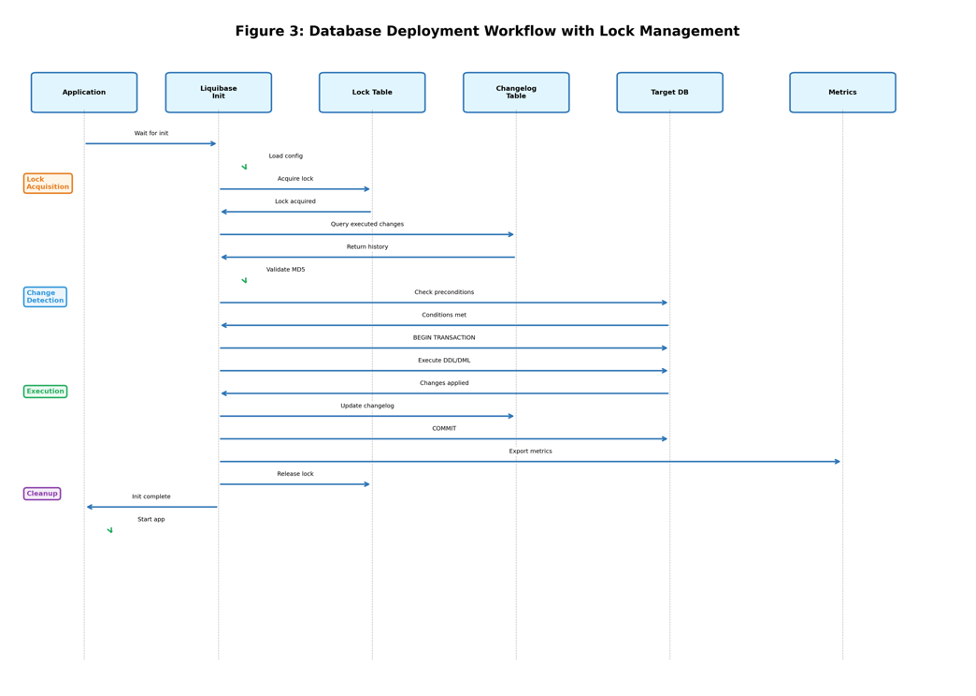
Figure 3: Detailed deployment workflow showing lock acquisition, MD5 validation, precondition checking, transaction management, and metrics emission throughout the deployment lifecycle.
Best Practices and Enterprise Patterns
Organizational Strategies
- Use a master changelog that includes versioned sub-changelogs organized by release or sprint for better maintainability.
- Keep changesets focused on single logical changes to enable granular rollback and easier troubleshooting.
- Never modify executed changesets; create new ones for corrections. MD5 checksums enforce this automatically.
- It is always better to provide rollback definitions even for reversible operations to maintain deployment predictability.
Security and Compliance
- Secret Management: Never commit credentials to version control (Application code repository). Design application in was to get those credentials from HashiCorp Vault, AWS Secrets Manager, or Kubernetes secrets for database credentials.
- Least Privilege Access: Never grant Liquibase user DBA privileges. Grant Liquibase users only DDL permissions required for schema changes.
- Audit Trail Integration: Enable database audit logging and integrate with SIEM systems for compliance requirements (SOC 2, PCI-DSS)
- Mandatory Peer Review: Implement strong Pull request review gate/ workflow before merging any changlog modification. Add a second pair of eyes for review here.
Performance Optimization
- Index Strategy: Create indexes after bulk data loads rather than before to minimize I/O during migration
- Database-Specific Optimization: Use native SQL with dbms attribute for performance-critical operations (e.g., Oracle PARALLEL hints)
- Lock Timeout Configuration: Set appropriate liquibase.lockWaitTime values to prevent indefinite waits in high-concurrency environments
Testing Pyramid for Database Changes
Implement comprehensive testing at multiple levels:
- Developers run liquibase update against local containers before committing changes
- Use Testcontainers to spin up ephemeral databases, apply migrations, and verify schema correctness
- Deploy to a production-like environment with realistic data volumes to identify performance issues
Test rollback procedures in staging before production deployment to ensure recovery capability
Monitoring and Observability
Effective monitoring of database deployments enables rapid issue detection and continuous improvement. Key metrics include deployment duration, lock contention events, checksum validation failures, and rollback frequency.
Critical Metrics to Track
- Deployment Duration: Track execution time per changeset to identify performance bottlenecks and optimize slow operations
- Lock Contention: Monitor DATABASECHANGELOGLOCK table for concurrent deployment conflicts that block releases
- Checksum Failures: Alert on MD5 mismatches indicating unauthorized manual changes to executed changesets
- Rollback Rate: Track rollback events as key indicators of deployment quality and testing effectiveness
Prometheus Integration Example
Export Liquibase metrics to Prometheus for visualization in Grafana dashboards:
# Deployment success counter
liquibase_deployment_success_total{environment="prod"} 145

# Changeset execution duration histogram
liquibase_changeset_duration_seconds_bucket{id="1",database="prod",le="0.1"} 45
liquibase_changeset_duration_seconds_bucket{id="1",database="prod",le="0.5"} 120
liquibase_changeset_duration_seconds_bucket{id="1",database="prod",le="1.0"} 142
liquibase_changeset_duration_seconds_bucket{id="1",database="prod",le="+Inf"} 145
liquibase_changeset_duration_seconds_sum{id="1",database="prod"} 52.3
liquibase_changeset_duration_seconds_count{id="1",database="prod"} 145

# Rollback counter for failure tracking
liquibase_rollback_total{environment="prod"} 3

# Additional operational metrics
liquibase_deployment_failure_total{environment="prod",reason="validation_error"} 2
liquibase_deployment_failure_total{environment="prod",reason="timeout"} 1

# Deployment success rate (calculated metric)
# success_rate = liquibase_deployment_success_total / (liquibase_deployment_success_total + sum(liquibase_deployment_failure_total))
# Result: 145 / (145 + 3) = 98.0%
Conclusion
Liquibase provides enterprise-grade database change management with seamless DevOps integration. Treating schemas as code enables consistency, traceability, and automation for deployment pipelines.
For those organizations that are managing critical payment infrastructure, Liquibase's rollback capabilities, precondition validation, and change tracking provide essential safeguards. With CI/CD integration, observability tooling, and security controls, teams deploy database changes with the same confidence and velocity as application code.
Opinions expressed by DZone contributors are their own.
Comments