

GenAI Implementation Isn't Magic — It’s a Lifecycle
GenAI apps follow a structured lifecycle — requirements, data, models, prompts, architecture, testing, deployment, and monitoring — to build scalable systems.
Join the DZone community and get the full member experience.
Join For FreeIf you’re planning to build an application using GenAI, it might seem like something completely new and complicated — but honestly, it’s not very different from building any other application. Just like any project, you still need a clear lifecycle and a proper framework to design, build, and successfully deploy your solution to production.
Think of it like building a house. You don’t just start putting bricks together — you first plan, design, gather materials, and then build step by step. GenAI projects work the same way. Without a structured approach, things can quickly become messy and unpredictable.
I’m sharing this not just from theory, but from real-world experience. I’ve worked on multiple GenAI use cases and taken them all the way to production. Along the way, I’ve learned what works, what doesn’t, and what truly matters.
So, let’s walk through the lifecycle and framework together in a simple and practical way.
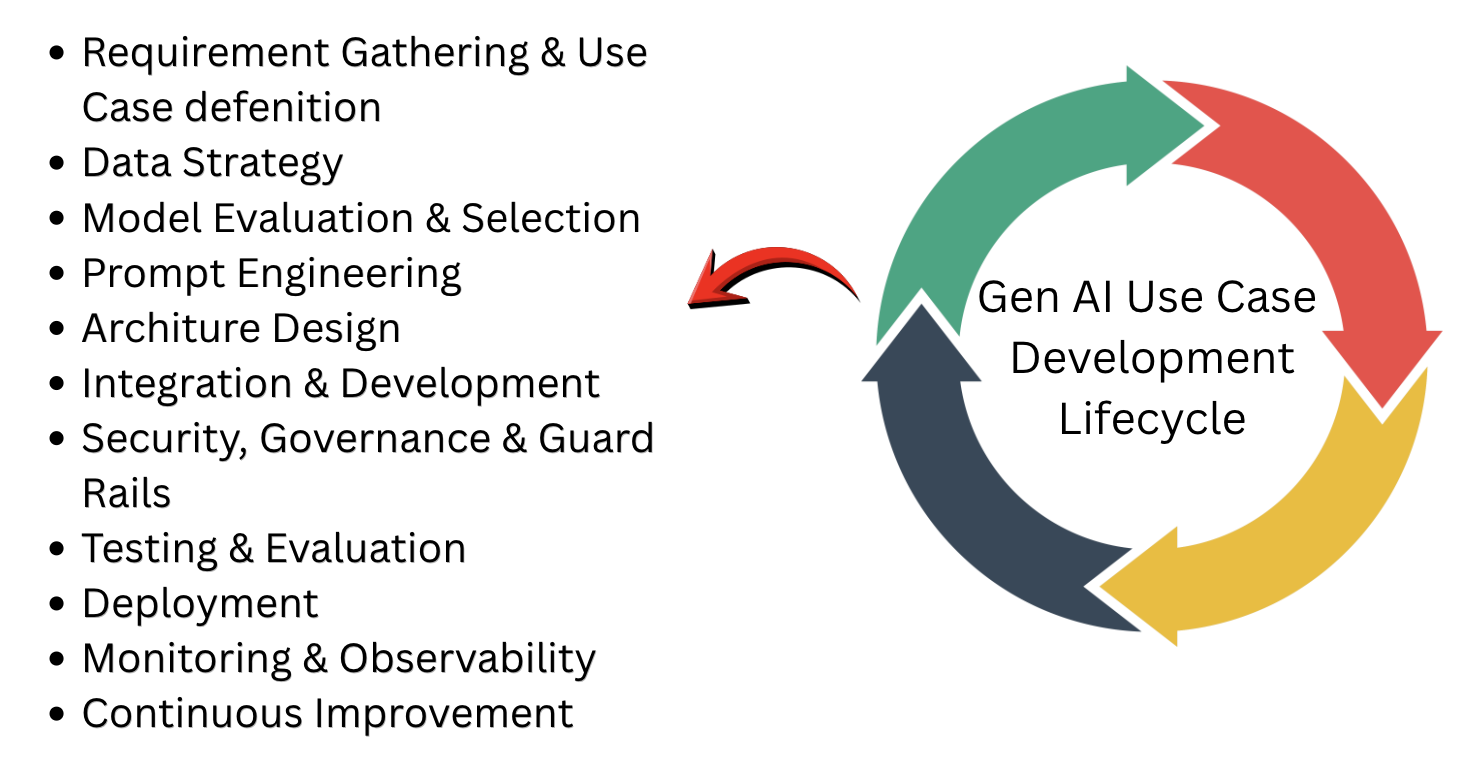
Requirement Gathering and Use Case Definition
When you begin building a GenAI use case, the first and most important step is understanding what you’re actually trying to solve. It’s a bit like starting a journey — you need to know your destination before choosing the route. This is where requirement gathering and use case definition come in.
At this stage, you sit down and clearly understand the problem, the goal, and what success looks like. Broadly, these requirements fall into two categories.
Functional Requirements
This is all about what the system should do. For example, imagine you want to help a customer support engineer quickly find answers using natural language or build a system that can analyze customer sentiment from feedback. These define the core purpose of your application. In fact, everything you design later — architecture, prompts, integrations — will revolve around these functional goals.
Non-Functional Requirements
NFRs focus on how the system should behave. This includes things like security, performance, scalability, and response time. Think of it this way: your system might give the right answer (functional), but if it’s slow, insecure, or can’t handle users at scale, it won’t succeed. These requirements quietly shape your system design and are just as important as the functional ones.
So before jumping into building anything, taking the time to clearly define both types of requirements sets a strong foundation for everything that follows.
Data Strategy
At first glance, it might feel like GenAI models already know everything — they’re pre-trained, after all. But when you start building real-world applications, you quickly realize that data still plays a huge role.
Think of it this way: the model is like a very smart assistant, but it doesn’t know your company’s knowledge, your documents, or your business context. So, you need to bring that into the picture. This means identifying and organizing your internal data — things like documents, knowledge bases, FAQs, or any structured information your system should rely on.
But it’s not just about having data — it needs to be clean, well-structured, and meaningful. If your data is messy or inconsistent, the responses from your GenAI system will reflect that.
At this stage, you also make an important decision: should you fine-tune the model, or use RAG (Retrieval-augmented generation) to fetch relevant data at runtime? In most real-world scenarios, RAG is often the preferred approach because it allows your system to stay up-to-date and grounded in actual data.
So even in a GenAI world, data is still the foundation — it’s what turns a smart model into a truly useful solution.
Model Evaluation and Selection
When you start working with GenAI, one thing becomes clear very quickly — not all models are the same. They come in different sizes, capabilities, and even modalities (text, image, etc.). It might be tempting to think one powerful model can handle everything, but in reality, no single model fits all use cases.
Choosing the right model is a careful balance. A larger model might give better accuracy, but it could also increase cost and latency. A smaller model might be faster and cheaper, but may not perform well for complex tasks. So, selecting the right model is not just a technical choice — it directly impacts your application’s performance and user experience.
To make this decision, you need to evaluate models based on your specific use case. One approach is to build your own evaluation framework using test datasets and measure metrics like accuracy, precision, recall, F1-score, or even BERT score. This gives you a more hands-on and tailored understanding of how well a model performs for your needs.
Another approach is to use built-in evaluation tools provided by cloud platforms like Amazon Web Services, Microsoft Azure, or Google Cloud Platform, which can speed up the process and provide useful insights.
In some cases, just selecting a pre-trained model isn’t enough. You may need to adapt it to better align with your business goals. This can be done using techniques like RAG (Retrieval Augmented Generation), fine-tuning, or model distillation, depending on your requirements.
So, model selection isn’t just about picking what’s available — it’s about finding the right fit for your use case and shaping it to deliver the best results.
Prompt Engineering
When users interact with a GenAI application, they usually ask questions in simple, natural language—just like they would talk to a person. These queries are often unstructured and don’t clearly define intent, tone, or constraints.
For example, a user might simply ask: "Why was my card declined?"
Now, if you send this directly to the model, it may give a response—but it could be inconsistent, vague, or even incorrect. That’s because there are no rules or guidance provided to the model.
This is where the idea of a prompt “envelope” comes in. Think of it like wrapping the user’s query with instructions that guide the model on how to behave. This envelope adds:
- Clear instructions
- Tone control
- Constraints
- Context
So instead of sending just the raw query, you transform it into a structured prompt like this:
- Define the role (e.g., banking assistant)
- Add rules (don’t guess, be concise)
- Provide context (card blocked for international usage)
- Specify expected output
Now, the same simple question becomes part of a much more controlled and meaningful interaction.
System:
You are a banking support assistant.

Rules:
- Do not guess
- Use only provided context
- Be polite and concise

User Query:
Why was my card declined?

Context:
- Card blocked for international usage

Output:
Provide reason and steps to resolve.
The best part? You don’t have to build this every time. These structured prompts can be saved as centralized prompt templates. Then, based on the use case, your GenAI application can:
- Load the right template
- Inject the user’s query dynamically
- Send the final prompt to the model
This approach ensures your responses are not just intelligent but also consistent, reliable, and aligned with your business needs.
Architecture Design
Once you have your use case, data, and model in place, the next step is to figure out how everything comes together — and that’s where architecture plays a key role.
Think of architecture like the blueprint of a house. You may have the best materials, but if they’re not put together properly, the structure won’t be stable. In the same way, a GenAI application needs a well-thought-out design to ensure all components work smoothly and reliably.
At this stage, you define how different pieces — like data sources, prompt templates, orchestration logic, and models — connect and interact with each other. This is important because even powerful models from OpenAI can give poor or inconsistent results if the data flow is not clear, the context is missing, or proper guardrails are not in place.
A strong architecture ensures that your system integrates well with enterprise applications, applies necessary validations, and includes monitoring for better control. It also helps you design for scalability, performance, and cost optimization, so your solution can handle real-world usage.
In simple terms, good architecture is what turns your GenAI idea into a stable, secure, and production-ready system, rather than just a working prototype.
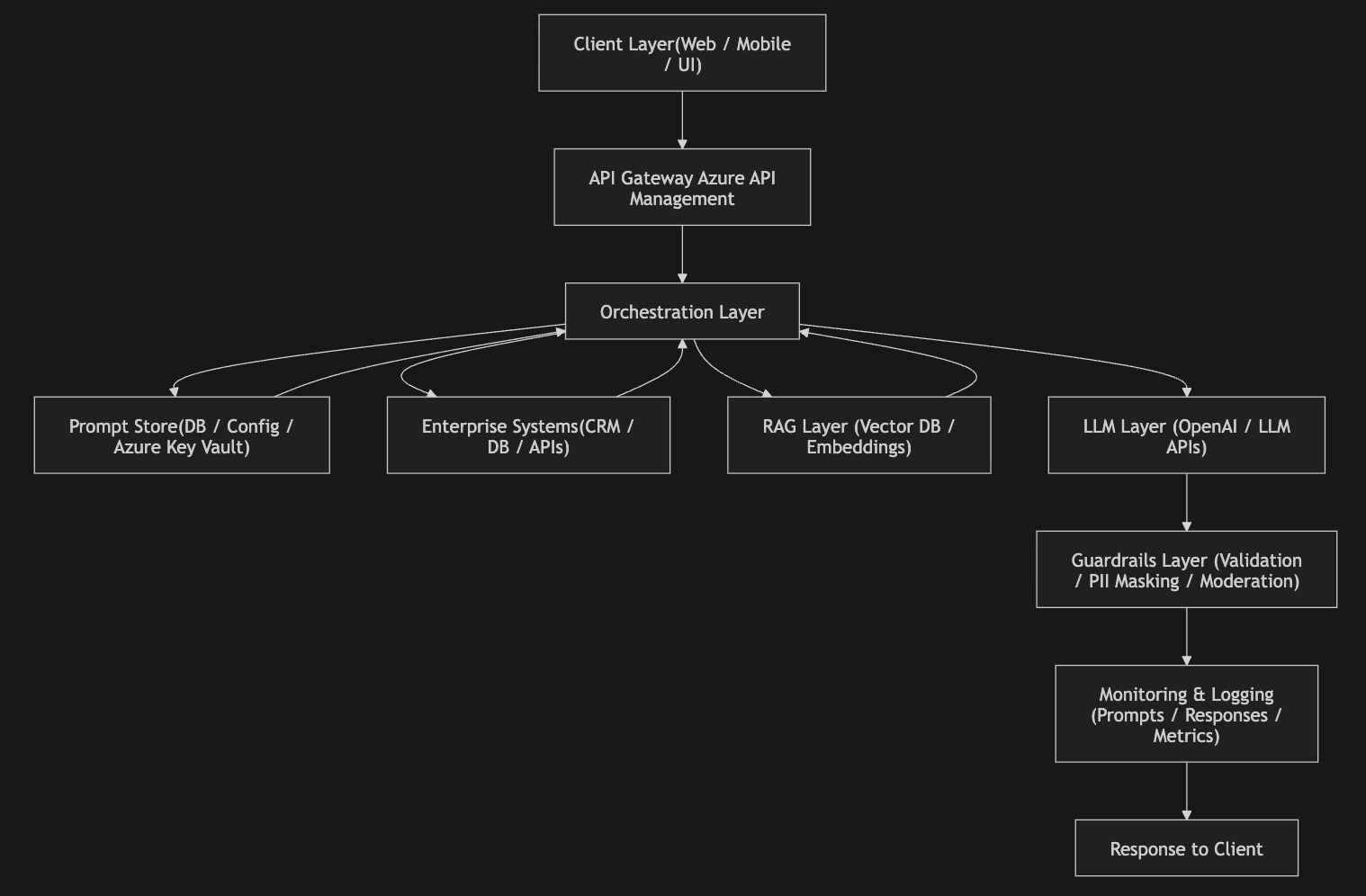
Integration and Development
The integration and development stage is where your GenAI idea truly comes to life as a working application. This is the practical, hands-on phase where you start connecting systems, building logic, and enabling the AI to function inside real business workflows. In enterprise environments, this is usually done using integration platforms along with large language models to orchestrate everything end to end.
At this stage, you build complete workflows that include API integrations, prompt generation logic, data retrieval pipelines, and safety mechanisms like content filtering and prompt validation. This is also where you ensure that your GenAI system is not working in isolation but is properly connected to enterprise systems, because LLMs by themselves do not understand your business data—you must fetch and supply it through integrations.
A key part of this phase is building a prompt pipeline, which prepares a structured prompt before sending it to the model. At a high level, this pipeline works in steps:
- Step 1: Load the prompt template
- Step 2: Inject the user query
- Step 3: Inject relevant context data
- Step 4: Add constraints and instructions
- Step 5: Send the final prompt to the LLM
Along with this, you also build a RAG (Retrieval Augmented Generation) pipeline, which ensures your model gets the right knowledge at runtime. RAG typically has two parts: an ingestion process and a retrieval process.
In the ingestion phase, documents are converted into embeddings and stored in a vector database. In the retrieval phase, the system searches for relevant information and injects it into the prompt before sending it to the model.
At a high level, the RAG pipeline works like this:
- Convert documents into embeddings
- Store them in a vector database
- At runtime:
- Search for relevant data
- Inject it into the prompt
Together, these components ensure that your GenAI application is not just intelligent but also context-aware, reliable, and ready for real-world use.
Security Governance and Guardrails
At this stage, you focus on building and integrating security and guardrails into your GenAI application to ensure it behaves safely and responsibly in real-world usage. This can be done either by implementing your own controls or by integrating third-party safety solutions that continuously monitor both inputs and outputs and take action whenever something risky is detected.
The main goal here is to make sure the system does not generate harmful, sensitive, or unintended responses while still maintaining usefulness and accuracy.
At a high level, this layer takes care of key safety responsibilities such as:
- Content moderation – detecting and filtering unsafe, toxic, or inappropriate content
- PII masking – identifying and hiding sensitive personal information like names, account numbers, or emails
- Output validation – ensuring responses follow the expected format, structure, and business rules
- Prompt injection protection – preventing malicious user inputs from overriding system instructions
In simple terms, this stage acts as a protective shield around your GenAI system, ensuring that every interaction stays secure, compliant, and aligned with business and ethical standards.
Testing and Evaluation
Testing and evaluation in GenAI projects are essential to make sure your system delivers accurate, reliable, safe, and consistent outputs both before and after deployment. Unlike traditional software testing, where outputs are fixed and predictable, GenAI testing deals with probabilistic responses, meaning the same input can produce different outputs. Because of this, the focus is not just on exact results, but on quality, behavior, and robustness of the system.
In practice, we perform different types of testing to validate the overall performance of the GenAI application. Some of the key ones are:
Functional Testing
This ensures the system is performing the intended task correctly. For example, if the prompt is “Summarize this document”, the output should be a proper summary and not a detailed explanation or translation. It validates whether the core functionality is working as expected.
Prompt Testing
This focuses on checking whether prompts are guiding the model properly. You verify if instructions are being followed, output formats are correct, and the tone and behavior of the response remain consistent across different inputs.
Output Quality Testing
This testing evaluates how good the response actually is. It checks whether the output is relevant, accurate, complete, and clearly written, ensuring it meets user expectations.
Safety and Compliance Testing
This ensures the system behaves in a responsible and secure manner. You check that there is no PII leakage, no biased responses, and no toxic or harmful content being generated.
Performance Testing
This validates whether the system meets performance requirements such as response time and throughput. It ensures the application is fast and scalable enough for real-world usage.
Cost Testing
This is a critical aspect in GenAI systems. You ensure that token usage and cost metrics are properly captured for every request and response, so the system remains financially optimized and transparent.
Overall, this stage ensures your GenAI application is not only functional but also reliable, safe, and production-ready.
Deployment
Deployment in a GenAI project is the stage where your solution moves from testing into a live production environment, where real users can interact with it. Unlike traditional software deployment, GenAI deployment is not just about hosting an application — it also involves managing models, prompts, data pipelines, integrations, and guardrails in a coordinated, reliable, and scalable way.
In real-world enterprise systems, you will notice that different components are deployed as independent units, and careful cutover planning becomes very important. For example, the model layer deployment is handled separately, the integration or orchestration layer is deployed as another unit, and the consumer application, like a chatbot or web interface, is deployed independently. Similarly, the RAG pipeline, including embedding generation and vector database setup, can also be deployed and scaled as a separate component.
Beyond just deployment, this stage also includes critical activities such as environment configuration (dev, test, prod), CI/CD automation, versioning of prompts and models, and rollback strategies in case something goes wrong. You also need to ensure that monitoring and logging are enabled from day one so that system behavior, cost, latency, and errors can be tracked in real time.
In addition, proper cutover planning is essential to ensure a smooth transition from old systems to GenAI-powered systems. This includes phased rollouts, canary releases, and fallback mechanisms to avoid business disruption.
In simple terms, GenAI deployment is not a single release — it is a coordinated rollout of multiple interconnected components, each working together to deliver a stable, scalable, and production-ready AI solution.
Monitoring and Observability
Monitoring and observability in a GenAI project ensure that your system remains reliable, accurate, cost-efficient, and safe once it is live in production. Since GenAI outputs are probabilistic in nature, unlike traditional APIs that produce fixed responses, you need much deeper visibility into what the model is doing, why it is behaving in a certain way, and how its responses are impacting users and business outcomes.
Monitoring focuses on continuously tracking the health and performance of the system by collecting logs, metrics, and alerts. It helps you understand what is happening in the system and notifies you when something goes wrong, such as increased latency, failures, or unusual cost spikes. On the other hand, observability goes a step further by using detailed telemetry data—such as logs, metrics, and traces—to help you understand why a particular issue is happening, especially in complex and distributed GenAI architectures. In simple terms, monitoring tells you that there is a problem, while observability helps you diagnose the root cause.
In GenAI systems, it is important to continuously log and track both output quality metrics and performance metrics. These include:
- Relevance of responses
- Accuracy of generated output
- Hallucination rate (incorrect or made-up responses)
- Format compliance (e.g., JSON or structured output adherence)
- Latency (response time)
- Throughput (requests per second)
- Timeout and failure rates
To effectively manage this, organizations use external observability and monitoring tools such as Datadog, ELK Stack, New Relic, Dynatrace, and Splunk, which provide powerful capabilities for visualization, analytics, alerting, and real-time system monitoring.
Overall, this stage ensures that your GenAI application is not just working, but is continuously measurable, diagnosable, and optimizable in a live production environment.
Continuous Improvement
Continuous improvement in a GenAI project means regularly enhancing the system even after it is deployed so that it stays accurate, reliable, and useful for business needs. Unlike traditional applications, GenAI systems keep learning and evolving based on how real users interact with them. Because of this, teams continuously review prompts, responses, and performance data to find problems like incorrect answers, bias, hallucinations, or inconsistent outputs.
Improvements are then made step by step — by refining prompt templates, improving or updating data sources (especially in RAG systems), adjusting model settings, or sometimes upgrading to better models from providers like OpenAI. Integration and orchestration platforms also play an important role because they allow changes in workflows, APIs, and data connections without breaking the entire system.
In simple terms, continuous improvement is a loop of monitoring, feedback, testing, and fixing, which ensures the GenAI application keeps getting better over time and continues to meet changing user expectations and business goals.
Conclusion
To wrap it all up, think of a GenAI project as building and growing a living system — not a one-time software build. It all starts with identifying the right problem to solve, then slowly shaping it through data, models, prompts, design, development, testing, and monitoring. Each stage plays its own important role in making sure the system is not just intelligent, but also reliable, safe, and scalable in real-world use.
Unlike traditional software projects that are built once and deployed, GenAI solutions are more like a journey. They keep evolving — prompts are refined, data is improved, workflows are optimized, and outputs are continuously evaluated to match user expectations. This ongoing refinement is what keeps the system relevant and effective over time.
With the right orchestration platforms and powerful models from providers like OpenAI, organizations can build intelligent solutions that fit smoothly into their enterprise ecosystem and adapt as business needs change.
Note to Readers
If you found this article helpful, feel free to drop a comment and let me know! I’d be happy to go deeper into each phase and explain it with real-world examples in a simple and practical way.
Opinions expressed by DZone contributors are their own.
Comments