

Centralized API Documentation in Microservices Using Spring Boot, SpringFox Swagger-UI, and Eureka
Learn how to easily document multiple Spring-based REST applications using the SpringFox Swagger-UI library.
Join the DZone community and get the full member experience.
Join For FreeIf you have worked on a Spring-based REST application, then you will probably be aware of API documentation with Swagger-UI using the SpringFox library. This library integrates seamlessly with Spring-based applications and provides an elegant Swagger user interface for documentation as well as testing your endpoints.
The Problem
As we already know, it is very easy to document REST applications using the SpringFox Swagger-UI library, but a problem arises when we are working in an environment where we have multiple REST-based applications. Typically, we face this issue in a microservices environment. Most of us end up managing a separate Swagger-UI for each application, which means that each service will have its own endpoint and to access the Swagger-UI and we have to use a different URL for different applications.

The Solution
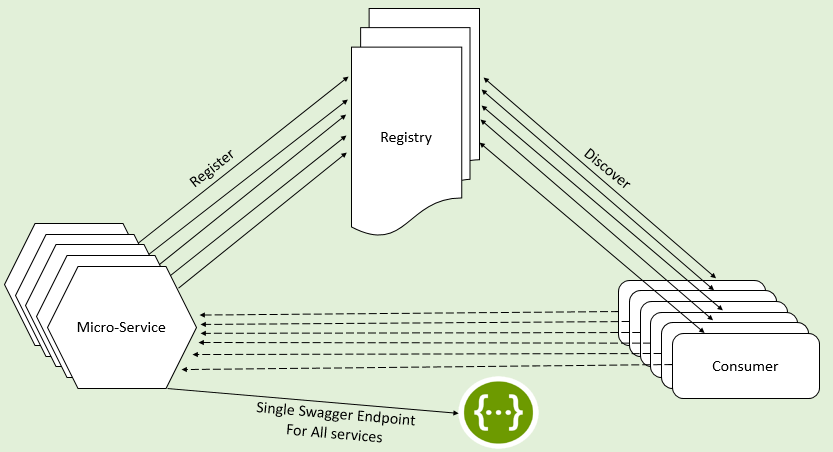
To access all this API documentation from a single URL, a solution can be implemented using the below steps:
Get the list of registered service instances from the service registry.
For each registered service instance, pull the Swagger definition JSON from the instance and store it locally. In our case, we are putting this JSON in the in-memory documentation context backed by a concurrent map.
Refresh the in-memory context at regular intervals to automatically remove/add the definitions as they are updated in the service registry.
Provide a single endpoint to serve Swagger definitions from our in-memory store on the basis of service instance name.
Implementation
Thanks to the folks at SpringFox, Swagger-UI offers the great functionality of extending the documentation by providing an implementation of the bean SwaggerResourcesProvider. Let us implement this using a hypothetical microservices enviroment setup. Our environment has the below services: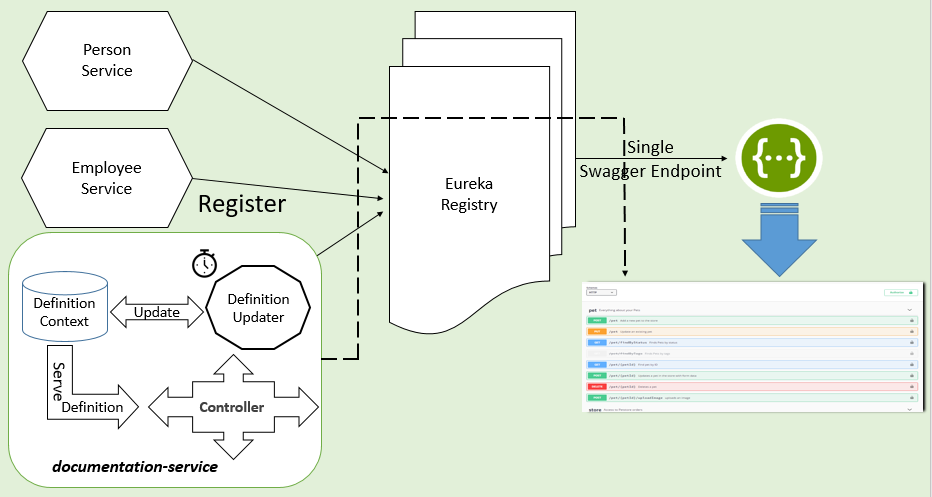
central-docs-eureka-server: Service registry powered by Netflix Eureka
employee-application and person-application: REST applications with Swagger-UI enabled. You can follow this article for a step-by-step guide.
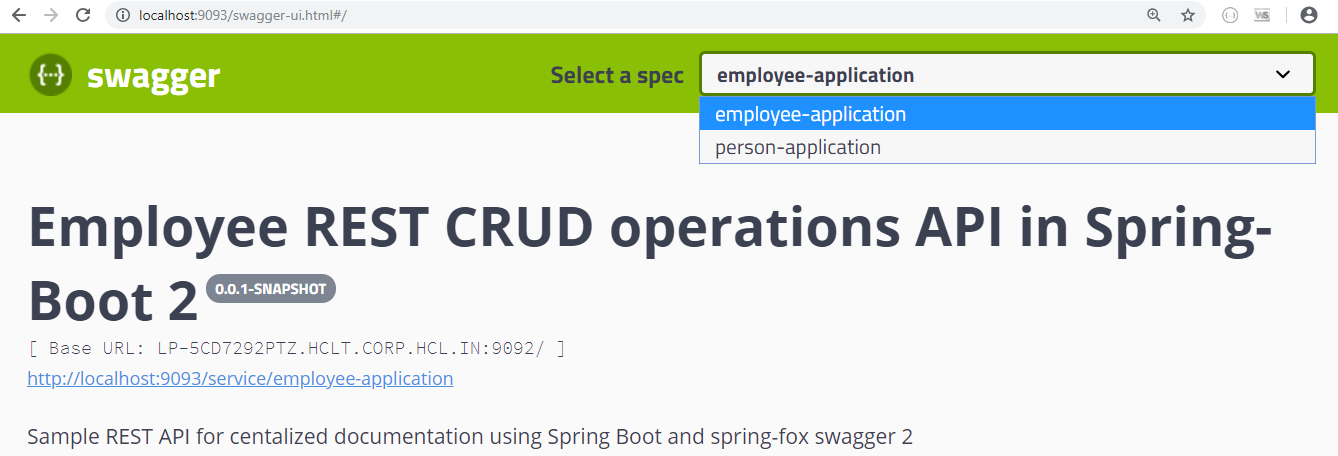
documentation-service: Spring Boot-based REST application consolidating all the Swagger JSON and offering it in a single endpoint. Please note that this component can be part of a gateway or the registry itself, but I have chosen to keep it separate. The final documentation shall be available at http://localhost:9093/swagger-ui.html.
Now to the most interesting part: coding.
SwaggerUIConfiguration
The Spring configuration class registers the instance of SwaggerResourcesProvider, which reads the swagger-api JSON files from our ServiceDefinitionsContext.
package com.satish.central.docs.config.swagger;

import java.util.ArrayList;
import java.util.List;

import org.springframework.beans.factory.annotation.Autowired;
import org.springframework.context.annotation.Bean;
import org.springframework.context.annotation.Configuration;
import org.springframework.context.annotation.Lazy;
import org.springframework.context.annotation.Primary;
import org.springframework.web.client.RestTemplate;

import springfox.documentation.swagger.web.InMemorySwaggerResourcesProvider;
import springfox.documentation.swagger.web.SwaggerResource;
import springfox.documentation.swagger.web.SwaggerResourcesProvider;

/**
 *
 * @author satish sharma
 * <pre>
 *  Swagger Ui configurations. Configure bean of the {@link SwaggerResourcesProvider} to
 *   read data from in-memory contex
 * </pre>
 */
@Configuration
public class SwaggerUIConfiguration {

@Autowired
private ServiceDefinitionsContext definitionContext;

@Bean
public RestTemplate configureTempalte(){
return new RestTemplate();
}

    @Primary
    @Bean
    @Lazy
    public SwaggerResourcesProvider swaggerResourcesProvider(InMemorySwaggerResourcesProvider defaultResourcesProvider, RestTemplate temp) {
        return () -> {
            List<SwaggerResource> resources = new ArrayList<>(defaultResourcesProvider.get());
            resources.clear();
            resources.addAll(definitionContext.getSwaggerDefinitions());
            return resources;
        };
    }
}
ServiceDefinitionController
Override the default behavior of the call to the service id and return JSON from ServiceDefinitionsContext as a response.
package com.satish.central.docs.web;

import org.springframework.beans.factory.annotation.Autowired;
import org.springframework.web.bind.annotation.GetMapping;
import org.springframework.web.bind.annotation.PathVariable;
import org.springframework.web.bind.annotation.RestController;

import com.satish.central.docs.config.swagger.ServiceDefinitionsContext;

/**
 *
 * @author satish sharma
 * <pre>
 *  Controller to serve the JSON from our in-memory store. So that UI can render the API-Documentation
 * </pre>
 */
@RestController
public class ServiceDefinitionController {

 @Autowired
 private ServiceDefinitionsContext definitionContext;

 @GetMapping("/service/{servicename}")
 public String getServiceDefinition(@PathVariable("servicename") String serviceName) {
  return definitionContext.getSwaggerDefinition(serviceName);
 }
}
ServiceDefinitionsContext
This component serves as an in-memory store for all the Swagger JSON files.
package com.satish.central.docs.config.swagger;

import java.util.List;
import java.util.concurrent.ConcurrentHashMap;
import java.util.stream.Collectors;

import org.springframework.beans.factory.config.ConfigurableBeanFactory;
import org.springframework.context.annotation.Scope;
import org.springframework.stereotype.Component;

import springfox.documentation.swagger.web.SwaggerResource;

/**
 *
 * @author satish sharma
 * <pre>
 *   In-Memory store to hold API-Definition JSON
 * </pre>
 */
@Component
@Scope(scopeName = ConfigurableBeanFactory.SCOPE_SINGLETON)
public class ServiceDefinitionsContext {

 private final ConcurrentHashMap < String, String > serviceDescriptions;

 private ServiceDefinitionsContext() {
  serviceDescriptions = new ConcurrentHashMap < String, String > ();
 }

 public void addServiceDefinition(String serviceName, String serviceDescription) {
  serviceDescriptions.put(serviceName, serviceDescription);
 }

 public String getSwaggerDefinition(String serviceId) {
  return this.serviceDescriptions.get(serviceId);
 }

 public List < SwaggerResource > getSwaggerDefinitions() {
  return serviceDescriptions.entrySet().stream().map(serviceDefinition -> {
   SwaggerResource resource = new SwaggerResource();
   resource.setLocation("/service/" + serviceDefinition.getKey());
   resource.setName(serviceDefinition.getKey());
   resource.setSwaggerVersion("2.0");
   return resource;
  }).collect(Collectors.toList());
 }
}
ServiceDescriptionUpdater
This is the most important component which reads all the registered service instances on Eureka server, polls them for the Swagger definition, and stores them in ServiceDefinitionsContext. By default, the puller will expect the Swagger definitions JSON to be available on the path "http://<Host: IP>:<Port>/v2/api-docs". If you have changed the path of the Swagger JSON URL, you can configure the path as Eureka metadata with the key "swagger_url" and the updater will look up that path.
package com.satish.central.docs.config.swagger;

import java.time.LocalDate;
import java.util.List;
import java.util.Optional;

import org.slf4j.Logger;
import org.slf4j.LoggerFactory;
import org.springframework.beans.factory.annotation.Autowired;
import org.springframework.cloud.client.ServiceInstance;
import org.springframework.cloud.client.discovery.DiscoveryClient;
import org.springframework.scheduling.annotation.Scheduled;
import org.springframework.stereotype.Component;
import org.springframework.web.client.RestClientException;
import org.springframework.web.client.RestTemplate;

import com.fasterxml.jackson.core.JsonProcessingException;
import com.fasterxml.jackson.databind.ObjectMapper;

/**
 *
 * @author satish sharma
 * <pre>
 *   Periodically poll the service instaces and update the in memory store as key value pair
 * </pre>
 */
@Component
public class ServiceDescriptionUpdater {

 private static final Logger logger = LoggerFactory.getLogger(ServiceDescriptionUpdater.class);

 private static final String DEFAULT_SWAGGER_URL = "/v2/api-docs";
 private static final String KEY_SWAGGER_URL = "swagger_url";

 @Autowired
 private DiscoveryClient discoveryClient;

 private final RestTemplate template;

 public ServiceDescriptionUpdater() {
  this.template = new RestTemplate();
 }

 @Autowired
 private ServiceDefinitionsContext definitionContext;

 @Scheduled(fixedDelayString = "${swagger.config.refreshrate}")
 public void refreshSwaggerConfigurations() {
  logger.debug("Starting Service Definition Context refresh");

  discoveryClient.getServices().stream().forEach(serviceId -> {
   logger.debug("Attempting service definition refresh for Service : {} ", serviceId);
   List < ServiceInstance > serviceInstances = discoveryClient.getInstances(serviceId);
   if (serviceInstances == null || serviceInstances.isEmpty()) { //Should not be the case kept for failsafe
    logger.info("No instances available for service : {} ", serviceId);
   } else {
    ServiceInstance instance = serviceInstances.get(0);
    String swaggerURL = getSwaggerURL(instance);

    Optional < Object > jsonData = getSwaggerDefinitionForAPI(serviceId, swaggerURL);

    if (jsonData.isPresent()) {
     String content = getJSON(serviceId, jsonData.get());
     definitionContext.addServiceDefinition(serviceId, content);
    } else {
     logger.error("Skipping service id : {} Error : Could not get Swagegr definition from API ", serviceId);
    }

    logger.info("Service Definition Context Refreshed at :  {}", LocalDate.now());
   }
  });
 }

 private String getSwaggerURL(ServiceInstance instance) {
  String swaggerURL = instance.getMetadata().get(KEY_SWAGGER_URL);
  return swaggerURL != null ? instance.getUri() + swaggerURL : instance.getUri() + DEFAULT_SWAGGER_URL;
 }

 private Optional < Object > getSwaggerDefinitionForAPI(String serviceName, String url) {
  logger.debug("Accessing the SwaggerDefinition JSON for Service : {} : URL : {} ", serviceName, url);
  try {
   Object jsonData = template.getForObject(url, Object.class);
   return Optional.of(jsonData);
  } catch (RestClientException ex) {
   logger.error("Error while getting service definition for service : {} Error : {} ", serviceName, ex.getMessage());
   return Optional.empty();
  }

 }

 public String getJSON(String serviceId, Object jsonData) {
  try {
   return new ObjectMapper().writeValueAsString(jsonData);
  } catch (JsonProcessingException e) {
   logger.error("Error : {} ", e.getMessage());
   return "";
  }
 }
}
You can get all the code used in this article from this GitHub location.
Opinions expressed by DZone contributors are their own.
Comments