

CodeReady Containers - Beginners guide to OpenShift Container Platform 4.9.10 with business automation tooling
Some time ago, back in December of 2020, I shared with you how to get started with business automation tooling on your developer machine using CodeReady Cont...
 CORE
·
Some time ago, back in December of 2020, I shared with you how to get started with business automation tooling on your developer machine using CodeReady Containers.
In this four part series you were familiarised with the OpenShift Container Platform, the business automation operators, and given a project to install the developer tooling needed to begin designing processes, rules, and much more.
Recently, there were updates to the CodeReady Containers offering that gives you the latest OpenShift Container Platform 4.9.10 to run quite easily on your local developer machine.
Time to update the various projects for leveraging to learn business automation tooling better known as the Red Hat Process Automation Manager and Red Hat Decision Manager. Along with these installation projects, you'll be able to use the free online workshops with the latests tooling.
Let's take a look at the fastest way to get started, shall we?
Installing CodeReady Containers
Once upon a time in the not so distant past, I put together a CodeReady Containers installer project. This is no longer needed, just download CodeReady Containers from the Red Hat Developer site and install following the provided documentation.
Verify the correct installation with the following from the command line (terminal):
$ crc version

CodeReady Containers version: 1.37.0+3876d27d
OpenShift version: 4.9.10
Once installed, you can then make use of the following projects to start exploring business automation developer tooling on your new OpenShift Container Platform.
Installing Decision Manager
The following project was setup to get you started with decision management developer tooling with just a few easy steps:
Ensure you have installed OpenShift with CodeReady Containers from Red Hat Developers.
- Download and unzip this demo.
Run 'init.sh' or 'init.bat' file. 'init.bat' must be run with Administrative privileges.
Now log in to Red Hat Decision Manager to start developing containerized process automation projects (the address will be generated by OCP):
- CodeReady Container example: https://insecure-rhdm-rhdmcentr-appdev-in-cloud.apps-crc.testing ( u:erics / p:redhatdm1! )
Not sure how to get started with Red Hat Decision Manager? Try one of these online workshops to build a first project from scratch.
Installing Process Automation Manager
The following project was setup to get you started with the latest process automation developer tooling with just a few easy steps:
Ensure you have installed OpenShift with CodeReady Containers from Red Hat Developers.
- Download and unzip this demo.
Run 'init.sh' or 'init.bat' file. 'init.bat' must be run with Administrative privileges.
Now log in to Red Hat Process Automation Manager to start developing containerized process automation projects (the address will be generated by OCP):
- CodeReady Container example: https://insecure-rhpam-rhpamcentr-appdev-in-cloud.apps-crc.testing ( u:erics / p:redhatpam1! )
Not sure how to get started with Red Hat Process Automation Manager? Try one of these online workshops to build a first project from scratch.
 Workshops and more
After installing the above tooling, you've been pointed to the freely available online workshops to start developing your first projects.
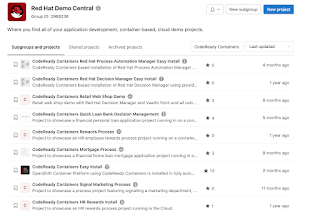
There are many more projects for you to explore without building them from scratch over on Red Hat Demo Central.
Explore all the projects with CodeReady Containers in the title and you should be well on your way to designing and executing business automation projects of your very own.
Published at DZone with permission of Eric D. Schabell. See the original article here.
Opinions expressed by DZone contributors are their own.