

ConcurrentHashMap: Call Only One Method Per Key
Using the ConcurrentHashMap in a thread-safe way is easy.
Join the DZone community and get the full member experience.
Join For FreeEach method of ConcurrentHashMap is thread-safe. But calling multiple methods from ConcurrentHashMap for the same key leads to race conditions. And calling the same method from ConcurrentHashMap recursively for different keys leads to deadlocks.
Let us look at an example to see why this happens:
Calling Multiple Methods
In the following test, I use two methods from ConcurrentHashMap for the same key 1. The method update, line 3 till 10, first gets the value from the ConcurrentHashMap using the method get. Than update increments the value and put it back using the method put , line 6 and 8:
import com.vmlens.api.AllInterleavings;
public class TestUpdateWrong {
public void update(ConcurrentHashMap<Integer, Integer> map) {
Integer result = map.get(1);
if (result == null) {
map.put(1, 1);
} else {
map.put(1, result + 1);
}
}
public void testUpdate() throws InterruptedException {
try (AllInterleavings allInterleavings =
new AllInterleavings("TestUpdateWrong");) {
while (allInterleavings.hasNext()) {
final ConcurrentHashMap<Integer, Integer> map =
new ConcurrentHashMap<Integer, Integer>();
Thread first = new Thread(() -> {
update(map);
});
Thread second = new Thread(() -> {
update(map);
});
first.start();
second.start();
first.join();
second.join();
assertEquals(2, map.get(1).intValue());
}
}
}
}
To test what happens I use two threads, created in line 18 and 21. I start those two threads, in line 25 and 25. And then wait till both are ended using thread join,in line 26 and 27. After both threads are stopped I check if the value is indeed two,line 28.
To test all thread interleavings we put the complete test in a while loop iterating over all thread interleavings using the class AllInterleavings from vmlens, line 15. Running the test I see the following error:
java.lang.AssertionError: expected:<2> but was:<1>
To see why the result is one, not two as expected we can look at the report vmlens generated:
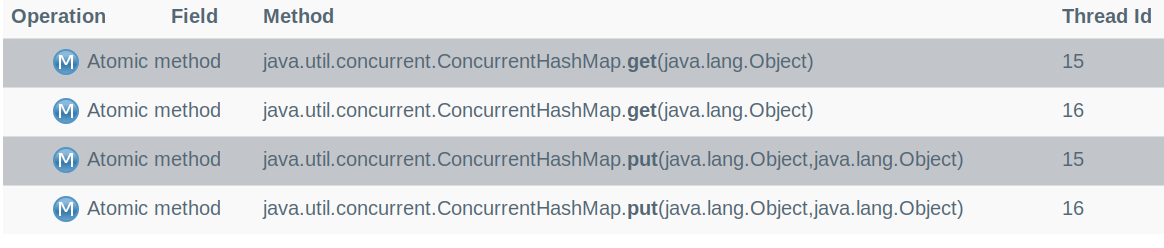
So. the problem is that first both threads call get, and after that, both threads call put. So, both threads see an empty value and update the value to one. This leads to a result of one and not, as expected, two. The trick to solving this race condition is to use only one method instead of two methods to update the value. Using the method compute, we can do this. So, the correct version looks like this:
public void update() {
    map.compute(1, (key, value) -> {
        if (value == null) {
            return 1;
        } else {
            return value + 1;
        }
    });
}
Calling the Same Method Recursively
Now, let us look at an example for calling the same method from ConcurrentHashMap recursively:
public class TestUpdateRecursive {
    private final ConcurrentHashMap<Integer, Integer> map =
            new ConcurrentHashMap<Integer, Integer>();
    public TestUpdateRecursive() {
        map.put(1, 1);
        map.put(2, 2);
    }
    public void update12() {
        map.compute(1,  (key,value) ->   {
               map.compute(2, ( k , v ) ->  {  return 2; }  );
               return 2;
        });
    }
    public void update21() {
        map.compute(2,  (key,value) ->   {
               map.compute(1, ( k , v ) ->  {  return 2; }  );
               return 2;
        });
    }
    @Test
    public void testUpdate() throws InterruptedException    {
        ExecutorService executor = Executors.newFixedThreadPool(2);
        executor.execute( () -> { update12();   }  );
        executor.execute( () -> { update21();   }  );
        executor.shutdown();
        executor.awaitTermination(10, TimeUnit.MINUTES);
    }

}
Here, we call the compute method inside of the compute method for different keys. Once for the key, one then two, and once for the key, two then one. If we run the test, we see the following deadlock:
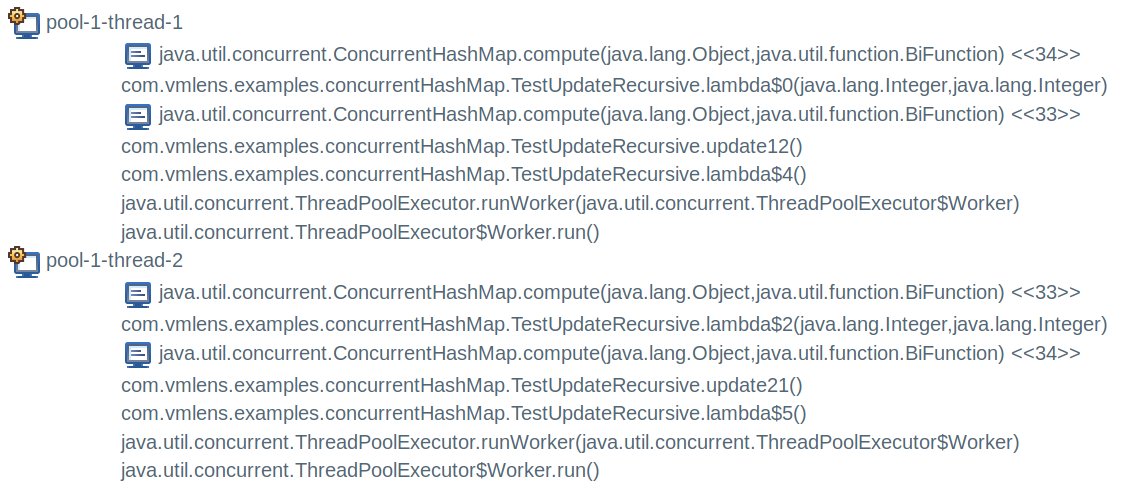
To understand why this deadlock happens, we have to look at the internals of the ConcurrentHashMap. ConcurrentHashMap uses an array to store the mapping between the keys and the values. Every time we update such a mapping of the ConcurrentHashMap, it locks the array element in which the mapping is stored. So in our test, the call to compute for the key one locked the array element for the key one. And then, we try to lock the array element for the key two. But this key is already locked by the other thread who called compute for key two and tries to lock the array element for the key one. A deadlock.
Note that only updates need a lock to an array element. Methods that are read-only, like, for example,get, do not use locks. So, it is no problem to use a get method inside a compute call.
Conclusion
Using the ConcurrentHashMap in a thread-safe way is easy. Select one method that best fits your needs — and use it exactly once per key
Opinions expressed by DZone contributors are their own.
Comments