

Connection Pooling
For almost every web or mobile application that we write, one of the crucial components underlying it is the database. Learn more!
 ·
·
For almost every web or mobile application that we write, one of the crucial components underlying it is the database. For writing applications that use databases and are performant and resource-efficient, there is a crucial resource one has to take care of, but unlike CPU, memory, etc., it’s often not very visible. That resource is a database connection.
What Is a Database Connection?
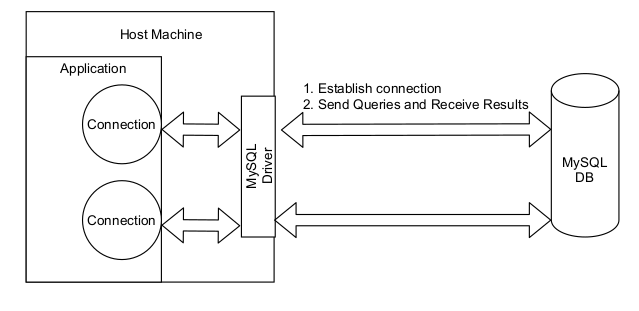
Database Connection using MySQL as the DB
Database connections are objects created by a database driver, which is a piece of software that manages the details of talking to the database and enables our application code to use the database easily. For example, MySQL connections can be created by com.mysql.jdbc.Driver driver. Connections maintain many things, which include sockets (the socket is loosely a logical representation of a connection between 2 machines) for data exchange and also a session with the DB, quite similar to a typical web session.
Need for Connection Pooling
Pitfalls of Mismanaging Connections
Not closing database connections properly is a source of errors that are hard to detect. The most common errors are:
'Too many connections'error, where the database doesn’t accept client connections for query processing- Memory overflow of some form (e.g.:
'Heap OutOfMemoryError'): Happens due to open connections accumulating in memory.
Even a single place in a web application serving requests, where connections are not closed properly, can potentially bring down the application over time with the above errors.
Using a connection pool usually reduces or eliminates such errors.
Effect of Introducing a Connection Pool
Consider the following simple program, which runs 1000 queries on DB:
for i = 1 to 1000
    connection = Driver.getConnection()
    result = connection.executeQuery(query)
    connection.close()
The number of times we create and close a connection in the above code increases linearly with the number of queries executed.
This program can be highly optimized by using a very simple Connection Pool, which is simply a cache of active database connections.
Pool = CreateConnectionPool(size = 2)
for i = 1 to 1000
    connection = Pool.getConnection()
    result = executeQuery(query, connection)
    Pool.returnConnection(connection)
Simplified representation of Connection Pooling
Here, creating a connection gets replaced by getting a connection from the pool, and closing a connection gets replaced by returning the connection to the pool, the latter being much faster.
Without Pool (~34 sec)
// Query Execution without pool ---> ~34 sec
public static void main(String[] args) throws SQLException {
    long start = System.currentTimeMillis();
    for(int i = 0 ;i < 1000; i++){
        // 1. Application will load the suitable MySQL Driver, eg: com.mysql.jdbc.Driver, com.mysql.cj.jdbc.Driver
        // 2. Driver will connect to the MySQL DB using the provided URL for the DB and credentials
        // 3. Driver will return a connection object corresponding to created DB connection
        Connection connection = DriverManager.getConnection("jdbc:mysql://localhost:3306/my_db", "root", "");

        connection.createStatement().execute("select count(*) from places");

        // release connection
        connection.close();
    }
    System.out.println(System.currentTimeMillis() - start);
With Pool (A Very Naive Implementation) (~16 sec)
//Query execution using a very simplistic Connection Pool ---> ~16 sec
public static void main(String[] args) throws SQLException {
    long start = System.currentTimeMillis();

    // create pool
    List<Connection> pool = new ArrayList<>();
    for(int i = 0; i < 10;i++){
        Connection connection = DriverManager.getConnection("jdbc:mysql://localhost:3306/my_db", "root", "");
        pool.add(connection);
    }

    Random r = new Random();
    for(int i = 0 ;i < 1000; i++){
        // get connection
        int randomIdx = r.nextInt(10);
        Connection connection = pool.get(randomIdx);
        pool.remove(randomIdx);

        connection.createStatement().execute("select count(*) from places");

        // release connection
        pool.add(randomIdx, connection);

    }
    System.out.println(System.currentTimeMillis() - start);
}
The connection pool, although implemented in a very naive way, leads to a > 50% reduction in program execution time. (34 sec to 16 sec execution time).
Sophisticated connection pooling libraries, such as HikariCP, C3P0, etc., can give huge performance improvements and bring resource efficiency to your application.
How To Determine the Size of a Connection Pool
Suppose that you have a web app where processing each request requires performing operations on DB records, and you decide to use connection pooling after reading this article :)
If your web application serves a load of 100 concurrent requests, what should be the size of the connection pool? 100, right (1 for each request)?
No. The answer is that it depends on several factors, and mostly, an appropriate value has to be arrived at experimentally. Some of the factors to take into account are the following:
- Number of concurrent requests served by your web app
- Average query execution times
- DB resources(CPU cores, disk speed)
But it’s usually lower than one might normally think; for example, for 100 concurrent requests in the above example, a good pool size will mostly not be greater than 10. Finally, here’s a figure to intuitively think about sizing:

Connection Pool Sizing
Key Takeaways
- What is a database connection?
- What is a connection pool? Why is it useful?
- How do you determine the size of a connection pool?
Opinions expressed by DZone contributors are their own.
Comments