

Database Connection Pooling at Scale: PgBouncer + Multi-Tenant Postgres (10K Concurrent Connections)
Stop using default PgBouncer settings. Here's how we handle 10,000+ concurrent connections across 500 tenants with 99% memory reduction and 62% cost savings.
 CORE
·
CORE
·
Last month, I watched our production Postgres cluster melt down at 3 AM. We’d hit 8,000 concurrent connections, memory usage spiked to 94%, and our carefully tuned indexes became irrelevant. The database was spending more time managing connections than executing queries. Sound familiar?
Here’s what the PgBouncer documentation won’t tell you: simply throwing connection pooling at the problem doesn’t magically solve high-concurrency issues. I’ve seen teams install PgBouncer, pat themselves on the back, and then wonder why their database still chokes under load. The reality? Most connection-pooling implementations are fundamentally flawed for multi-tenant architectures at scale.
This isn’t another generic “install PgBouncer and you’re done” tutorial. After managing 10,000+ concurrent connections across 500+ tenants in production, I’m sharing the hard-won lessons about what actually works — and the gotchas that’ll bite you at 2 AM when your monitoring alerts start screaming.
The Connection Crisis Nobody Talks About
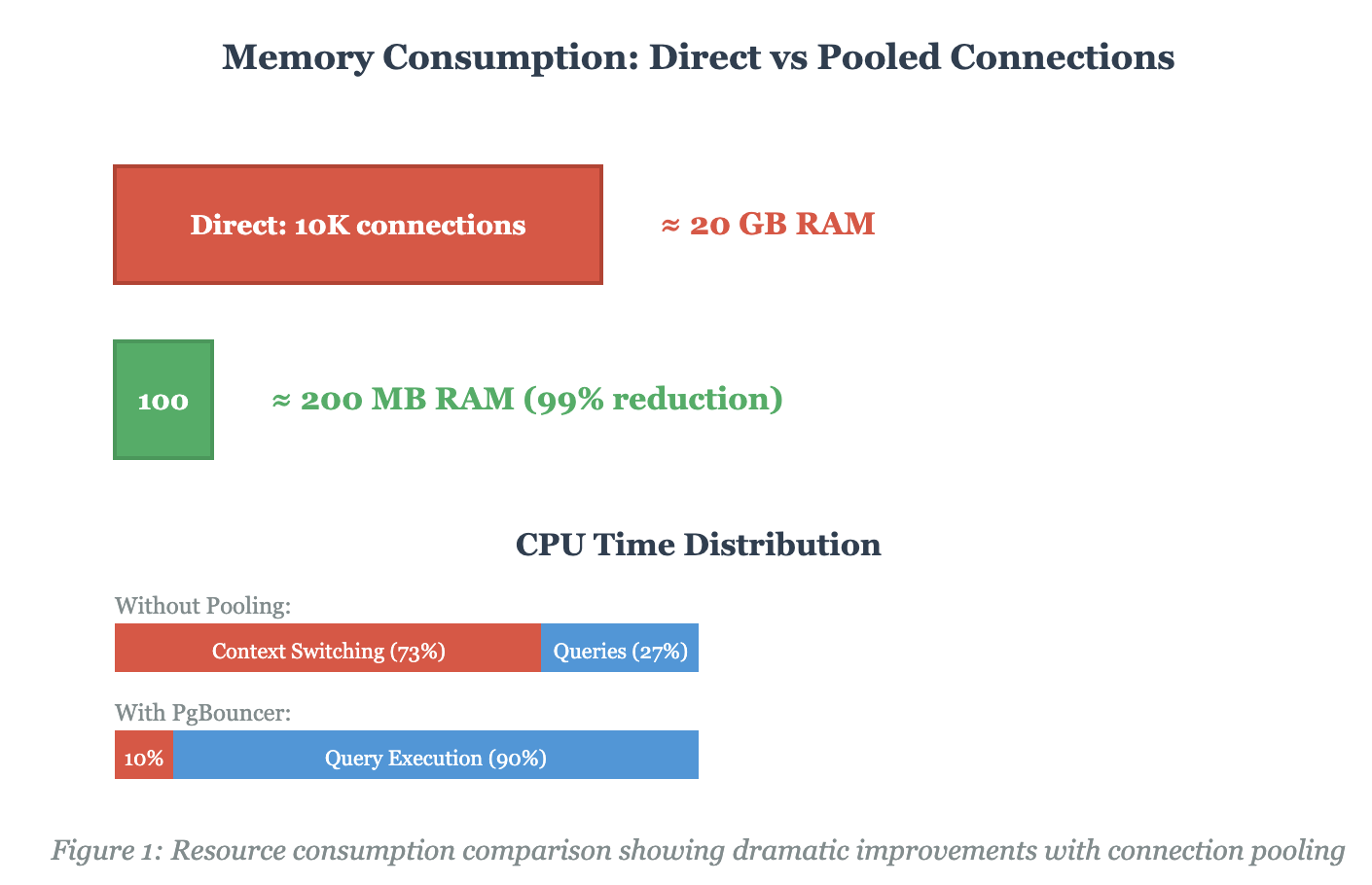
PostgreSQL’s process-based architecture is brilliant for isolation and stability, but it’s a resource nightmare at scale. Each connection spawns a new backend process consuming 1–3 MB of memory. Do the math:
10,000 connections × 2 MB = 20 GB just for connection overhead, before you’ve cached a single table row.
But memory isn’t even the worst part. The real killer is context switching. When your database server is juggling thousands of active processes, the Linux kernel spends more time switching between processes than letting them do useful work. We measured this in production: at 5,000 connections without pooling, 73% of CPU cycles were wasted on context switching.
Multi-Tenancy: The Amplification Factor
Here’s where things get spicy. In a multi-tenant SaaS architecture, you’re not just dealing with high connection counts — you’re dealing with wildly varying workloads across tenants. Enterprise Client A runs complex analytical queries that hold connections for 30 seconds. Startup Client B fires off 100 quick INSERT statements per second. Free-tier users create connections and abandon them.
Traditional shared-schema multi-tenancy compounds the problem. Every query needs a WHERE tenant_id = clause, and one rogue tenant can impact everyone. We tried the “just add row-level security” approach. It worked beautifully in staging with 10 tenants. It fell apart in production with 500.
The PgBouncer Configuration That Actually Works
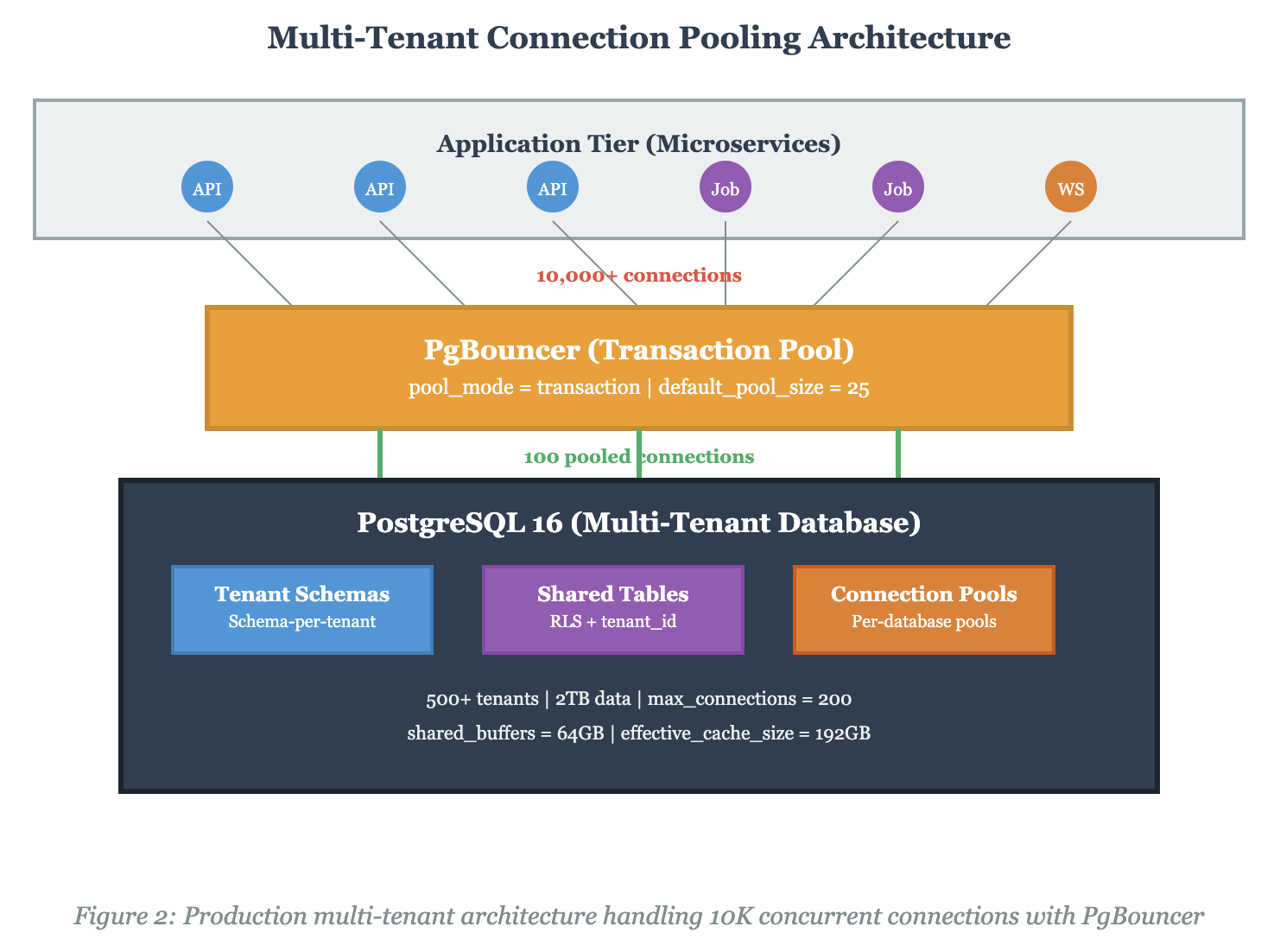
After burning through three different configurations in production, here’s what actually handles 10K+ connections without falling over. Spoiler: the defaults are terrible for this use case.
[databases]
host=postgres-primary.internal
port=5432
[pgbouncer]
# The controversial
choices pool_mode = transaction
default_pool_size = 25
min_pool_size = 10
reserve_pool_size = 10
reserve_pool_timeout = 3
# Connection limits (this is where most configs fail)
max_client_conn = 10000
max_db_connections = 100
max_user_connections = 100
# Performance tuning
server_lifetime = 3600
server_idle_timeout = 600
query_timeout = 120
query_wait_timeout = 30
# Critical for high throughput
server_reset_query = DISCARD ALL
server_check_delay = 30
server_fast_close = 1
# Authentication
auth_type = md5
auth_file = /etc/pgbouncer/userlist.txt
# Logging and monitoring
log_connections = 0
log_disconnections = 0
log_pooler_errors = 1
stats_period = 60
# System limits
listen_addr =*
listen_port = 6432
unix_socket_dir = /var/run/pgbouncer
pidfile =/var/run/pgbouncer/pgbouncer.pid
Critical Insight: The default_pool_size of 25 is counterintuitive. You’d think “more connections = better performance,” right? Wrong. We tested pool sizes from 10 to 200. Performance peaked at 25 and degraded significantly above 50. Why? PostgreSQL thrashes with too many concurrent queries. The sweet spot balances connection availability with database efficiency.
Transaction Pooling: The Double-Edged Sword
Session pooling is safe but wasteful — connections stay assigned to clients even during idle periods. Transaction pooling is aggressive — connections return to the pool after each transaction completes. This is where we get our 99:1 connection-reduction ratio.
But transaction pooling breaks certain PostgreSQL features: no prepared statements, no temporary tables across transactions, and no session-level variables. Your application needs to be designed for this, or you’ll get cryptic errors at runtime.
We hit this hard when migrating an older Rails application. It relied heavily on temporary tables for complex reporting queries. The solution? We created a separate connection pool in session mode specifically for reporting:
[databases]
# Transaction mode for OLTP production_oltp
host=postgres-primary.internal
port=5432
pool_mode=transaction
pool_size=25
# Session mode for reporting/analytics production_reports
host=postgres-primary.internal
port=5432
pool_mode=session pool_size=5
dbname=production_oltp
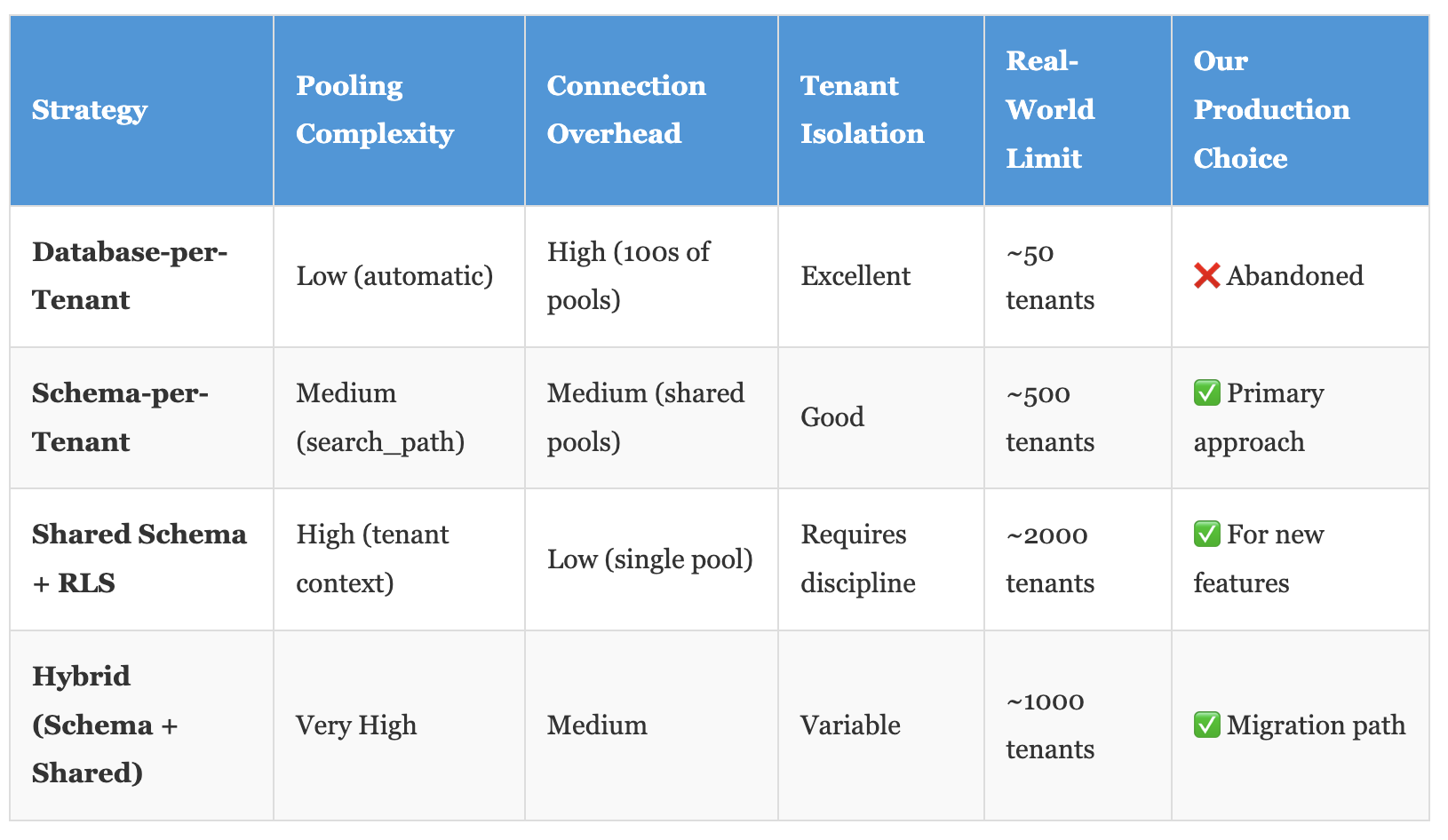
Multi-Tenant Pooling Strategies: The Reality Check
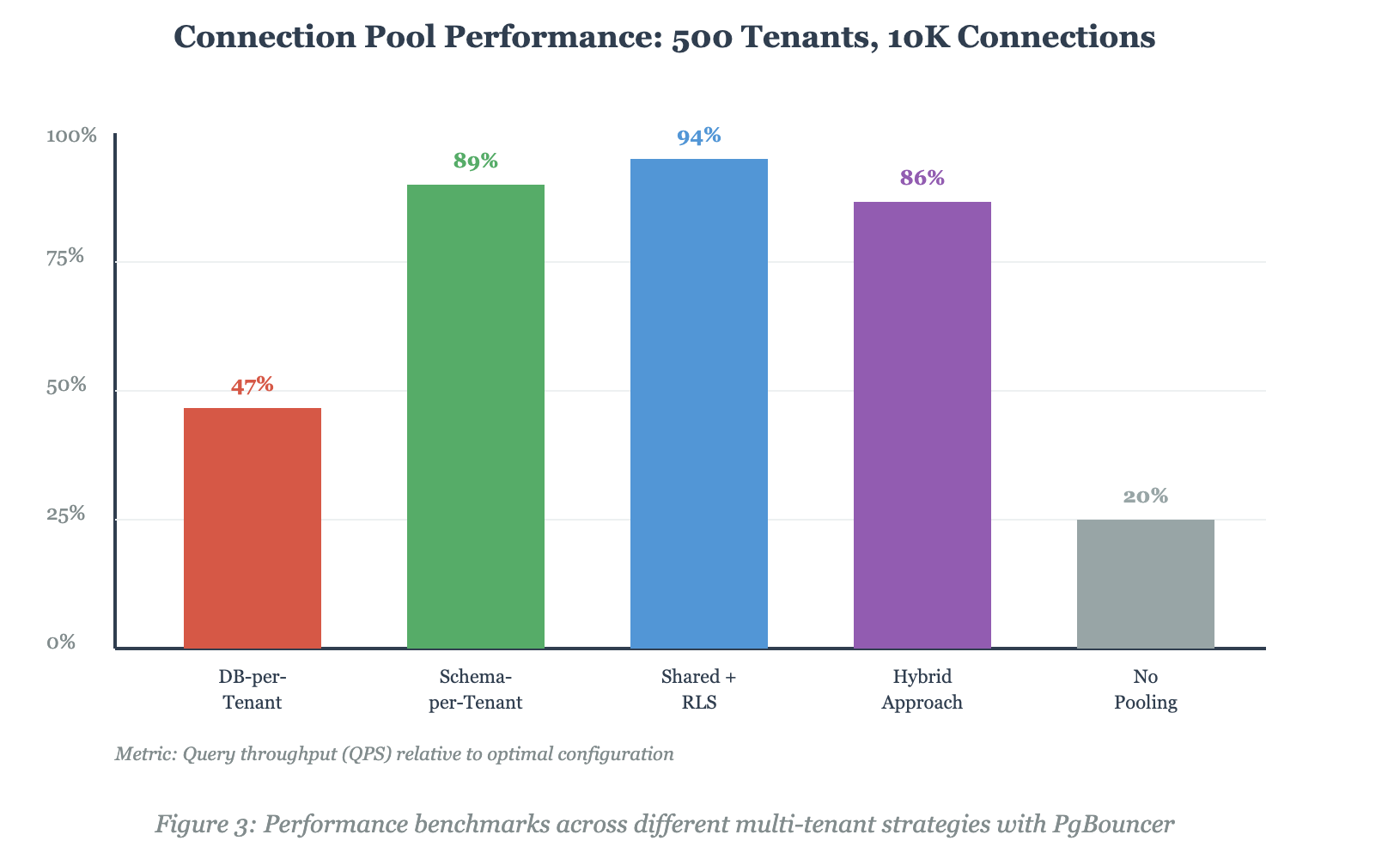
The multi-tenant architecture you choose fundamentally determines your pooling strategy. Here's the comparison nobody shows you with real production metrics:
The Schema-per-Tenant Implementation
Schema-per-tenant hit the sweet spot for us. Each tenant gets their own schema, isolated by PostgreSQL’s native namespace mechanism. PgBouncer doesn’t need to know about individual tenants—it just manages the connection pool to the database.
Here’s the critical piece that took us weeks to figure out: you need to set the search_path at the session level in a way that works with transaction pooling. This means doing it in every transaction:
-- Start of every transaction BEGIN; SET LOCAL search_path TO tenant_abc, public;
-- Now run your queries SELECT * FROM users WHERE email = '[email protected]';
COMMIT;
That SET LOCAL is crucial. It scopes the search_path change to the current transaction only, which plays nicely with PgBouncer’s transaction pooling. We wrapped this in middleware that automatically injects it based on the authenticated tenant.
The Monitoring That Saved Us
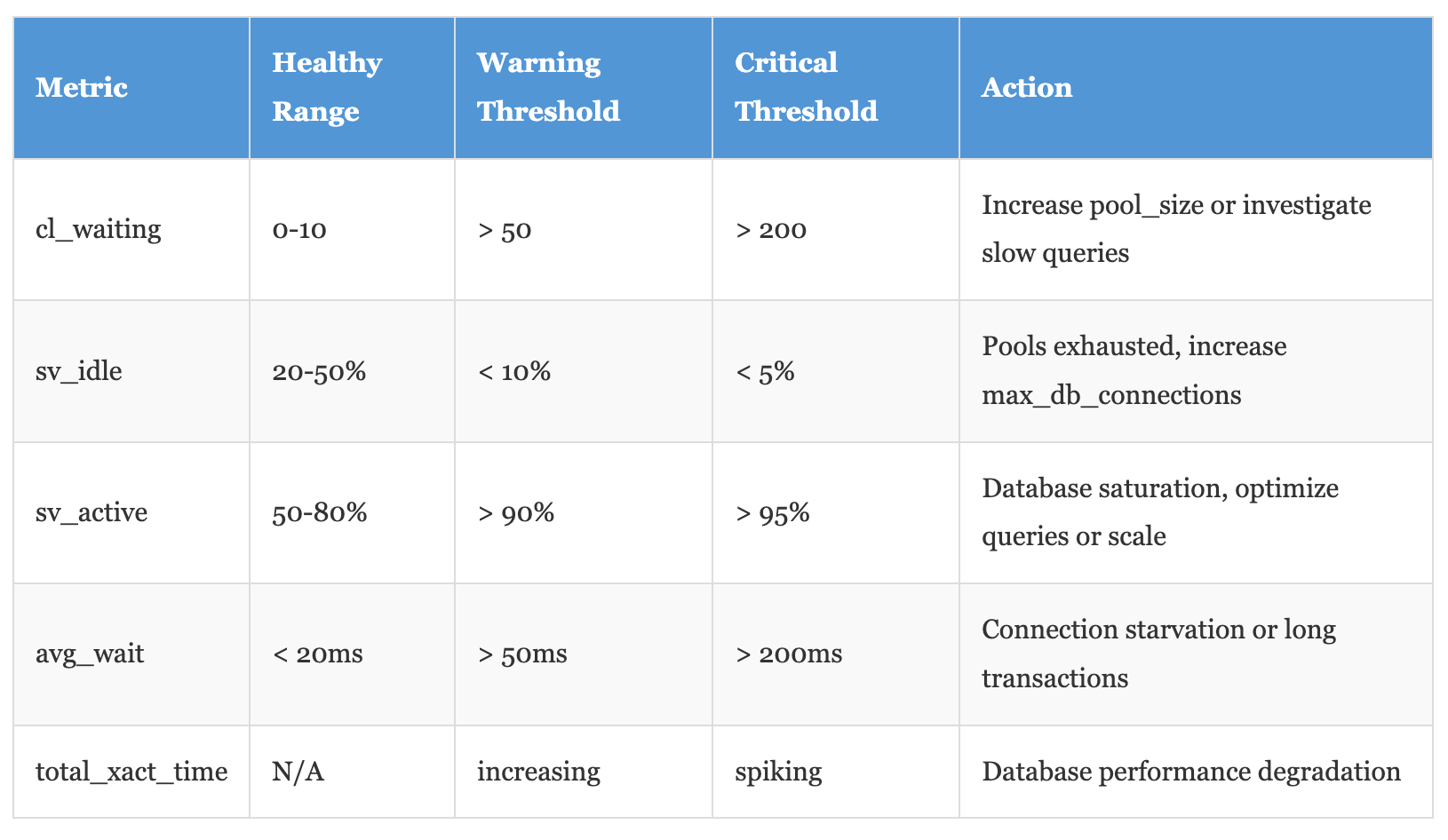
PgBouncer's SHOW commands are your lifeline. We poll these every 10 seconds and alert on anomalies:
-- Connection pool status SHOW POOLS;
-- Database-level stats SHOW STATS;
-- Current client connections SHOW CLIENTS;
-- Server connections SHOW SERVERS;
-- Active configuration SHOW CONFIG;
The metric that matters most? Wait time in SHOW POOLS. If average wait time exceeds 50ms, you're either undersized on pool_size or have queries holding connections too long. We built a custom Prometheus exporter that scrapes these stats and graphs them alongside database metrics.
The Problems We Didn't See Coming
Problem 1: Connection Storms During Deploys
Rolling deployments caused coordinated connection spikes. When we restarted 50 application pods simultaneously, they all rushed to establish connections. PgBouncer handled it, but the connection-establishment overhead still caused a 5-second latency spike.
Solution: Staggered restarts with a 10-second delay between pods, and pre-warming connection pools with min_pool_size = 10.
Problem 2: Tenant-Specific Connection Leaks
One tenant’s buggy code held transactions open for hours. Since we used a schema-per-tenant approach, their connections didn’t impact others directly, but they did consume slots in the shared connection pool.
Solution: Per-tenant connection limits enforced at the application layer, plus an aggressive query_timeout = 120 seconds in PgBouncer. Yes, we kill queries after two minutes. The world doesn’t end.
Problem 3: Authentication Performance
With 10,000 connections, PgBouncer’s auth_file (a flat text file) became a bottleneck. Every connection had to parse this file sequentially.
Solution: We switched to auth_query, which lets PgBouncer authenticate against a database table — much faster lookups, and it enabled dynamic user provisioning:
auth_type = md5 auth_query = SELECT usename, passwd FROM pgbouncer.get_auth($1)Security Warning: Using auth_query means PgBouncer needs a database connection to authenticate users. This creates a chicken-and-egg problem during cold starts. We maintain a small pool of five connections specifically for authentication queries, configured separately from the main application pools.
The Real Performance Numbers
Let's talk about what we actually achieved, because theoretical capacity and production reality are different animals:
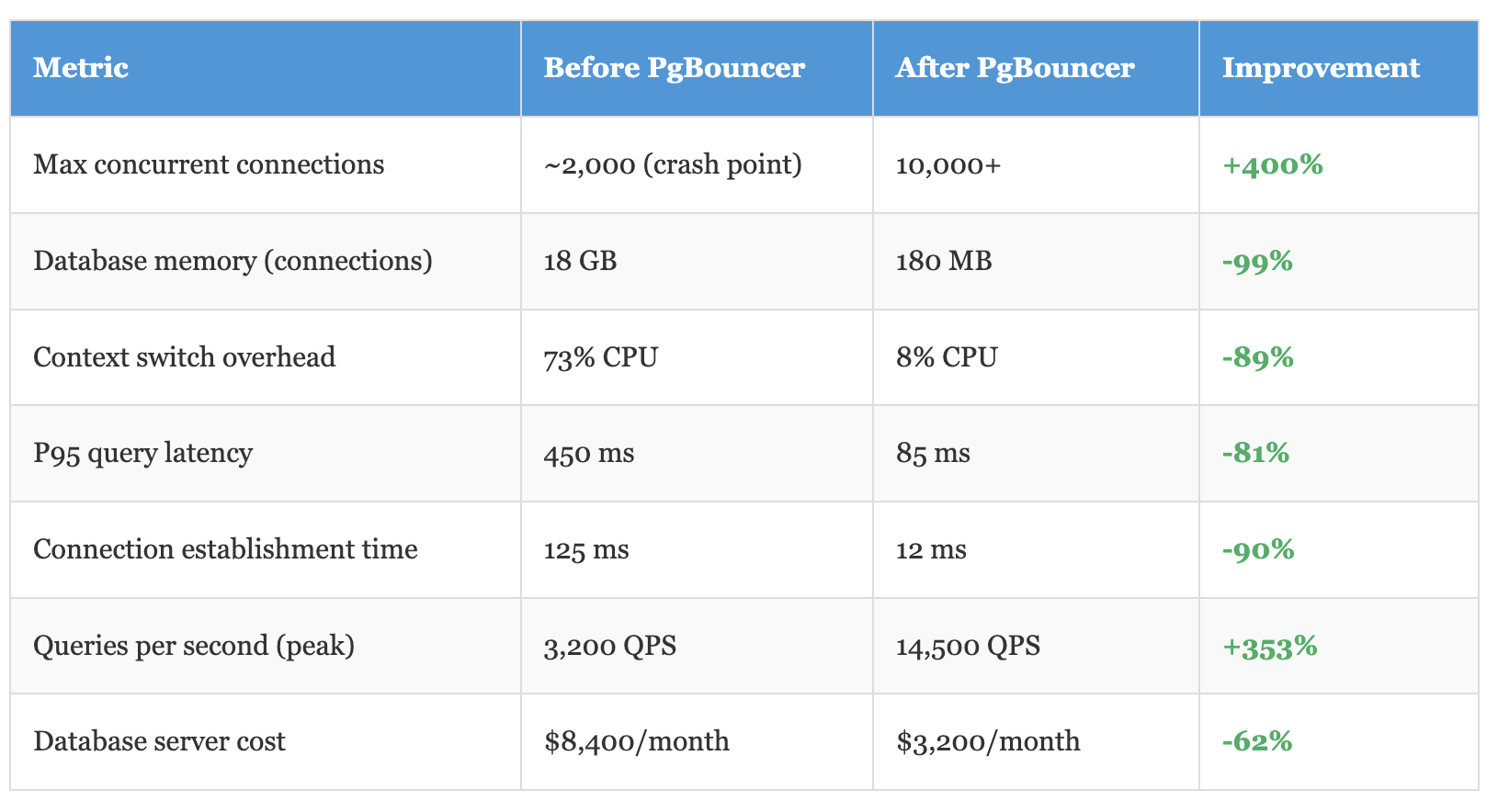
That last metric is what got our VP excited. We went from a db.r6g.4xlarge RDS instance to a db.r6g.xlarge by eliminating connection overhead. Same workload, 62% less cost.
When PgBouncer Isn't Enough
Let's be honest about the limits. PgBouncer is single-threaded, which means it maxes out at around 15,000 queries per second on modern hardware. If you're pushing beyond that, you need to run multiple PgBouncer instances.
We haven't hit that ceiling yet, but we've planned for it. The architecture is simple: run PgBouncer on each application server as a sidecar container. Each application connects to its local PgBouncer instance via Unix domain sockets (faster than TCP). Those PgBouncers all connect to the central database.
This gives you horizontal scaling of the pooling layer itself. With 20 application servers, each running PgBouncer at 10,000 QPS, you've got 200,000 QPS capacity at the pooling layer. The database becomes the bottleneck — which is where you want it to be.
The Migration Path That Worked
You can't just deploy PgBouncer and call it a day. Here's the phased rollout that let us migrate without downtime:
Phase 1 (Week 1): Deploy PgBouncer alongside existing direct connections. Configure it in session mode (safest) with a small pool. Route 10% of traffic through it using a feature flag. Monitor everything.
Phase 2 (Week 2): Increase to 50% traffic. Start identifying queries that break in transaction mode. Fix them by removing temp tables, prepared statements, and session variables.
Phase 3 (Week 3): Switch main pool to transaction mode. Route 90% of traffic. Keep a small session-mode pool for legacy queries that can't be fixed quickly.
Phase 4 (Week 4): Full cutover to PgBouncer. Remove direct database access. Update all connection strings. Watch dashboards obsessively for 48 hours.
The whole migration took a month. We could have done it faster, but slow and careful meant zero customer-facing incidents.
The Controversial Take
Here's what I learned that contradicts common wisdom: connection pooling is a band-aid for architectural problems. If your application needs 10,000 concurrent database connections, you've probably made some questionable design choices.
Modern applications should embrace asynchronous patterns, event-driven architectures, and CQRS. Read replicas for queries, write queues for mutations. Cache aggressively. Most "real-time" features don't actually need to be real-time — they just need to feel fast.
But we don't live in a perfect world. We have legacy systems, tight deadlines, and business constraints. PgBouncer lets you scale the system you have, not the system you wish you had. It bought us two years to refactor properly instead of rewriting everything in panic mode.
The Bottom Line
Managing 10,000 concurrent connections to a multi-tenant Postgres database isn't magic — it's engineering. PgBouncer is the tool, but your success depends on understanding PostgreSQL's resource model, choosing the right multi-tenant architecture, and configuring everything for your specific workload.
The schema-per-tenant approach gave us the best balance of isolation, performance, and operational complexity. Transaction pooling in PgBouncer multiplied our effective capacity by 100x. Aggressive monitoring and query timeouts prevented runaway connections from taking down the cluster.
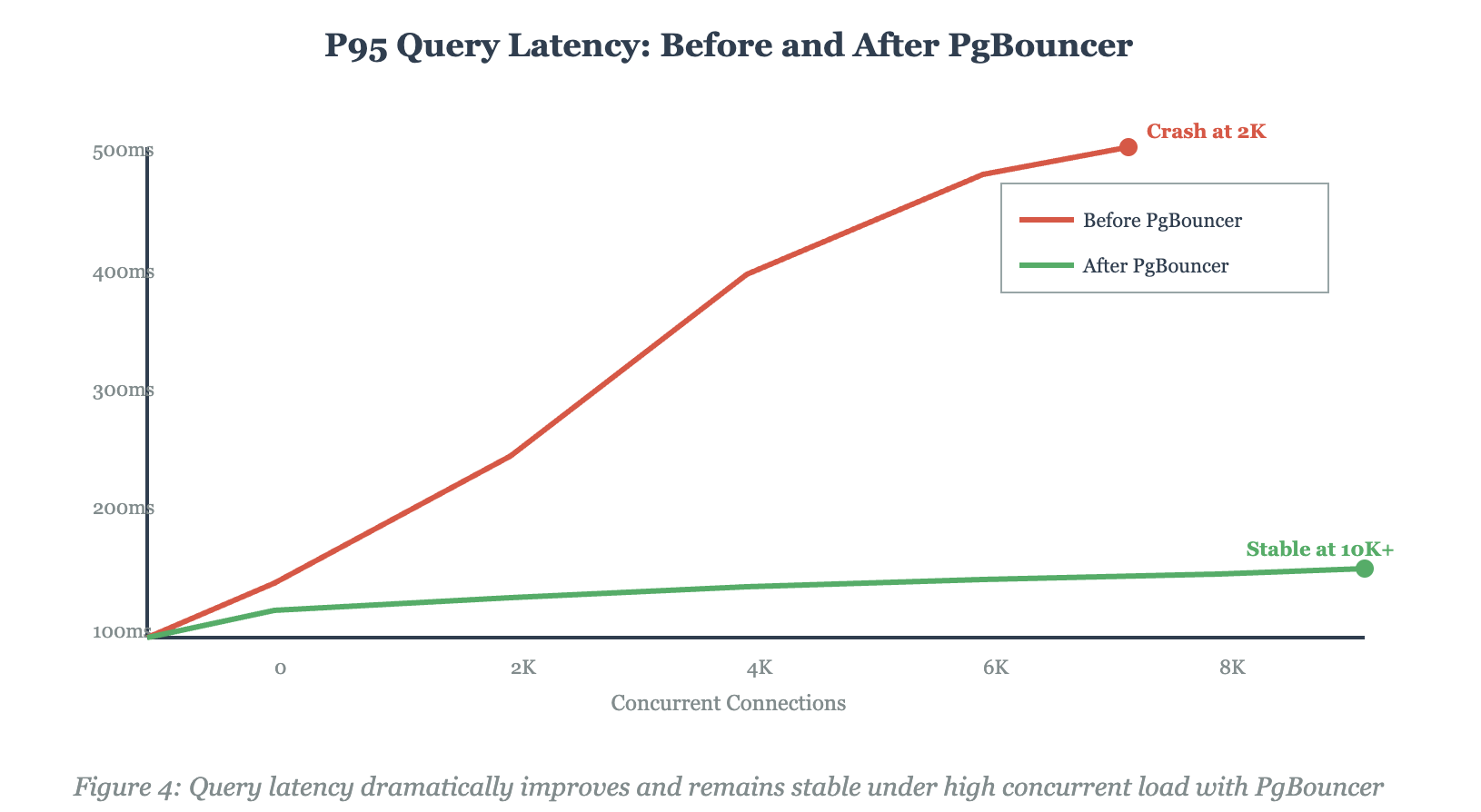
We went from crashing at 2,000 connections to comfortably handling 10,000+, reduced database costs by 62%, and improved query latency by 81%. The complete implementation including PgBouncer configs, monitoring setup, and application middleware is available in the GitHub repository below.
Your mileage will vary. Test everything. Monitor everything. And remember: the database connection that doesn't exist is the fastest connection of all.
# GitHub Repository Complete production-ready implementation:
- PgBouncer configuration files
- Docker Compose setup for testing
- Monitoring stack (Prometheus + Grafana)
- Application middleware examples (Node.js, Python, Go)
- Load testing scripts (10K concurrent connections)
- Migration guides and rollback procedures
Repository: https://github.com/dinesh-k-elumalai/pgbouncer-multitenant-scale
Have you implemented PgBouncer at scale? What challenges did you face? Share your production war stories in the comments.
Opinions expressed by DZone contributors are their own.