

Why PostgreSQL Vacuum Matters More Than You Think
Learn how dead tuples slow queries, when to use autovacuum or manual Vacuum, and how tuning improves large or high traffic tables.
 CORE
·
CORE
·
Join the DZone community and get the full member experience.
Join For Free
Why PostgreSQL Vacuum Matters More Than You Think
Keeping PostgreSQL fast and stable is not just about good schema design or indexing. One of the most overlooked pillars of database health is the Vacuum process. It is easy to ignore because it operates quietly in the background, yet it is crucial for long-term performance, storage efficiency, and even preventing database outages.
In this article, I will walk through why Vacuum exists, what happens when it is neglected, and when it makes sense to tune or run it manually.
What Vacuum Really Does
PostgreSQL uses Multi-Version Concurrency Control (MVCC), allowing many users to interact with data without stepping on each other’s transactions. Instead of overwriting a row during an update, PostgreSQL leaves the old version in place. That old version becomes a dead tuple. Over time, these dead rows pile up.
Vacuum’s job is to clean these up. It frees space inside the table so PostgreSQL can reuse it. Standard Vacuum does not return space to the operating system. For that, you need Vacuum Full, which rewrites the whole table and is too disruptive for regular use.
Think of Vacuum as housekeeping. Without it, clutter builds up and starts slowing everything down.
How Dead Tuples Hurt Performance
Dead rows may not be visible to your application, but PostgreSQL still has to sift through them. Over time this leads to:
- More storage use: Your tables and indexes grow larger purely because of old, unused versions of data.
- Slower queries: Sequential scans and index scans take longer because PostgreSQL must read more blocks and filter out dead tuples.
- Poor cache usage: The larger a table becomes, the less of it fits in memory. That means extra disk reads and slower query execution.
- Index bloat: Indexes accumulate dead entries just like tables do, which slows lookups and increases I/O.
- Risk of transaction ID wraparound: If old transaction IDs are not frozen by Vacuum, PostgreSQL eventually stops accepting writes to prevent corruption. Vacuum is essential to prevent this scenario.
When Automatic Vacuum Is Enough, and When It Isn’t
PostgreSQL comes with an autovacuum daemon that monitors table activity and kicks in when needed. In most environments, it does an excellent job. However, there are situations where a manual Vacuum is the smarter move:
- After very large updates or deletes: If you just deleted a few million rows or updated half your table, autovacuum might not react quickly enough. A manual Vacuum can help PostgreSQL reclaim space sooner.
- When you must reclaim disk space immediately: Vacuum Full rewrites the table and returns unused space to the operating system. This is useful after archiving or purging old partitions, but it has a heavy lock and should only happen during maintenance windows.
- High activity tables: Some tables see so many writes that they need more frequent cleanup than autovacuum settings allow.
- Preparing for wraparound or maintaining older PostgreSQL versions: Manual Vacuum Freeze can be required in rare cases where TXIDs are reaching unsafe limits.
A Practical Scenario That Shows the Vacuum’s Impact
Here is a simple walkthrough demonstrating how dead tuples accumulate and how Vacuum restores performance. This example uses a table of 100k sensor readings.
-- 1. Create a test table
CREATE TABLE sensor_data (
    id SERIAL PRIMARY KEY,
    sensor_id INT NOT NULL,
    temperature NUMERIC(5, 2),
    humidity NUMERIC(5, 2),
    recorded_at TIMESTAMP DEFAULT NOW()
);

-- 2. Insert initial data (e.g., 100,000 rows)
INSERT INTO sensor_data (sensor_id, temperature, humidity)
SELECT
    (random() * 100)::INT,
    (random() * 50 + 10)::NUMERIC(5,2),
    (random() * 60 + 20)::NUMERIC(5,2)
FROM generate_series(1, 100000);

-- Enable timing for performance measurement
timing on;

-- 3. Measure initial performance (e.g., retrieving latest 100 records)
SELECT * FROM sensor_data ORDER BY recorded_at DESC LIMIT 100;

-- 4. Simulate heavy updates and deletes (creating dead tuples)
-- Update 50% of the rows
UPDATE sensor_data SET temperature = temperature + 1.0, humidity = humidity - 0.5
WHERE id % 2 = 0; -- Update even IDs

-- Delete 20% of the rows
DELETE FROM sensor_data WHERE id % 5 = 0; -- Delete every 5th ID

-- 5. Measure performance *after* dead tuples accumulate
-- (Note: autovacuum might kick in if left for too long, but we're simulating a rapid change)
SELECT * FROM sensor_data ORDER BY recorded_at DESC LIMIT 100;

-- Let's also check table stats to see dead tuples (requires superuser or specific permissions)
SELECT relname, n_live_tup, n_dead_tup, last_autovacuum, last_vacuum
FROM pg_stat_user_tables
WHERE relname = 'sensor_data';

-- 6. Run manual VACUUM
VACUUM ANALYZE sensor_data;

-- 7. Measure performance *after* manual VACUUM
SELECT * FROM sensor_data ORDER BY recorded_at DESC LIMIT 100;

-- 8. Check stats again
SELECT relname, n_live_tup, n_dead_tup, last_autovacuum, last_vacuum
FROM pg_stat_user_tables
WHERE relname = 'sensor_data';
Measure the query again and recheck statistics.
Typical results look like this:
| Stage | Live Rows | Dead Rows | Query Time |
|---|---|---|---|
| Initial | 100000 | 0 | 50ms |
| After churn | ~70000 | ~30000 | 75ms |
| After Vacuum | ~70000 | 0 | 48ms |
Even on small servers, the improvement is usually noticeable.
Tuning Autovacuum for Different Table Sizes
Good autovacuum tuning varies by workload. PostgreSQL gives you control at both global and per table levels. Here are the main settings worth adjusting:
autovacuum_vacuum_scale_factorThe percentage of dead tuples that triggers a Vacuum. Lower values trigger cleanup sooner.autovacuum_vacuum_thresholdThe minimum number of dead tuples before cleanup starts.autovacuum_analyze_scale_factor / thresholdControls when statistics refresh.autovacuum_vacuum_cost_delay / limitControls how aggressive Vacuum should be. Lower delay and higher limit make cleanup faster, but increase the load.
Recommended Approaches
Small Tables
Keep them extremely clean for the best planner performance.
ALTER TABLE small_table SET (
    autovacuum_vacuum_scale_factor = 0.05,
    autovacuum_vacuum_threshold = 10,
    autovacuum_analyze_scale_factor = 0.02,
    autovacuum_analyze_threshold = 5,
    autovacuum_vacuum_cost_delay = 1
);
Medium Tables
Use defaults but monitor frequently. Adjust scale factors if bloat becomes recurring.
Large or Heavy Write Tables
Tune for slower, less disruptive Vacuum.
ALTER TABLE large_table SET (
    autovacuum_vacuum_scale_factor = 0.1,
    autovacuum_vacuum_threshold = 10000,
    autovacuum_analyze_scale_factor = 0.05,
    autovacuum_analyze_threshold = 5000,
    autovacuum_vacuum_cost_delay = 10,
    autovacuum_vacuum_cost_limit = 1000
);
In very large append-heavy tables, it can make sense to disable autovacuum and schedule a manual Vacuum during off-hours using pg cron or an external scheduler.
Manual Vacuum vs Autovacuum
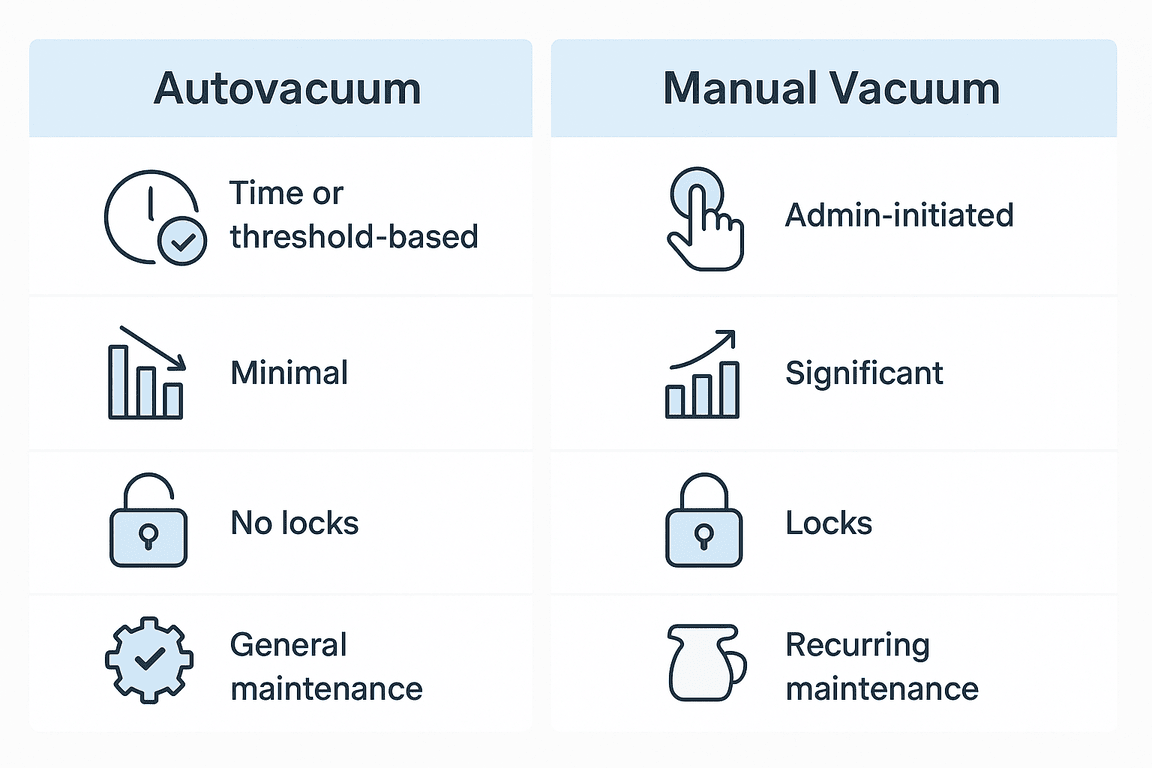
Both are essential, but they behave differently.
| Feature | Autovacuum | Manual Vacuum |
|---|---|---|
| Execution | Background and continuous | On demand |
| Performance impact | Throttled and gentle | Can be heavy |
| Locking | Non blocking | Vacuum Full blocks all access |
| Space management | Reclaims internal space | Vacuum Full returns free space to OS |
| Best use | Routine maintenance | After large workloads or for space recovery |
Autovacuum should be your default choice. It is designed to work quietly without slowing production workloads. Manual Vacuum is situational and requires planning.
Global Settings That Improve Vacuum Efficiency
Some system wide settings make a big difference:
autovacuum Must be enabled.
maintenance_work_mem Higher values allow Vacuum to process more data in memory. Production servers often use 256MB to 1GB depending on available RAM.
autovacuum_max_workers More workers help on systems with many tables or high write activity.
vacuum_cost_delay / vacuum_cost_limit Controls how aggressively manual Vacuum runs.
log_autovacuum_min_duration Logging autovacuum actions helps diagnose bloat issues early. Setting it to zero logs all autovacuum runs and is extremely useful during tuning.
Final Thoughts
A well-tuned Vacuum strategy is one of the most potent ways to keep PostgreSQL fast and reliable. Autovacuum does most of the heavy lifting, but understanding how it works on its own — and when to intervene manually — can prevent performance slowdowns, reduce storage use, and avoid dangerous transaction ID wraparound events.
If you give Vacuum the attention it deserves, your PostgreSQL environment will reward you with healthier tables, faster queries, and fewer surprises.
Opinions expressed by DZone contributors are their own.
Comments