

Implementing Content Based Routing With Apache Camel
Learn the steps for implementing the Content Based Routing enterprise integration pattern for messages with Apache Camel.
Join the DZone community and get the full member experience.
Join For Free1.0 Overview
Content Based Routing (CBR)'s Enterprise Integration Patterns allows you to route a message to the correct destination depending on the message or its content. It is one of the most important and widely used integration patterns; for example, you have received a new purchase order and it needs to route to Widget or Gadget Inventory depending on message or its content.
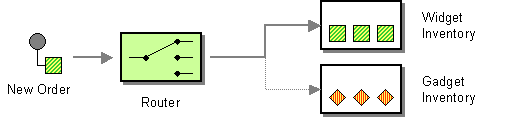 2.0 Camel DSL for Content Based Routing
Camel DSL typically looks as shown below:
from(anEndpoint)
  .choice()
    .when(someCondition).to(firstEndpoint)
    .when(anotherCondition).to(secondEndpoint)
  .otherwise()
    .to(thirdEndpoint)
  .end();
You need to start a block with
choice()to tell Camel that the following line will contain some conditions to evaluate.The
when()method indicates new conditions need to be evaluated, similar to IF in Java.The
otherwise()method will be evaluated if no conditions are satisfied in previouswhen()methods.The
end()method will end the block.
3.0 Business Use Case
Consider that a purchase order is received in some file directory or FTP location and we need to route that purchase order to a different file directory or destination depending on the country field in the purchase order.
<Order>
<Number>123456</Number>
<Country>USA</Country>
<Amount>676332</Amount>
<Items>
<ItemID>12345</ItemID>
<ItemCost>44.00</ItemCost>
<ItemQty>1</ItemQty>
</Items>
</Order>
IF Country="USA" then route the message to directory "A."
IF Country="UK" then route the message to directory "B."
IF no above condition is satisfied then route the message to directory "C."
4.0 Implementing Content Based Routing With Apache Camel
Please go through the article Introduction to Apache Camel for a basic idea of how to create a Java project and add the Camel dependencies required to implement Camel integrationa. Below is the code for implementing the above business use case. xpath is used to read the country from the XML message.
package com.camel.router;

import org.apache.camel.builder.RouteBuilder;
import org.apache.camel.CamelContext;
import org.apache.camel.impl.DefaultCamelContext;

public class CamelCBRRouter {
public static void main(String[] args) throws Exception
{
System.out.println("Initializing the camel context...");
CamelContext camelContext = new DefaultCamelContext();
System.out.println("Implementing Routes......");
camelContext.addRoutes(new RouteBuilder(){
@Override
public void configure() throws Exception{
from("file:F:\\Apache_Camel_Test\\IN").
choice()
.when(xpath("/Order/Country='USA'")).to("file:F:\\Apache_Camel_Test\\A")
.when(xpath("/Order/Country='UK'")).to("file:F:\\Apache_Camel_Test\\B")
.otherwise().to("file:F:\\Apache_Camel_Test\\C")
.end();

}
});
System.out.println("Starting Camel Context......");
camelContext.start();
      Thread.sleep(3000);
      camelContext.stop();
}
}
5.0 Testing
Now, you will see how to test various scenarios for routing the message to the correct destination.
5.1 Scenario: When Country=USA
Drop the purchase order at the input directory with Country=USA; this message will be routed to output directory A. In this case, the first when() method will be executed.
<Order>
<Number>123456</Number>
<Country>USA</Country>
<Amount>676332</Amount>
<Items>
<ItemID>12345</ItemID>
<ItemCost>44.00</ItemCost>
<ItemQty>1</ItemQty>
</Items>
</Order>
5.2 Scenario: When Country=UK
Drop the purchase order at the input directory with Country=UK; this message will be routed to output directory B. In this case, the second when() method will be executed.
<Order>
<Number>123456</Number>
<Country>UK</Country>
<Amount>676332</Amount>
<Items>
<ItemID>12345</ItemID>
<ItemCost>44.00</ItemCost>
<ItemQty>1</ItemQty>
</Items>
</Order>
5.3 Scenario: When Country!=USA And Country!=UK
Drop the purchase order at the input directory with Country=India; this message will be routed to output directory C. In this case, the otherwise() method will be executed as no condition is satisfied in the when() method.
<Order>
<Number>123456</Number>
<Country>India</Country>
<Amount>676332</Amount>
<Items>
<ItemID>12345</ItemID>
<ItemCost>44.00</ItemCost>
<ItemQty>1</ItemQty>
</Items>
</Order>
6.0 Conclusion
Content Based Routing is a very crucial Enterprise Integration Pattern (EIP) for routing message to correct destination. Apache Camel provides very simple steps to implement Content Based Routing.
Now, you know how to implement content based routing with Apache Camel.
Opinions expressed by DZone contributors are their own.
Comments