

5 Critical Databricks Performance Hacks That Most Engineers Miss (100x Faster Queries)
In this article, learn to boost Databricks' performance with six proven optimization strategies for UDFs, AQE, Delta Lake, broadcasts, and Photon acceleration.
 CORE
·
CORE
·
Join the DZone community and get the full member experience.
Join For FreeDatabricks performance tuning is not guesswork; it needs a deep understanding of internals.
In this guide, I will explore six practical optimization techniques every data engineer should apply to achieve faster, cost-efficient production.
1. UDF Optimization in Databricks: Performance Critical
The Databricks Reality
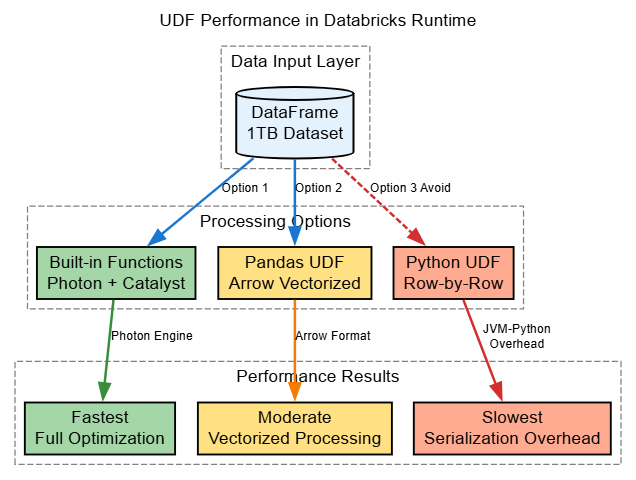
In Databricks Runtime, UDFs remain one of the biggest performance bottlenecks. Traditional Python UDFs bypass the catalyst optimizer and photon engine optimizations (when enabled).
Performance Impact
The relative performance depends heavily on workload:
- Built-in functions: Full catalyst optimization, eligible for Photon acceleration
- Pandas (Arrow) UDFs: Vectorized processing with Apache Arrow, often significantly faster than plain Python UDFs (benchmarks show speedups ranging from modest ~1.5x to substantial improvements depending on the workload)
- Plain Python UDFs: Row-by-row processing with serialization overhead between JVM and Python processes, can be substantially slower in production workloads
Databricks Best Practices
from pyspark.sql import functions as F
from pyspark.sql.functions import pandas_udf, udf, col
from pyspark.sql.types import IntegerType, LongType
import pandas as pd

# BAD: Standard Python UDF - Bypasses Catalyst and Photon optimizations
@udf(returnType=IntegerType())
def calculate_score(value):
    return int(value * 1.5 + 100)

df = df.withColumn("score", calculate_score(col("value")))

# GOOD: Use built-in functions - Full Catalyst and Photon optimization
df = df.withColumn("score", (col("value") * 1.5 + 100).cast("int"))

# BETTER: Pandas UDF when custom logic needed - Arrow optimized
@pandas_udf(LongType())
def calculate_complex_score(values: pd.Series) -> pd.Series:
    return (values * 1.5 + 100).astype('int64')

df = df.withColumn("score", calculate_complex_score(col("value")))
Databricks-Specific Configuration
# Enable Arrow for Pandas UDFs (default in DBR 7.0+)
# Requires PyArrow library on driver and executors
spark.conf.set("spark.sql.execution.arrow.pyspark.enabled", "true")
spark.conf.set("spark.sql.execution.arrow.pyspark.fallback.enabled", "false")Important: Arrow optimization requires the Apache Arrow library to be installed on both the driver and executor nodes. Databricks Runtime includes this by default.
2. Shuffle Partition Tuning With AQE in Databricks
The Default Problem
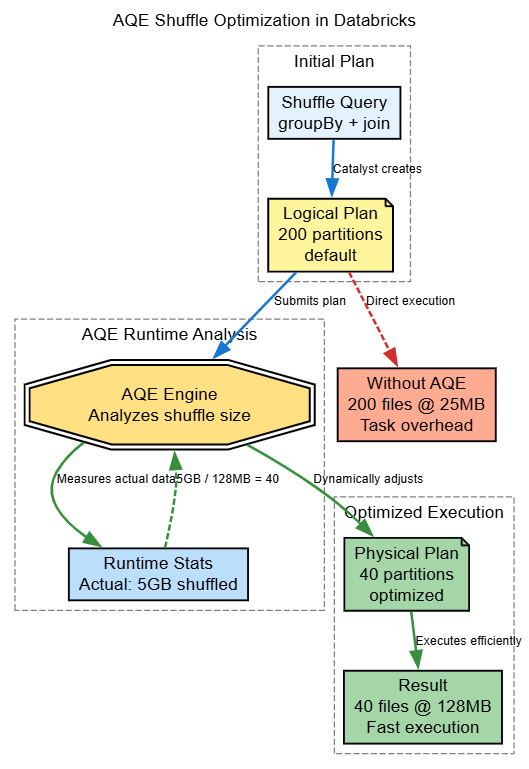
Spark uses spark.sql.shuffle.partitions = 200 as the default, for production work loads, it is rarely optimal for production workloads.
This setting affects all shuffle operations, including joins, groupBy, and aggregations.
The Rule-of-Thumb for Databricks
Practical target: Aim for approximately 128 MB per partition after the shuffle for many workloads.
This is a guideline, not a strict requirement. The actual optimal size depends on your cluster configuration and data characteristics.
Example scenarios:
- 10GB shuffle: Approximately 80 partitions.. (10,000 MB/128 MB)
- 1TB shuffle: Approximately 8,000 partitions... (1,000,000 MB/128 MB)
- 100MB shuffle: Approximately 1 partition.. (100 MB/128 MB)
Databricks AQE Advantage
Databricks Runtime includes enhanced Adaptive Query Execution (AQE) that automatically optimizes partition counts based on actual shuffle data sizes at runtime. This removes much of the manual tuning burden.
Configuration
# Enable AQE (recommended for all Databricks jobs)
# Default enabled in Spark 3.2+ and Databricks Runtime 9.1+
spark.conf.set("spark.sql.adaptive.enabled", "true")

# Dynamic partition coalescing
spark.conf.set("spark.sql.adaptive.coalescePartitions.enabled", "true")
spark.conf.set("spark.sql.adaptive.coalescePartitions.initialPartitionNum", "1000")
spark.conf.set("spark.sql.adaptive.advisoryPartitionSizeInBytes", "128MB")

# Databricks-optimized settings for Delta Lake
spark.conf.set("spark.databricks.delta.optimizeWrite.enabled", "true")
spark.conf.set("spark.databricks.delta.autoCompact.enabled", "true")
Real-World Example
# Before: 200 partitions creating 200 small files
df.write.format("delta").save("/mnt/data/table")  # 200 files of 5MB each

# After: AQE coalesces to optimal count
spark.conf.set("spark.sql.adaptive.enabled", "true")
df.write.format("delta").save("/mnt/data/table")  # ~10 files of 100MB each
Diagram
3. File Size Optimization for Delta Lake
The Small File Problem in Databricks
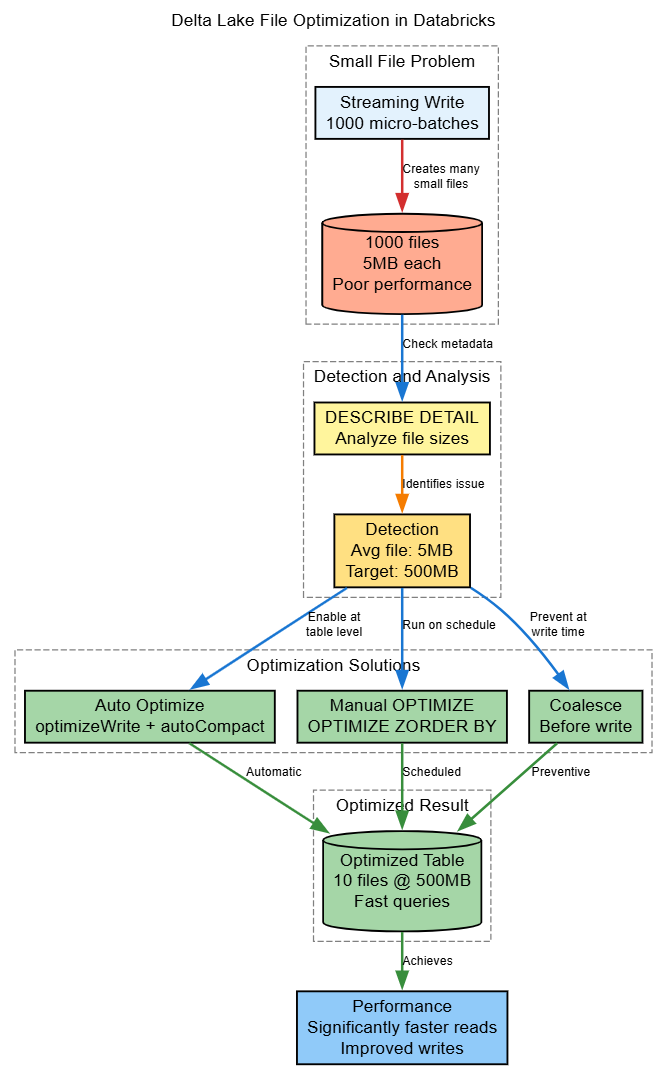
Delta Lake performance degrades with small files due to:
- Increased metadata operations in the transaction log
- More cloud storage API calls (S3/ADLS/GCS)
- Reduced efficiency when Photon is enabled
- Slower OPTIMIZE operations
Practical Target File Sizes
Based on Databricks documentation and production experience[4], these are practical targets (not hard limits):
- Practical minimum: 128MB per file
- Common target range: 256MB - 1GB per file
- Avoid exceeding: 2GB per file (diminishing returns and potential memory issues)
Note: Databricks may auto-tune these targets in Unity Catalog-managed tables and newer runtimes.
Detection Query
-- Check file sizes in Delta table
DESCRIBE DETAIL delta.'/mnt/data/table';

-- Analyze file distribution
SELECT   CASE     WHEN size < 134217728 THEN 'Small (<128MB)'
    WHEN size < 1073741824 THEN 'Good (128MB-1GB)'
    ELSE 'Large (>1GB)'
  END as size_category,
  COUNT(*) as file_count
FROM (
  SELECT explode(split(location, '/')) as path, size
  FROM (DESCRIBE DETAIL delta.'/mnt/data/table')
)
GROUP BY size_category;
Solutions in Databricks
1. Auto Optimize (Recommended for Databricks)
# Enable at table level (Databricks-specific feature)
spark.sql("""
  ALTER TABLE my_table SET TBLPROPERTIES (
    'delta.autoOptimize.optimizeWrite' = 'true',
    'delta.autoOptimize.autoCompact' = 'true'
  )
""")

# Or set at session level for all writes
spark.conf.set("spark.databricks.delta.optimizeWrite.enabled", "true")
spark.conf.set("spark.databricks.delta.autoCompact.enabled", "true")Note: Auto Optimize incurs additional compute costs during writes but significantly improves read performance.
2. Manual OPTIMIZE With Z-ORDER
-- Compact small files (schedule during off-peak hours)
OPTIMIZE delta.'/mnt/data/events';

-- With Z-ORDER for query performance on specific columns
OPTIMIZE delta.'/mnt/data/events'
ZORDER BY (customer_id, event_date);

-- Check optimization impact
DESCRIBE HISTORY delta.'/mnt/data/events';
Best practice: Run OPTIMIZE on a schedule (daily/weekly) rather than after every write to balance compute costs.
3. Coalesce Before Writing
# Calculate optimal partitions based on data size
data_size_gb = 50  # Estimate or calculate actual size
target_file_size_gb = 0.5  # 500MB files
num_files = max(1, int(data_size_gb / target_file_size_gb))

df.coalesce(num_files).write.format("delta").mode("overwrite").save("/mnt/data/table")
Diagram
4. Broadcast Variables in Databricks
When to Use
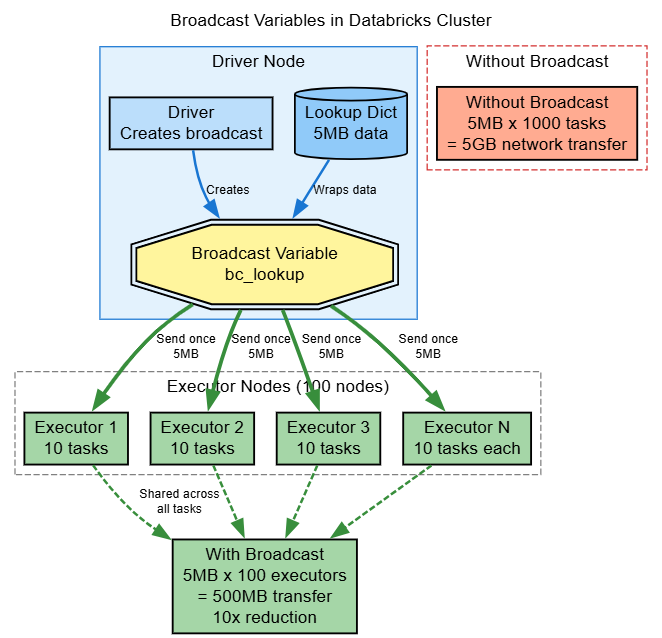
In Apache Spark Broadcast variables are very critical, when we need to share read-only data across all executors without sending it with every task. This is very important in Databricks, where network bandwidth between the driver and executors can become a bottleneck.
Common Use Cases
- Lookup tables: Small dimension tables (typically <10MB)
- Configuration maps: Key-value pairs for transformations
- ML model parameters: Shared model coefficients
- Business rules: Mapping dictionaries
Databricks Best Practices
# BAD: Sending large dictionary with each task
lookup_dict = {"key1": "value1", "key2": "value2"}  # Assume 5MB dictionary

def apply_lookup(key):
    return lookup_dict.get(key, "unknown")

udf_lookup = udf(apply_lookup, StringType())
df = df.withColumn("mapped_value", udf_lookup(col("key")))
# Dictionary serialized with every task - 1000 tasks = 5GB network transfer

# GOOD: Broadcast once, shared by all executors
lookup_dict = {"key1": "value1", "key2": "value2"}
broadcast_lookup = spark.sparkContext.broadcast(lookup_dict)

def apply_lookup_broadcast(key):
    return broadcast_lookup.value.get(key, "unknown")

udf_lookup = udf(apply_lookup_broadcast, StringType())
df = df.withColumn("mapped_value", udf_lookup(col("key")))

# Clean up when done to free memory
broadcast_lookup.unpersist()
Real-World Example: Currency Conversion
from pyspark.sql.types import StringType

# Exchange rates lookup (small dataset)
exchange_rates = {
    "USD_EUR": 0.85,
    "USD_GBP": 0.73,
    "USD_JPY": 110.0,
    # ... 100 currency pairs, ~1KB total
}

# Broadcast to all executors
bc_rates = spark.sparkContext.broadcast(exchange_rates)

# Use in transformation with Pandas UDF (better performance)
@pandas_udf("double")
def convert_currency(amounts: pd.Series, pairs: pd.Series) -> pd.Series:
    rates = bc_rates.value
    return amounts * pairs.map(lambda p: rates.get(p, 1.0))

df_converted = df.withColumn(
    "amount_usd",
    convert_currency(col("amount"), col("currency_pair"))
)

# Cleanup
bc_rates.unpersist()
Performance Impact
- Without broadcast: Data size × Number of tasks = Total network transfer
- With broadcast: Data size × Number of executors = Total network transfer
For a 5MB lookup with 1000 tasks on 100 executors:
- Without: 5MB × 1000 = 5GB transfer
- With: 5MB × 100 = 500MB transfer (10x reduction)
Diagram
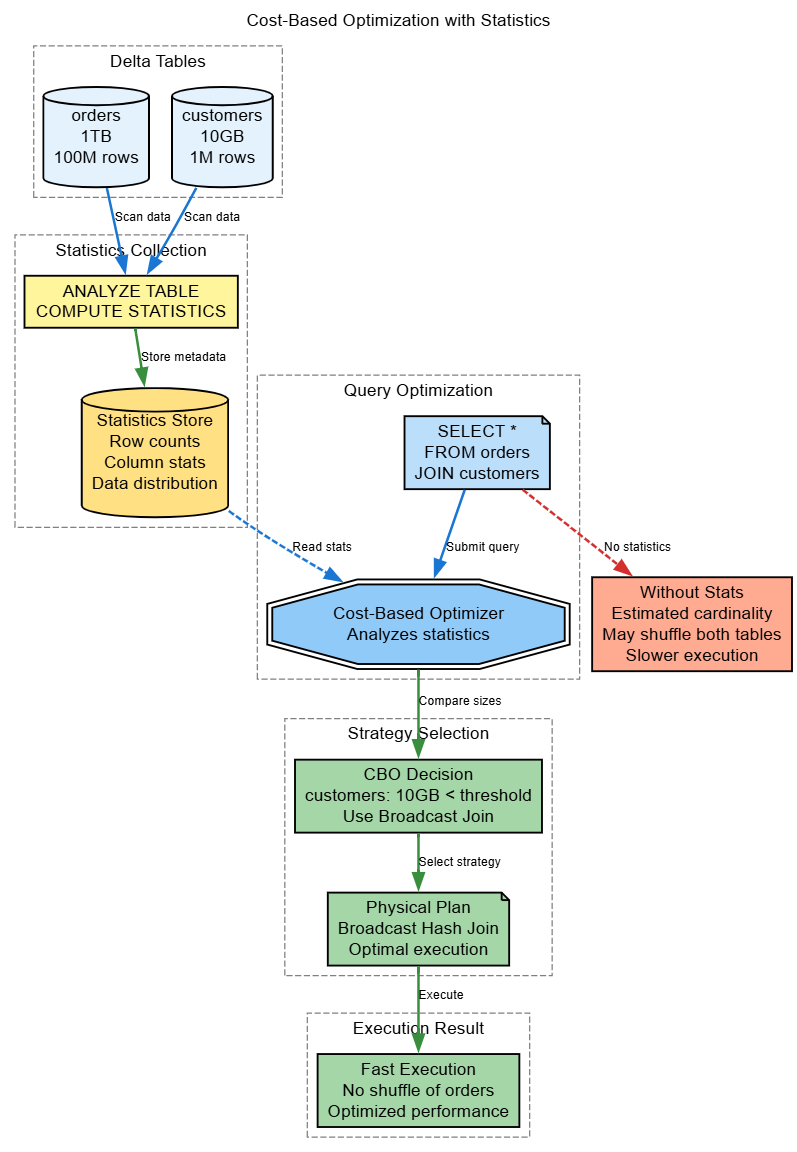
5. Statistics and Cost-Based Optimization in Databricks
Why Statistics Matter
Delta Lake and Databricks use statistics to optimize query plans through:
- Better join strategy selection (broadcast vs shuffle)
- Optimal join ordering for multi-way joins
- Partition pruning at the file level
- Data skipping based on min/max values
Statistics in Delta Lake
Delta Lake automatically collects statistics:
- Min/Max values: Per column per file
- Row counts: Total rows per file
- Null counts: Null values per column per file
Advanced: Table-Level Statistics for CBO
-- Collect comprehensive table statistics (Cost-Based Optimizer input)
ANALYZE TABLE my_table COMPUTE STATISTICS;

-- Collect column-level statistics for specific columns
-- Note: This scans the table and has compute cost
ANALYZE TABLE my_table COMPUTE STATISTICS FOR COLUMNS customer_id, order_date, amount;

-- View table statistics
DESCRIBE EXTENDED my_table;

-- View column statistics
DESCRIBE EXTENDED my_table customer_id;
Real-World Impact
# Without statistics: Spark's Cost-Based Optimizer makes estimates
result = large_table.join(medium_table, "id")  # May choose suboptimal strategy -degrade performance

# With statistics: CBO has accurate cardinality estimates
spark.sql("ANALYZE TABLE large_table COMPUTE STATISTICS FOR COLUMNS id")
spark.sql("ANALYZE TABLE medium_table COMPUTE STATISTICS FOR COLUMNS id")

result = large_table.join(medium_table, "id")  # Optimal strategy chosen
When to Run ANALYZE
Schedule ANALYZE TABLE when:
- After large data loads (>20% of table size)
- After significant schema changes
- Before running critical production queries
- On a regular schedule for frequently updated tables (e.g., weekly)
Cost consideration: ANALYZE requires a full table scan. Schedule during off-peak hours and balance the cost against query optimization benefits.
6. Photon Engine in Databricks (Optional but Powerful)
What Is Photon?
Photon is a Databricks-native vectorized query engine written in C++ that accelerates SQL and DataFrame operations. It provides significant performance improvements for compatible workloads but must be explicitly enabled.
How to Enable Photon
Photon is NOT enabled via spark.conf.set() in notebooks. Instead, enable it through:
Option 1: Cluster UI
- Go to Compute > Create Cluster
- Check the "Use Photon Acceleration" checkbox
- Select compatible runtime (DBR 9.1 LTS or higher)
Option 2: Jobs API / Terraform
{
  "runtime_engine": "PHOTON",
  "spark_version": "11.3.x-photon-scala2.12",
  "node_type_id": "i3.xlarge"
}
Requirements and Compatibility
- Runtime: Databricks Runtime 9.1 LTS or higher
- Instance types: Most compute-optimized and memory-optimized instances
- Workload types: Best for SQL/DataFrame operations, aggregations, joins
- Not optimized for: RDD operations, Python UDFs, streaming with stateful operations
Cost Consideration
Photon-enabled clusters may have different DBU pricing. Always test performance improvements against cost increases to validate ROI for your workload.
Performance Benchmarks
Observed improvements vary significantly by workload:
- Aggregations: Often 2-5x faster
- Joins on large tables: Can see 2-4x improvements
- Complex SQL queries: Variable, benchmark your specific queries
Always A/B test: Run the same job with and without Photon on your actual data to measure impact.
Conclusion
Databricks Production Checklist
Essential Configurations for New Jobs
# Enable all AQE features (Spark 3.2+ / DBR 9.1+)
spark.conf.set("spark.sql.adaptive.enabled", "true")
spark.conf.set("spark.sql.adaptive.coalescePartitions.enabled", "true")
spark.conf.set("spark.sql.adaptive.skewJoin.enabled", "true")

# Delta Lake write optimizations (Databricks-specific)
spark.conf.set("spark.databricks.delta.optimizeWrite.enabled", "true")
spark.conf.set("spark.databricks.delta.autoCompact.enabled", "true")

# Arrow for Pandas UDFs (requires PyArrow library)
spark.conf.set("spark.sql.execution.arrow.pyspark.enabled", "true")

# Note: Photon must be enabled at cluster level, not via spark.conf.set()
Performance Monitoring Query
-- Monitor Delta table health
SELECT   'table_name' as table_name,
  num_files,
  size_in_bytes / 1024 / 1024 / 1024 as size_gb,
  num_files / GREATEST(size_in_bytes / 1024 / 1024 / 1024, 1) as files_per_gb,
  CASE     WHEN num_files / GREATEST(size_in_bytes / 1024 / 1024 / 1024, 1) > 10       THEN 'ALERT: Too many small files'
    ELSE 'OK'
  END as health_status
FROM (
  SELECT     COUNT(*) as num_files,
    SUM(size) as size_in_bytes
  FROM (DESCRIBE DETAIL delta.'/mnt/data/your_table')
);
Benchmark Template for Your Environment
import time

def benchmark_operation(df, operation_name, operation_func):
    """
    Simple benchmark function to measure Spark operation performance
    """
    # Warm up
    operation_func(df).count()
        # Actual benchmark
    start_time = time.time()
    result = operation_func(df).count()
    end_time = time.time()
        duration = end_time - start_time
    print(f"{operation_name}: {duration:.2f} seconds")
    return duration

# Example usage comparing built-in vs UDF
from pyspark.sql.functions import col, year as spark_year

# Create sample data
df = spark.range(0, 10000000).withColumn("date", F.current_date())

# Test 1: Built-in function
def builtin_test(df):
    return df.withColumn("year", spark_year(col("date")))

# Test 2: Python UDF
@udf(returnType=IntegerType())
def extract_year_udf(date_val):
    return date_val.year if date_val else None

def udf_test(df):
    return df.withColumn("year", extract_year_udf(col("date")))

# Test 3: Pandas UDF
@pandas_udf(IntegerType())
def extract_year_pandas(dates: pd.Series) -> pd.Series:
    return dates.dt.year

def pandas_udf_test(df):
    return df.withColumn("year", extract_year_pandas(col("date")))

# Run benchmarks
print("Performance Comparison on 10M rows:")
builtin_time = benchmark_operation(df, "Built-in function", builtin_test)
pandas_time = benchmark_operation(df, "Pandas UDF", pandas_udf_test)
python_time = benchmark_operation(df, "Python UDF", udf_test)

print(f"\nSpeedup ratios:")
print(f"Pandas UDF vs Python UDF: {python_time/pandas_time:.2f}x")
print(f"Built-in vs Python UDF: {python_time/builtin_time:.2f}x")
Summary: Five Critical Missing Strategies
These 5 strategies address the important performance gaps :
- UDF optimization – Understanding the performance hierarchy (built-in > Pandas UDF > Python UDF) and using Arrow-optimized UDFs can yield significant performance improvements in workloads with custom logic.
- Shuffle partition tuning – Taking advantage of Adaptive query execution (AQE) to automatically optimize shuffle partitions removes the guesswork from the default 200 partitions setting. Target approximately 128MB per partition as a practical guideline.
- File size optimization – Delta Lake's Auto Optimize and manual OPTIMIZE commands address the small-file problem that degrades both read and write performance. Target 256MB-1GB files for most workloads.
- Broadcast variables – Efficiently sharing read-only lookup data across executors reduces network transfer from gigabytes to megabytes in many production scenarios.
- Statistics and CBO – Running ANALYZE TABLE provides the cost-based optimizer with accurate cardinality estimates, leading to better join strategies and query plans.
Version Compatibility Note
- Databricks runtime: 11.0 LTS or higher (recommended: 13.3 LTS)
- Apache Spark: 3.3 or higher
- Delta Lake: 2.0 or higher
Performance Testing Best Practice
Always benchmark optimizations in your specific environment with your actual data patterns. Performance improvements differ based on below factors:
- Cluster configuration (instance types, cluster size)
- Data characteristics (size, distribution, schema)
- Query patterns and complexity
- Concurrency levels
Additional Resources
- Databricks Blog — Pandas UDF Performance: https://www.databricks.com/blog/2017/10/30/introducing-vectorized-udfs-for-pyspark.html
- Apache Spark Tuning Guide: https://spark.apache.org/docs/latest/tuning.html
- Databricks Adaptive Query Execution: https://docs.databricks.com/optimizations/aqe.html
- Delta Lake Best Practices: https://docs.databricks.com/delta/best-practices.html
- Photon Engine Documentation: https://docs.databricks.com/runtime/photon.html
Quick Reference Commands
Enable All Recommended Settings
# Copy-paste starter configuration for production jobs
spark.conf.set("spark.sql.adaptive.enabled", "true")
spark.conf.set("spark.sql.adaptive.coalescePartitions.enabled", "true")
spark.conf.set("spark.sql.adaptive.skewJoin.enabled", "true")
spark.conf.set("spark.databricks.delta.optimizeWrite.enabled", "true")
spark.conf.set("spark.databricks.delta.autoCompact.enabled", "true")
spark.conf.set("spark.sql.execution.arrow.pyspark.enabled", "true")
Common Diagnostic Queries
-- Check table file counts and sizes
DESCRIBE DETAIL delta.'/mnt/data/table_name';

-- View table optimization history
DESCRIBE HISTORY delta.'/mnt/data/table_name';

-- Check if statistics are collected
DESCRIBE EXTENDED table_name column_name;

-- View current Spark configuration
SET -v;
Optimization Maintenance Schedule
# Weekly OPTIMIZE for frequently updated tables
spark.sql("""
  OPTIMIZE delta.'/mnt/data/high_traffic_table'
  ZORDER BY (user_id, event_date)
""")

# Monthly ANALYZE for dimension tables
spark.sql("""
  ANALYZE TABLE dimension_table   COMPUTE STATISTICS FOR COLUMNS id, category, region
""")

# Vacuum old versions (after 7 days retention)
spark.sql("""
  VACUUM delta.'/mnt/data/table_name' RETAIN 168 HOURS
""")Opinions expressed by DZone contributors are their own.
Comments