

Delta Sharing in Action: Securely Share Data Across Organizations With Databricks
From dusty SFTP drops to live, governed datasets — how Delta Sharing enables secure, real-time data access without moving or duplicating data.
Join the DZone community and get the full member experience.
Join For FreeFor most companies, sharing data with a partner still looks roughly like this: someone writes a CSV to an S3 bucket on Friday, emails a pre-signed URL, and crosses their fingers until Monday. The data is stale before it is even consumed. Schemas drift silently. There is no audit trail of who actually read what. Delta Sharing was Databricks' attempt to fix this, and unlike a lot of "open" things in our industry, the protocol really is open — there is a spec, a reference server, and SDKs in Python, Java, and Go.
We have used Delta Sharing in two distinct flavors: Databricks-to-Databricks (D2D), where both sides happen to be on Databricks, and the open protocol, where the recipient is on literally anything that can speak HTTPS. This article walks through both, with the code we actually run.
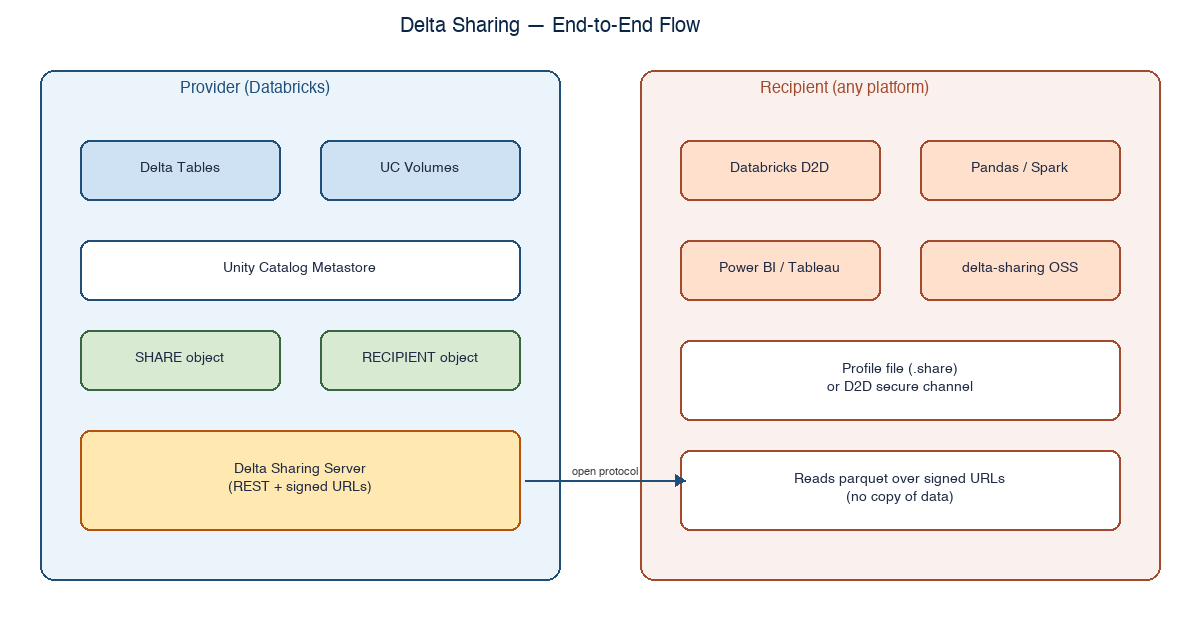
Figure 1. Delta Sharing — provider exposes governed shares; recipients consume without copying data.
The Mental Model
Three objects do most of the work in Delta Sharing:
- SHARE – a logical bundle of tables, views, notebooks, or volumes you want to expose.
- RECIPIENT – the entity that consumes a share. Can be another Databricks account or any external party.
- PROVIDER – on the recipient side, this is the inbound counterpart of the share, used to mount catalogs.
When a recipient queries a shared table, the provider's Delta Sharing server hands back short-lived signed URLs for the underlying parquet files plus a Delta protocol manifest. There is no copy. There is no nightly job. The reader is reading the same parquet files that the provider's own pipelines write.
Provider Side: Creating a Share
Everything below assumes Unity Catalog is enabled — Delta Sharing is a UC feature. The principal creating the share needs the USE CATALOG and SELECT privileges on what they intend to share, plus CREATE SHARE on the metastore.
-- 1. Create the share
CREATE SHARE acme_partner_share
  COMMENT 'Daily order facts and product dim for ACME partner';

-- 2. Add tables (and optionally views)
ALTER SHARE acme_partner_share
  ADD TABLE prod_retail.gold.orders_daily;

ALTER SHARE acme_partner_share
  ADD TABLE prod_retail.gold.product_dim
  WITH HISTORY;  -- enables time travel on the recipient side

-- 3. (Optional) partition pruning by recipient property
ALTER SHARE acme_partner_share
  ADD TABLE prod_retail.gold.transactions
PARTITION (region = CURRENT_RECIPIENT().region);
That last block is one of the more useful tricks: a single share can serve multiple recipients, with the data each one sees scoped automatically by a recipient property. We use this for multi-tenant partner programs — one share, dozens of recipients, no per-tenant view duplication.
Provider Side: Defining the Recipient
If the recipient is also on Databricks, you exchange a metastore identifier, and you are done — credentials and trust are handled inside Databricks. If they are not, you generate an activation link that the recipient turns into a credential file.
-- Open protocol recipient (off-Databricks)
CREATE RECIPIENT acme_open
  COMMENT 'ACME partner, consuming via OSS delta-sharing client';

-- Set a tag the share's partition rule will match
ALTER RECIPIENT acme_open
  SET PROPERTIES (region = 'EU-WEST');

-- Bind the share to the recipient
GRANT SELECT ON SHARE acme_partner_share TO RECIPIENT acme_open;

-- Show the activation URL once — the recipient downloads a config.share file
DESCRIBE RECIPIENT acme_open;
Treat the activation link like a password. It can be redeemed exactly once, but if it leaks before that single use, you have to rotate the recipient.
Recipient Side: Reading From Pandas
The simplest possible consumer is a Python script with the open-source `delta-sharing` package. No Spark required, no Databricks required.
# pip install delta-sharing
import delta_sharing

# Path to the .share profile file the provider sent
profile = "/secrets/acme.share"

# Tables are addressed as <share>.<schema>.<table>
table_url = f"{profile}#acme_partner_share.gold.orders_daily"

df = delta_sharing.load_as_pandas(table_url)
print(df.head())
print(f"rows: {len(df):,}")
If the table is too big for a single machine, swap one line:
# Spark on any cluster — Databricks, EMR, OSS Spark on Kubernetes, etc.
df = delta_sharing.load_as_spark(table_url)
df.createOrReplaceTempView("orders_daily_shared")

spark.sql("""
  SELECT region, SUM(net_revenue) AS rev
  FROM orders_daily_shared
  WHERE order_date >= current_date() - 7
  GROUP BY region
""").show()
Recipient Side: Mounting in Databricks (D2D)
When both sides are Databricks, the recipient creates a PROVIDER object from the share identifier and then mounts the share as a catalog. From that point on, the data behaves exactly like a local UC catalog — same SELECT syntax, same lineage, same governance.
-- On the recipient's metastore
CREATE PROVIDER acme_provider USING JSON '<provider-json>';

-- Mount the share as a read-only catalog
CREATE CATALOG acme_shared
  USING SHARE acme_provider.acme_partner_share;

-- Give analysts access
GRANT USE CATALOG, USE SCHEMA, SELECT
  ON CATALOG acme_shared
  TO `[email protected]`;

-- Query like any other UC table
SELECT region, SUM(net_revenue) rev
FROM acme_shared.gold.orders_daily
WHERE order_date >= current_date() - 7
GROUP BY region;
What About Audit?
Both providers and recipients get audit events in the system tables. A query we run on the provider side every Monday morning:
SELECT
event_time,
user_identity.email AS recipient,
request_params.share_name,
request_params.schema_name,
request_params.table_name,
action_name
FROM system.access.audit
WHERE service_name = 'unityCatalog'
AND action_name LIKE 'deltaSharing%'
AND event_time >= current_date() - 7
ORDER BY event_time DESC;
If a recipient suddenly stops reading, that is usually a sign of a broken pipeline on their side — and it is easier to ping them proactively than to wait for a support ticket.
Pitfalls We Hit
- Sharing tables that have not been OPTIMIZED produces a brutal number of file listings on the recipient. Compact aggressively before exposing.
- Time travel on the share requires WITH HISTORY when adding the table. You cannot retroactively flip it on without re-adding.
- Column masks and row filters defined on the provider apply to the share — make sure your masks behave correctly with NULL recipients.
- Activation links expire. Bake renewal into your offboarding/onboarding runbook for partners.
- If the data underneath gets vacuumed too aggressively (under 7 days), recipients with stale snapshots see hard failures. Keep retention at 7+ days.
Closing Thoughts
Delta Sharing is one of those features that does not look like a big deal in a slide deck and ends up reshaping your data partnerships. The first time a partner reads from your share with a five-line Python script and gets the data live — no copy, no lag, no broken schema — the conversation about "how do we share data" is over. You stop talking about transport and start talking about contracts, SLAs, and what the dataset actually means. Which, honestly, is where the conversation should have been the whole time.
Opinions expressed by DZone contributors are their own.
Comments