

Designing a CPU-Efficient Redis Cluster Topology
Learn how to design a Redis Cluster to minimize infrastructure cost by combining Docker & multi-master replication delivering the same performance with fewer VMs.
 ·
·
Join the DZone community and get the full member experience.
Join For FreeRedis is a popular in-memory data store that has become an essential component of many modern applications. With its high performance, scalability, and reliability features, Redis has emerged as a top choice for caching, session management, and other use cases. In this article, we'll explore the deployment topology of Redis Cluster, specifically focusing on the master-replica approach utilizing all the cores on the vms, leveraging the single threaded behaviour of redis.
What Is a Redis Cluster
A Redis Cluster is a distributed deployment that shards your dataset across multiple Redis nodes. It automatically handles data partitioning and replication, ensuring both high availability and horizontal scalability.
Each cluster node manages a subset of hash slots, allowing the system to distribute data and load efficiently. When combined with replicas, Redis Cluster provides fault tolerance and performance benefits ideal for high-traffic workloads.
Typical Master-Replica Deployment
In a standard Redis deployment, a master node handles all write operations while replica nodes replicate data and handle read operations.
For example, a 3-node setup might consist of 1 master and 2 replicas.
Pros:
- Availability: If the master fails, one of the replicas is automatically promoted
- Fault Tolerance: Adding more replicas increases redundancy
- Load Distribution: Reads and writes are separated across nodes for efficiency
Cons:
- Limited scalability for writes, since only one master handles them
- Under utilization of CPU resources, as Redis uses a single thread per process
Multi-Master Cluster Deployment
To overcome the write scalability issue, Redis supports multiple masters, each with their own set of replicas.
Let’s consider a 3-master and 2-replica setup, totaling 9 VMs (2 vcpu each).
Pros:
- Sharding: Each master handles a unique keyspace segment — distributing load effectively
- High Write Throughput: Multiple masters process writes concurrently
- Fault Isolation: A single master failure impacts only a subset of keys
Cons:
- Infrastructure Cost: Requires significantly more VMs or instances
- Operational Complexity: Managing hash slot rebalancing and failover increases overhead
- Potential Imbalance: Uneven key distribution can cause hotspots
Optimized Deployment: CPU-Aware Containerized Redis Cluster
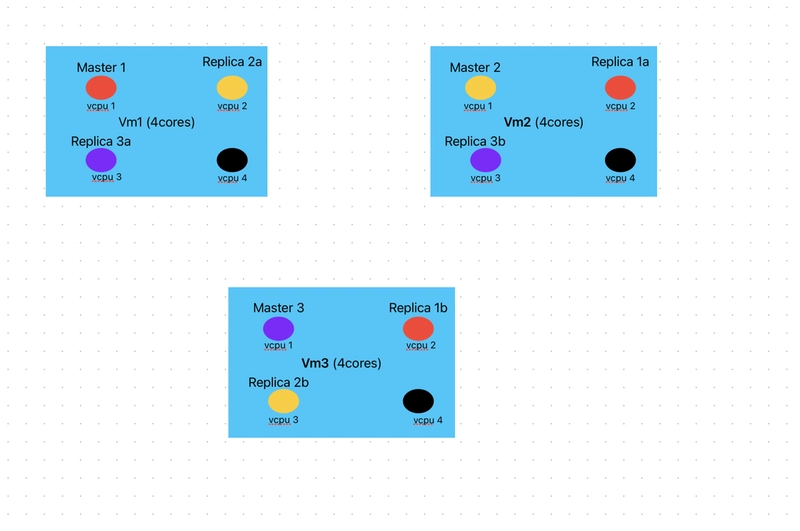
To reduce infrastructure cost while maintaining performance, we can consolidate Redis masters and replicas on fewer VMs by using Docker Swarm and CPU pinning.
Deployment Strategy
- Three VMs, each with 4 CPU cores
- Docker Swarm configured across all three VMs
- On each VM, run three Redis containers:
- One master container (unique per VM)
- Two replica containers — each replicating masters from the other VMs
In this topology:
Each Redis process (master or replica) runs on a dedicated CPU core.
Redis’ single-threaded design ensures one vCPU per instance provides optimal performance.
Each VM uses:
- 1 core for its master
- 2 cores for replicas of the other masters
- 1 core for system operations
Advantages:
- CPU Efficiency: Fully utilizes available cores without over provisioning
- Cost Optimization: Achieves multi-master performance using only 3 VMs instead of 9
- Simplified Management: Fewer VMs to monitor, patch, and secure
- Same High Availability: Replication ensures data redundancy across hosts
Implementation Specific:
- Create a Docker swarm with those 3 vms
- Create a Docker overlay network. (
--attachableflag, so that standalone containers can attach to this network) - Open following ports on all the nodes: Redis port to serve client (6379) and cluster bus port (16379, 16380, 16381)
- Create the Docker Redis container on all the vms, using the overlay network and exposing the ports, on all the 3 vms
Once the docker Redis container are up, we can create Redis cluster using below command from any Redis container.
docker exec -it redis-master1 redis-cli --cluster create <<redis-master1-ip>>:6379 <<redis-master2-ip>>:6379 <<redis-master3-ip>>:6379 \
<<redis-master1-ip>>:6380 <<redis-master2-ip>>:6380 <<redis-master3-ip>>:6380 \
<<redis-master1-ip>>:6381 <<redis-master2-ip>>:6381 <<redis-master3-ip>>:6381  \
--cluster-replicas 2
Once you run above command, you can confirm cluster creation using following command:docker exec -it redis-master1 redis-cli cluster nodes

Testing
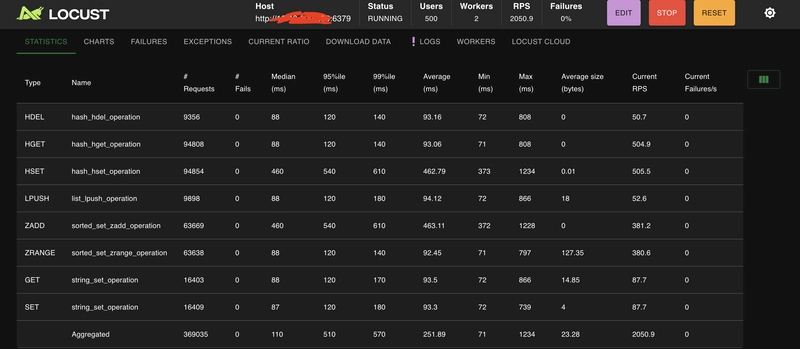
We were able to validate using a standard python (locust) script, that only a single core is utilized when Redis process (container) is deployed on a 2 core vm.

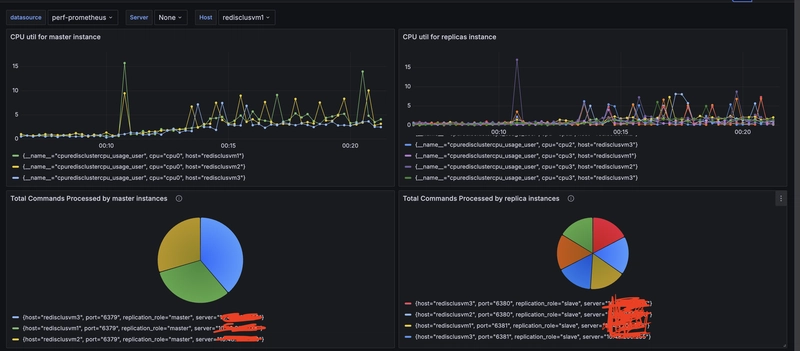
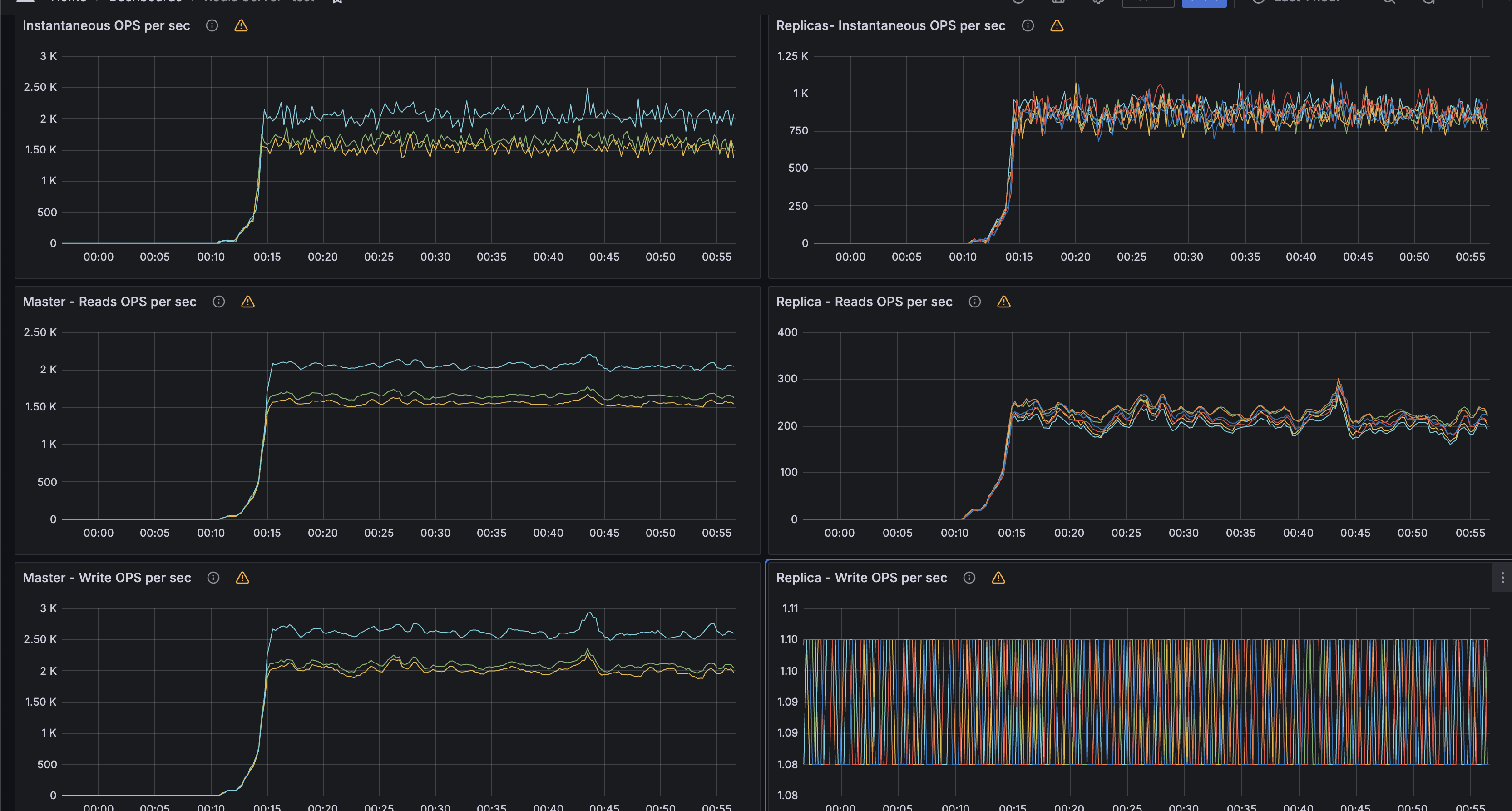
While running the same locust python script (with set/get to varied data-structures), we observed that Redis master were handling the writes and only used one core. The load was evenly distributed across all 3 masters.
Our performance validation on cluster topology confirmed that:
- Each Redis master process consistently utilized a single CPU core.
- Replicas used their assigned cores for replication tasks.
- Additional CPU cores remained available for system or Docker tasks.
When comparing traditional vs optimized setups:
| Configuration | Nodes | Total CPUs | Observations |
|---|---|---|---|
| Traditional 3-Master + 2-Replica (9 VMs) | 9 | ~18 | Higher cost, underutilized CPUs |
| Optimized Swarm Deployment (3 VMs) | 3 | ~12 | Efficient core utilization, same throughput |
Limitations
While this topology provides a balanced tradeoff between cost and performance, there are some practical constraints to be aware of:
Resource Contention Under Heavy Load
Even though CPU cores are pinned, network and memory I/O are still shared at the VM level. Heavy workloads may cause contention, especially during replication bursts or snapshotting (RDB/AOF persistence).
Recovery Complexity
Container or node failures require manual intervention or Swarm rebalancing to maintain master-replica pairing across hosts. Automated failover can be slower than in dedicated setups.
Operational Visibility
Monitoring multiple Redis containers per VM demands robust observability — metrics, logs, and alerts should be aggregated using tools like Prometheus + Grafana or RedisInsight.
Persistence Overhead in Shared Storage
If persistence is enabled and multiple containers share underlying disks, storage I/O may become a bottleneck, impacting latency.
Despite these trade-offs, for many real-world workloads where cost efficiency and CPU utilization matter, this architecture delivers an excellent balance between performance, simplicity, and maintainability.
Conclusion
Redis single-threaded nature makes CPU utilization a critical design factor. By leveraging containerization, Docker Swarm(or any other orchestration), and CPU pinning, it’s possible to achieve a multi-master Redis Cluster with high throughput and fault tolerance while using fewer VMs and fewer CPU cores overall.
This topology proves that smart deployment design can save infrastructure cost and CPU resources without compromising Redis performance or availability.
Published at DZone with permission of Gaurav Rathor. See the original article here.
Opinions expressed by DZone contributors are their own.
Comments