

How Different Docker Engine Versions Led to Partial Traffic Unavailability in Docker Swarm
This article is based on a real-world production case. Different Docker Engine versions on Swarm nodes led to partial traffic degradation on one of the manager nodes.
Join the DZone community and get the full member experience.
Join For FreeIf different Docker Engine versions are running simultaneously in a Docker Swarm cluster, this may lead not to an obvious service outage but to a more subtle scenario: partial traffic degradation on individual nodes. In this case, the issue appeared on one of the manager nodes, Traefik started reporting an unavailable status (health=0) for the router-app service, and the cause, according to the working hypothesis, was related to differences in iptables rules and overlay networking between Docker 28.1.1 and 28.2.2.
On June 22, 2025, this exact scenario occurred in the production cluster of the backend infrastructure for a socially significant public transportation mobile application. The system serves about 2 million users, several tens of thousands of daily active users, and a total load of around 1000–1600 RPS, so even partial degradation at a single entry point affected a high-load segment of traffic and could have had a noticeable impact on SLA metrics if it had not been localized in time.
Context
At the time of the incident, the Docker Swarm cluster consisted of 5 manager nodes, several dozen worker nodes, and approximately 40–50 services. External HTTP traffic passed through Traefik, deployed on each of the five manager nodes, and was then routed by Traefik to the backend application containers.
One of the key services was router-app, responsible for building public transportation routes on the frontend. It was one of the critical entry-point services with the highest SLA, and any disruption to its availability could have led to severe penalties from the customer, so any deviation in its availability required an immediate response.
Grafana dashboards showed application availability through Traefik health-check statuses. Those statuses were generated based on HTTP health-check endpoints implemented by the developers for most services, primarily the most critical ones. This was enough to quickly localize the problem at the ingress traffic level.
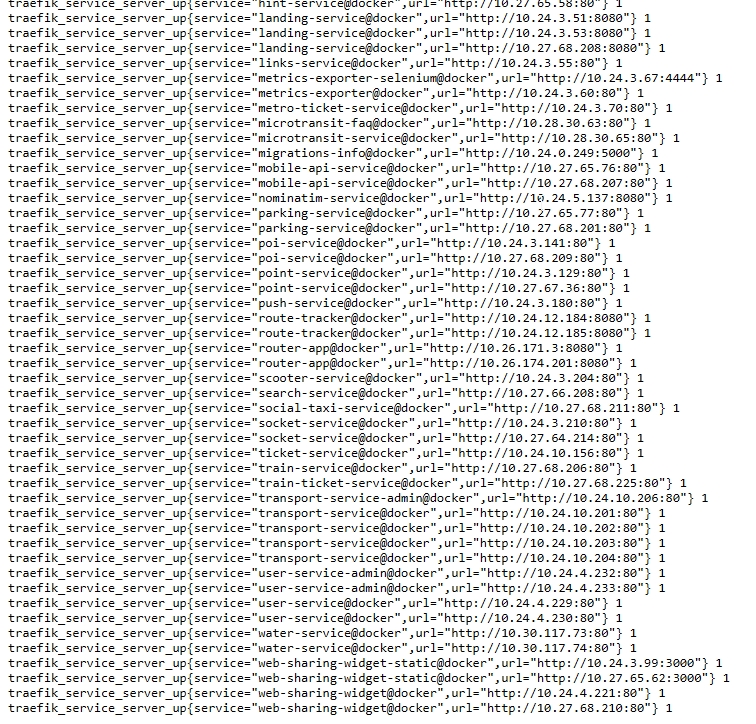
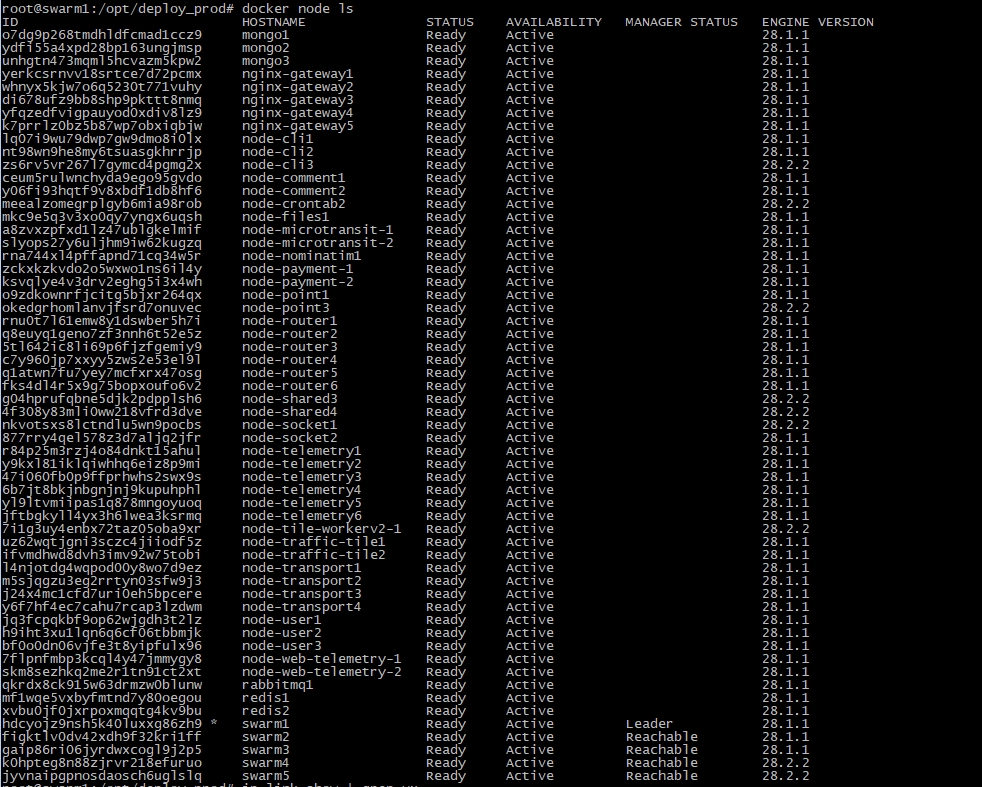
The cluster had one important characteristic. Some nodes were running Ubuntu 20.04 (focal), while others were running Ubuntu 22.04 (jammy), and different APT repositories were pulling different Docker Engine versions. As a result, after another scheduled Docker update on the nodes, the production environment ended up with a mix of nodes running 28.1.1 and 28.2.2 at the same time. The docker node ls screenshot additionally confirmed that mixed versions were present not only on worker nodes but also on manager nodes, including swarm4 and swarm5.
How the Incident Manifested
The incident was detected not through user complaints and not through a general service outage, but through Traefik monitoring. The triggered alerts showed partial unavailability of one of the router-app containers, after which the health-check dashboard confirmed that the issue affected not the entire service but one of the manager nodes.
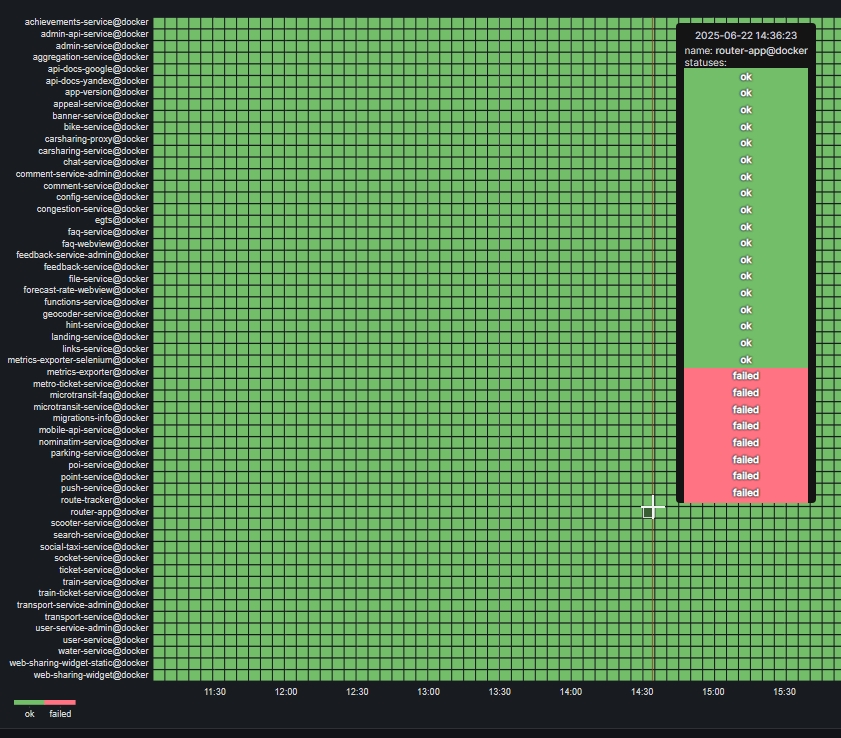
This is important because the red blocks on the dashboard did not indicate a complete outage of router-app. It meant that Traefik on one of the manager nodes started receiving health=0 when checking that service’s backend endpoint, while the other manager nodes continued to see the backend as healthy.
In practice, it looked like this: traffic through one of the manager nodes stopped reaching the router-app containers correctly, but Traefik, running on all five manager nodes, automatically excluded requests to the unhealthy entry point. As a result, from the outside the incident appeared as partial degradation rather than full unavailability.
That is exactly what made the situation tricky. Fault tolerance limited the impact of the incident, but the underlying cause remained inside the cluster and continued to affect one of the entry points.
What Docker Showed
After localizing the issue to one of the manager nodes, it became clear that the cause should be sought not in router-app itself but in the network path between Traefik and the backend containers. At the same time, docker service ps did not show a widespread service failure, and the containers still appeared as running.
The next useful signal came from the dockerd logs on swarm5. Repeated messages appeared there, including Peer delete operation failed, neighbor entry not found, and errors related to deleting FDB and neighbor entries for the VXLAN interface vx-001001-5lk08. For example:
Jun 22 16:38:09 swarm5 dockerd:
time="2025-06-22T16:38:09.366807202Z"
level=warning
msg="Peer delete operation failed"
error="could not delete fdb entry for
nid:5lk08r7jjvtq5idqggzeygmlv
eid:4e7d63d00fffaa6be7ce6362f47acd7912f7c11e5ac6e018393722decc16c210
into the sandbox:neighbor entry not found for IP 10.170.0.37,
mac 02:42:0a:1b:14:2c, link vx-001001-5lk08"

Jun 22 16:38:09 swarm5 dockerd:
time="2025-06-22T16:38:09.765092537Z"
level=warning
msg="error deleting neighbor entry"
error="no such file or directory"
ifc=vx-001001-5lk08
ip=10.170.0.138
mac="02:42:0a:1b:14:65"
Such messages were highly consistent with problems in Docker Swarm’s overlay network. In essence, Docker was trying to delete network records that were no longer present in the tables, which usually points to desynchronization of network state at the VXLAN, FDB, or neighbor-table level.
By themselves, these messages still did not provide a complete explanation, but they pushed the investigation in the right direction. It became clear that the problem was not in the application’s business logic but in the network layer on one of the nodes.
Additionally, docker node inspect self --pretty on swarm5 showed that from Swarm’s point of view the node looked normal: State: Ready, Availability: Active, Raft Status: Reachable, Leader: No, while Engine Version was already 28.2.2. This was an important point: the control plane still considered the node healthy, even though at the traffic-flow and network-state level it was already behaving differently.
Diagnostics
The investigation was carried out at the node level. The tools used included docker node ls, docker version, apt-cache policy docker-ce, as well as ip link show, bridge fdb show, ip neigh show, and comparisons of iptables chains across different nodes.
The key fact became visible after docker node ls. The cluster was not homogeneous in terms of Docker Engine version: some manager nodes and some worker nodes were already running 28.2.2, while the others remained on 28.1.1. This led to the assumption that the issue might be at the iptables rules level.
After that, iptables had to be compared separately on healthy and problematic nodes. On swarm5, a full rules dump was collected using the combination of iptables -S, iptables -t nat -S, and iptables -t mangle -S. Those rules showed the DOCKER, DOCKER-FORWARD, DOCKER-INGRESS, and DOCKER-USER chains, as well as ACCEPT, DROP, and DNAT rules for traffic through docker_gwbridge, published ports, and ingress routing.... To test the hypothesis, not only the problematic swarm5 but also the first manager node, swarm1, was compared, where a stable stack with Docker 28.1.1 had long been running.
On swarm1, the output of iptables -S and iptables -t nat -S showed the expected picture: the DOCKER and DOCKER-INGRESS chains contained a full set of ACCEPT and DNAT rules for all published ports (80, 8080–8082, and dozens of internal service ports) with symmetric dport/sport pairs, while DOCKER-USER effectively boiled down to a clean RETURN. Taken together with the dump from swarm5, this reinforced the conclusion that on nodes running 28.1.1, the iptables configuration for ingress and routing was consistent, and the differences seen on 28.2.2 were related not to manual changes but to the behavior of Docker Engine itself.
After that, iptables had to be compared separately on other nodes running different Docker versions. On nodes with 28.1.1, the DOCKER and DOCKER-USER chains and the associated rules were in the expected state, whereas on nodes with 28.2.2 some of the required rules were missing or the chains were reduced to a minimal RETURN.
This explained the observed behavior well. The services remained running, Swarm did not appear broken, but external traffic and part of the overlay routing through a specific manager node were working incorrectly, causing Traefik on that node to report health=0 for router-app.
It is worth noting separately that journalctl -u docker and docker service ps did not provide a simple direct cause for the incident. They did not show a picture of a general failure, so the conclusion had to be assembled from several sources: Traefik monitoring, dockerd logs, Docker versions, and the state of iptables on different nodes.
Fix
Once the main hypothesis had narrowed down to mismatched Docker Engine versions, the solution was fairly straightforward: return the cluster to a homogeneous configuration by rolling back to version 28.1.1 as the fastest solution. The rollback was performed for swarm4, swarm5, and all worker nodes where version 28.2.2 had already been installed.
To do this, a specific package version was pinned via apt, then Docker was restarted, and the installed version was verified. One version of the commands looked like this:
apt-cache madison docker-ce | grep 28.1.1

apt-get install docker-ce=5:28.1.1-1~ubuntu.22.04~jammy \
docker-ce-cli=5:28.1.1-1~ubuntu.22.04~jammy \
containerd.io && systemctl restart docker && docker --version
Additionally, it made sense to check the package sources and, if necessary, remove conflicting APT entries so that the nodes would no longer receive an unsuitable Docker version from another repository. In practice, it looked like this:
sudo rm /etc/apt/sources.list.d/download_docker_com_linux_ubuntu.list

sudo apt update
After the rollback, docker version was checked again, as well as the DOCKER and DOCKER-USER chains. After Docker Engine had been unified to 28.1.1 on both manager and worker nodes, the issue disappeared.
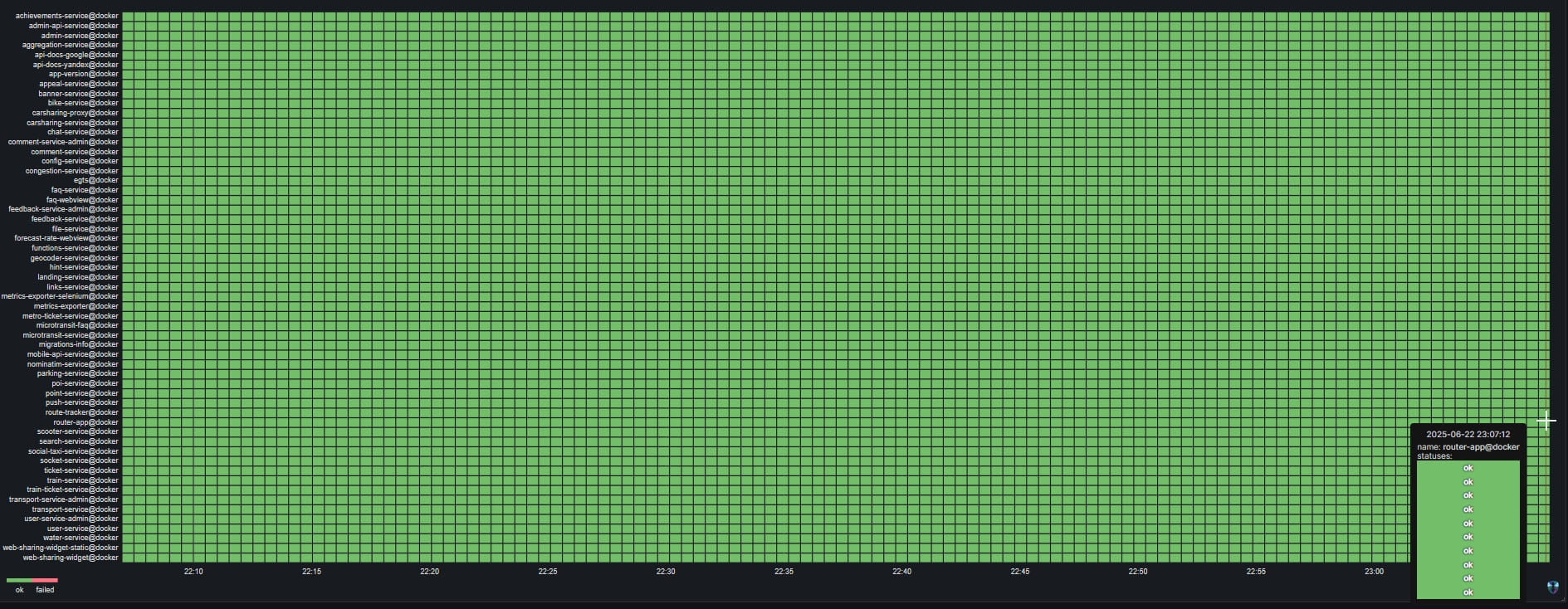
From the perspective of external behavior, this was confirmed immediately. Health checks in Traefik returned to the green zone, and the partial unavailability of router-app on one of the manager nodes could no longer be reproduced.
Root Cause
Based on the available data, the most well-founded working version is this: in this environment, Docker Engine 28.2.2 formed or applied iptables rules related to DOCKER, DOCKER-USER, FORWARD, ingress, and overlay networking differently. In a mixed cluster, this led to one of the manager nodes no longer forwarding traffic correctly to the router-app backend containers, even though from the perspective of the control plane and service state this did not look like a direct failure.
It is important here not to overstate what the data allows. This case does not prove a universal upstream bug in Docker 28.2.2 for all Swarm installations, but it does show that even closely related Docker Engine versions can affect the cluster’s network plane differently, especially when different Ubuntu distributions and different package sources are present in production at the same time.
What Follows From This
The first conclusion is simple: Docker Swarm is sensitive to Docker Engine version mismatches. If some manager or worker nodes have been updated while others have not, this can lead not only to version drift as an organizational problem, but also to practical issues with traffic, published ports, and overlay routing.
The second conclusion is that after updating Docker, it is necessary to check not only docker version but also the node’s network behavior. The minimum set includes iptables -L DOCKER -v -n, iptables -L DOCKER-USER -v -n, checking published ports, ingress/overlay state, and health checks from the edge proxy.
The third conclusion is that it is useful to maintain a single baseline stack across all nodes. One Ubuntu LTS distribution, unified repositories, and the same update order reduce the chance that cluster state will remain formally healthy while part of the network traffic is already being handled incorrectly.
The fourth conclusion concerns update order. In our case, that was exactly how it happened, but it is worth noting separately. When Docker is updated in a Swarm cluster, it is better to update worker nodes first, then manager nodes, and the leader last, while after each stage separately checking the node’s behavior under real traffic conditions (service availability, correct routing, and published ports).
In our case, enhanced monitoring was in place, so no additional manual checks of node behavior in traffic were required: if any part of the infrastructure became unavailable, we would promptly receive an alert.
The final conclusion relates to monitoring. In this case, Traefik not only helped limit the impact of the incident by routing around the unhealthy node, but also provided the first precise signal that the problem was localized to a specific entry point rather than existing at the level of the entire service or the entire cluster.
Opinions expressed by DZone contributors are their own.
Comments