

Building Production-Safe Agentic Remediation With Docker MCP Gateway: Lessons From 43% to 100% Accuracy
We built an AI Docker remediation system on MCP Gateway. First version: 43% correct. After 9 engineering fixes: 100%. Here's what changed.
 CORE
·
CORE
·
Join the DZone community and get the full member experience.
Join For FreeOur first version was wrong 57% of the time.
Not because the AI model couldn't identify Docker container failure scenarios—it usually could. The failures occurred at the decision boundary: determining when an automated action was appropriate, when escalation was required, and when no action should be taken.
Over several weeks, we built and evaluated an AI-assisted remediation system on Docker MCP Gateway across four container failure scenarios, improving decision correctness from 43% to 100%.
What we learned surprised us: the hard problem is not teaching the agent to act. The hard problem is defining and enforcing the boundary where the agent must stop acting.
The project reinforced a broader lesson: production-safe AI is less about model intelligence and more about engineering explicit policies, validation mechanisms, and execution controls.
This article covers what we built, what failed, and the engineering changes that improved correctness.
The full code, audit logs, validation datasets, and analyzer scripts are all in the companion repository.
Why Naive Auto-Remediation Is Dangerous
The most common mistake in AI-driven operations is treating "AI can fix things" as the goal. It isn't. A remediation system that attempts to fix every incident automatically is often worse than having no automation at all.
Consider the failure modes:
An automatic restart of a CrashLoopBackOff container does not fix the underlying problem—it simply generates more alerts. The container will fail again because the code or configuration issue remains unchanged. The result is additional operational noise without any meaningful remediation.
Automatically increasing memory limits for every OOM event can be equally problematic. The workload continues running, but the underlying memory leak remains hidden. Months later, teams may find themselves running multi-gigabyte containers that should have been consuming a fraction of those resources.
Automated remediation without an audit trail creates a different problem: a lack of accountability. Without structured records, it becomes impossible to determine what actions were taken, what actions were considered, and why a particular remediation path was selected. "The AI fixed it" is not a useful postmortem entry.
The safest remediation systems are not the ones that automate the most actions. They are the ones with clearly defined operational boundaries, explicit escalation rules, and auditable decision paths. The engineering challenge is not maximizing automation — it is determining where automation should stop.
According to Mohammad-Ali A'râbi, Docker Captain:
One of the most dangerous assumptions teams can make is treating a language model as if it were an experienced senior site reliability engineer.
It is not.
A language model may generate useful recommendations, but it has no operational accountability. It does not understand business context, service ownership, deployment history, or the downstream consequences of an action. Any system granted the ability to modify production infrastructure must therefore be treated as an untrusted component operating behind strict controls.
The container ecosystem learned this lesson years ago through the principle of least privilege. We stopped running containers as root whenever possible. We reduced Linux capabilities to the minimum required set. We learned that mounting Docker sockets into containers for convenience often created unacceptable security risks. The common theme was simple: convenience should not bypass security boundaries.
The same principle applies to operational automation.
Granting unrestricted access to restart workloads, modify resource limits, or execute privileged actions without meaningful controls introduces unnecessary risk. The challenge is not improving the quality of recommendations. The challenge is ensuring that every action is constrained, observable, and reversible.
This is where Docker MCP Gateway becomes valuable.
Rather than allowing direct access to infrastructure operations, the Gateway places a controlled execution layer between the decision-making component and the underlying tools. Authentication, rate limiting, audit logging, input validation, and execution isolation are applied consistently before any action is performed.
In our implementation, every tool invocation passed through HMAC authentication, Redis-backed rate limiting, structured audit logging, and containerized execution. These controls were not added as enhancements; they were treated as core design requirements.
Production systems already rely on admission controllers, access controls, audit trails, and policy enforcement. Operational automation should be held to the same standard. Access to credentials should remain isolated from the decision-making layer. Direct access to host resources should be minimized. Every action should be traceable and reviewable.
The more authority a system is given, the more important it becomes to enforce clear operational boundaries. Reliable automation depends less on unrestricted capability and more on well-defined constraints.
What Docker MCP Gateway Gives You
At a high level, Docker MCP Gateway acts as a secure control plane between AI agents and MCP tools, enforcing authentication, rate limits, audit logging, and execution isolation for every tool call.
The Model Context Protocol (MCP) is an open standard introduced by Anthropic in late 2024 that gives AI applications a uniform interface for invoking external tools and services. It has since gained support across multiple vendors, including Anthropic, OpenAI, Google DeepMind, and AWS.
MCP solves the protocol problem. It doesn't solve the production problem.
Production systems require controls around tool execution, not just a standardized way to invoke tools
- Authenticated tool calls (not just "the agent has the API key in plaintext somewhere")
- Rate limiting (agents can spiral fast)
- Audit logging of every decision
- Containerized tool isolation (so a misbehaving tool can't take down its host)
- Centralized policy enforcement (so adding a new server doesn't require reconfiguring every client)
Docker MCP Gateway provides these operational controls. It sits between AI clients and MCP servers, routing every tool invocation through a centralized enforcement layer that handles authentication, policy enforcement, rate limiting, and execution isolation.
For our work, we built a custom MCP server inside Docker that exposes three remediation tools: check_container_logs, restart_container, and update_container_resources. Every request passes through HMAC authentication, is rate-limited using Redis, and is recorded in a structured JSON audit log before execution.mc
From Mohammad-Ali A'râbi, Docker Captain:
Docker's AI tooling strategy is fundamentally about building a verifiable supply chain for reasoning engines. You cannot build secure AI on top of bloated, vulnerable foundations.
The strategy begins with Docker Hardened Images (DHI), providing agents and MCP servers with minimal attack-surface base images backed by cryptographically signed SLSA Level 3 provenance. The Docker Hub MCP then acts as a discovery layer, allowing agents to find and navigate trusted container artifacts through natural-language interactions. From there, these components converge into Docker AI Governance, where MicroVM-based sandboxes apply strict, deny-by-default controls over filesystem access, network connectivity, and tool execution.
Together, these capabilities represent a broader architectural shift from securing application code to securing an agent's entire operational blast radius. Recent supply-chain attacks such as Shai-Hulud 2.0 have shown that modern attackers increasingly target the automation layers that underpin software delivery. AI agents now operate inside those same environments, making blast-radius reduction a first-class architectural concern.
A Decision Framework: When to Auto-Fix vs. Escalate
Before implementing any automation, we documented the expected behavior for each failure mode. This was not a planning exercise—it became the specification the system had to satisfy and later served as the foundation for our validation framework.
|
Failure Type
|
Likely Cause
|
Safe Action
|
|---|---|---|
|
OOMKilled
|
Resource exhaustion (often legitimate)
|
Auto-fix: increase memory
|
|
CrashLoopBackOff
|
Code or configuration bug
|
Escalate — never auto-restart
|
|
Single Exit (code 1)
|
Could be transient (network, DB) or persistent
|
Try restart once, escalate if it persists
|
|
HealthCheckFailure
|
App stuck or deadlocked
|
Auto-fix: restart
|
The guiding principle was simple: transient and resource-related failures could be remediated automatically, while persistent application and configuration failures required escalation.
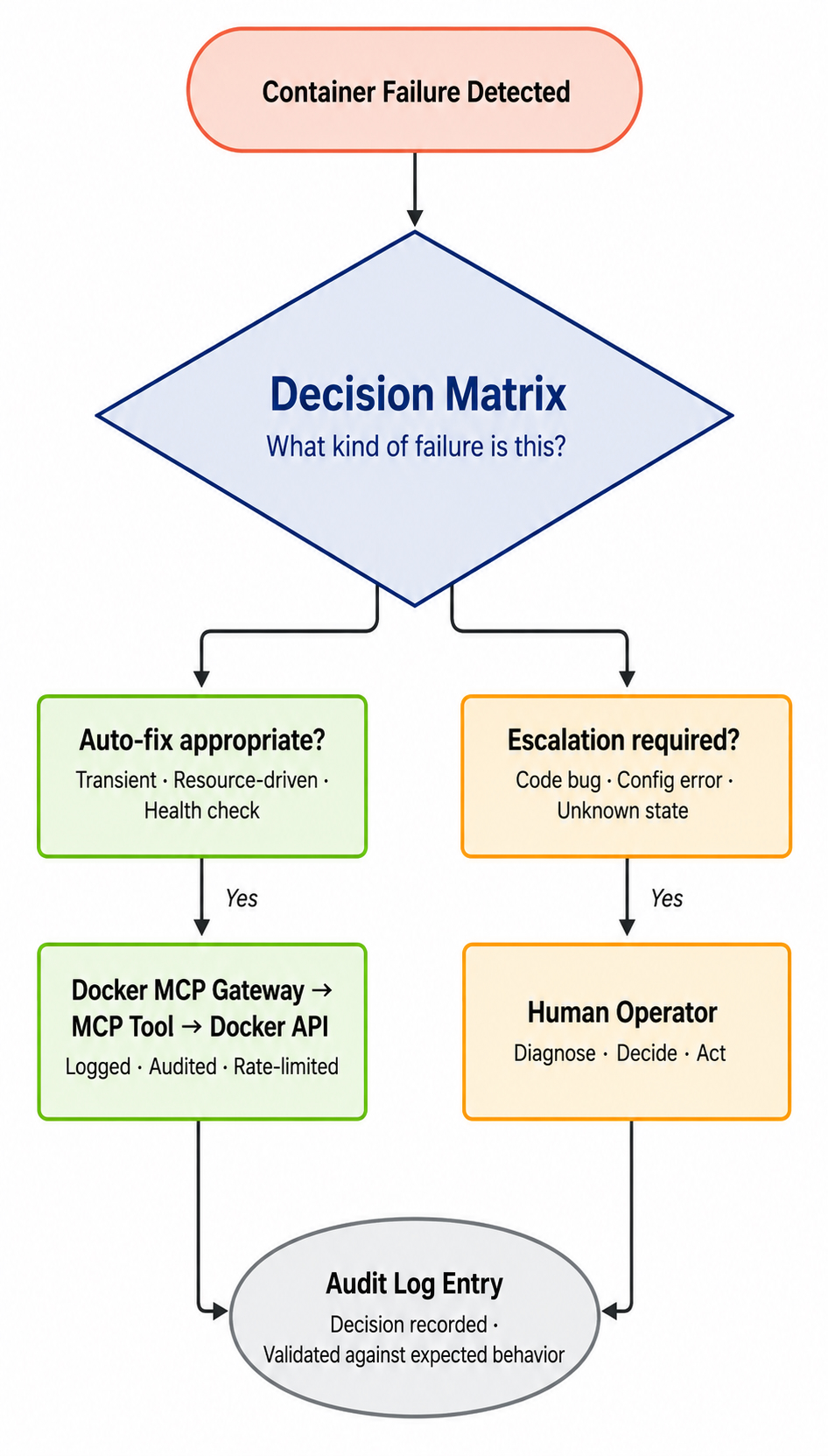
This framing matters more than the implementation. It's the part you should keep even if you replace every other piece of the system. The agent's job isn't to be smart — it's to apply this rule consistently and visibly.
We chose to encode this in the agent's system prompt rather than in code branching, which turned out to be one of our most important design decisions. More on that below.
The Architecture in Practice
The system has five logical layers running across three Docker Compose containers:
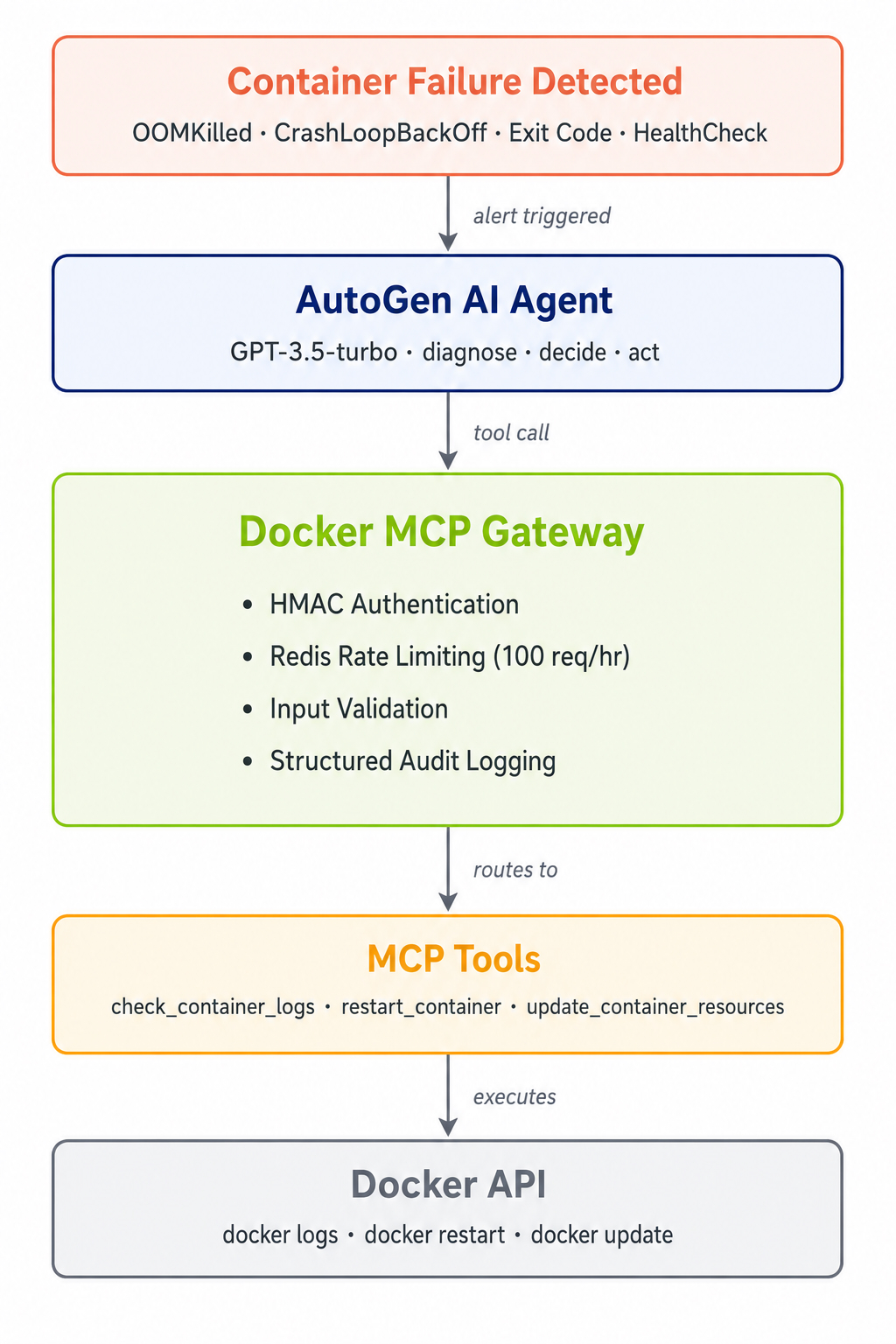
The architecture separates concerns into five layers. The AutoGen agent (GPT-3.5-turbo, cost-optimized for this decision space) handles reasoning and decision-making. The Docker MCP Gateway sits in front of the tools as a security enforcement point — every tool call passes through HMAC authentication, Redis-backed rate limiting (100 requests/hour), input validation, and structured audit logging. The MCP Tools layer exposes three remediation actions: check_container_logs, restart_container, and update_container_resources. Below that, the Docker API performs the actual container operations. In our current implementation, the Gateway and Tools layers are colocated in a single Python service for simplicity — in a multi-tenant production setup you'd separate them into distinct services that scale independently.
Every tool call generates an audit log entry like this:
{
  "timestamp": "2026-05-07T02:08:15.456Z",
  "incident_id": "inc-20260507-020815",
  "agent_id": "docker-ops-agent-001",
  "alert": {
    "description": "Docker container crashed with OOMKilled",
    "container_id": "nginx-oom-test",
    "status": "OOMKilled"
  },
  "decision_chain": [
    {"tool": "check_container_logs", "result": "..."},
    {"tool": "update_container_resources", "result": "Memory limit updated to 200MB"}
  ],
  "resolved": true
}
That structured output is what makes the system auditable. It's also what makes our validation work possible.
The Engineering Reality: 43% to 100%
Across 7 development-phase incidents, our agent made the correct decision 43% of the time. Across 6 validation-phase incidents after applying our fixes, it was correct 100% of the time. Both datasets are committed in the repo's monitoring/analysis directory.
|
Phase
|
Runs
|
Correct
|
Avg Turns/Incident
|
|---|---|---|---|
|
Before fixes
|
7
|
3/7 (43%)
|
22.7
|
|
After fixes
|
6
|
6/6 (100%)
|
11.7
|
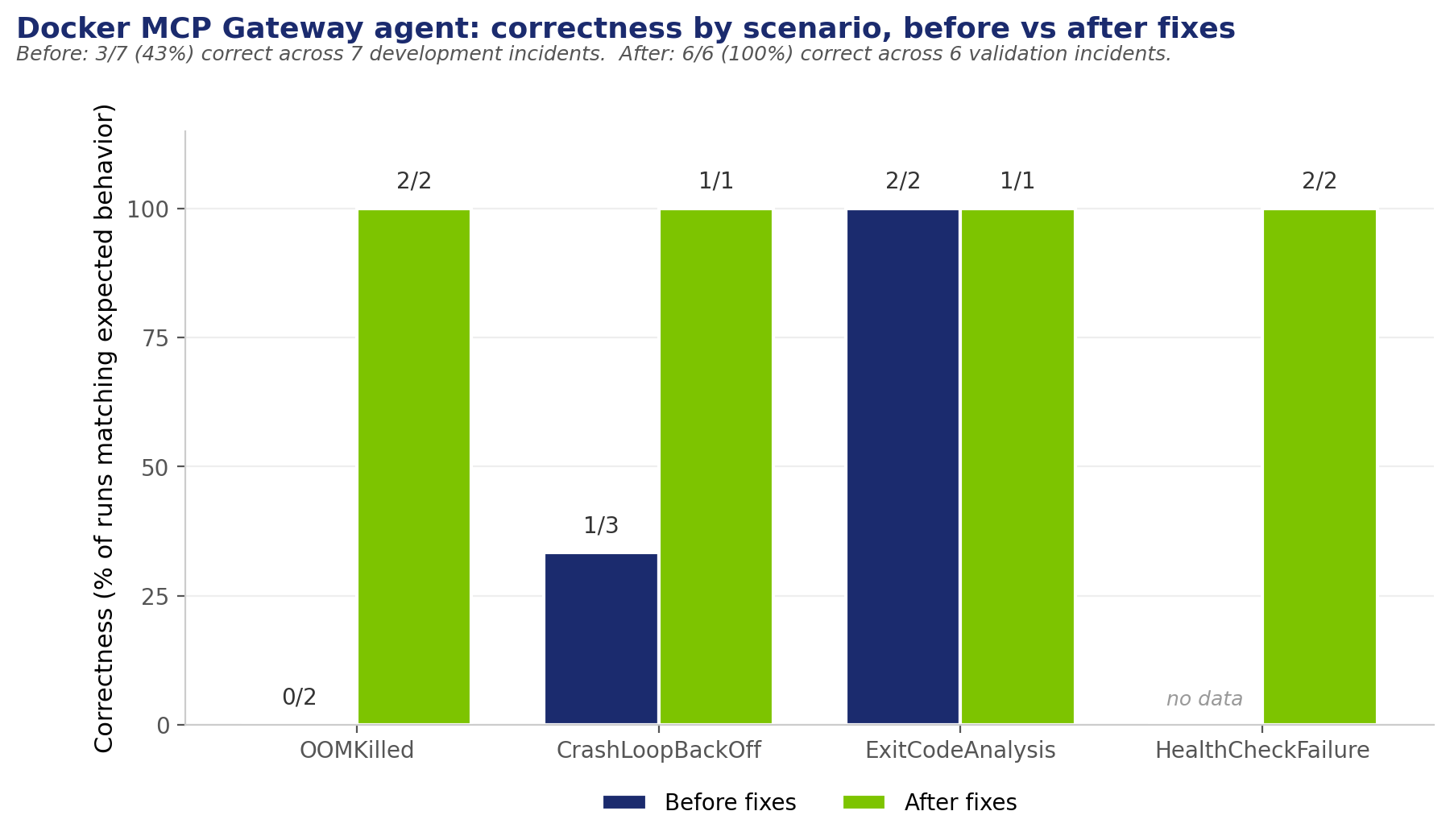
A note on sample size: this is a small dataset. It's enough to show the expected behavior is reproducible across the four scenarios, but not enough to make claims about reliability under load or at scale.
What changed between the two phases is documented as nine challenges in the lab README. Three of them drove most of the improvement. Here they are.
Challenge A: The OOM That Couldn't Be Fixed
In the early runs, the agent correctly diagnosed an OOMKilled container, called the memory-update tool, and got back this Docker error:
Memory limit should be smaller than already set memoryswap limit,
update the memoryswap at the same time
Then it correctly escalated, because it had no tool for updating memoryswap. Our analyzer marked this as wrong because the OOMKilled scenario expected AutoResolved, not Escalated.
But the agent's logic was right. The bug wasn't in the agent — it was in our test container's --memory-swap configuration. Once we fixed that (set --memory-swap=-1 for unlimited swap), the agent's behavior didn't change at all. The same logic that escalated correctly before now succeeded correctly. The agent went from 0/2 to 2/2 correct.
Lesson: When the agent makes the right decision but your tests say it's wrong, check the test setup before blaming the agent. We spent a few hours debugging the agent before realizing our own container configuration was the problem.
Challenge B: The Over-Eager Restart
In the first three CrashLoopBackOff runs, the agent restarted the container 2 out of 3 times. CrashLoopBackOff is exactly the failure mode where you should never restart — the container is crashing because of a code or config bug, not a transient state. Restarting just generates more crashes.
We almost wrote a code branch for it: add a check, route CrashLoopBackOff to a different path. Before doing that, we tried tightening the system prompt instead:
For CrashLoopBackOff failures: ALWAYS escalate to a human operator.
NEVER attempt to restart the container. Restarting will only cause the container to crash again.
Your role is to diagnose and report, not to fix.
That single change — no code, just words in the prompt — made the agent consistently escalate on every subsequent run.
Lesson: If you want the agent to follow a rule, write the rule down in the system prompt. Don't leave it to the model to figure out. We spent more time arguing about whether to add code branching than the prompt change actually took.
Challenge C: The Hallucinated Containers
After resolving real incidents, the agent started making up alerts for containers that didn't exist — memory-hungry-app, app-crash-loop, none of which were ever in our system. It was inventing failures and then "responding" to them.
Root cause: AutoGen's max_consecutive_auto_reply was set to 10. After the agent finished a real incident, the conversation framework kept giving it turns. Without a real prompt to respond to, it generated plausible-looking next incidents and walked itself through fake remediations.
Fix: drop max_consecutive_auto_reply to 3. The agent gets exactly enough turns to diagnose, act, and report — then the conversation ends.
Lesson: AutoGen and similar frameworks default to long conversations because they're built for chat use cases. For production, you want them to stop talking once the job is done.
From Mohammad-Ali A'râbi, Docker Captain:
The progression from 43% to 100% correctness reinforced a key lesson: production AI is often less a machine-learning problem; it is a systems engineering challenge. The initial failures were not the fault of the LLM; they were the result of implicit, undocumented policies and permissive execution environments.
Production AI engineering requires moving past the "magic" of conversational models and returning to a rigorous, deterministic engineering discipline. It means treating the system prompt as an immutable policy file, writing explicit, boundary-defining rules that leave zero room for the model to improvise. It means enforcing aggressive Redis-backed rate limits to prevent hallucination loops, isolating execution tools to eliminate docker.sock vulnerabilities, and relying exclusively on structured JSON audit logs rather than plain text for forensic validation.
The agent is merely a component. The surrounding infrastructure — the cryptographic constraints, the isolated execution environments, and the hardcoded fallbacks — is what actually makes the system safe. Building trust in AI demands the exact same rigor we apply to cluster security: trust nothing, verify everything, and strictly log the rest.
Production Patterns We'd Recommend
If you're building something similar with Docker MCP Gateway, here's what we'd carry over from our nine challenges:
Authenticate every tool call, even in dev. We used HMAC signing on every request from agent to MCP server. The reason to do this early isn't just production security — it surfaces auth integration bugs during development, when they're cheaper to fix.
Use structured JSON for audit logs, not text. The audit format we used (incident ID, agent ID, alert, decision chain, resolved flag) made it possible to write an analyzer that validates agent behavior automatically. Plain text logs would have made that impossible.
Set rate limit low. We used Redis with 100 requests per hour per agent. Agents can make a lot of tool calls quickly — a single bug in the system prompt triggered thousands of calls in one of our early runs before we noticed.
Default to escalation when uncertain. A false-positive escalation costs you a page that turns out to be nothing. A false-negative auto-fix can mask a real problem for weeks. The costs aren't symmetric, so the default shouldn't be either.
Validate against expected behavior. Write down what you expect each failure mode to do, then write an analyzer that checks the audit log against that spec. We open-sourced ours — it's about 250 lines of Python, no external dependencies. You can adapt it to any agent that produces structured audit logs.
Tighten conversation turn limits. max_consecutive_auto_reply=3 is a sane starting point for production. The agent should do its job and then the conversation should end. Frameworks default to longer because they're optimized for conversational AI demos, not production ops.
What's Still Missing
This article would be marketing if we didn't include this section. Honest engineering means owning what isn't built yet.
No Docker Scout MCP server exists yet. Security-aware container discovery — "find the most secure nginx tag," "show me CVEs in this image" — isn't possible through MCP today. The Docker Hub MCP server has 13 tools, but none of them surface vulnerability data. This is a real gap in the ecosystem.
No incident memory or pattern recognition. Our agent treats every incident as fresh. A production system would learn that this container OOMs every Tuesday at 4 pm and recommend a permanent memory increase rather than reactively bumping it each time. We've left this as future work.
Sample sizes are small. Our 6 post-fix incidents prove the expected behavior is reproducible across the four scenarios. They don't prove reliability under production load, traffic spikes, or adversarial conditions. We'd need 100x more data and load testing to make those claims.
MTTR is unmeasured. AutoGen records all decision-chain timestamps within microseconds of each other, so the per-incident duration data we collected isn't usable as a real mean-time-to-recovery metric. Capturing real MTTR would require external timing instrumentation around the agent.
Gateway and tools are colocated. Our MCP server bundles the security pipeline (HMAC, rate limiting, audit) with the tool execution. In a true multi-tenant production setup, you'd separate these into distinct services so they can scale independently. Our current architecture is fine for a single team or environment; it would need refactoring before serving multiple agent populations.
What This Means for AI Infrastructure
The interesting part of building agentic infrastructure isn't getting the agent to act. It's getting it to not act when acting would make things worse. Docker MCP Gateway is one of the first production tools that takes this seriously — treating the infrastructure around the agent as the security layer, not the agent itself.
The pattern we ended up with — a Gateway in front, scoped tools, decision boundaries written into the system prompt, structured audit logs — isn't novel. It's just what worked. We expect most production AI agents will end up looking similar, because this is what makes them debuggable when something goes wrong.
The nine challenges we documented in the lab README are probably challenges you'll hit too. The analyzer script, the audit log format, and the validation patterns are all MIT-licensed in the companion repository. Use whatever's useful.
This article was originally published on OpsCart.
Published at DZone with permission of Mohammad-Ali Arabi. See the original article here.
Opinions expressed by DZone contributors are their own.
Comments