

Down the Rabbit Hole of an Apache APISIX Plugin
In this article, the author explores custom plugins and checks the parameters of the _M.access(conf, ctx) function, especially the ctx one.
Join the DZone community and get the full member experience.
Join For FreeMy demo, Evolving your APIs, features a custom Apache APISIX plugin. I believe that the process of creating a custom plugin is relatively well-documented. However, I wanted to check the parameters of the _M.access(conf, ctx) function, especially the ctx one.
The documentation states:
The
ctxparameter caches data information related to the request. You can usecore.log.warn(core.json.encode(ctx, true))to output it toerror.logfor viewing.
Unfortunately, core.log ultimately depends on nginx's logging, and its buffer is limited in size. Thanks to my colleague Abhishek for finding the info. For this reason, the ctx display is (heavily) truncated. I had to log data bit by bit; however, it was instructive.
The Context
The ctx parameter is a Lua table. In Lua, table data structures are used for regular indexed access (akin to arrays) and key access (like hash maps). A single ctx instance is used for each request.
The Apache APISIX engine reads and writes data in the ctx table. It's responsible for forwarding the latter from plugin to plugin. In turn, each plugin can also read and write data.
I resorted to a custom plugin to conditionally apply rate-limiting in the demo. The custom plugin is a copy-paste of the limit-count plugin. Note that the analysis is done in a specific context. Refrain from assuming the same data is available on your own. However, it should be a good starting point.
Overview of the ctx Parameter
The data available in the ctx parameter is overwhelming. To better understand it, we shall go from the more general to the more particular. Let's start from the overview.
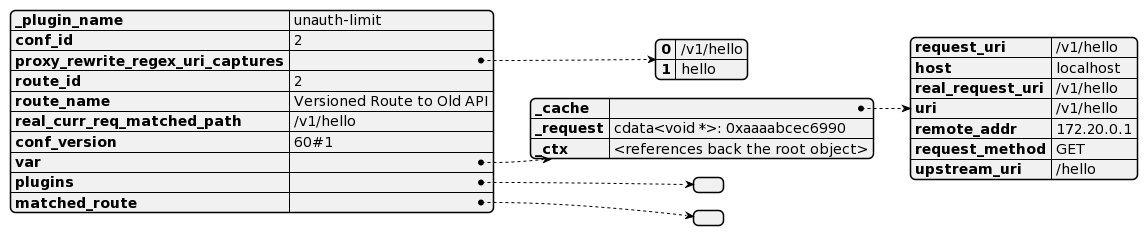
_plugin_name: self-explanatoryconf_id: either route ID or service IDproxy_rewrite_regex_uri_capture: data set by the proxy-rewrite plugin.route_id: route ID the plugin is applied toroute_name: route name the plugin is applied toreal_current_req_matched_path: URI for which matching was doneconf_version: etcd-related revision — see belowvar: references thectxobject and a cache of data about the request, e.g., URI, method, etc.matched_route: the route that was matched based on host header/URI and/orremote_addr; see belowplugins: pairs of plugin/data — see below
Matched Route
The matched_route row is a complex data tree that deserves a detailed description.
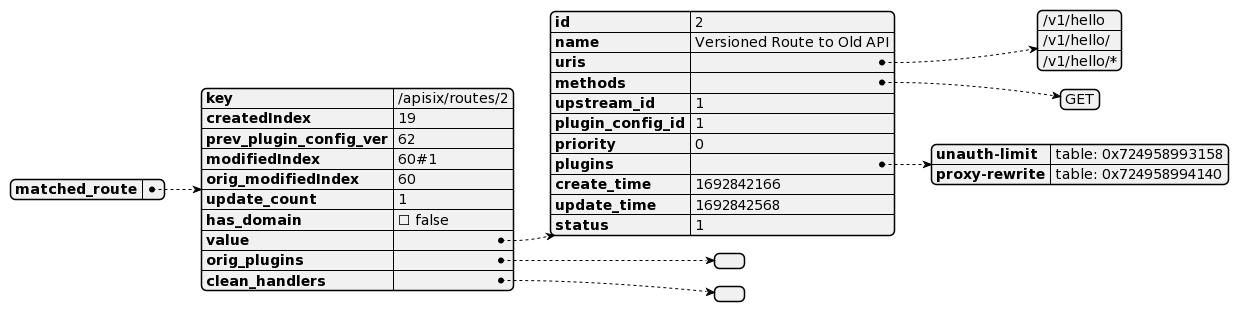
key: access key in theetcddatastorecreated_index,modifiedIndexandorig_modifiedIndex: these attributes are related to etcd and how it stores metadata associated with revisions. Different revisions of a single key are logged in thecreate_revisionandpre_revisionfields. The former points to the initial created row ID and is constant throughout the changes, while the latter points to the row ID of the previous value.Apache APISIX maps them respectively to the
created_indexandmodifiedIndexvalues and uses them for caching. In many places,created_indexis later assigned toconf_version- see above.prev_plugin_config_ver: after a plugin configuration is merged with the route configuration, the currentmodifiedIndexis assigned toprev_plugin_config_ver. It allows saving CPU cycles if one attempts to apply the same plugin config later in the call chain.update_count: replaced withmodifiedIndexhas_domain: whether the matched route references an upstream with a domain, e.g.,http://httpbin.org, or not, e.g.,192.168.0.1orig_plugins: temporary placeholder used if a route has plugins defined directly and reference a plugins configclean_handlers: list of functions scheduled to be called after a plugin has been createdvaluehas keys related to how the route was created, as well as a couple of others:Shellcurl http://apisix:9180/apisix/admin/routes/2 -H 'X-API-KEY: edd1c9f034335f136f87ad84b625c8f1' -X PUT -d ' { "name": "Versioned Route to Old API", "methods": ["GET"], "uris": ["/v1/hello", "/v1/hello/", "/v1/hello/*"], "upstream_id": 1, "plugin_config_id": 1 }'
priority: since we didn't set it, it has a default value 0. Priority is essential when multiple routes match to determine which one to apply.create_time: self-explanatoryupdate_time: self-explanatoryplugins: references to plugin's functionstatus: I couldn't find this
Plugins
The plugins value contains plugin-related data in an indexed-based Lua table. Each plugin has two entries: the first (even-indexed) entry contains data related to the plugin in general, e.g., its schema, while the second (odd-index) entry data is related to its configuration in the current route.
My setup has two plugins, hence four entries, but to keep things simpler, I kept only a single plugin in the following diagram:
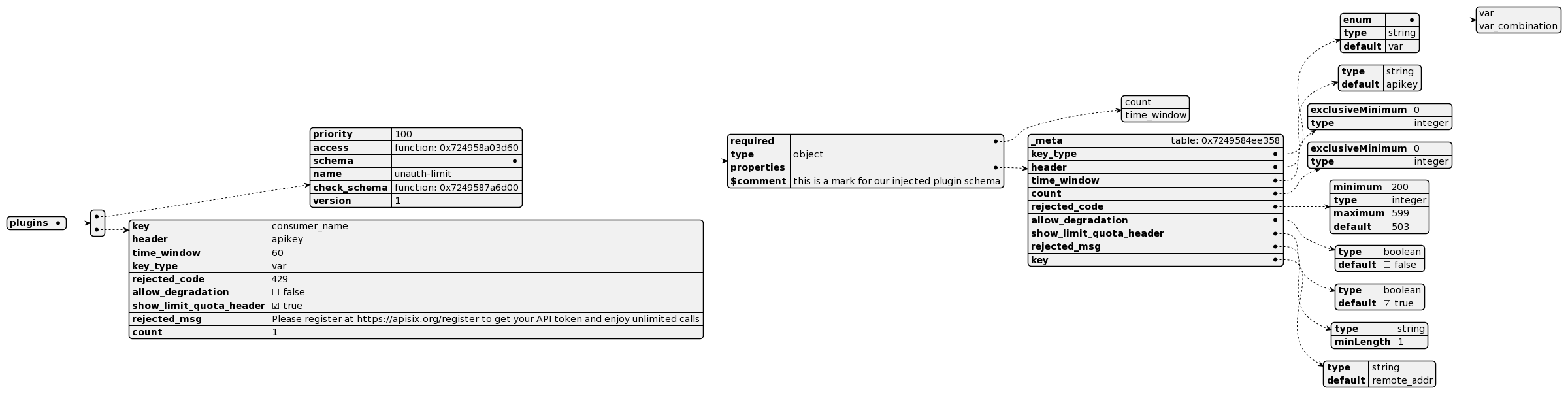
Key values match directly to the plugin schema and configuration; you can check the whole descriptions directly in the plugin.
A Final Trick
I initially had issues printing the ctx table because of the nginx buffer limit and had to do it bit by bit. However, you can print it to a file.
Here's the function, courtesy of my colleague Zeping Bai:
local file, err = io.open("conf/ctx.json", "w+")
if not file then
    ngx.log(ngx.ERR, "failed to open file: ", err)
    return
end
file.write(core.json.encode(ctx, true) .. "\n")
file.close()
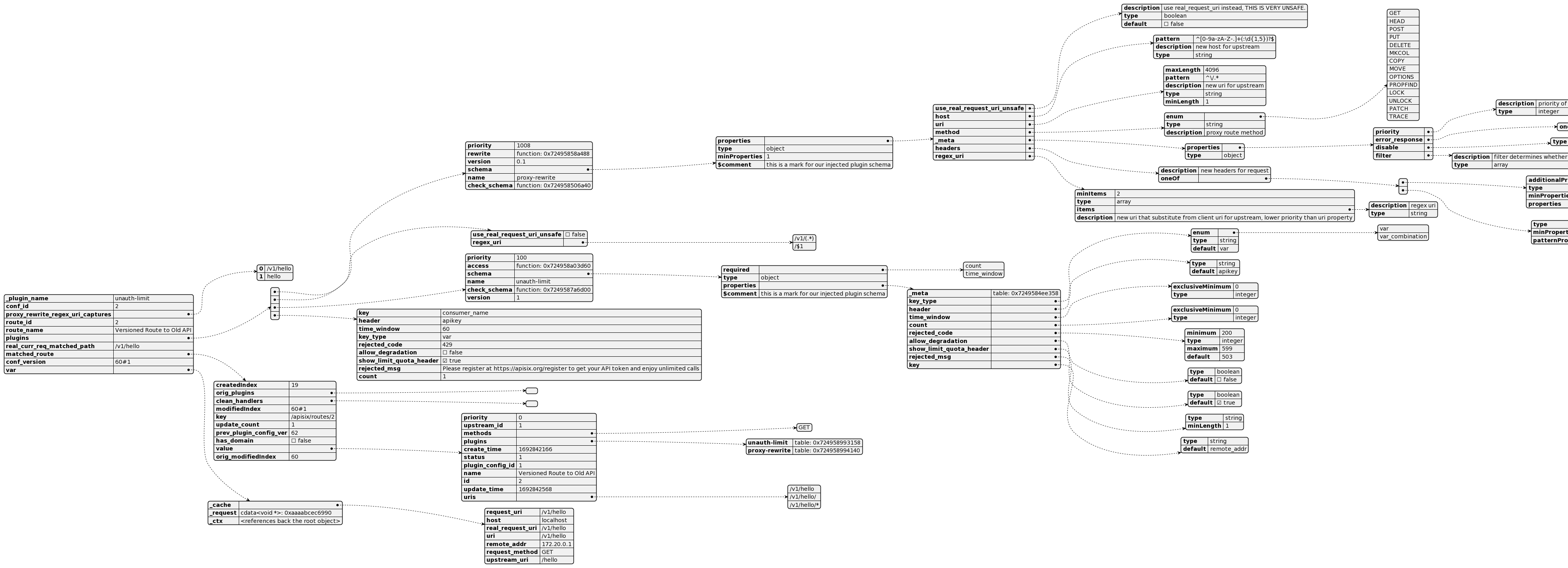
Here's the whole data representation, in case you have good eyes:
Alternatively, here's the PlantUML representation.
Conclusion
In this post, I described the structure of the ctx parameter in the access() function. While specific entries vary from configuration to configuration, it gives a good entry point into data manipulated by plugins.
It's also a good reminder that even if you're not fluent in a language or a codebase, you can get quite a lot of information by logging some variables.
To Go Further
Published at DZone with permission of Nicolas Fränkel. See the original article here.
Opinions expressed by DZone contributors are their own.
Comments