

Supercharge Your Coding Workflow With Ollama, LangChain, and RAG
Learn how to build a retrieval-augmented generation (RAG) code assistant using Ollama and LangChain to optimize your coding workflow.
 CORE
·
CORE
·
Join the DZone community and get the full member experience.
Join For FreeAs developers, we always look for ways to make our development workflows smoother and more efficient. With the new year unfolding, the landscape of AI-powered code assistants is evolving at a rapid pace. It is projected that, by 2028, 75% of enterprise software engineers will use AI code assistants, a monumental leap from less than 10% in early 2023. Tools like GitHub Copilot, ChatGPT, and Amazon CodeWhisperer have already made significant inroads.
However, while these tools are impressive, they often operate as one-size-fits-all solutions. The real magic happens when we take control of their workflows, creating intelligent, context-aware assistants tailored to our unique needs. This is where Retrieval-augmented eneration (RAG) can come in handy.
At its core, RAG is about combining two powerful ideas: searching for the right information (retrieval) and using AI to generate meaningful and context-aware responses (generation). Think of it like having a supercharged assistant that knows how to find the answers you need and explain them in a way that makes sense.
What Are We Building?
In this tutorial, we'll build a code assistant that combines the best of modern AI techniques:
- Retrieval-augmented generation (RAG) for accurate, context-aware responses
- LangChain for robust AI pipelines
- Local model execution with Ollama
Understanding the Building Blocks
Before we start coding, let's understand what makes our assistant special. We're combining three powerful ideas:
- RAG (Retrieval-Augmented Generation): Think of this like giving our AI assistant a smart notebook. When you ask a question, it first looks up relevant information (retrieval) before crafting an answer (generation). This means it always answers based on your actual code, not just general knowledge.
- LangChain: This is our AI toolkit that helps connect different pieces smoothly. It's like having a well-organized workshop where all our tools work together perfectly.
- Ollama: This is our local AI powerhouse. Ollama lets us run powerful language models right on our own computers instead of relying on remote servers. Think of it as having a brilliant coding assistant sitting right at your desk rather than having to make a phone call every time you need help. This means faster responses, better privacy (since your code stays on your machine), and no need to worry about internet connectivity. Ollama makes it easy to run models like Llama 2 locally, which would otherwise require a complex setup and significant computational resources.
Prerequisites
To follow along, ensure you have the following:
- Basic knowledge of Python programming
- Python 3.8+ installed on your system
- An IDE or code editor (e.g., VS Code, PyCharm)
Setting Up the Environment
Step 1: Create Project Structure
First, let's set up our project directory:
mkdir rag_code_assistant
cd rag_code_assistant
mkdir code_snippets
Step 2: Install Dependencies
Install all required packages using pip:
pip install langchain-community langchain-openai langchain-ollama colorama faiss-cpuThese packages serve different purposes:
langchain-community: Provides core functionality for document loading and vector storeslangchain-openai: Handles OpenAI embeddings integrationlangchain-ollama: Enables local LLM usage through Ollamacolorama: Adds colored output to our terminal interfacefaiss-cpu: Powers our vector similarity search
Step 3: Install and Start Ollama
- Download Ollama from https://ollama.ai/download
- Install it following the instructions for your operating system
- Start the Ollama server:
ollama serveStep 4: Create Knowledge Base
In the code_snippets folder, create calculator.py:
def add_numbers(a, b):
    return a + b

def subtract_numbers(a, b):
    return a - b

def multiply_numbers(a, b):
    return a * b

def divide_numbers(a, b):
    if b != 0:
        return a / b
    return "Division by zero error"
Building the RAG Assistant
Step 1: Create the Index Knowledge Base (index_knowledge_base.py)
from langchain_community.document_loaders import DirectoryLoader
from langchain_community.vectorstores import FAISS
from langchain_openai.embeddings import OpenAIEmbeddings
from colorama import Fore, Style, init

# Initialize colorama for terminal color support
init(autoreset=True)

def create_index():
    openai_api_key = "your-openai-api-key"  # Replace with your actual API key
    try:
        print(f"{Fore.LIGHTBLUE_EX}Loading documents from the 'code_snippets' folder...{Style.RESET_ALL}")
        loader = DirectoryLoader("code_snippets", glob="**/*.py")
        documents = loader.load()
        print(f"{Fore.LIGHTGREEN_EX}Documents loaded successfully!{Style.RESET_ALL}")

        print(f"{Fore.LIGHTBLUE_EX}Indexing documents...{Style.RESET_ALL}")
        data_store = FAISS.from_documents(documents, OpenAIEmbeddings(openai_api_key=openai_api_key))
        data_store.save_local("index")
        print(f"{Fore.LIGHTGREEN_EX}Knowledge base indexed successfully!{Style.RESET_ALL}")
    except Exception as e:
        print(f"{Fore.RED}Error in creating index: {e}{Style.RESET_ALL}")
This script does several important things:
- Uses DirectoryLoader to read Python files from our
code_snippetsfolder - Converts the code into embeddings using OpenAI's embedding model
- Stores these embeddings in a FAISS index for quick retrieval
- Adds colored output for better user experience
Step 2: Create the Retrieval Pipeline (retrieval_pipeline.py)
from langchain_community.vectorstores import FAISS
from langchain_openai.embeddings import OpenAIEmbeddings
from langchain_ollama.llms import OllamaLLM
from colorama import Fore, Style, init
import asyncio

# Initialize colorama for terminal color support
init(autoreset=True)

openai_api_key = "your-openai-api-key"  # Replace with your actual API key

try:
    print(f"{Fore.LIGHTYELLOW_EX}Loading FAISS index...{Style.RESET_ALL}")
    data_store = FAISS.load_local(
        "index",
        OpenAIEmbeddings(openai_api_key=openai_api_key),
        allow_dangerous_deserialization=True
    )
    print(f"{Fore.LIGHTGREEN_EX}FAISS index loaded successfully!{Style.RESET_ALL}")
except Exception as e:
    print(f"{Fore.RED}Error loading FAISS index: {e}{Style.RESET_ALL}")

try:
    print(f"{Fore.LIGHTYELLOW_EX}Initializing the Ollama LLM...{Style.RESET_ALL}")
    llm = OllamaLLM(model="llama3.2", base_url="http://localhost:11434", timeout=120)
    print(f"{Fore.LIGHTGREEN_EX}Ollama LLM initialized successfully!{Style.RESET_ALL}")
except Exception as e:
    print(f"{Fore.RED}Error initializing Ollama LLM: {e}{Style.RESET_ALL}")

def query_pipeline(query):
    try:
        print(f"{Fore.LIGHTBLUE_EX}Searching the knowledge base...{Style.RESET_ALL}")
        context = data_store.similarity_search(query)
        print(f"{Fore.LIGHTGREEN_EX}Context found:{Style.RESET_ALL} {context}")

        prompt = f"Context: {context}\nQuestion: {query}"
        print(f"{Fore.LIGHTBLUE_EX}Sending prompt to LLM...{Style.RESET_ALL}")
        response = llm.generate(prompts=[prompt])
        print(f"{Fore.LIGHTGREEN_EX}Received response from LLM.{Style.RESET_ALL}")
        return response
    except Exception as e:
        print(f"{Fore.RED}Error in query pipeline: {e}{Style.RESET_ALL}")
        return f"{Fore.RED}Unable to process the query. Please try again.{Style.RESET_ALL}"
This pipeline:
- Loads our previously created FAISS index
- Initializes the Ollama LLM for local inference
- Implements the query function that:
- Searches for relevant code context
- Combines it with the user's query
- Generates a response using the local LLM
Step 3: Create the Interactive Assistant (interactive_assistant.py)
from retrieval_pipeline import query_pipeline
from colorama import Fore, Style, init

# Initialize colorama for terminal color support
init(autoreset=True)

def interactive_mode():
    print(f"{Fore.LIGHTBLUE_EX}Start querying your RAG assistant. Type 'exit' to quit.{Style.RESET_ALL}")
    while True:
        try:
            query = input(f"{Fore.LIGHTGREEN_EX}Query: {Style.RESET_ALL}")

            if query.lower() == "exit":
                print(f"{Fore.LIGHTBLUE_EX}Exiting... Goodbye!{Style.RESET_ALL}")
                break

            print(f"{Fore.LIGHTYELLOW_EX}Processing your query...{Style.RESET_ALL}")
            response = query_pipeline(query)
            print(f"{Fore.LIGHTCYAN_EX}Assistant Response: {Style.RESET_ALL}{response.generations[0][0].text}")

        except Exception as e:
            print(f"{Fore.RED}Error in interactive mode: {e}{Style.RESET_ALL}")
The interactive assistant:
- Creates a user-friendly interface for querying
- Handles the interaction loop
- Provides colored feedback for different types of messages
Step 4: Create the Main Script (main.py)
from interactive_assistant import interactive_mode
from index_knowledge_base import create_index
from colorama import Fore, Style, init

# Initialize colorama for terminal color support
init(autoreset=True)

print(f"{Fore.LIGHTBLUE_EX}Initializing the RAG-powered Code Assistant...{Style.RESET_ALL}")

try:
    print(f"{Fore.LIGHTYELLOW_EX}Indexing the knowledge base...{Style.RESET_ALL}")
    create_index()
    print(f"{Fore.LIGHTGREEN_EX}Knowledge base indexed successfully!{Style.RESET_ALL}")
except Exception as e:
    print(f"{Fore.RED}Error while indexing the knowledge base: {e}{Style.RESET_ALL}")

try:
    print(f"{Fore.LIGHTYELLOW_EX}Starting the interactive assistant...{Style.RESET_ALL}")
    interactive_mode()
except Exception as e:
    print(f"{Fore.RED}Error in interactive assistant: {e}{Style.RESET_ALL}")
The main script orchestrates the entire process:
- Creates the knowledge base index
- Launches the interactive assistant
- Handles any errors that might occur
Running the Assistant
Make sure your Ollama server is running:
ollama serveReplace the OpenAI API key in both index_knowledge_base.py and retrieval_pipeline.py with your actual key
Run the assistant:
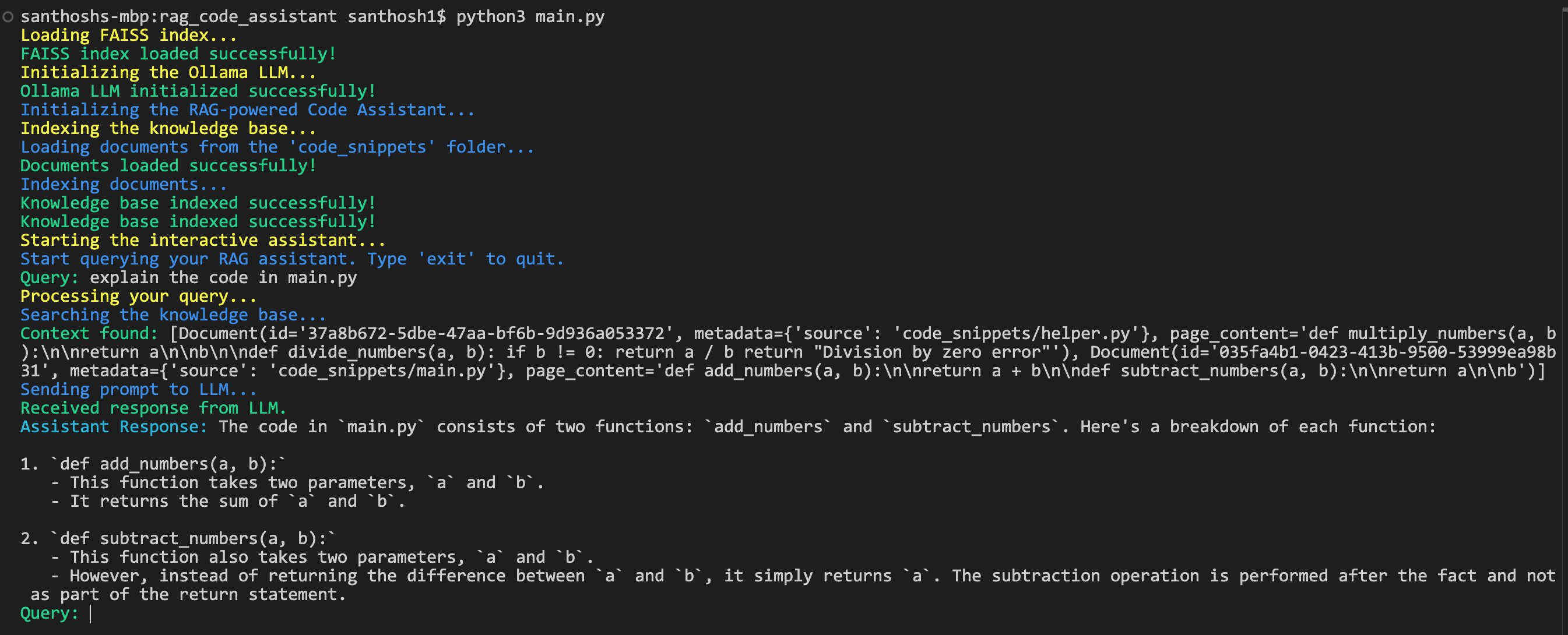
python main.pyYou can now ask questions about your code! For example:
- "How does the calculator handle division by zero?"
- "What mathematical operations are available?"
- "Show me the implementation of multiplication"
Output:
Conclusion
Building a RAG-powered code assistant isn’t just about creating a tool — it’s about taking ownership of your workflow and making your development process not just more efficient but actually more enjoyable. Sure, there are plenty of AI-powered tools out there, but this hands-on approach lets you build something that’s truly yours — tailored to your exact needs and preferences.
Along the way, you’ve picked up some pretty cool skills: setting up a knowledge base, indexing it with LangChain, and crafting a retrieval and generation pipeline with Ollama. These are the building blocks of creating intelligent, context-aware tools that can make a real difference in how you work.
Opinions expressed by DZone contributors are their own.
Comments