

Enterprise Integration Patterns With MuleSoft: Message Enricher
Learn how to enrich your data with everything you need.
Join the DZone community and get the full member experience.
Join For FreeIntroduction
Message or Content Enricher is an enterprise integration pattern that receives an incoming message that doesn't have all the required information, then retrieves that required information from another target system appends it to the data to the message, or forms a new message with everything we need. The image below demonstrates the basic flow.
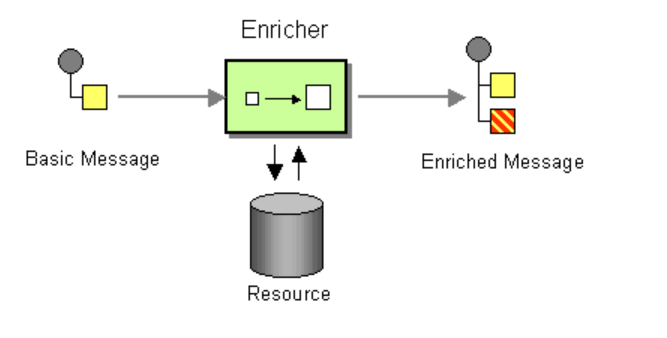
MuleSoft 3 provides the Message Enricher component. Generally, we wrap the message processor with the Message Enricher component to enrich the data.
In MuleSoft 4, there is no component like the Message Enricher — it has been removed. This component is replaced by the Target and Target Value attributes with the message processor.

- Target is the basically variable that holds the data (output data of the processor). Names can only include numbers, characters, and underscores.
- Target Value is output data of the processor that is stored within the target variable. By default, the value is the message payload (
payload). The field accepts any value that a variable accepts: any supported data type, DataWeave expressions, the keywordspayload,attributes, andmessage, but not the keywordvars.
One use case is if you don't want to change your actual payload when a request has been processed by a particular processor.
We receive the request with the payload and, after it passes through one of the processors, the payload will be the output of that processor, but we don't want to change the actual payload. In such cases, you can make use of the Target and Target Value, and the output of that processor will be stored in the Target variable instead of replacing the actual payload with the output of the processor.
Here is a video tutorial explaining step by step how to enrich data with Target and Target Values in MuleSoft.
Code
<mule xmlns:http="http://www.mulesoft.org/schema/mule/http" xmlns:file="http://www.mulesoft.org/schema/mule/file"
xmlns:ee="http://www.mulesoft.org/schema/mule/ee/core"
xmlns:salesforce="http://www.mulesoft.org/schema/mule/salesforce" xmlns:batch="http://www.mulesoft.org/schema/mule/batch" xmlns="http://www.mulesoft.org/schema/mule/core" xmlns:doc="http://www.mulesoft.org/schema/mule/documentation" xmlns:xsi="http://www.w3.org/2001/XMLSchema-instance" xsi:schemaLocation="http://www.mulesoft.org/schema/mule/core http://www.mulesoft.org/schema/mule/core/current/mule.xsd
http://www.mulesoft.org/schema/mule/batch http://www.mulesoft.org/schema/mule/batch/current/mule-batch.xsd
http://www.mulesoft.org/schema/mule/salesforce http://www.mulesoft.org/schema/mule/salesforce/current/mule-salesforce.xsd
http://www.mulesoft.org/schema/mule/ee/core http://www.mulesoft.org/schema/mule/ee/core/current/mule-ee.xsd
http://www.mulesoft.org/schema/mule/file http://www.mulesoft.org/schema/mule/file/current/mule-file.xsd
http://www.mulesoft.org/schema/mule/http http://www.mulesoft.org/schema/mule/http/current/mule-http.xsd">
<http:listener-config name="HTTP_Listener_config" doc:name="HTTP Listener config" doc:id="9c0ac87d-f684-48f1-a745-5ef1c714afee" >
<http:listener-connection host="0.0.0.0" port="8081" />
</http:listener-config>
<flow name="batch-process-demoFlow" doc:id="f7753551-7534-4d21-9251-8fa22b838777" >
<http:listener doc:name="Listener" doc:id="913a9c63-b367-4c5c-b6c4-a5ab5480e951" config-ref="HTTP_Listener_config" path="/api/enrich"/>
<flow-ref doc:name="Flow Reference" doc:id="f88822ec-8191-4157-a34d-09a2a5ef34db" name="batch-process-demoSub_Flow" target="vRespData"/>
<logger level="INFO" doc:name="Original Payload Logger" doc:id="ef162a90-8b32-4670-8561-211233b37deb" message="Original Payload: #[payload]"/>
<logger level="INFO" doc:name="Response Data Payload" doc:id="2bb45828-9f70-432c-a521-69083d0b4ae4" message="Response Payload: #[vars.vRespData]"/>
<ee:transform doc:name="Enriched Data" doc:id="2fd0201a-8137-495c-96a4-12128a733291" >
<ee:message >
<ee:set-payload ><![CDATA[%dw 2.0
output application/json
---
{
city: payload.city,
region: payload.region,
ip_address: vars.vRespData.client_ip,
datetime:vars.vRespData.datetime,
timezone:vars.vRespData.timezone,
utc: vars.vRespData.utc_datetime,
dayOfYear: vars.vRespData.day_of_year
}]]></ee:set-payload>
</ee:message>
</ee:transform>
</flow>
<sub-flow name="batch-process-demoSub_Flow" doc:id="3f04f187-37d3-47d7-8b1a-612f7275b8d1" >
<http:request method="GET" doc:name="Enriched Request" doc:id="d721546f-af82-444a-925d-13e36f79701d" url="http://worldtimeapi.org/api/timezone/{region}/{city}">
<http:uri-params ><![CDATA[#[{
region: payload.region,
city: payload.city
}]]]></http:uri-params>
</http:request>
</sub-flow>
</mule>
Now you know how to implement a Message Enricher with MuleSoft.
Opinions expressed by DZone contributors are their own.
Comments