

Going Beyond Authentication: Essential Features for Profile-First Systems
Profile-first systems go beyond login — storing preferences, filters, and watchlists to drive engagement and flexibility.
"Just log in" is not enough
With the evolution of modern web applications, products, and user experience, relying only on authentication and authorization is not enough for user management. It demands personalization, saved preferences, notifications, compliance, and smooth lifecycle controls. How often are users looking for these nowadays?
- “Save this search and reuse it later.”
- “Notify me when this record changes.”
- “Switch my notifications to email only.”
- “Download my data before I close my account.”
These are no longer a wishlist, and at the same time, these are not identity features. They belong in a profile system — the layer that makes your users feel in control and stick with the product/application.
Drawing a thin line between Identity and Profile
It is important to understand the difference between these two. Identity ensures who you are. Profile ensures how you want the system to behave for you.
- Identity: Authentication, authorization, roles, and credentials; usually handled by identity providers (OAuth, SSO, LDAP etc.)
- Profile: Preferences, settings, saved filters, watchlists, activity logs, visibility controls, and lifecycle management
What is a profile-first system?
A profile-first system emphasizes user profile beyond authentication. Instead of just verifying who the user is, it focuses on how the system should adapt to that user’s behavior and preferences.
Key principles include:
- Decoupled from identity: Profiles exist as separate entities linked to identity records, enabling flexible integration across multiple login providers.
- Extensible schema: Designed to store user-specific metadata like filters, watchlists, notification settings, and UI preferences.
- API-driven personalization: Applications pull data from the profiles to render personalized dashboards, saved states, and notifications.
- Lifecycle-aware: Adherence to privacy and compliance requirements by retention, export, and deletion policies.
It is a shift in ownership by giving users more control over their data and giving developers a centralized way to drive personalization.
The essential profile feature set
Here’s a practical checklist of what a modern user profile system should support:
Core Profile Data
- Name, profile picture, contact info, custom attributes.
- Editable via self-service UI.
Security Control
- Change password, reset MFA, view active sessions.
- Account deactivation and deletion.
Preferences and Settings
- Timezone, language, theme.
- Notification channels (email, SMS, push).
Watch and Subscription Lists
- Users can “watch” or follow records, projects, or items.
- System triggers notifications on changes.
Saved Searches and Filters
- Store frequently used queries or filter sets.
- Allow users to rename, reorder, and pick defaults.
Privacy and Consent Management
- Decide what is public or private.
- Record terms and policy acceptance history.
Activity and Audit Logs
- Show users their recent logins and changes.
- Give admins visibility for audit & compliance.
Data Portability
- Export all user-owned data (JSON, CSV, zip archive).
- Essential for specific compliance requirements.
Architecture at a glance
A profile system usually sits between the identity provider and the rest of the application features.
- Identity Provider handles authentication, authorization, and tokens.
- Profile Service stores preferences, watchlists, saved filters and settings.
- Application reads from profile service to personalize UI or send notifications.
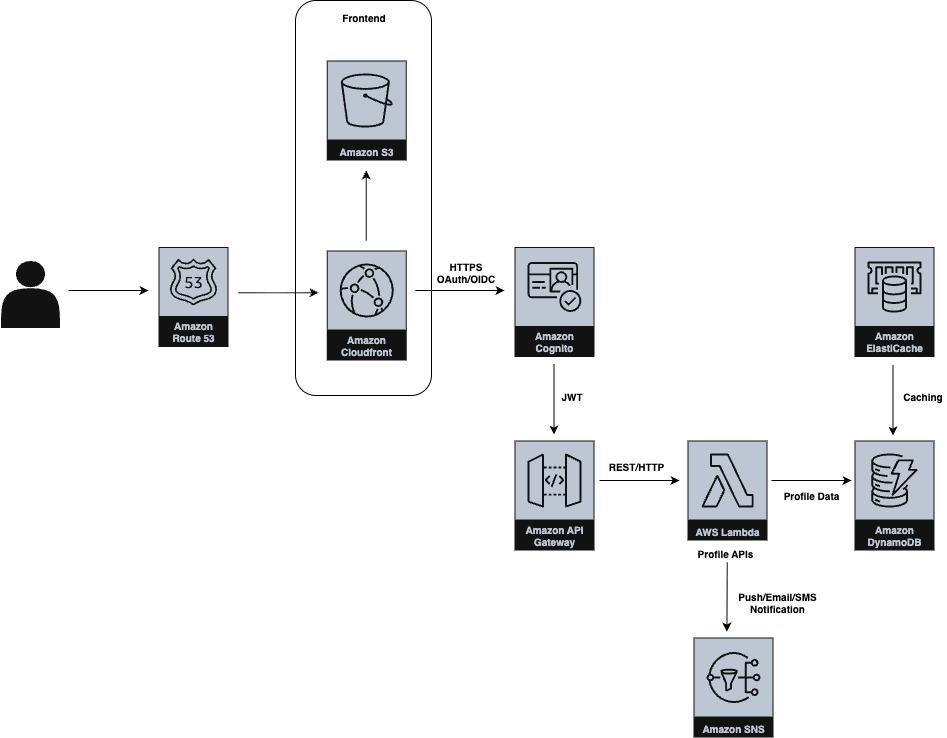
UI: SPA (React/Vue) deployed to CloudFront + S3
Identity: Amazon Cognito (or external OIDC provider) for authentication
Profile APIs: All endpoints deployed in Lambda are behind API Gateway, authorizing via Cognito JWT.
Notification: SNS for push, SMS, or email delivery
Datastore: DynamoDB for flexibility, scale, and single-table patterns.
A simple backend table design might include:
- users table: core user details (linked to identity provider)
- user_preferences table: key/value or JSON fields.
- user_saved_filters table: filter JSON, name, default flag
- user_watchlist table: item_type, item_id, user_id, last_notified
- user_activity_log: timestamped activity for audit
Sample APIs for all essential features
Here is how each profile capability could look as an API contract.
Core Profile Data
# Get user profile
GET /users/{id}

# Update user profile
PATCH /users/{id}
{
  "displayName": "John Doe",
  "photoUrl": "/images/profile.png",
  "phone": "+1-123-456-7890"
}
Preferences and Settings
# Get preferences
GET /users/{id}/preferences

# Update preferences
PATCH /users/{id}/preferences
{
  "theme": "dark",
  "language": "en",
  "timezone": "America/New_York",
  "notificationChannels": ["email", "push"]
}
Watch list and Subscription
# Watch a record
POST /users/{id}/watchlist
{
  "itemType": "project",
  "itemId": "PROJ-1234"
}

# Remove watch
DELETE /users/{id}/watchlist/PROJ-1234

# List all watched items
GET /users/{id}/watchlist
Saved Searches and Filters
# Create saved filter
POST /users/{id}/filters
{
  "name": "My Active Tasks",
  "definition": { "status": "active", "owner": "me" },
  "default": true
}

# Get all filters
GET /users/{id}/filters

# Update a filter
PATCH /users/{id}/filters/{id}
{
  "name": "My Pending Tasks"
}

# Delete a filter
DELETE /users/{id}/filters/{id}
Privacy and Consent Management
# Get privacy settings
GET /users/{id}/privacy

# Update visibility and consent
PATCH /users/{id}/privacy
{
  "profileVisibility": "private",
  "acceptedPolicies": ["terms-v2", "privacy-v3"]
}

# View consent history
GET /users/{id}/consent-history
Activity and Audit Logs
# Get user activity log
GET /users/{id}/activity?limit=20

# Example response
[
  { "action": "login", "timestamp": "2025-10-05T21:32Z", "ip": "123.123.1.123" },
  { "action": "update_preferences", "timestamp": "2025-10-04T15:12Z" }
]
Data Portability
# Export user data asynchronously
POST /users/{id}/export
{
  "format": "zip"
}

# Check export status
GET /users/{id}/export/status

# Download export
GET /users/{id}/export/download
Technical implementation considerations
- Leverage event-driven architecture for watchlist, audit, export, etc. features where things can be handled asynchronously.
- Use of caching will speed up the repetitive read (for example, user preference)
- Database indexing and sharding for larger system
- Digest notifications instead of one per change
- No hard delete of user data
- Incorporate robust observability
Conclusion
User management is more than authentication and authorization. A profile-first approach gives users control and makes the application/product more engaging. By separating identity from profile and layering in preferences, saved filters, watchlists, and lifecycle controls, we can provide enhanced user experiences.
Opinions expressed by DZone contributors are their own.