

The Hidden World of Exit Codes: Tiny Integers With Big Meanings
Unix utilities and CLIs often exit with a range of exit codes, what do they mean and why do they matter? This article dives deep into each.
Join the DZone community and get the full member experience.
Join For FreeIt's not what you say, it's how you say it - Albert Mehrabian
In the land of your favorite TTY, the output (stdout, stderr) of the commands themselves are often not looked at, specifically within scripts that are meant to run in those terminals.
Below will work just fine, but how did the terminal know?
echo "Hello World!"
Enter, Exit codes! They form the bedrock of control flow for processes. A failed shell command often exits with a NON zero exit code.
Stop!
What Is an Exit Code?
Exit codes are just "integers" (ranging from 0 to 255). You can think of them as the HTTP status code of terminal computing. As the name suggests, exit codes give you more metadata about the status of an operation, supplementing whatever lands in stderr or stdout.
Typically in the shell of your choice, you can find the exit code of the previously exited by running.
echo $?Why Does That Work?
When one runs a command in the shell, the shell process calls fork()to create a new child process, the child process then calls an exec()family command to replace itself with the actual command. Now, whenever the child process exits, it calls exit() with a status code. This status code is made available to the shell (the parent process) via wait(). The shell then sets the exit code that it received to a special variable called $?.
Let's go over the common exit codes and I'm making up zones as we go by to make it fun.
The "Safe" Zone
An exit code of 0 typically means that everything is smooth sailing. The command line program exited with the consequences that you intended. In other words, its "success".
The "Not So" Safe Zone
Well, as you have surmised. A non-zero status code signifies that an error has occurred. Some are simple, whereas others are more gnarly, but they all give us valuable information.
1. Generic Error: This is the equivalent of the catch-all error and tells us the command has not succeeded.
2. Bad Usage: Incorrect input or passing in bad flags to a CLI command, will result in this. Its useful, because it tells us the process did not even start. One could think of this as a client side error, does HTTP 400 ring a bell?
The "Configurable" Zone
From here on, we jump straight to 126. Hold on! What happened to other codes? This is where true configurability kicks in. Every CLI or Unix utility is free to document and exit with any of the exit codes from 3 to 125, providing extreme granularity for determining root cause of a process exit. Isn't that neat?
The "Head-Scratch" Zone
126 - The command exists, but cannot be run. Usually, this indicates permission issues either on the file or requiring superuser access.
127 - (HTTP 404) The command does'nt exist! All your accidental typos will end up here.
Tip: Try hitting rat instead of cat on the terminal and look at the exit code.
The "Signal" Zone
Things are starting to get really interesting. Remember, that the kernel can always deliver a signal to a running process. Usually, the process has code to handle a signal (if a signal handler is defined) and react accordingly. Let's look at a few.
128 + N is the exit code that is returned for a process that had to handle a signal. Makes it easier to distinguish a process that exited by itself vs one that interacted with a signal.
130 - (128+2) SIGINT, Typically this means that the process had to handle Ctrl + C from the terminal.
137 - (128+9) SIGKILL, Cannot be handled or ignored. Folks who have used kill -9 on the command line will instantly recognize this one. Note: This could also be triggered by an OOM killer, more on this later.
139 - (128+11) SIGSEGV, Process being killed by the kernel when it tried to access invalid memory.
143 - (128+15) SIGTERM, A graceful shutdown where the process has been allowed to clean up, close open file descriptors and such.
Core Dumps
Now, depending on the ulimit setting. Some of the above exit codes will also produce a core dump file, which can they be analyzed with a debugger to go frame by frame to figure out what went wrong. These files can be really big and depend on the size of the process that got killed.
The "Fatal" Zone
255 - Something truly fatal has happened and its used as a "catch-all" exit code in Unix systems. exit(-1) also exits with 255. 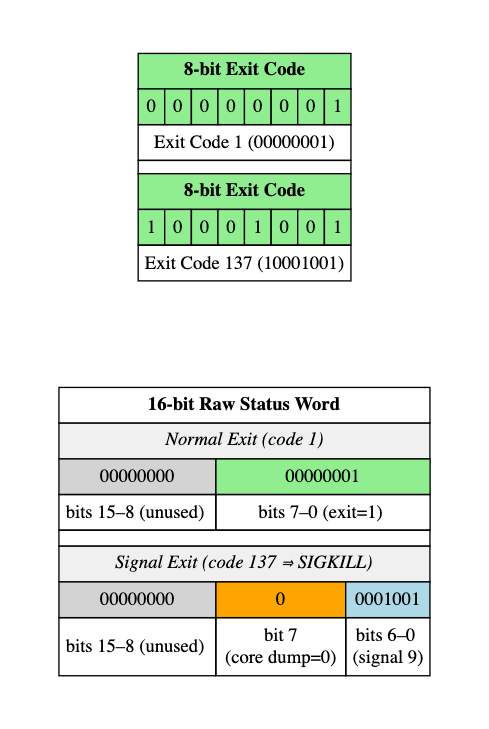
Exit Code Standards
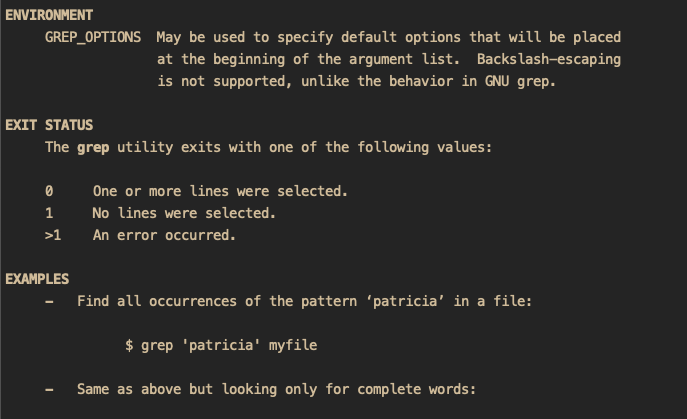
Different unix utilities and CLIs have their own standards on exit codes. Its a good idea to check the man page which usually list the EXIT STATUS as its own section to find the quirks. For example: grep actually considers no matches as an exit code 1, even though technically it did its job just fine. This gets even trickier for custom CLIs, I recommend reading documentation for existing CLIs or coming up with a clear set of exit codes if you're building your own.
Why Do Exit Codes Matter?
Exit codes help power all sorts of modern automation in today's world.
Chaining
git add -A && git commit -m "fix: squash a bug"Each step only succeeds if each preceding process exits with 0.
ssh -i "mykey.pem" [email protected] || echo "ssh failed"CI/CD
All continuous integration runners such as Github Actions, AWS Codebuild all rely entirely on exit codes to manage their build pipelines. They exit on non zero exit codes and log the error. Importantly for custom CLI tools it can debilitating if a new version of the CLI exits with a different exit code than it did previously for the same exact command. These regressions halt the world for consumers of said CLI.
Monitoring
Specific exit codes like 137 (OOM killer) can be monitored by supervisor processes that restart processes that they owned (eg: worker processes) thereby increasing availability of services. It also serves as a place to look for memory leaks if there was core dump. There is also a security angle to this for tools like ssh which log 255 for login failures and can serve as a place to audit for attacks.
Other Wordly: Exit Codes in Space
Exit codes have been pivotal for remote debugging in Space. The Mars Spirit rover ran on VxWorks which used sigLib which returned 0 or -1 with a detailed error number. NASA engineers were able to discover the rover was stuck in a "reboot" loop based on the non-zero exit codes that were repeatedly logged. This was eventually tracked down to a memory issue.
For an example, closer to home, I'd suggest giving this a read.
Conclusion
Exit codes take up a tiny amount of space, however knowing what they mean can be essential in your next debugging session or automation workflow. Gain clarity, control and confidence over them and you will be a terminal wizard. What's your strangest exit code story?
Opinions expressed by DZone contributors are their own.
Comments