

Feature Flags and Safe Rollouts With Azure App Configuration for Large SPA Teams
Feature flags and safe rollouts with Azure App Configuration for large SPA teams, hands-on setup, core principles, TypeScript code for backend and frontend.
 ·
·
Join the DZone community and get the full member experience.
Join For FreeWhen a new application starts, everything feels simple: features look straightforward, the architecture is clean, and launch day goes smoothly. Then the real work begins — a steady flow of new features, refactors, and bug fixes. You need to ship critical fixes fast without revealing unfinished pages or risky changes to customers. As the scope grows — multiple teams, shared dependencies, and large features — coordination gets harder. This is where feature flags help.
Feature flags reduce risk by decoupling deployment from release. Azure App Configuration and Key Vault let you control rollouts safely, target by tenant/segment, and audit changes — without exposing secrets to the browser.
In this tutorial, you’ll build a reference implementation that:
- Runs safe, progressive rollouts in a React/TypeScript SPA
- Targets by tenant or segment, and limits the blast radius
- Audits changes and prevents config drift
- Keeps all secrets server-side (no secrets in the SPA)
- Supports fast rollback via labels
If that’s what you’re after, let’s dive in.
Reference Architecture (No Secrets in the SPA) High-Level Flow
- Browser SPA (React): Never calls Azure App Configuration directly.
- Edge: Akamai WAF → Azure Application Gateway.
- Backend “Config Proxy” service (AKS): Exposes GET /flags for the SPA. Authenticated, tenant-aware, read-only. Uses Managed Identity to read App Configuration and, if needed, resolve Key Vault references server-side only.
- Azure App Configuration: Stores flags, labels (env/version), and references to Key Vault.
- Azure Key Vault: Holds secrets; never returned to clients.
- Redis (optional): Short-lived cache for flags to reduce latency and protect App Configuration during spikes.
- Log Analytics: Audits, metrics, and rollout dashboards.
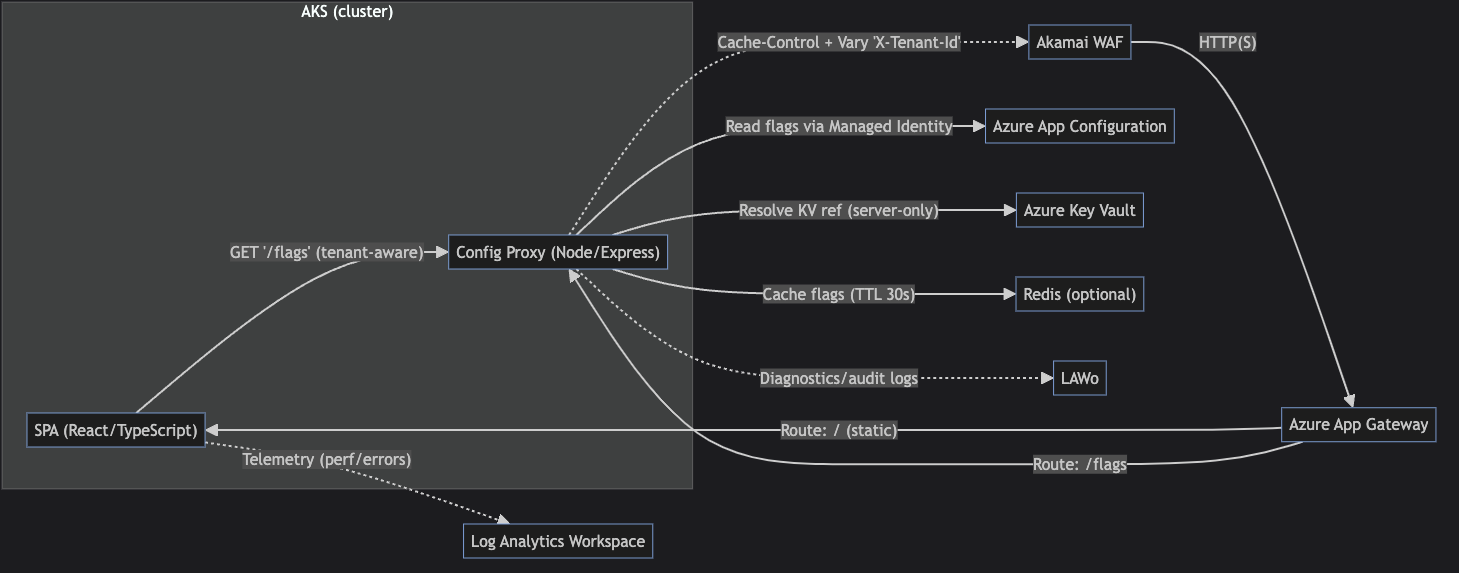
flowchart LR
  WAF["Akamai WAF"]
  AG["Azure App Gateway"]
  subgraph "AKS (cluster)"
    SPA["SPA (React/TypeScript)"]
    PROXY["Config Proxy (Node/Express)"]
  end
  APPCONF["Azure App Configuration"]
  KV["Azure Key Vault"]
  REDIS["Redis (optional)"]
  LAW["Log Analytics Workspace"]

  WAF -->|"HTTP(S)"| AG
  AG -->|"Route: / (static)"| SPA
  AG -->|"Route: /flags"| PROXY
  SPA -->|"GET '/flags' (tenant-aware)"| PROXY
  PROXY -->|"Read flags via Managed Identity"| APPCONF
  PROXY -->|"Resolve KV ref (server-only)"| KV
  PROXY -->|"Cache flags (TTL 30s)"| REDIS
  PROXY -.->|"Cache-Control + Vary 'X-Tenant-Id'"| WAF
  SPA -.->|"Telemetry (perf/errors)"| LAW
  PROXY -.->|"Diagnostics/audit logs"| LAWo
Core Principles
- Minimize blast radius: Ship dark, expose to < 5% or a pilot tenant list, then ramp.
- Never leak secrets: Resolve Key Vault only in backend; SPA receives booleans/strings needed for UI toggles.
- Single source of truth: Flags defined in Git, synced to App Configuration via CI/CD, with drift detection.
- Fast rollback: Label-based rollback to last-good config; circuit-breaker flag as a kill switch.
Hands-On Setup (Azure) Prerequisites
- Azure subscription + CLI (az)
- AKS cluster with OIDC issuer enabled (for Kubernetes Workload Identity)
- Resource group and VNet (recommended)
- Optional: Azure Cache for Redis; Log Analytics workspace
1. Create a key vault (for any secrets your backend needs to resolve).
- Create a resource group (if needed):
Shell
az group create -n rg-flags -l eastus - Create Key Vault az keyvault create:
Shell
-g rg-flags -n kv-flags- --location eastus - Add a secret (example):
Shell
az keyvault secret set --vault-name kv-flags- --name third-party-api-key --value "s3cr3t-value"
2. Create Azure App Configuration.
- Create the store:
Shell
az appconfig create -g rg-flags -n appcs-flags- -l eastus - Add a simple flag (value is JSON):
Shell
az appconfig kv set \ --name appcs-flags- \ --key "flag:newCheckout" \ --label "prod" \ --value '{"enabled": false}' - Optional: Add a Key Vault reference (for server-side use only)
- In App Configuration, create a key with content type:
application/vnd.microsoft.appconfig.keyvaultref+json;charset=utf-8 - Value:
{"uri":"https://kv-flags-.vault.azure.net/secrets/third-party-api-key"} - Your backend resolves this; never surface to the SPA.
3. Enable diagnostics to Log Analytics (for auditability).
- Create a Log Analytics workspace (if you don’t have one):
Shell
az monitor log-analytics workspace create -g rg-flags -n law-flags- -l eastus - Get IDs:
Shell
APP_CONFIG_ID=$(az appconfig show -g rg-flags -n appcs-flags- --query id -o tsv) LAW_ID=$(az monitor log-analytics workspace show -g rg-flags -n law-flags- --query id -o tsv) - Send App Configuration diagnostic logs and metrics to Log Analytics:
Shell
az monitor diagnostic-settings create \
  --name appcs-diag \
  --resource $APP_CONFIG_ID \
  --workspace $LAW_ID \
  --logs '[{"category":"ConfigurationStoreRead","enabled":true},{"category":"ConfigurationStoreWrite","enabled":true},{"category":"ConfigurationStoreSnapshot","enabled":true}]' \
  --metrics '[{"category":"AllMetrics","enabled":true}]'
4. AKS identity and permissions (Workload Identity recommended).
- Create a user-assigned managed identity (UAMI):
Shell
az identity create -g rg-flags -n uami-flags - Grant App Configuration Data Reader on the App Configuration store to the:
Shell
UAMI_ID=$(az identity show -g rg-flags -n uami-flags --query principalId -o tsv) APP_CONFIG_SCOPE=$(az appconfig show -g rg-flags -n appcs-flags- --query id -o tsv) az role assignment create \ --assignee-object-id $UAMI_ID \ --assignee-principal-type ServicePrincipal \ --role "App Configuration Data Reader" \ --scope $APP_CONFIG_SCOPE - If you will resolve Key Vault secrets server-side, grant Key Vault Secrets User (or Reader + Get secret):
Shell
KV_SCOPE=$(az keyvault show -g rg-flags -n kv-flags- --query id -o tsv) az role assignment create \ --assignee-object-id $UAMI_ID \ --assignee-principal-type ServicePrincipal \ --role "Key Vault Secrets User" \ --scope $KV_SCOPE - Federate the identity with your AKS service account (Workload Identity).
- Get AKS OIDC issuer:
AKS_OIDC=$(az aks show -g -n --query "oidcIssuerProfile.issuerUrl" -o tsv):- Create the federated credential on the UAMI.
Shell
az identity federated-credential create \ --name fc-flags \ --identity-name uami-flags \ --resource-group rg-flags \ --issuer $AKS_OIDC \ --subject system:serviceaccount:flags-namespace:flags-sa \ --audience api://AzureADTokenExchange - In your cluster, create the namespace and service account annotated for Workload Identity.
Shell
kubectl create namespace flags-namespace

kubectl apply -n flags-namespace -f - <<EOF
apiVersion: v1
kind: ServiceAccount
metadata:
  name: flags-sa
  annotations:
    azure.workload.identity/client-id: "$(az identity show -g rg-flags -n uami-flags --query clientId -o tsv)"
EOF
- Create the federated credential on the UAMI.
5. Optional: Azure Cache for Redis.
- Create a cache (Basic or Standard).
- Capture the connection string (for ioredis).
6. Deploy the Config Proxy service on AKS.
- Build/publish your Node/Express image.
- Deploy a Kubernetes Deployment and Service that:
- Runs with the flags-sa service account.
- Sets environment variables:
APP_CONFIG_ENDPOINT=https://appcs-flags-.azconfig.ioFLAG_LABEL=prod (or pilot/canary)REDIS_URL=redis://:@:6380 (optional, TLS recommended)
- Exposes port 8080.
- Route/flags through App Gateway, and set Akamai behavior to cache/flags with a short TTL; respect Vary header.
TypeScript Code: Config Proxy (Node/Express in AKS)
- Uses Managed Identity (DefaultAzureCredential) to read flags from App Configuration.
- Applies tenant/segment targeting server-side.
- Sends safe, cacheable responses with ETag and Vary headers.
// server/flags.ts
import express from "express";
import crypto from "crypto";
import { AppConfigurationClient } from "@azure/app-configuration";
import { DefaultAzureCredential } from "@azure/identity";
import Redis from "ioredis";

const app = express();
const credential = new DefaultAzureCredential();
const endpoint = process.env.APP_CONFIG_ENDPOINT!; // e.g. https://myappconfig.azconfig.io
const client = new AppConfigurationClient(endpoint, credential);
const redis = process.env.REDIS_URL ? new Redis(process.env.REDIS_URL) : null;

type Flag = { key: string; value: string; label?: string };
type PublicFlags = Record<string, boolean | string | number>;

const TARGET_LABEL = process.env.FLAG_LABEL || "prod"; // prod | pilot | canary
const MAX_AGE = 30; // seconds

function selectForTenant(all: Flag[], tenantId: string): PublicFlags {
  const out: PublicFlags = {};
  for (const kv of all) {
    // Expected JSON value: {enabled:boolean, allowTenants?:string[], percent?:number}
    try {
      const cfg = JSON.parse(kv.value) as {
        enabled: boolean;
        allowTenants?: string[];
        percent?: number; // 0..100 rollout
        variant?: string; // optional variant name
      };
      if (!cfg.enabled) continue;
      // Tenant allow-list
      if (cfg.allowTenants && !cfg.allowTenants.includes(tenantId)) continue;
      // Progressive rollout (hash-based stable bucketing)
      if (typeof cfg.percent === "number") {
        const hash = crypto.createHash("sha1").update(`${kv.key}:${tenantId}`).digest()[0];
        const bucket = (hash / 255) * 100;
        if (bucket > cfg.percent) continue;
      }
      // Expose safe values only
      out[kv.key] = cfg.variant ?? true;
    } catch {
      /* ignore malformed */
    }
  }
  return out;
}

app.get("/flags", async (req, res) => {
  const tenantId = req.header("X-Tenant-Id") || "unknown";
  const cacheKey = `flags:${TARGET_LABEL}:${tenantId}`;

  if (redis) {
    const cached = await redis.get(cacheKey);
    if (cached) {
      res.set("Cache-Control", `public, max-age=${MAX_AGE}`);
      res.set("Vary", "X-Tenant-Id");
      const etag = crypto.createHash("sha1").update(cached).digest("hex");
      res.set("ETag", etag);
      return res.type("application/json").send(cached);
    }
  }

  const iter = client.listConfigurationSettings({ labelFilter: TARGET_LABEL, keyFilter: "flag:*" });
  const all: Flag[] = [];
  for await (const s of iter) all.push({ key: s.key.replace(/^flag:/, ""), value: s.value!, label: s.label });

  const filtered = selectForTenant(all, tenantId);
  const body = JSON.stringify(filtered);
  const etag = crypto.createHash("sha1").update(body).digest("hex");

  res.set("Cache-Control", `public, max-age=${MAX_AGE}`);
  res.set("ETag", etag);
  res.set("Vary", "X-Tenant-Id");
  if (redis) await redis.setex(cacheKey, MAX_AGE, body);

  res.type("application/json").send(body);
});

app.listen(8080, () => console.log("Flags service running on :8080"));
TypeScript Code: React Hook to Consume Flags Safely
- Calls/flags with tenant header.
- Supports optimistic default values and refresh on ETag change.
- Keeps UI deterministic for a user session.
// web/useFlags.ts
import { useEffect, useState } from "react";
import axios from "axios";

export type Flags = Record<string, boolean | string | number>;

export function useFlags(tenantId: string, defaults: Flags = {}): Flags {
  const [flags, setFlags] = useState<Flags>(defaults);

  useEffect(() => {
    let active = true;
    axios
      .get<Flags>("/flags", { headers: { "X-Tenant-Id": tenantId } })
      .then((r) => {
        if (active) setFlags({ ...defaults, ...r.data });
      })
      .catch(() => {
        // fall back to defaults on errors
      });
    return () => {
      active = false;
    };
  }, [tenantId]);

  return flags;
}

// Example usage in a component
// const flags = useFlags(user.tenantId, { "newCheckout": false });
// return flags["newCheckout"] ? <NewCheckout /> : <LegacyCheckout />;
Progressive Delivery Patterns
- Targeting by tenant or segment: use allowTenants lists for pilot customers, then expand via percent rollout for scale.
- Blast radius control: start with internal tenants only; require a runbook (owner, success metrics, rollback label).
- Kill switch: a global flag (flag:kill.newCheckout) that forces fallback rendering in the SPA.
- Edge correctness: set Vary: X-Tenant-Id and avoid Authorization-bearing responses being cached. In Akamai, mark /flags as cacheable for short TTL with the Vary header to avoid cross-tenant bleed.
Practical Governance
- Flag lifecycle in Git:
- Propose: PR adds flag spec (key, owner, intent, default, expiry date).
- Active: rollout plan with metrics and alert thresholds.
- Sunset: remove code paths and delete from App Configuration.
- CI/CD (GitHub Actions/Azure DevOps):
- Import/export kv: az appconfig kv import --source file --format json --label prod
- Protect prod with approvals; promote via labels (dev → pilot → prod).
- Drift detection: nightly job exports App Configuration and diffs with Git; alert on mismatch to Log Analytics.
- Auditability:
- Enable diagnostic logs on App Configuration; ship to Log Analytics Workspace.
- Tag each change with the change reason, PR link, and owner.
- Dashboard: correlate exposure % to error rate and LCP on the new path; auto-trigger rollback if SLO breaches.
Rollback Playbook
- Repoint label prod to the last good snapshot or reduce the percent to 0.
- Clear Redis caches; Akamai purge URL/flags if needed.
- Announce in the channel and link to the dashboard. Post-incident, remove the problematic code path.
Flag Data Model (in App Configuration)
- Keys: flag:newCheckout (value is JSON)
- Label: prod|pilot|canary
- Example value:
{"enabled": true, "allowTenants": ["att-internal","tenantA"], "percent": 10, "variant": "v2"}
Test the Toggle Logic (Jest)
// server/selectForTenant.test.ts
test("percent rollout yields stable buckets", () => {
  const f = { key: "newCheckout", value: JSON.stringify({ enabled: true, percent: 10 }) };
  const a = selectForTenant([f as any], "tenantA");
  const b = selectForTenant([f as any], "tenantA");
  expect(a["newCheckout"] === b["newCheckout"]).toBe(true); // deterministic
});
What’s Next
- Add per-feature metrics: flag key → route-level Core Web Vitals, conversion, and error budgets.
- Automate expirations: a bot PR that removes flags past expiry date and deletes KV entries.
Opinions expressed by DZone contributors are their own.
Comments