

Federated Identity: The Modern Approach to Cloud Security and Automation
Long-lived cloud credentials are risky. Federated identity lets workloads use short-lived tokens from a trusted IdP, improving security without storing secrets.
In the rapidly evolving landscape of cloud automation and multi-cloud strategies, the secure handling of sensitive data, particularly credentials, has emerged as a paramount concern. Traditional methods of storing long-lived credentials, whether in configuration files, CI/CD pipelines, or dedicated secret managers, introduce significant operational overhead and, more critically, expose organizations to heightened security risks.
Enter federated identity credentials — a modern, robust alternative that allows workloads to authenticate using ephemeral tokens issued by trusted identity providers. This approach eliminates the need for persistent secret storage, fundamentally transforming how cloud automation is secured.
This article explores the mechanics of federated identity within two leading cloud platforms: Microsoft Entra ID (formerly Azure AD) and Google Cloud Platform (GCP), highlighting its benefits for cloud automation.
A similar strategy can also be applied in AWS through IAM Roles Anywhere or OIDC integration with IAM Roles for Service Accounts (IRSA).
What Exactly Are Federated Identity Credentials?
Federated identity credentials are essentially token-based credentials originating from an external identity provider (IdP). These tokens are then exchanged for access tokens on a cloud provider. Distinct from static secrets, these tokens offer several key advantages:
- Short-lived: Their transient nature significantly reduces the window of opportunity for compromise.
- No Secret Storage: Eliminates the security risks associated with storing static credentials.
- Reduced Risk of Compromise: The short lifespan and absence of stored secrets inherently lower the impact of a potential breach.
- Reduced Risk of Compromise: The short lifespan and absence of stored secrets inherently lower the impact of a potential breach.
- Eliminate Certificate Expiration Concerns: Bypasses the operational burden and security risks tied to managing certificate lifecycles.
Federated Identity in Microsoft Entra ID (Formerly Azure AD)
Historically, managing certificates and client secrets manually, storing credentials outside Azure, and grappling with expired or accidentally exposed secrets presented ongoing challenges for organizations.
Microsoft Entra ID addresses these issues through its support for federated identity credentials. This capability enables secure authentication for workloads residing outside of Azure that require access to Azure resources.
Common use cases include:
- GitHub Actions
- Kubernetes Pods operating outside Azure Kubernetes Service (AKS)
- Other OpenID Connect (OIDC)-compliant systems
Key Properties of a Federated Identity Credential in Entra ID:
- Audiences: Typically set to
api://AzureADTokenExchange. - Issuer: The URL of the external Identity Provider that issues the token.
- Subject: The specific identity within the external IdP (e.g.,
repo:org/repo:environmentfor GitHub). - Name: A user-friendly identifier for the credential.
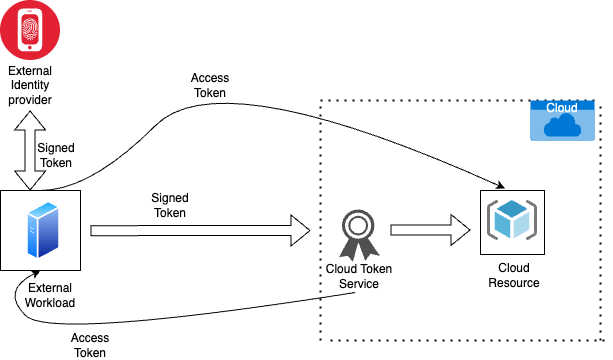
Figure 1: A token-based authentication flow where an external workload uses a signed token from an identity provider to obtain an access token from a cloud token service and access a cloud resource.
How It Works:
- A trust relationship is established between your Identity Provider and Microsoft Entra ID.
- Your IdP issues a digitally signed token to your workload.
- Microsoft Entra ID validates this token, verifying that the issuer, audience, and subject claims match the configured trust relationship.
- Upon successful validation, Microsoft Entra ID issues an access token.
- The workload then uses this access token to access the designated protected resources within Azure.
Note: All token claims (issuer, audience, subject) are case-sensitive.
Federated Identity in Google Cloud: Workload Identity Federation
The inherent risks associated with long-lived service account keys in Google Cloud — where a compromise could grant broad access to cloud resources — are entirely mitigated by Workload Identity Federation. This feature removes the necessity for these keys altogether.
Use Cases:
Workload Identity Federation is specifically designed for workloads running outside of Google Cloud that need to interact with GCP resources. This encompasses a wide range of environments, including:
- Workloads hosted in AWS, Azure, or on-premise data centers
- GitHub Actions workflows
- GitLab CI/CD pipelines
- Kubernetes clusters (e.g., Amazon EKS, Azure AKS, on-premises Kubernetes)
- Any OIDC or SAML 2.0 compliant Identity Provider
Note: For Google Kubernetes Engine (GKE), where workloads run within GCP, Workload Identity (a native GKE feature) is the recommended approach.
Key Concepts in Google Cloud Workload Identity Federation:
- Workload Identity Pool: This acts as a logical container for external identities, grouping identities that are permitted to authenticate to GCP.
- Provider: This component connects Google Cloud to your external IdP (e.g., GitHub, Entra ID, Okta).
- Attribute Mapping: This critical step defines how claims from your external IdP's token are translated and assigned to Google Cloud attributes.
Authentication Flow:
- The workload authenticates with its external IdP.
- The IdP issues a signed token to the workload.
- This token is then sent to the Google Security Token Service.
- Google validates the token (checking the issuer, audience, and subject, and applying any configured attribute conditions).
- A short-lived federated token is issued by Google.
- The workload utilizes this federated token to make GCP API calls, or it can impersonate a Google Cloud service account to access resources with specific IAM roles.
The Benefits of Adopting Federated Identity
Implementing federated identity strategies offers significant advantages for cloud automation:
- Elimination of Static Credentials: No more hardcoded secrets in code repositories or CI/CD pipelines.
- Reduced Risk of Secrets Leakage: The transient nature of tokens drastically minimizes the attack surface.
- Simplified Rotation and Revocation: Tokens are short-lived, simplifying the process of managing their lifecycle and revoking access if needed.
- Granular, Dynamic Access Control: Access can be dynamically controlled based on attributes from the external identity, enabling fine-grained permissions.
- Improved Security Posture: By adhering to the principle of least privilege, organizations enhance their overall security.
Key Considerations and Best Practices
When integrating federated identity into your cloud environment, keep these best practices in mind:
- Principle of Least Privilege: Always ensure that federated identities or the service accounts they impersonate are granted only the absolute minimum IAM roles and permissions required for their tasks.
- Thorough Testing: Meticulously test the entire authentication flow and access controls to confirm that workloads can only access their intended resources and nothing more.
- Auditing and Logging: Enable comprehensive logging for all authentication attempts and resource access. Regularly monitor these logs for any suspicious activity that could indicate misuse or a security incident.
- IdP Configuration: Verify that your external Identity Provider is correctly configured to issue tokens containing the necessary claims (issuer, subject, audience) that precisely align with your cloud provider's federation setup.
Opinions expressed by DZone contributors are their own.
Comments