

First Successful Router in Mule
Learn how to set up message processing in Mule flows with the First Successful router, and how to customize its behavior.
Join the DZone community and get the full member experience.
Join For FreeFirst successful is one of the flow control components in Mule which iterates through message processors until one succeeds.
The First Successful message processor iterates through its list of child message processors, routing a received message to each of them in order until one processes the message successfully. If none succeed, an exception is thrown.
Defining success and failure:
If the child message processor throws an exception, this is a failure.
Otherwise:
If the child message processor returns a message that contains an exception payload, this is a failure.
If the child message processor returns a message that does not contain an exception payload, this is a success.
If the child message processor does not return a message (e.g. is a one-way connector), this is a success.
If the child message processor does not return a message (e.g. is a one-way connector), this is a success.
Defining failureExpression
We can further customize the behavior of this router by specifying a 'failureExpression' that allows you to use Mule Expressions to define a failure. The failureExpression attribute is configured as follows:
Syntax:
<first-successful failureExpression="exception-type:java.sql.SQLException">
</first-successful>
A failure expression is being used to more exactly define the exception type that’s considered a failure.
Let’s walk through how the First Successful router works in a Mule application.
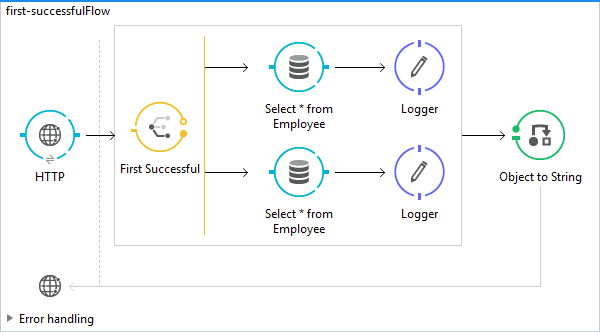
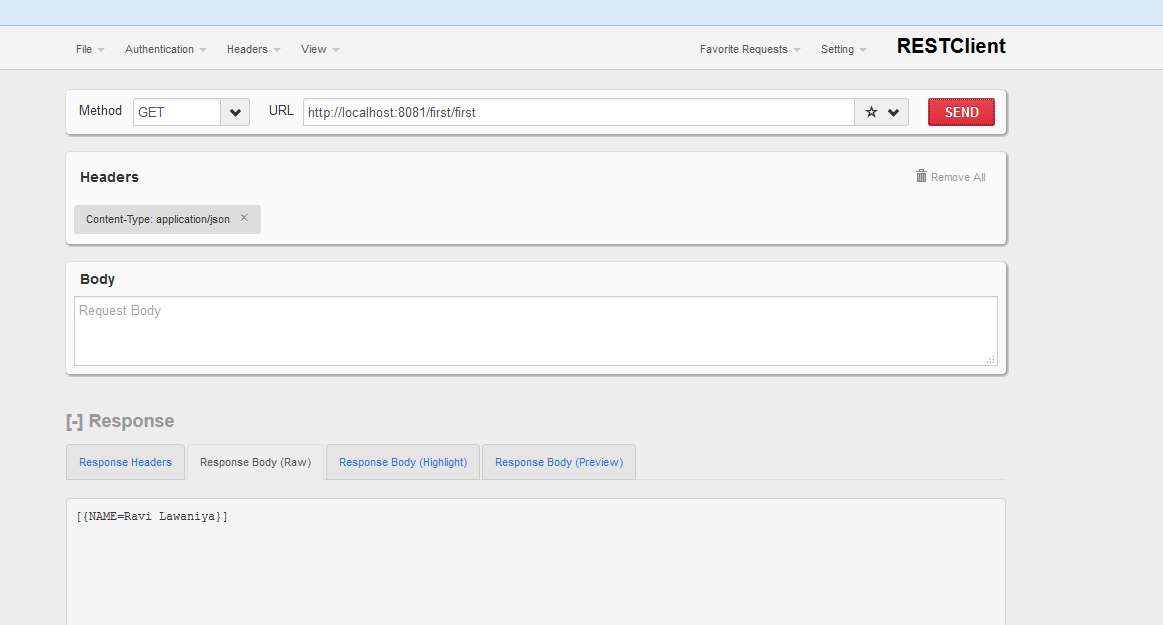
In this example, we have defined two routes; in both of the routes, we are connecting with HSQL databases. One of the routes is configured with the correct DB configuration "Generic_Database_Configuration_success," and the other with the wrong DB configuration "Generic_Database_Configuration_failed," which is configured to connect to HSQL DB on port 9002. After making a request through a REST client, the second route configured will be able to process the message successfully.
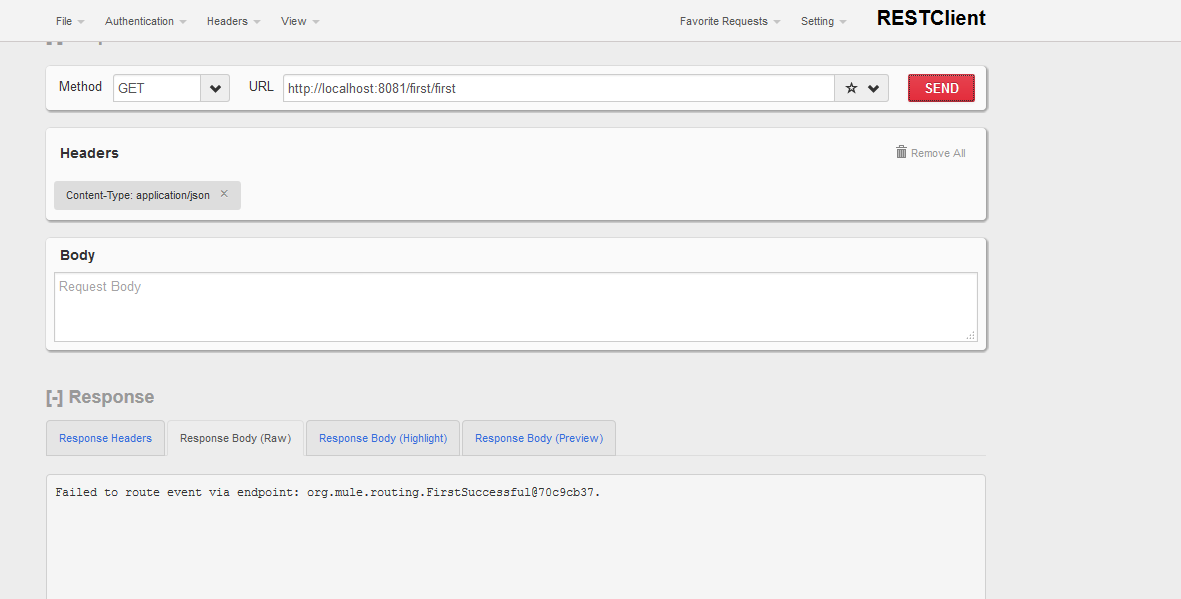
If none of the routes is able to process, then the below exception will be thrown:
Root Exception stack trace:
org.mule.api.routing.CouldNotRouteOutboundMessageException: Failed to route event via endpoint: org.mule.routing.FirstSuccessful@79baf566.
at org.mule.routing.FirstSuccessful.route(FirstSuccessful.java:58)
Flow:
Code:
<?xml version="1.0" encoding="UTF-8"?>
<mule xmlns:db="http://www.mulesoft.org/schema/mule/db"
xmlns:http="http://www.mulesoft.org/schema/mule/http" xmlns="http://www.mulesoft.org/schema/mule/core"
xmlns:doc="http://www.mulesoft.org/schema/mule/documentation"
xmlns:spring="http://www.springframework.org/schema/beans" xmlns:xsi="http://www.w3.org/2001/XMLSchema-instance"
xsi:schemaLocation="
http://www.mulesoft.org/schema/mule/db http://www.mulesoft.org/schema/mule/db/current/mule-db.xsd http://www.springframework.org/schema/beans http://www.springframework.org/schema/beans/spring-beans-current.xsd
http://www.mulesoft.org/schema/mule/core http://www.mulesoft.org/schema/mule/core/current/mule.xsd
http://www.mulesoft.org/schema/mule/http http://www.mulesoft.org/schema/mule/http/current/mule-http.xsd">
<http:listener-config name="HTTP_Listener_Configuration"
host="0.0.0.0" port="8081" basePath="/first" doc:name="HTTP Listener Configuration" />
<db:generic-config name="Generic_Database_Configuration_success"
url="jdbc:hsqldb:hsql://localhost:9001" driverClassName="org.hsqldb.jdbcDriver"
doc:name="Generic Database Configuration" />
<db:generic-config name="Generic_Database_Configuration_failed"
url="jdbc:hsqldb:hsql://localhost:9002" driverClassName="org.hsqldb.jdbcDriver"
doc:name="Generic Database Configuration" />
<flow name="first-successfulFlow">
<http:listener config-ref="HTTP_Listener_Configuration"
path="/first" doc:name="HTTP" />
<first-successful doc:name="First Successful">
  <processor-chain>
           <db:select config-ref="Generic_Database_Configuration_failed"
doc:name="Select * from Employee">
<db:dynamic-query><![CDATA[select name from employee where id=3]]></db:dynamic-query>
</db:select>
<logger level="INFO" message="Processed by first message Processor"
doc:name="Logger" />
 </processor-chain>
  <processor-chain>
 <db:select config-ref="Generic_Database_Configuration_success"
doc:name="Select * from Employee">
<db:dynamic-query><![CDATA[select name from employee where id=3]]></db:dynamic-query>
</db:select>
<logger level="INFO" message="Processed by second message Processor"
doc:name="Logger" />
 </processor-chain>
</first-successful>
<object-to-string-transformer />
</flow>
</mule>
Failed Request:
Success Request:
Hope this helps.
Thanks.
Keep learning.
Opinions expressed by DZone contributors are their own.
Comments