

Generate Dapper Queries On-The-Fly With C#
Dapper is a simple object mapper for .NET. It's simple and fast. What can we do to make it even better and easier to use?
Join the DZone community and get the full member experience.
Join For FreeORMs are very common when developing with .NET. According to Wikipedia:
Object-relational mapping (ORM, O/RM, and O/R mapping tool) in computer science is a programming technique for converting data between incompatible type systems using object-oriented programming languages. This creates, in effect, a "virtual object database" that can be used from within the programming language. There are both free and commercial packages available that perform object-relational mapping, although some programmers opt to construct their own ORM tools.
Dapper is a simple object mapper for .NET. It's simple and fast. Performance is the most important thing that we can achieve with Dapper. According to their website:
Dapper is a simple object mapper for .NET and own the title of King of Micro ORM in terms of speed and is virtually as fast as using a raw ADO.NET data reader. An ORM is an Object Relational Mapper, which is responsible for mapping between database and programming language.
What else can we do to make it easier and better?
I am a big fan of code generator tools. They allow you to avoid rewriting a lot of code and you can just simplify automating queries and so on.
Recently, I released a Visual Studio Extension called Dapper Crud Generator, which is responsible to automatically generate SELECT/INSERT/UPDATE/DELETE commands.
How does it work?
You have a solution with a model project inside, then you have several classes with properties, right?
For example:
public class Student
{
    public int Id { get; set; }
    public string Name { get; set; }
    public DateTime Birth { get; set; }
}
Then, you have a requirement for each statement. You have to write queries and you have to write a lot of code to do it.
After installing the extension, right-click on your project and click on Generate Dapper CRUD:
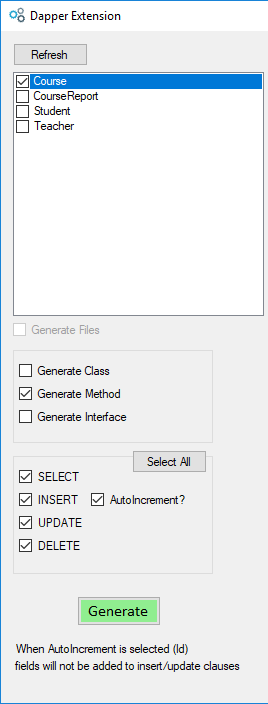
Select the options above, select your model. Here is the result:
public List<Course> SelectCourse()
{
    // Select
    List<Course> ret;
    using (var db = new SqlConnection(connstring))
    {
        const string sql = @"SELECT Id, Name, StudentLimit FROM [Course]";

        ret = db.Query<Course>(sql, commandType: CommandType.Text).ToList();
    }
    return ret;
}
public void InsertCourse(Course course)
{
    // Insert
    using (var db = new SqlConnection(connstring))
    {
        const string sql = @"INSERT INTO [Course] (Name, StudentLimit) VALUES (@Name, @StudentLimit)";

        db.Execute(sql, new { Name = course.Name, StudentLimit = course.StudentLimit }, commandType: CommandType.Text);
    }
}
public void UpdateCourse(Course course)
{
    // Update
    using (var db = new SqlConnection(connstring))
    {
        const string sql = @"UPDATE [Course] SET Name = @Name, StudentLimit = @StudentLimit WHERE Id = @Id";

        db.Execute(sql, new { Id = course.Id, Name = course.Name, StudentLimit = course.StudentLimit }, commandType: CommandType.Text);
    }
}
public void DeleteCourse(Course course)
{
    // Delete
    using (var db = new SqlConnection(connstring))
    {
        const string sql = @"DELETE FROM [Course] WHERE Id = @Id";

        db.Execute(sql, new { course.Id }, commandType: CommandType.Text);
    }
}
To install and use the extension, just go to Marketplace or download directly from Visual Studio (via the Tools and Extensions menu).
For the next major release, I'm planning to implement queries with complex objects.
You can find the source code here.
Opinions expressed by DZone contributors are their own.
Comments