

DZone
Thanks for visiting DZone today,
Edit Profile
  • Manage Email Subscriptions
  • How to Post to DZone
  • Article Submission Guidelines
Sign Out View Profile
  • Post an Article
  • Manage My Drafts
Over 2 million developers have joined DZone.
Log In / Join
Refcards Trend Reports
Events Video Library
Refcards
Trend Reports

Events

View Events Video Library

Zones

Culture and Methodologies Agile Career Development Methodologies Team Management
Data Engineering AI/ML Big Data Data Databases IoT
Software Design and Architecture Cloud Architecture Containers Integration Microservices Performance Security
Coding Frameworks Java JavaScript Languages Tools
Testing, Deployment, and Maintenance Deployment DevOps and CI/CD Maintenance Monitoring and Observability Testing, Tools, and Frameworks
Culture and Methodologies
Agile Career Development Methodologies Team Management
Data Engineering
AI/ML Big Data Data Databases IoT
Software Design and Architecture
Cloud Architecture Containers Integration Microservices Performance Security
Coding
Frameworks Java JavaScript Languages Tools
Testing, Deployment, and Maintenance
Deployment DevOps and CI/CD Maintenance Monitoring and Observability Testing, Tools, and Frameworks

Curious about the future of data-driven systems? Join our Data Engineering roundtable and learn how to build scalable data platforms.

Data Engineering: The industry has come a long way from organizing unstructured data to adopting today's modern data pipelines. See how.

Threat Detection: Learn core practices for managing security risks and vulnerabilities in your organization — don't regret those threats!

Managing API integrations: Assess your use case and needs — plus learn patterns for the design, build, and maintenance of your integrations.

Related

  • Revolutionize Your MuleSoft Deployments With GitOps
  • 5 Simple Steps To Get Your Test Suite Running in Heroku CI
  • Developer Git Commit Hygiene
  • From Code to Insight: Using NLP and Sentiment Analysis in Git History

Trending

  • Integrated Gradients: AI Explainability for Regulated Industries
  • Enhancing Observability in iOS Applications: Key Insights
  • Dapr and Service Meshes: Better Together
  • How to Get Plain Text From Common Documents in Java
  1. DZone
  2. Testing, Deployment, and Maintenance
  3. Deployment
  4. Git for Windows, Getting Invalid Username or Password with Wincred

Git for Windows, Getting Invalid Username or Password with Wincred

By 
Ricci Gian Maria user avatar
Ricci Gian Maria
·
Jun. 23, 15 · Interview
Likes (0)
Comment
Save
Tweet
Share
20.2K Views

Join the DZone community and get the full member experience.

Join For Free

if you use https to communicate with your git repository, es, github or visualstudioonline, you usually setup credential manager to avoid entering credential for each command that contact the server. with latest versions of git you can configure wincred with this simple command.

git config --global credential.helper wincred

this morning i start getting error while i’m trying to push some commits to github.

$ git push
remote: invalid username or password.
fatal: authentication failed for 'https://github.com/proximosrl/jarvis.documents
tore.git/'

if i remove credential helper (git config –global credential.helper unset) everything works, git ask me for user name and password and i’m able to do everything, but as soon as i re-enable credential helper, the error returned. this problem is probably originated by some corruption of stored credentials, and usually you can simply clear stored credentials and at the next operation you will be prompted for credentials and everything starts worked again. the question is, where are stored credential for wincred?

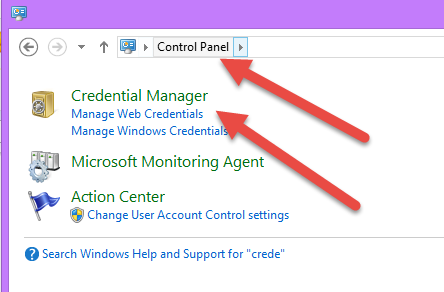
if you use wincred for credential.helper, git is storing your credentials in standard windows credential manager

you can simply open credential manager on your computer,
image

figure 1: credential manager in your control panel settings

opening credential manager you can manage windows and web credentials. now simply have a look to both web credentials and windows credentials, and delete everything related to github or the server you are using. the next time you issue a git command that requires authentication, you will be prompted for credentials again and the credentials will be stored again in the store.

gian maria.

Git

Published at DZone with permission of Ricci Gian Maria, DZone MVB. See the original article here.

Opinions expressed by DZone contributors are their own.

Related

  • Revolutionize Your MuleSoft Deployments With GitOps
  • 5 Simple Steps To Get Your Test Suite Running in Heroku CI
  • Developer Git Commit Hygiene
  • From Code to Insight: Using NLP and Sentiment Analysis in Git History

Partner Resources


Comments

The likes didn't load as expected. Please refresh the page and try again.

ABOUT US

  • About DZone
  • Support and feedback
  • Community research
  • Sitemap

ADVERTISE

  • Advertise with DZone

CONTRIBUTE ON DZONE

  • Article Submission Guidelines
  • Become a Contributor
  • Core Program
  • Visit the Writers' Zone

LEGAL

  • Terms of Service
  • Privacy Policy

CONTACT US

  • 3343 Perimeter Hill Drive
  • Suite 100
  • Nashville, TN 37211
  • support@dzone.com

Let's be friends: