

Open-Source GitOps at the Edge: Deploying to Thousands of Clusters With Rancher Fleet
Establish GitOps-driven CI/CD pipelines to create zero-downtime deployments across thousands of edge locations with automated rollbacks.
Join the DZone community and get the full member experience.
Join For FreeThe Edge Deployment Challenge
Modern microservice applications are moving beyond central data centers and the cloud to the edge to provide ultra-low latency and real-time processing. This enables real-time responsiveness for applications powering autonomous vehicles, remote healthcare, and IoT solutions.
A fundamental operational challenge exists when you attempt to deploy code to distributed edge computing environments. Each time that you are deploying code to containerized workloads at thousands of different edge locations, it will require coordination across unreliable networks, heterogeneous hardware, and edge locations with no technical staff available to correct failed deployments.
The edge computing environment provides limited connectivity, low bandwidth for other critical business operations, and no on-site engineers to resolve failures during deployment.
CI/CD pipelines based on traditional models use a push-based model where a centralized server connects to the target deployment environments and directly pushes changes to those environments. The traditional push-based model assumes the deployment target is always accessible, and a failure to deploy can be immediately recovered. Edge computing violates both assumptions.
For example, in a retail deployment that includes 2,500 store locations, a push-based pipeline that attempts to simultaneously deploy to all stores will experience connection timeouts as a result of connectivity issues with some stores; partially deployed code as a result of network outages during the deployment process; and lack of visibility into the status of the deployment process for the many store locations with no connectivity (see Figure 1).
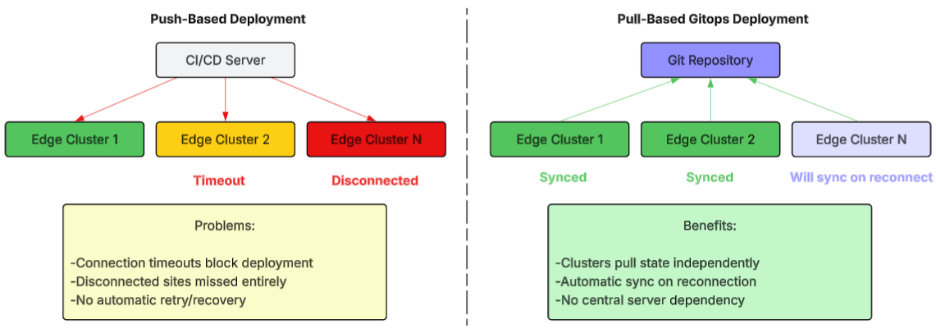 Figure 1: Push-based vs. pull-based deployment models for edge environments
GitOps With Open-Source Rancher Fleet
To solve this problem, the method of deployment needs to be inverted. The current model has changes pushed to edge locations. With pull-based GitOps, each edge cluster pulls its state from a central Git repository. Rancher Fleet is designed to provide GitOps-based deployment for managing large numbers of clusters. One Fleet Controller can manage well over one million resources across thousands of clusters. This makes Rancher Fleet ideal for use in edge deployments.
Edge locations using Fleet are part of a continuous reconciliation cycle. The cycle includes observing the desired state for the cluster from the Git repository and then comparing the observed state against the actual state of the cluster. It identifies what is out of sync or "drift" and applies changes to the cluster. This model provides several key advantages for edge locations—locations that lose their connection will auto-synchronize when they regain their connection. A persistent connection to an edge cluster is not required, and failed deployments will be retried (see Figure 2).
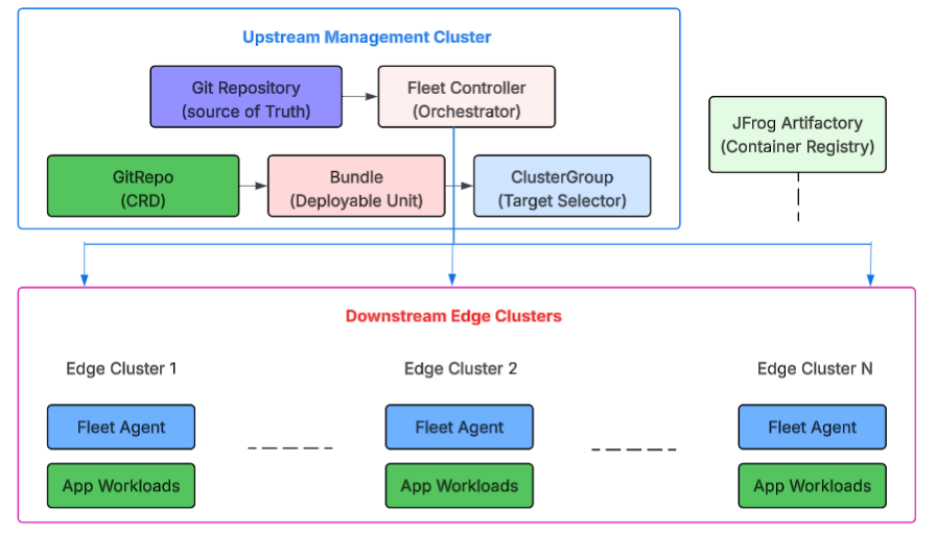 Figure 2: Fleet architecture with upstream controller and downstream edge clusters
Fleet’s clustering capability enables deployment to thousands of different locations based on a single configuration file:
yaml

apiVersion: fleet.cattle.io/v1alpha1
kind: GitRepo
metadata:
  name: edge-retail-app
  namespace: fleet-default
spec:
  repo: https://github.com/org/edge-manifests.git
  branch: main
  paths:
    - apps/retail-app
  pollingInterval: 5m
  imageScanInterval: 30m
  targets:
    - name: canary-stores
      clusterSelector:
        matchLabels:
          environment: edge
          rollout-wave: canary
    - name: retail-edge-all
      clusterSelector:
        matchLabels:
          environment: edge
          tier: retail
  helmSecretName: jfrog-registry-credentials
When an additional edge cluster registers with matching labels, Fleet will automatically include it in all deployments; this eliminates configuration drift throughout the fleet.
The rollout behavior and customizations for each target are defined by the fleet.yaml within the application path:
yaml

# fleet.yaml - Controls deployment behavior
defaultNamespace: retail-apps
helm:
  releaseName: edge-pos-app
  values:
    image:
      repository: artifactory.internal.com/edge/pos-app
      tag: v2.4.1
    resources:
      limits:
        memory: 256Mi
        cpu: 200m
    replicaCount: 1

rollout:
  autoPartitionSize: 25
  partitions:
    - name: canary
      maxUnavailable: 1
      clusterSelector:
        matchLabels:
          rollout-wave: canary
    - name: production
      maxUnavailable: 10%
      clusterGroup: retail-fleet

targetCustomizations:
  - name: high-traffic-stores
    clusterSelector:
      matchLabels:
        traffic-tier: high
    helm:
      values:
        replicaCount: 3
        resources:
          limits:
            memory: 512Mi
This configuration enables partition-based rollout, so that your canary clusters are updated first and then the production clusters in batches of predetermined size. The target customization section allows high-traffic stores to receive additional resources without having to create their own manifests.
Wave-Based Deployment Strategy
Implementing changes to all edge locations at the same time poses too much risk. For example, if there is an error in how we process payments and it is rolled out to the 2,500 stores at the same time, it would immediately cause disruption to our business across the entire fleet. Staged rollouts reduce the blast radius because they deploy small subsets of stores first and validate success before expanding the deployment (see Figure 3).
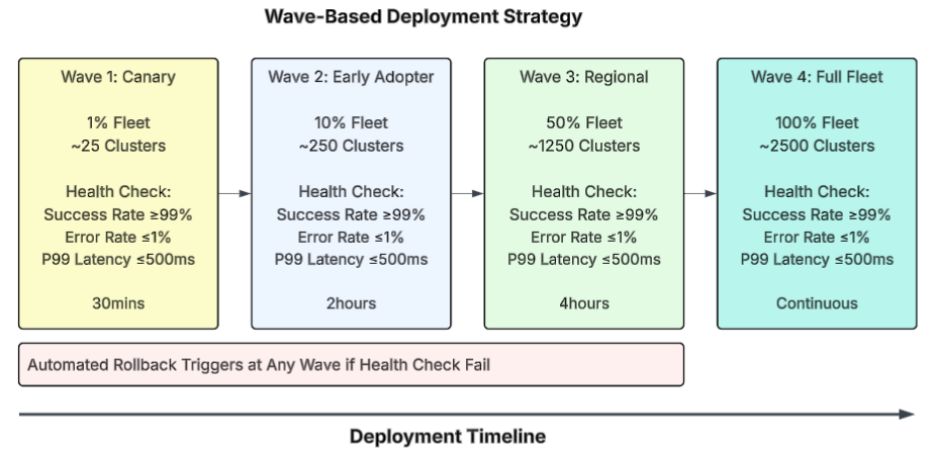 Figure 3: Four-wave deployment strategy with health validation gates
Wave-Based Rollout Schedule
| Wave | Coverage | Duration | Purpose |
|---|---|---|---|
|
Wave 1: Canary |
1% of fleet |
30 minutes |
Identify Obvious Failures (with Minimal Impact) |
|
Wave 2: Early Adopter |
10% of fleet |
2 hours |
Validate against a variety of conditions |
|
Wave 3: Regional |
50% of fleet
|
4 hours |
Confirm scalability and regional variations |
|
Wave 4: Full |
100% of fleet |
Continuous |
Complete rollout |
Automated Health Assessment is required for transition in each stage of the waves. The deployment controller automatically collects performance metric data from the deployments at all locations and compares them to thresholds such as error rate, latency, and success rate that were previously established. When the collected metrics meet or exceed those thresholds, then the deployment proceeds to the next wave.
Health Check Thresholds for Wave Promotion
| metric | threshold | rationale |
|---|---|---|
|
Success Rate |
≥ 99% |
Determine if application is functioning as intended |
|
Error Rate |
≤ 1% |
Catch error spikes in the system rapidly |
|
P99 Latency |
≤ 500ms
|
Detect performance degradation |
Handling Disconnected Edge Locations
Network reliability varies greatly depending on how you deploy your edge. A typical urban retail location will generally have reliable connectivity; a remote site could be down for hours. Therefore, the pipeline needs to be able to support either of these options, but no manual effort should be required.
Fleet allows for disconnection by design with its agent-based architecture. The Fleet Agent on each edge cluster maintains a connection to the upstream controller. If that fails, it simply runs in the last known desired state until the agent can reconcile the difference once connectivity is restored. Applications continue to run while the agents are working to get back into sync due to cached container images.
To ensure containers can operate in a disconnected environment, they need hierarchical caching. JFrog Artifactory is the authoritative repository at the center; the JFrog Edge nodes provide caching in each region, and the edge clusters cache locally. This enables successful pod restarts regardless of whether there is network connectivity.
Automated Rollback
When an incident occurs, it is most important to minimize recovery time. Automated rollback removes human decision-making latency from the recovery path (see Figure 4).
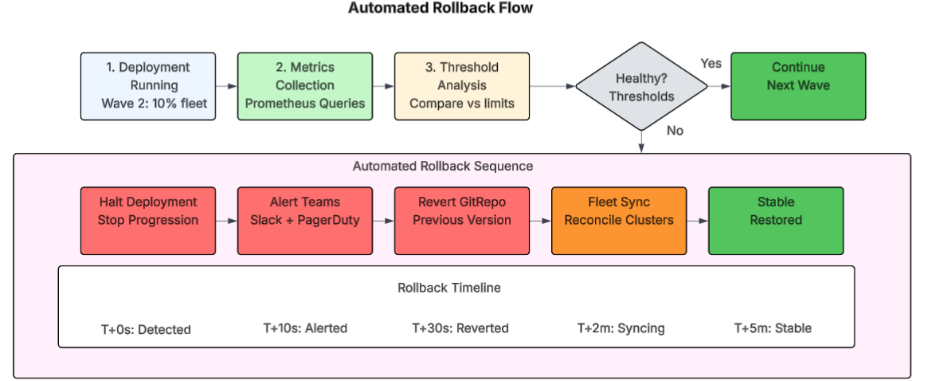 Figure 4: Automated rollback flow from detection to recovery
The same metrics powering deployment promotion also trigger rollback of a deployment. If the success rate falls below thresholds, Fleet will halt all future activity and initiate a rollback to the most recent good version of the application. Operations teams will be notified immediately via both Slack and PagerDuty, with full audit history available for post-deployment incident review.
Key Outcomes
Using this framework at distributed edge locations yields quantifiable benefits:
Deployment Framework Results
| metric | result |
|---|---|
|
Deployment Success Rate |
99.7% across 2,500+ locations |
|
Mean Time to Deploy |
45 minutes (full fleet, staged) |
|
Automatic Rollback Time |
Under 5 minutes
|
|
Disconnected Recovery |
Automatic sync upon reconnection |
Conclusion
The development of CI/CD pipelines for distributed edge computing does not follow the traditional CI/CD pipelines of the cloud computing world. By implementing GitOps-based synchronization through Rancher Fleet, wave-based rollouts with automated analysis, and disconnected operation capabilities, organizations achieve reliable deployments across thousands of edge locations. The pull-based model changes network unreliability from a blocker to expected behavior with automatic recovery.
Opinions expressed by DZone contributors are their own.
Comments